CPU Scheduling Example Presented By: Dr. El-Sayed M. El-Alfy Note: - - PowerPoint PPT Presentation

cpu scheduling
SMART_READER_LITE
LIVE PREVIEW

CPU Scheduling Example Presented By: Dr. El-Sayed M. El-Alfy Note: - - PowerPoint PPT Presentation

Recap: Process states and transitions Chapter 5: State diagram CPU Scheduling Example Presented By: Dr. El-Sayed M. El-Alfy Note: Most of the slides are compiled from the textbook and its complementary resources March 08 1 March 08


slide-1
SLIDE 1

March 08 1

CPU Scheduling

Chapter 5:

Presented By: Dr. El-Sayed M. El-Alfy

Note: Most of the slides are compiled from the textbook and its complementary resources

March 08 2

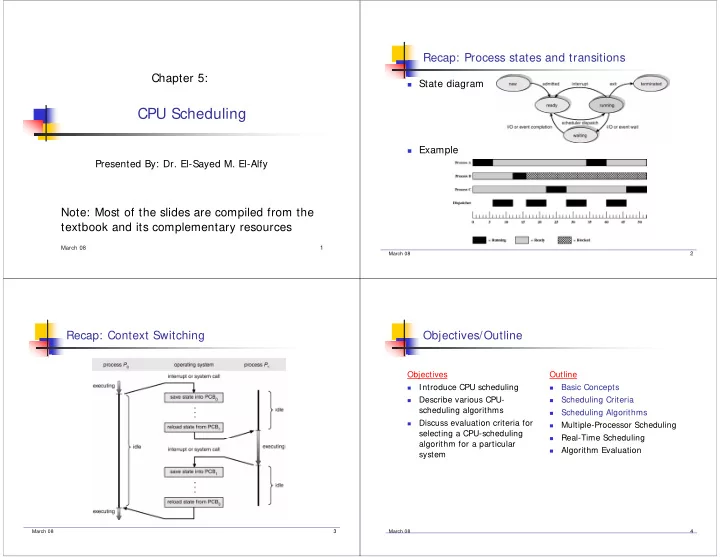
Recap: Process states and transitions

State diagram Example

March 08 3

Recap: Context Switching

March 08 4

Objectives/Outline

Objectives

  • Introduce CPU scheduling
  • Describe various CPU-

scheduling algorithms

  • Discuss evaluation criteria for

selecting a CPU-scheduling algorithm for a particular system Outline

  • Basic Concepts
  • Scheduling Criteria
  • Scheduling Algorithms
  • Multiple-Processor Scheduling
  • Real-Time Scheduling
  • Algorithm Evaluation
slide-2
SLIDE 2

March 08 5

Basic Concepts

Multiprogramming systems provide interleaved execution

  • f several processes to give an illusion of many

simultaneously executing processes.

Computer can be a single-processor or multi-processor machine. OS must keep track of the state for each active process and

make sure that the correct information is properly installed when a process is given control of the CPU.

By switching CPU among processes can make the

computer more productive (i.e. enhance CPU utilization)

March 08 6

Basic Concepts (cont.)

Nature of Processes

Not all processes have an even

mix of CPU and I/O usage

CPU-BOUND process

A number crunching program

may do a lot of computation and minimal I/O

I/O-BOUND process

A data processing job may do

little computation and a lot of I/O

Required OS components:

Dispatcher Scheduler

Alternating Sequence of CPU And I/O Bursts

March 08 7

Dispatcher

Dispatcher module gives control of the CPU to the process

selected by the short-term scheduler; this involves:

Context switch – occurs when a process exchange is made

between ready and run queues; OS must save the state of the running process and restore the state of the ready process

Switching to user mode Jumping to the proper location in the user program to restart that

program

Dispatch latency – time it takes for the dispatcher to stop

  • ne process and start another running

March 08 8

CPU Scheduling

  • Selects from among the processes in memory that are ready to

execute, and allocates the CPU cycles to one of them

  • Types of Schedulers
  • Job scheduler (long-term scheduler)

In a batch system, job scheduler decides as jobs arrive to the system which

jobs to let into memory and in which order

Occurs less frequently

  • CPU scheduler (short-term scheduler)

Decides which process to run next from those waiting in the ready queue Short-term scheduling only deals with jobs that are currently resident in

memory

Occurs frequently

  • Swapper (medium-term scheduler)

Involves suspending or resuming processes by swapping (rolling) them out of

  • r into memory (from disk)
slide-3
SLIDE 3

March 08 9

CPU Scheduling

  • CPU scheduling decisions may take place when a process:
  • 1. Switches from running to waiting state
  • 2. Switches from running to ready state
  • 3. Switches from waiting to ready
  • 4. Terminates
  • Scheduling under 1 and 4 is non-preemptive
  • All other scheduling is preemptive
  • Non-preemptive scheduler means: a process is never FORCED to give up

control of the CPU. The process gives up control of the CPU only

  • If it isn't using the CPU
  • If it is waiting for I/O
  • If it is finished using the CPU
  • Preemptive scheduling is forcing a process to give up control of the CPU

March 08 10

Scheduling Criteria

  • Scheduling is an optimization task – it is performed in such a way

to achieve “good performance” of some criteria

  • There are many factors to consider:

CPU utilization: percentage of time the CPU is busy; keep the

CPU as busy as possible

Throughput: number of jobs completed per time unit Total service time (turnaround time): time from submission to

completion of a job

Waiting Time: amount of time a job spends in the ready queue Response time: time until the system starts to respond to a

command

much more useful in interactive systems

March 08 11

Additional Scheduling Criteria

There are also other factors to consider:

Priority/Importance of work – hopefully more important work can

be done first

Fairness – hopefully eventually everybody is served

Implement policies to increase priority as we wait longer… (this is

known as “priority aging”)

Deadlines – some processes may have hard or soft deadlines that

must be met

Overhead – e.g., data kept about execution activity, queue

management, context switches

Consistency and/or predictability may be a factor as well,

especially in interactive systems

March 08 12

Optimization Criteria

Max CPU utilization Max throughput Min turnaround time Min waiting time Min response time In other words, we want to maximize CPU utilization

and throughput AND minimize turnaround, waiting, and response times

slide-4
SLIDE 4

March 08 13

Scheduling Algorithms

First-Come, First-Served (FCFS) Shortest Job First (SJF) Shortest Remaining Time First (SRTF) Priority Round Robin (RR) Multi-Level Queue (MLQ) Multi-Level Feedback Queue (MLFQ)

March 08 14

First-Come, First-Served (FCFS) Scheduling

Process Burst Time P1 24 P2 3 P3 3

Suppose that the processes arrive in the order: P1 , P2 , P3

The Gantt Chart for the schedule is:

Waiting time for P1 = 0; P2 = 24; P3 = 27 Average waiting time: (0 + 24 + 27)/3 = 17

P1 P2 P3 24 27 30

March 08 15

FCFS Scheduling (Cont.)

Suppose that the processes arrive in the order P2 , P3 , P1

The Gantt chart for the schedule is: Waiting time for P1 = 6; P2 = 0; P3 = 3 Average waiting time: (6 + 0 + 3)/3 = 3 Much better than previous case

P1 P3 P2 6 3 30

March 08 16

Convoy Effect

time 5 10 15 20 25

10 3 1 4

D C B A

pro c e ss

pro c e ss se rvic e turnaro und waiting time ts time tt time tw A 10 10 0 B 1 11 10 C 3 14 11 D 4 18 14

AVE RAGE 13.25 8.75

A long CPU-bound job may hog the CPU and force shorter (or I/O-bound) jobs to wait for prolonged periods. This in turn may lead to a lengthy queue of ready jobs, and hence to the 'convoy effect'

slide-5
SLIDE 5

March 08 17

FCFS Scheduling (Cont.)

FCFS is:

Non-preemptive Ready queue is a FIFO queue Jobs arriving are placed at the end of ready queue First job in ready queue runs to completion of CPU burst

Advantages: simple, low overhead Disadvantages: long waiting time, inappropriate for

interactive systems, large fluctuations in average turnaround time are possible

March 08 18

Shortest-Job-First (SJF) Scheduling

Associate with each process the length of its next CPU

  • burst. Use these lengths to schedule the process with the

shortest time

Two schemes:

Nonpreemptive – once CPU is given to the process it cannot be

preempted until the process completes its CPU burst

Preemptive – if a new process arrives with CPU burst length less

than the remaining time of current executing process, preempt. This scheme is know as the Shortest-Remaining-Time-First (SRTF)

SJF is optimal – gives minimum average waiting time for a

given set of processes

March 08 19

Example of Non-Preemptive SJF

Process Arrival Time Burst Time P1 0.0 7 P2 2.0 4 P3 4.0 1 P4 5.0 4

SJF (non-preemptive) Average waiting time = (0 + 6 + 3 + 7)/4 = 4

P1 P3 P2 7 3 16 P4 8 12

March 08 20

SRTF - Shortest Remaining Time First

Preemptive version of SJF Ready queue ordered on length of time till completion

(shortest time to complete first, STCF )

Arriving jobs inserted at proper position shortest job

Runs to completion (i.e. CPU burst finishes) or Runs until a job with a shorter remaining time arrives (i.e.

placed in the ready queue)

slide-6
SLIDE 6

March 08 21

Example of Preemptive SJF (i.e., SRTF)

Process Arrival Time Burst Time P1 0.0 7 P2 2.0 4 P3 4.0 1 P4 5.0 4

Preemptive SJF (i.e., SRTF) Average waiting time = (9 + 1 + 0 + 2)/4 = 3

P1 P3 P2 4 2 11 P4 5 7 P2 P1 16

March 08 22

Shortest-Job-First (SJF) Scheduling

Ready queue treated as a priority queue based on

smallest CPU-time requirement

Arriving jobs inserted at proper position in queue Shortest job (1st in queue) runs to completion

In general, SJF is often used in long-term scheduling Advantages: provably optimal w.r.t. average waiting time Disadvantages:

Starvation is possible! Unimplementable at the level of short-term CPU scheduling. Can do it approximately: use exponential averaging to predict

length of next CPU burst = = > pick shortest predicted burst next!

March 08 23

Determining Length of Next CPU Burst

Can only estimate the length Can be done by using the length of previous CPU

bursts, and using exponential averaging

: Define 5. 1 , 4. burst CPU for the value predicted 3. burst CPU ) 1 (i.e., next for the value predicted 2. burst CPU

  • f

lenght actual 1.

n 1

≤ ≤ = + = =

+

α α τ τ

th th n th n

n n n t

( )

n n n

t τ α α τ 1

1

− + =

+

α = 0 implies making no use of recent history (τ n+ 1 = τ n) α = 1 implies τn+ 1 = tn (past prediction not used) α = 1/2 equally weighted

  • Ex. Show that older bursts get less and less weight

March 08 24

Prediction of the Length of the Next CPU Burst

5 . = α

This figure is for 10 and 5 .

0 =

= τ α

predicted actual

slide-7
SLIDE 7

March 08 25

Priority Scheduling

A priority number (integer) is associated with each process

Priority can be internally computed (e.g., may involve time limits,

memory usage) or externally (e.g., user type, funds being paid)

In SJF, priority is simply the predicted next CPU burst time

The CPU is allocated to the process with the highest priority

(smallest integer might mean highest priority) first

A priority scheduling mechanism can be

Preemptive or Nonpreemptive

Starvation is a problem, where low priority processes may

never execute

Solution: as time progresses, the priority of the long waiting

(starved) processes is increased. This is called priority aging

March 08 26

Priority Scheduling

5 10 15 20 25

pro c e ss prio rity se rvic e turnaro und waiting time ts time tt time tw A 4 10 18 8 B 3 1 8 7 C 2 3 7 4 D 1 4 4

AVE RAGE 9.25 4.75

time

10 3 1 4

D C B A

pro c e ss

March 08 27

Round Robin (RR)

RR is designed especially for time sharing systems RR reduces the penalty that short jobs suffer with FCFS

by preempting running jobs periodically

Each process gets a small unit of CPU time (time quantum

  • r time slice), usually 10-100 milliseconds

The CPU blocks the current job when its reserved time-

slice is exhausted

The current job is then put at the end of the ready queue if it has

not yet completed

If the current job is completed, it will exit the system (terminate) March 08 28

Example of RR with Time Quantum = 20

Process Burst Time P1 53 P2 17 P3 68 P4 24

The Gantt chart is: Typically, higher turnaround than SJF, but better

response time

P1 P2 P3 P4 P1 P3 P4 P1 P3 P3 20 37 57 77 97 117 121 134 154 162

All arrive at time 0

Average waiting time=?

slide-8
SLIDE 8

March 08 29

Round Robin (RR) (cont.)

If there are n processes in the ready queue and the time

quantum is q, then each process gets 1/n of the CPU time in chunks of at most q time units at once. No process waits more than (n -1)q time units

Performance: the critical issue with the RR policy is the

length of the quantum q

q is large: RR will behave like FCFS and hence interactive

processes will suffer

q is small: the CPU will be spending more time on context

switching

q must be large with respect to context switch, otherwise overhead

is too high

March 08 30

Time Quantum and Context Switch Time

March 08 31

Turnaround Time Varies With The Time Quantum

Increasing the time quantum does not necessarily

improve the average turnaround time!

March 08 32

Multilevel Queue Scheduling

Used in situations where processes are classified into

different groups (with different sch. needs)

slide-9
SLIDE 9

March 08 33

Multilevel Queue Scheduling (cont.)

Ready queue is partitioned into separate queues and

each process is assigned permanently to one queue

For example, foreground (interactive) and background (batch)

Each queue has its own scheduling algorithm:

Foreground – RR (better response) Background – FCFS (less overhead)

Scheduling must be done between the queues

Commonly using fixed-priority preemptive scheduling (foreground

then background)

  • Possibility of starvation

Time slice – each queue gets a certain amount of CPU time which

it can schedule amongst its processes

e.g., 80% to foreground in RR and 20% to background in FCFS

March 08 34

Multilevel Feedback Queue

In Multilevel Queue Scheduling, once a process is

assigned to a queue it is not allowed to change (less

  • verhead but inflexible)

E.g. a foreground and a background processes

Multilevel Feedback Queue allows a process to change

the queue

Allows processes to be separated according to their CPU

characteristics

E.g. if a process needs more time it can shifted to a lower-

priority queue; also if a process waits for long time in a low- priority queue, it can be shuffled to a higher-priority queue

More general but more complex March 08 35

Example of Multilevel Feedback Queue

Three queues:

Q0 – time quantum 8 milliseconds Q1 – time quantum 16 milliseconds Q2 – FCFS

Scheduling

A new job enters queue Q0 which is served FCFS. When it gains

CPU, the job receives 8 milliseconds. If it does not finish in 8 milliseconds, the job is moved to queue Q1

At Q1 , the job is again served FCFS and receives 16 additional

  • milliseconds. If it still does not complete, it is preempted and

moved to queue Q2

March 08 36

Multiple-Processor Scheduling

CPU scheduling is more complex when multiple CPUs

are available

A multiprocessor system can have:

Homogeneous processors

Processors are identical in their functionality. Any available

processor can be used to run any of the processes in the ready queue

In this class of processors, load sharing can occur

Heterogeneous processors

Processors are not identical. That is, only programs compiled for

a given processor's instruction set could be run on that processor
slide-10
SLIDE 10

March 08 37

Multiple-Processor Scheduling

If identical processors are available, then:

Can provide a separate ready queue for each processor Can provide a common ready queue

Enables load sharing. All processes go into one queue and are

scheduled onto any available processor

Asymmetric multiprocessing: only one processor accesses the system

data structures, alleviating the need for data sharing

Master-slave relationship Symmetric multiprocessing: each processor is self-scheduling and may

have its own queue

We must insure that two processors do not select the same process We must insure that processes are not lost from the ready queue

March 08 38

Real-Time Scheduling

Real-time computing is divided into two types:

Hard real-time systems: required to complete a critical task within

a guaranteed amount of time

Soft real-time computing: requires that critical processes receive

priority over less fortunate ones

Hard real-time systems:

Resource reservation

Soft real-time systems are less restrictive

The dispatch latency must be small The priority of real-time processes must not degrade

Disallow aging

The priority of non-real-time processes might degrade March 08 39

Algorithm Evaluation

How do we select a CPU-scheduling algorithm for a

particular system?

We must define the measures to be used in selecting the

CPU scheduler and we must define the relative importance of these measures

After the selected measures have been defined, than we

can evaluate the various algorithms under consideration

Evaluation methods:

Deterministic modeling Queuing models Simulation Implementation March 08 40

Algorithm Evaluation – Deterministic Modeling

One type of analytical evaluation Deterministic modeling takes a particular predetermined

workload and defines the performance of each algorithm for that workload

Deterministic modeling is

Simple and fast Gives exact number allowing algorithms to be compared

BUT,

Requires exact input data Its answers apply to only those input cases

In general, deterministic modeling is too specific and

requires exact knowledge

slide-11
SLIDE 11

March 08 41

In class activity

Process Burst Time P1 10 P2 29 P3 3 P4 7 P5 12

Average waiting time for each scheduling algorithm:

FCFS, SJF, RR

March 08 42

Algorithm Evaluation – Queuing Models

Since processes running on systems vary with time, there

is NO static set of processes to use for deterministic modeling

We can determine some parameters such as:

The distribution of the CPU burst, the distribution of the I/O burst

These distributions can be measured or estimated For example, we have a distribution for CPU burst (service

time), arrival time, waiting time, and so on

Therefore, the computer system can be described by a

network of servers

March 08 43

Algorithm Evaluation – Queuing Models

Queuing analysis can be useful in comparing the

performance of scheduling algorithms

But, queuing analysis is still only an approximation of the

real system

Since distributions are only estimates of the real pattern

input

  • utput

queue server

March 08 44

Algorithm Evaluation – Simulations

  • Give more accurate results
  • Involve programming a model of the computer system
  • Software data structures represent the major components of the system;

simulator has a variable representing a clock

  • The common method to generate the data to drive the simulation is using

a random-number generator

  • According to a probability distribution, the random-number generator is

programmed to generate processes, CPU burst times, arrivals, etc

  • A distribution-driven simulation may be inaccurate
  • The distribution indicates only how many and not the order
  • To resolve this problem, we can use a trace tape obtained by monitoring the

real system and recording the sequence of the actual events

  • Simulation can be expensive; requires hours of computer time and large

amounts of storage space

slide-12
SLIDE 12

March 08 45

Evaluation of CPU Schedulers by Simulation

March 08 46

Algorithm Evaluation – Implementation

The only completely accurate way to evaluate a

scheduling algorithm is to code it, deploy it in the real OS, and see how it works

The major difficulty is the cost involved

Coding the algorithm and modifying the OS to support it Users’ reaction to a constantly changing OS may not be accepted

Another difficulty is that the environment in which the

algorithm is used will change as new

New programs are coded Performance of the scheduler March 08 47

Operating Systems Examples

March 08 48

Solaris 2 Scheduling

  • Uses priority-based thread

scheduling

  • Uses four classes, in order of

priority:

  • Real time
  • System
  • Time sharing
  • Interactive
  • Within each class, there are

different priorities and different scheduling algorithms

  • Default class for a process is

‘time sharing’

  • In time sharing: assign time

slices of different lengths using a multilevel feedback queue

slide-13
SLIDE 13

March 08 49

Windows 2000 Priorities

March 08 50

Linux Scheduling for time-sharing processes

When a new task must be chosen, the process with the most

credits is selected

Every time a timer interrupt occurs, the currently running

process loses one credit

When its credit reaches 0 it is suspended and another

process gets a chance

If no runnable process has any credits, every process is re-

credited using the formula: credits= (credits/2) + priority

This mixes the process‘s behaviour history (half its earlier

credits) with its priority

March 08 51

End of Chapter 5

Operating System Concepts, 7th Ed. A. Siblerschatz, P. Galvin, and

  • G. Gagne. Addison Wesley, 2005