SLIDE 1
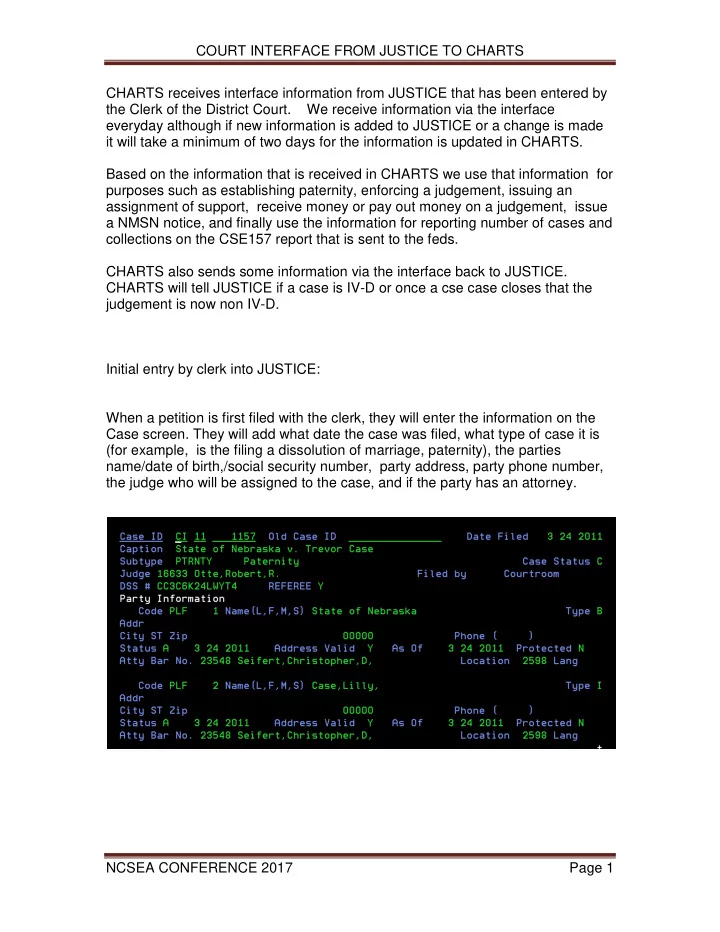
COURT INTERFACE FROM JUSTICE TO CHARTS NCSEA CONFERENCE 2017 Page 1 CHARTS receives interface information from JUSTICE that has been entered by the Clerk of the District Court. We receive information via the interface everyday although if new information is added to JUSTICE or a change is made it will take a minimum of two days for the information is updated in CHARTS. Based on the information that is received in CHARTS we use that information for purposes such as establishing paternity, enforcing a judgement, issuing an assignment of support, receive money or pay out money on a judgement, issue a NMSN notice, and finally use the information for reporting number of cases and collections on the CSE157 report that is sent to the feds. CHARTS also sends some information via the interface back to JUSTICE. CHARTS will tell JUSTICE if a case is IV-D or once a cse case closes that the judgement is now non IV-D. Initial entry by clerk into JUSTICE: When a petition is first filed with the clerk, they will enter the information on the Case screen. They will add what date the case was filed, what type of case it is (for example, is the filing a dissolution of marriage, paternity), the parties name/date of birth,/social security number, party address, party phone number, the judge who will be assigned to the case, and if the party has an attorney.
SLIDE 2
COURT INTERFACE FROM JUSTICE TO CHARTS NCSEA CONFERENCE 2017 Page 2
This is a list of Subtypes: ANNULMNT ANNULMENT CJURIS UNIFORM CHILD CUSTODY JURISDICTION ACT CTSUPP ORDER OF SUPPORT DSSMARR DISSOLUTION OF MARRIAGE FOSUPP INTERSTATE REGISTRATION OF FOREIGN SUPPORT ORDER GPVISIT GRANDPARENT VISITATION RIGHTS IIFSUPP FOREIGN ORDER INCOME WITHHOLDING IOWFSUPP FOREIGN ORDER WAGE WITHHOLDING OUTSTATE JC JUVENILE CHILD SUPPORT LSEPR LEGAL SEPARATION AND SEPARATION MAINTENANCE PTRNTY PATERNITY PTRNTYCC PATERNITY-COUNTY/JUVENILE RFORJDGT REGISTRATION OF FOREIGN JUDGMENTS TJUDG TRANSCRIPT OF JUDGMENT UIENF INTERSTATE INCOMING REQUEST FOR ENFORCEMENT UIESTAB INTERSTATE INCOMING REQUEST FOR ESTABLISHMENT UOENF INTERSTATE OUTGOING REQUEST FOR ENFORCEMENT UOESTAB INTERSTATE OUTGOING REQUEST FOR ESTABLISHMENT UPTRNTY INTERSTATE INCOMING PATERNITY UTPTRNTY INTERSTATE OUTGOING PATERNITY 1 JUVENILE MISDEMEANOR/INFRACTION 2 JUVENILE FELONY 3AABAND JUVENILE ABANDONED 3AABUSE JUVENILE ABUSED 3AHMLES JUVENILE HOMELESS/DESTITUTE
SLIDE 3
COURT INTERFACE FROM JUSTICE TO CHARTS NCSEA CONFERENCE 2017 Page 3
3ANEGLT JUVENILE NEGLECTED 3AWYWRD JUVENILE WAYWARD 3B JUVENILE DISOBEDIENT 4 JUVENILE TRAFFIC OFFENSE 5 JUVENILE PARENTAL JURISDICTION 6 JUVENILE TERMINATION 7 JUVENILE TERMINATION/DIVORCE 8 JUVENILE VOLUNTARY RELINQUISHMENT
SLIDE 4
COURT INTERFACE FROM JUSTICE TO CHARTS NCSEA CONFERENCE 2017 Page 4 If the petition involved involves a case that has children involved the clerk will add the dependent information. They will list the child’s name, date of birth, gender, ssn, if paternity was established and how, and whether insurance was ordered. This is a list of reasons that the clerk has to choose from to describe how paternity was established on this child.
CD BY COURT ORDER – SUPPORT DEFERRED CN BY COURT ORDER – NO SUPPORT ORDERED CT COURT ORDER – SUPPORT ORDERED
SLIDE 5
COURT INTERFACE FROM JUSTICE TO CHARTS NCSEA CONFERENCE 2017 Page 5
DM DISMISSED EX DISMISSED – EXCLUDED BY TESTING MA MARRIAGE PA PENDING IN APPELLATE COURT PC PENDING TS TEMPORARY SUPPORT
Once the judge has signed an order for support the clerk will add this information in JUSTICE. They will enter the date that the order was signed, what the interest rate any arrears will be charts, who the payor (aka debtor) is, who the payee is (aka creditor). Each judgment is entered on a separate screen in JUSTICE. On each judgment, they list the obligation amounts, the start date and stop date. If it is a child support or cash medical judgment they will also list the children and whether it is a family obligation or per child obligation. In this example there are three judgments… a regular ongoing support order, a child support judgment for retro support, and a judgment for genetic testing.
SLIDE 6
COURT INTERFACE FROM JUSTICE TO CHARTS NCSEA CONFERENCE 2017 Page 6
SLIDE 7
COURT INTERFACE FROM JUSTICE TO CHARTS NCSEA CONFERENCE 2017 Page 7
List of judgment codes: BT BLOOD TESTING CC CHILD CARE EXPENSES CS CHILD SUPPORT FC FOSTER CARE FS FOREIGN CHILD SUPPORT-NON LIEN GR GRANT REIMBURSEMENT INS INSURANCE IW INCOME WITHHOLDING MR MEDICAL REIMBURSEMENT MT MAINTENANCE SS SPOUSAL SUPPORT
SLIDE 8
COURT INTERFACE FROM JUSTICE TO CHARTS NCSEA CONFERENCE 2017 Page 8 The clerk will also enter purge information:
SLIDE 9 COURT INTERFACE FROM JUSTICE TO CHARTS NCSEA CONFERENCE 2017 Page 9 Resolving Paternity CHARTS evaluates Court Interface records nightly to determine if Court Case data exists that can Resolve (Establish) Paternity for Dependents Born Out of Wedlock. The images below display how the Dependent Paternity fields populated by the Clerks result in the creation of CHARTS/ARP/Paternity Court Information grid – Dependent Type row and is used to display Paternity is Established by court
In addition, the same Court Case of a CS Judgment and the resulting creation of a Paternity Court Information row – Judgment Type that also can be used to display Paternity is Established.
- 1. Paternity Subtype Court Cases have four related Paternity fields on the
CHARTS Dependent Tab (JUSTICE Dependent Screen?), that when completed by CDC are evaluated by CHARTS to determine if Paternity was Established. The four fields and key values used to identify Paternity Established include:
- a. Paternity Established = Yes;
- b. Paternity Reason (Established by)
Court Order – Support Ordered; or Court Order – Support Deferred; or Court Order – No Support Ordered.
SLIDE 10 COURT INTERFACE FROM JUSTICE TO CHARTS NCSEA CONFERENCE 2017 Page 10
- d. Paternal Name (selected from Party)
The Dependent Paternity data is passed in the Court Interface programs from JUSTICE to CHARTS, and if the four fields are completed with a combination of the above values, CHARTS updates the ARP Paternity Tab and displays Paternity Resolved. It is crucial that data elements c. and d. are completed correctly, reflecting the correct Paternity Established Date for each Dependent, and the correct Party listed as Paternal Name. Let me give you an example of why c. and d. are crucial: Paternity Subtype Court Case with multiple Dependents: The Paternity Established Date should never be prior to the Dependents Date of Birth, but it does happen sometimes; Paternal Name: Sometimes the wrong Party is selected for the Paternal Name and a female Party is passed to CHARTS as the Father.
- Another note: Sometimes CHARTS receives Paternity Subtype Court
Cases with two female Parties, which reflects the selection of the wrong Subtype by CDC – perhaps Order for Support is the more appropriate choice.
- 2. Child Support Judgments entered by CDC with a Male Payor are also
used to Establish Paternity for Dependents Born Out of Wedlock, with the Judgment Date and/or Judgment Detail Date for the Dependent used to capture the Paternity Established Effective Date. If multiple Dependents are included in the Court Case, CHARTS will evaluate the Dependent Judgment Detail Start Date to ensure that the date is not prior to the Dependent’s DOB before using the date to Establish Paternity. Court Cases with a Male Payee or questionable Judgment Detail Start Dates are reviewed by CHARTS or CSE staff and not automatically processed.
SLIDE 11
COURT INTERFACE FROM JUSTICE TO CHARTS NCSEA CONFERENCE 2017 Page 11 National Medical Support Notice (NMSN) If it’s a Nebraska Court order, Subtype must be other than TJUDG, CJURIES or IOWFSUPP No “Date of Death” on Responsible Party Eligible Dependent: “Health Insurance Ordered End Date” 90 days greater than current “Health Insurance Ordered” must be Yes “Responsible Party” must be an ARP ( not an Organization)
SLIDE 12
COURT INTERFACE FROM JUSTICE TO CHARTS NCSEA CONFERENCE 2017 Page 12 ____________________________________________________ Once the judgment is received in CHARTS and linked to the cse case… The function will change from establishment to Enforcement Once the judgment is loaded CHARTS will build a ledger that you can view in the payment history tab in customer service
SLIDE 13
COURT INTERFACE FROM JUSTICE TO CHARTS NCSEA CONFERENCE 2017 Page 13 There are times where information is coded incorrectly in JUSTICE Here is an example of a child support judgment that was loaded but the clerk forgot to add the child to the court case and to the judgment so when CHARTS received the information it didn’t know to change the function on the cse case, couldn’t link the court case to the cse case, couldn’t resolve paternity via a court case.
SLIDE 14
COURT INTERFACE FROM JUSTICE TO CHARTS NCSEA CONFERENCE 2017 Page 14
SLIDE 15
COURT INTERFACE FROM JUSTICE TO CHARTS NCSEA CONFERENCE 2017 Page 15
SLIDE 16
COURT INTERFACE FROM JUSTICE TO CHARTS NCSEA CONFERENCE 2017 Page 16 Here is an example of a case, where instead of having two separate judgments the two judgments were added as one.
SLIDE 17
COURT INTERFACE FROM JUSTICE TO CHARTS NCSEA CONFERENCE 2017 Page 17
______________________________________________________________________________
Here is an example of a case where the clerk that child had paternity established because of marriage when the order specifically states that the child is not from the marriage. Here is an example of a temporary order that was in place and when the final decree was entered instead of using the same judgment number, In September the clerk entered a retroactive stop date to March on judgment 2 and then added a new child support judgment with a retroactive start date back to April. While this is okay to add a new judgment, this can cause problems with the payment history in customer service when payments have been received during this time and show incorrect balances.
SLIDE 18
COURT INTERFACE FROM JUSTICE TO CHARTS NCSEA CONFERENCE 2017 Page 18