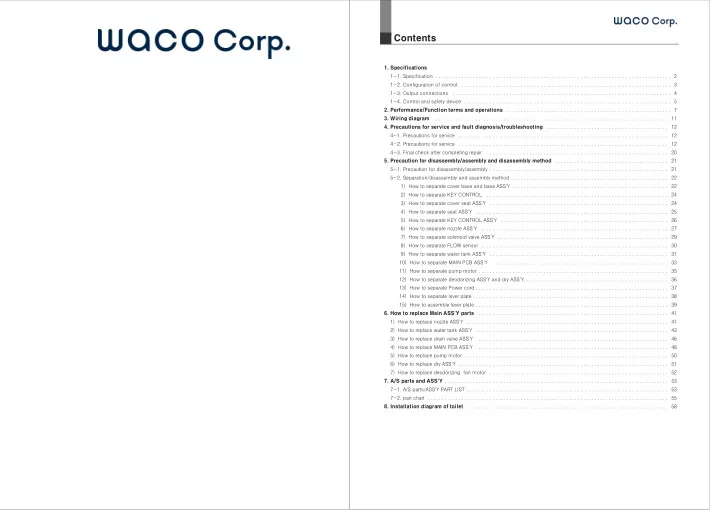
Contents 1. Specifications 1-1. Specification . . . . . . . . . . - - PowerPoint PPT Presentation

contents
SMART_READER_LITE
LIVE PREVIEW

Contents 1. Specifications 1-1. Specification . . . . . . . . . . - - PowerPoint PPT Presentation

Contents 1. Specifications 1-1. Specification . . . . . . . . . . . . . . . . . . . . . . . . . . . . . . . . . . . . . . . . . . . . . . . . . . . . . . . . . . . . . . . . . . . . . . . . . . . . . . . . . . . 2 1-2. Configuration of control


slide-1
SLIDE 1
  • 1. Specifications

1-1. Specification 1-2. Configuration of control 1-3. Output connections 1-4. Control and safety device

  • 2. Performance/Function terms and operations
  • 3. Wiring diagram
  • 4. Precautions for service and fault diagnosis/troubleshooting

4-1. Precautions for service 4-2. Precautions for service 4-3. Final check after completing repair

  • 5. Precaution for disassembly/assembly and disassembly method

5-1. Precaution for disassembly/assembly 5-2. Separation/disassembly and assembly method 1) How to separate cover base and base ASS'Y 2) How to separate KEY CONTROL 3) How to separate cover seat ASS'Y 4) How to separate seat ASS'Y 5) How to separate KEY CONTROL ASS'Y 6) How to separate nozzle ASS'Y 7) How to separate solenoid valve ASS'Y 8) How to separate FLOW sensor 9) How to separate water tank ASS'Y 10) How to separate MAIN PCB ASS'Y 11) How to separate pump motor 12) How to separate deodorizing ASS'Y and dry ASS'Y 13) How to separate Power cord 14) How to separate lever plate 15) How to assemble lever plate

  • 6. How to replace Main ASS'Y parts

1) How to replace nozzle ASS'Y 2) How to replace water tank ASS'Y 3) How to replace drain valve ASS'Y 4) How to replace MAIN PCB ASS'Y 5) How to replace pump motor 6) How to replace dry ASS'Y 7) How to replace deodorizing fan motor

  • 7. A/S parts and ASS'Y

7-1. A/S parts/ASS'Y PART LIST 7-2. part chart

  • 8. Installation diagram of toilet

Contents

. . . . . . . . . . . . . . . . . . . . . . . . . . . . . . . . . . . . . . . . . . . . . . . . . . . . . . . . . . . . . . . . . . . . . . . . . . . . . . . . . . . 2 . . . . . . . . . . . . . . . . . . . . . . . . . . . . . . . . . . . . . . . . . . . . . . . . . . . . . . . . . . . . . . . . . . . . . . . . . . 3 . . . . . . . . . . . . . . . . . . . . . . . . . . . . . . . . . . . . . . . . . . . . . . . . . . . . . . . . . . . . . . . . . . . . . . . . . . . . . 4 . . . . . . . . . . . . . . . . . . . . . . . . . . . . . . . . . . . . . . . . . . . . . . . . . . . . . . . . . . . . . . . . . . . . . . . . . 5 . . . . . . . . . . . . . . . . . . . . . . . . . . . . . . . . . . . . . . . . . . . . . . . . . . . . . . . . . . 7 . . . . . . . . . . . . . . . . . . . . . . . . . . . . . . . . . . . . . . . . . . . . . . . . . . . . . . . . . . . . . . . . . . . . . . . . . . . . . . . . . . . 11 . . . . . . . . . . . . . . . . . . . . . . . . . . . . . . . . . . . . . . . . . . . 12 . . . . . . . . . . . . . . . . . . . . . . . . . . . . . . . . . . . . . . . . . . . . . . . . . . . . . . . . . . . . . . . . . . . . . . . . . . 12 . . . . . . . . . . . . . . . . . . . . . . . . . . . . . . . . . . . . . . . . . . . . . . . . . . . . . . . . . . . . . . . . . . . . . . . . . . 12 . . . . . . . . . . . . . . . . . . . . . . . . . . . . . . . . . . . . . . . . . . . . . . . . . . . . . . . . . . . . . . . . 20 . . . . . . . . . . . . . . . . . . . . . . . . . . . . . . . . . . . . . . . . 21 . . . . . . . . . . . . . . . . . . . . . . . . . . . . . . . . . . . . . . . . . . . . . . . . . . . . . . . . . . . . . . . 21 . . . . . . . . . . . . . . . . . . . . . . . . . . . . . . . . . . . . . . . . . . . . . . . . . . . . . . . 22 . . . . . . . . . . . . . . . . . . . . . . . . . . . . . . . . . . . . . . . . . . . . . . . . . . . . . . . 22 . . . . . . . . . . . . . . . . . . . . . . . . . . . . . . . . . . . . . . . . . . . . . . . . . . . . . . . . . . . . . . . . 24 . . . . . . . . . . . . . . . . . . . . . . . . . . . . . . . . . . . . . . . . . . . . . . . . . . . . . . . . . . . . . . . 24 . . . . . . . . . . . . . . . . . . . . . . . . . . . . . . . . . . . . . . . . . . . . . . . . . . . . . . . . . . . . . . . . . . . . 25 . . . . . . . . . . . . . . . . . . . . . . . . . . . . . . . . . . . . . . . . . . . . . . . . . . . . . . . . . . . 26 . . . . . . . . . . . . . . . . . . . . . . . . . . . . . . . . . . . . . . . . . . . . . . . . . . . . . . . . . . . . . . . . . . 27 . . . . . . . . . . . . . . . . . . . . . . . . . . . . . . . . . . . . . . . . . . . . . . . . . . . . . . . . . . . . 29 . . . . . . . . . . . . . . . . . . . . . . . . . . . . . . . . . . . . . . . . . . . . . . . . . . . . . . . . . . . . . . . . . . 30 . . . . . . . . . . . . . . . . . . . . . . . . . . . . . . . . . . . . . . . . . . . . . . . . . . . . . . . . . . . . . . . 31 . . . . . . . . . . . . . . . . . . . . . . . . . . . . . . . . . . . . . . . . . . . . . . . . . . . . . . . . . . . . . . . 33 . . . . . . . . . . . . . . . . . . . . . . . . . . . . . . . . . . . . . . . . . . . . . . . . . . . . . . . . . . . . . . . . . . . 35 . . . . . . . . . . . . . . . . . . . . . . . . . . . . . . . . . . . . . . . . . . . . . . . . . . . 36 . . . . . . . . . . . . . . . . . . . . . . . . . . . . . . . . . . . . . . . . . . . . . . . . . . . . . . . . . . . . . . . . . . . . 37 . . . . . . . . . . . . . . . . . . . . . . . . . . . . . . . . . . . . . . . . . . . . . . . . . . . . . . . . . . . . . . . . . . . . . 38 . . . . . . . . . . . . . . . . . . . . . . . . . . . . . . . . . . . . . . . . . . . . . . . . . . . . . . . . . . . . . . . . . . . . 39 . . . . . . . . . . . . . . . . . . . . . . . . . . . . . . . . . . . . . . . . . . . . . . . . . . . . . . . . . . . . . . . . . . . 41 . . . . . . . . . . . . . . . . . . . . . . . . . . . . . . . . . . . . . . . . . . . . . . . . . . . . . . . . . . . . . . . . . . . . . . . 41 . . . . . . . . . . . . . . . . . . . . . . . . . . . . . . . . . . . . . . . . . . . . . . . . . . . . . . . . . . . . . . . . . . . . 43 . . . . . . . . . . . . . . . . . . . . . . . . . . . . . . . . . . . . . . . . . . . . . . . . . . . . . . . . . . . . . . . . . . . 46 . . . . . . . . . . . . . . . . . . . . . . . . . . . . . . . . . . . . . . . . . . . . . . . . . . . . . . . . . . . . . . . . . . . 48 . . . . . . . . . . . . . . . . . . . . . . . . . . . . . . . . . . . . . . . . . . . . . . . . . . . . . . . . . . . . . . . . . . . . . . . . 50 . . . . . . . . . . . . . . . . . . . . . . . . . . . . . . . . . . . . . . . . . . . . . . . . . . . . . . . . . . . . . . . . . . . . . . . . . . 51 . . . . . . . . . . . . . . . . . . . . . . . . . . . . . . . . . . . . . . . . . . . . . . . . . . . . . . . . . . . . . . . 52 . . . . . . . . . . . . . . . . . . . . . . . . . . . . . . . . . . . . . . . . . . . . . . . . . . . . . . . . . . . . . . . . . . . . . . . . . . . . . . . 53 . . . . . . . . . . . . . . . . . . . . . . . . . . . . . . . . . . . . . . . . . . . . . . . . . . . . . . . . . . . . . . . . . . . . . . . 53 . . . . . . . . . . . . . . . . . . . . . . . . . . . . . . . . . . . . . . . . . . . . . . . . . . . . . . . . . . . . . . . . . . . . . . . . . . . . . . . . . . . . . 55 . . . . . . . . . . . . . . . . . . . . . . . . . . . . . . . . . . . . . . . . . . . . . . . . . . . . . . . . . . . . . . . . . . . . . . . 58

slide-2
SLIDE 2

1 Specifications

1-1. Specification

Product Name No Type Description Function A _ During Wash operation, the LED is on to the set water pressure level

  • f Strong/Weak LED and off 2 minutes after or when pressing Stop button.

Wash B _ During bidet operation, the LED is on to the set water pressure level

  • f Strong/Weak LED and off 2 minutes after or when pressing Stop button.

Bidet C _ During Regular motion, the LED is on to the set water pressure level

  • f Strong/Weak LED and off 2 minutes after or when pressing Stop button.

Regular motion D _ During dry operation, the LED is on to the set air level and off 3 minutes after or when pressing Stop button. dry E GRN-2 YEL-2 RED-1 Displays water pressure strength of Wash/Bidet/Regular motion, air strenth

  • f dry and nozzle level. On and off with the LED increased/decreased by level.

1~5-level F _ For Wash or Bidet, press Move button to move the nozzle back and forth and jet Wash water evenly and more widely and press again to stop Move. Move G _ For Wash, Bidet and Regular motion, press Massage button to jet water repeatedly by alternating water pressure strong and weak, and press again to stop Massage. massage H GRN YEL RED For warm water control (off:1level, Green:2level, Yellow:3level, Red:4level) Warm water I GRN YEL RED For seat temperature control. (off: Level 1, Green:2level, Yellow:3level, Red:4level) Seat J YEL GRN When the seat temperature is higher than Level 2, press Power Saving button to set power saving function, press again to set learning power saving and press to release the function. Power-saving Learning power saving K GRN Press Children button to set Children function and press it again to release the function. Children L for warm water LED When a user sits on the seat, the deodorizing function operates automatically and stops 1 minute after leaving.(for HDB-1500 only) Deodorizer Wash Model Name Rated voltage/Rated frequency Rated input Power cord Water supply Service water pressure Dimensions Weight(For main body) Bidet Water

  • utlet

Regular motion Water pressure control

Water temperature control

Heater capacity Safety device

Seat temperature control

Heater capacity Safety device Temperature control Heater capacity Safety device Warm water bidet Heated seat Dry heater Deodorizer Accessories HDB-1300 Auto Bidet & dry Toilet HDB-1500 HDB-1100 AC 220~240V / 50Hz 1670 W 1.8 m Direct connection 0.7~7.5 Kgf/㎠ W470×D528×H145 mm 7.7 Kg(4.7Kg) 7.8 Kg(4.8Kg) 7.5 Kg(4.5Kg) 0.8 ℓ / min 0.8 ℓ / min 0.7 ℓ / min 5-level control, Microcom control Level 4 control(Water temperature~38℃) 1600 W Level sensor, Thermo switch, temperature fuse Level 4 control(ambient temperature~42℃) 55 W seat temperature sensor, temperature fuse 250 W 2 _ _ 5-level control, Microcom control Thermal protecting bimetal, temperature fuse _ _ _ Catalyst deodorizing 2 fixing bolts, fixing nuts , 2 main body fixing rubber plates, 2 fixing bolts bracket holders, 1 fixing bracket, 1 T valve, 1 water supply hose for toilet, 1 water supply hose for bidet, deodorizing cartridge(for HDB-1500 only) ※ Initial product and specifications may be changed to improve the products. ※ Although the service water pressure is 0.7-7.5 Kgf/㎠, the nozzle jet water pressure may be weakened at a lower level if using within a scope of 0.7-1.1 Kgf/㎠.

1-2. Configuration of control

1)MAIN P.C.B (1)Constant voltage IC : MICOM control power supply (2)MICOM IC : MAIN CPU (3)TRIAC : AC output control (Warm water heater, seat heater, dry heater, solenoid valve) 2)Operating equipment(DISPLAY P.C.B) (1)LED : For Strong/Weak 1-5-level, Warm water /seat heater display, Children function, Power saving, Learning power saving (2)TACT S/W : Stop, Wash, Bidet, Regular motion, dry, Warm water temperature, seat temperature, Power saving, Strong/Weak( water pressure and air), massage, MOVE, Children function, nozzle back/forth, 3)LED function description table

1 Specifications

3 _ _

slide-3
SLIDE 3

1 Specifications

1-3. Output connections

Level Voltage LED Level 1

  • ff

Level 2 1.88 V Green Level 3 1.80 V Yellow Level 4 1.72 V Red Overheated error Overheated error 1.46 V Warm water temperature ambient temperature 34±2℃ 36±2℃ 38±2℃ 45±2℃ _ 4 _ _

1-4. Control and safety device

1)First controls (1)Warm water temperature sensor (1)Warm water heater (A)The warm water heater will operate under the set temperature when the warm water temperature is set at Lever or higher. (B)The warm water heater is stopped by force during dry or when the Float S/W(for heater control) signals water deficiency. (2)dry heater The dry heater operates when the dry temperature is at Level 2 or higher in setting dry function. (3)seat heater The seat heater operates when the seat temperature is at Level 2 or higher. (4)dry motor The dry motor operates for 3 minutes at dry function. (5)Solenoid valve When pressing Wash or Bidet button after sitting on the seat, the solenoid valve operates to supply water and the Wash or Bidet nozzle jets water at a full level. Wash or Bidet stops automatically 2 minutes later or returns to Stand-by. (6)Select stepping motor Press Wash, Bidet and Regular motion button to jet water by converting into the set function. (7)Move motor (stepping motor) For moving back/forth of Wash and Bidet nozzle, press Move button to move the nozzle back/forth by right rotation and reverse rotation and press Nozzle level back/forth button to move the nozzle level back/forth. (8)Deodorizing fan motor(for HDB-1500 only) The deodorizing fan motor is on at seating and off 1 minute after leaving the seat with controlled at Level 3s of off/Low speed/ High speed. (3)FLOAT SENSOR(For Warm water heater only) The warm water heater is off when the Float S/W is at a lower level and on when it si at a safe level. 2)Second safety device (1)bimetal for warm water : It is off when the water temperature is 50±5℃ or higher by water temperature sensor error and

  • verheated error.

(2)bimetal for dry : It is off when the fan is stopped by fan circuit error of dry motor or dry fan and the water temperature is 105±5℃ or higher. (3)Temperature fuse for seat : It is off when the temperature of seat temperature sensor is 77±5℃ or higher by seat temperature sensor error and overheated error. 3)Third safety device (1)Temperature fuse for warm water : It is off when the temperature of warm water temperature fuse copper plate is 72±5℃ or higher by warm water sensor error, bimetal error or level sensor error. (2)Dry temperature fuse : It is off when the temperature of dryer heater temperature fuse is 152±5℃ or higher by dry bimetal error.

1 Specifications

5 _ _ Level Voltage LED Level 1

  • ff

Level 2 2.17 V Green Level 3 1.99 V Yellow Level 4 1.83 V Red 1.71 V seat temperature ambient temperature 34±2℃ 38±2℃ 42±2℃ 45±2℃ _ Resistance Check sensor error only 6.0764㏀ 5.6533㏀ 5.2637㏀ 4.1249㏀ Resistance Check sensor error only 7.6737㏀ 6.6451㏀ 5.7731㏀ 5.2057㏀ NO Type of load Load control mode Use 1 Warm water heater control by temperature sensor Warm water 2 dry heater ON/off control dry 3 seat heater ON/off control by temperature sensor seat 4 WATER PUMP motor PWM control Wash/Bidet 5 dry motor Consecutive rotation dry 6 Water supply SOLENOID ON/off control water inlet static pressure 7 stepping motor 1-2phase excitation unipolar drive Move 8 9 deodorizing fan motor ON/off control MAIN power supply AC cord Capacity 230V 1600W 230V 250W 230V 55W DC12V 1.2A DC12V 0.4A 230V 0.4A DC12V 0.4A DC12V 0.16A AC 230V 10A deodorizing Power supply input POWER (2)Seat temperature sensor Measured value of temperature sensor for warm water(50℃=3.485㏀±3%) Measured value of temperature sensor for seat(sensor part temperature 25℃=10.74㏀±5%))

slide-4
SLIDE 4

※ When Warm water or seat sensor is failed, the Logo LED shall blink red. Display items divided in warm water and seat failure.

1 Specifications

6 _ _ 4)Overpressure protector of supply water pressure (1)First overpressure protector Solenoid valve : A reducing valve controls high water pressure into constant water pressure of 1.1±0.1Kgf/㎠ at an area with strong supply water pressure or at midnight to protect water tank and devices. (2)Second overpressure protector Overpressure safety valve : When the reducing valve does not control constant water pressure of 1.1±0.1Kgf/㎠, the safety valve maintains stable water pressure by leaking water into the toilet so that water pressure will no exceed 2.0±0.3Kgf/㎠ in the water tank. 5)Overcurrent protector When overcurrent flows in an electric circuit such as short circuit, the overcurrent protector disconnects the current fuse and shuts down all circuits. 6)peration in overheating and sensor failure (1)When the water tank is overheated to 45℃ or higher, the Logo LED blinks red, shuts down Wash, Bidet and Regular motion function, and blocks the output of warm water heater. (2)When the water tank temperature sensor is failed, the Logo LED blinks red and shuts down only the output of warm water

  • heater. Wash, Bidet or Regular motion operates normally but the water is jetted at the temperature of tap water(cold water), not

warm water. (3)When the seat temperature is overheated to 45℃ or higher or the seat temperature sensor(THERMISTOR) is failed, the Logo LED blinks red and shuts down the output of seat heater.

2 Performance/Function terms and operations

7 _ _ Sensor Display Symptom Inlet warm water sensor

Both Green and Yellow LED of warm water temperature LED blink simultaneously sensor disconnected or non-inserted Both Yellow and Red LED of warm water temperature LED blink simultaneously sensor short-circuited or Overheated Outlet warm water sensor Green and Yellow LED of warm water temperature LED blink alternately sensor disconnected or non-inserted Yellow and Red LED of warm water temperature LED blink alternately sensor short-circuited or Overheated Seat sensor Green LED of seat temperature LED blinks sensor disconnected or non-inserted Red LED of seat temperature LED blinks sensor short-circuited or Overheated

2-1. Power supply

1)When a user plugs in the power cord, the nozzle operates at the origin, the Logo LED(blue) blinks for 10 seconds and stops after operating Dry and Deodorizing for 4 seconds. After then the LED(blue) stops blinking and is lighted on, but the water is not supplied at this time. (Dry and Deodorizing does not operate except at initial installation.) 2)When pressing Stop button for 3 seconds in Stand-by, the Logo LED(blue) will be off and Deodorizing, Warm water temperature, Seat temperature function will be shut down. 3)When pressing again one of Stop, Wash, Bidet and Regular motion button, the Logo LED(blue) will be in Stand-by with the set warm water temperature, seat temperature LEDs on.

2-2. Stop button

1)Press Stop button during Wash, Bidet(for women), Regular motion and Dry to stop the operated function and convert into usual Stand-by. 2)Use Stop button to stop Wash, Bidet, Regular motion and Dry function at your option.

2-3. Seating sensing function

1)Wash, Bidet, Regular motion and Dry will operate only when a user sits on the seat to protect the user or children from malfunction. 2)When a user sits on the seat, the water pressure Strong/Weak LED blinks in sequence, the seating sensor senses the seating

  • f user, and Wash, Bidet, Regular motion and Dry function will be in Stand-by.

3)When a user stands from the seat, all the water pressure Strong/Weak LEDs are off, and Wash, Bidet, Regular motion and Dry function will not operate even by pressing buttons.

2-4. Wash button(After sensing seating)

1)Press Wash button, and the LED will on to the set water pressure level of Strong/Weak LED and start Wash operation. 2)Wash will stop automatically 2 minutes after unless pressing Stop button within 2 minutes after starting Wash. 3)Press Stop button during Wash to stop Wash and convert into Stand-by. ※ When pressing Bidet button during Wash, Bidet will operate about 8 seconds after conversion.

2-5. Bidet(for women only) button(After sensing seating)

1)Press Bidet button, and the LED will on to the set water pressure level of Strong/Weak LED and start Bidet operation. 2)Bidet will stop automatically 2 minutes after unless pressing Stop button within 2 minutes after starting Bidet. 3)Press Stop button during Bidet to stop Wash and convert into Stand-by. ※ When pressing Wash button during Bidet, Wash will operate about 8 seconds after conversion.

2-6. Regular motion button(After sensing seating)

1)Press Regular motion button, and the LED will on to the set water pressure level of Strong/Weak LED and start Regular motion operation. 2)Regular motion will stop automatically 2 minutes after unless pressing Stop button within 2 minutes after starting Regular motion. 3)Press Stop button during Regular motion to stop Wash and convert into Stand-by. ※ Move function cannot be used during Regular motion.

2-7. Dry button(After sensing seating)

1)Press Dry button, and the LED will on to the set air level of Strong/Weak LED and start Dry operation. 2)Use Strong/Weak button to control temperature into 5 levels during Dry. 3)Dry will stop automatically 3 minutes after unless pressing Stop button within 2 minutes after starting Dry. 4)Press Stop button during Dry to stop Dry and convert into Stand-by.

  • How to control air temperature

After pressing Dry button, Weak Level 1 of Strong/Weak LED always shows cold air. Press Strong or Weak button repeatedly to control air temperature from cold to warm or from warm to cold, where the LED will be changed into 5 levels from Level 1 cold air, Level 2 low temperature to Level 5 hot air.

slide-5
SLIDE 5

LED color by level Sitting on the Level 1(Off) Stop Level 2(Green blinking) Low speed Level 3(Green/Yellow blinking) Low speed Level 4(Green/Yellow/Red blinking) High speed Leaving the seat Low speed Low speed High speed High speed

2 Performance/Function terms and operations

8 _ _

2-14. Children button

1)Press Children button to convert general operation setting into Children function. 2)Children function lowers the seat temperature from High/Medium/Low temperature to Medium/Medium low/Low temperature and Dry air temperature 1 level lower than general setting to prevent low temperature burn. 3)In Wash or Bidet, the nozzle moves forward and starts to jet at low water pressure. 4)When selecting Children function, a user can operate Move, Strong/Weak water pressure control, Massage or Nozzle back/forth, but not Regular motion function.

2-15. Power saving button

1)When pressing Power saving button at Level 2(Green) of seat temperature, the LED(Yellow) will be lighted on and converted into Power saving. (Sitting on the seat will release Power saving and raise to the set temperature, while leaving the seat will convert it into Power saving.) 2)In Power saving, the temperature of water and seat will be low of about 32℃ below Level 2(Green=34℃) to reduce power rates. 3)During Power saving state, press Power saving button to release Power saving and convert into Learning power saving and press the button again to release Power saving state and return automatically to the preset temperature. 4)When a user presses the Seat temperature while not releasing Power saving, the color of LED will be changed but the temperature will be always maintained at about 32℃.

2-16. Learning power saving button

1)Press Power saving button twice to light Power saving LED(Green) and convert into Learning power saving function. 2)In Learning power saving, Microcom will sense for itself the time zone when a user uses the toilet to release Power saving for frequent use and implement Power saving for little or no use. 3)Sitting on the seat at a time zone of little use(during Power saving) will release Power saving function, while leaving the seat will be converted into Power saving function.

2-17. Deodorizing button(for HDB-1500 only)

1)Sitting on the seat will operate Deodorizing up to 30 minutes. 2)Leaving the seat will stop Deodorizing 1 minute after. 3)Deodorizing can be set into 4 levels. (To set Deodorizing, press Warm water button once while holding Stop button. The button will change its color and blink to set Deodorizing into each level.)

2-18. Damper

1)A light one touch can close the cover smoothly and slowly so that no impact and noise will be applied to the seat when lowering the seat cover after stool. 2)When lowering the seat and the cover after cleaning or use by men, a light one touch can close both the cover and the seat or each one separately so that no impact and noise will be applied to the seat and the toilet to protect the seat.

2-19. Self Cleaning function

When the nozzle operates before and after each use, the jet water cleans the nozzle by force to maintain always clean condition.

2-20. Nozzle cleaning function

1)Press Wash button for 3 seconds while not sitting on the seat, and the nozzle will move forward as farther as it can and stand by for 2 minutes. At this time, you can clean foreign substances attached to the nozzle. 2)When pressing Stop button within 2 minutes, the nozzle will return to the origin and start Self cleaning. 3)When not pressing Stop button within 2 minutes, the nozzle will stop Nozzle cleaning function 2 minutes after.

2-8. Warm water temperature button

Repeat pressing Warm water temperature button to change the Warm water temperature LED from Off→Green→Yellow→Red to Off again and to control each level output of warm water heater from Stop→Low temperature→Medium temperature→High temperature to Stop again. When Dry is operated during the heating of Wash water, the output of warm water heater will be stopped.

  • How to control Warm water temperature

The temperature of water tank is controlled by 4 levels. When pressing Warm water temperature button repeatedly, the warm water temperature LED will be lighted on for each level and the warm water temperature will be changed as follows according to the color of LED: Off(Level 1): supply water temperature Green(Level 2): Low temperature Yellow(Level 3): Medium temperature Red(Level 4): High temperature

2-9. Seat temperature button

Repeat pressing seat temperature button to change the seat temperature LED from Off→Green→Yellow→Red to Off again and to control each level output of warm water heater from Stop→Low temperature→Medium temperature→High temperature to Stop again.

  • How to control seat temperature

The seat temperature is controlled by 4 levels. When pressing Seat temperature button repeatedly, the seat temperature LED will be lighted on for each level and the warm water temperature will be changed as follows according to the color of LED: Off(Level 1): supply water temperature Green(Level 2): Low temperature Yellow(Level 3): Medium temperature Red(Level 4): High temperature.

2-10. Strong/Weak button(water pressure control and air temperature control)

1)Use Strong/Weak button to control water pressure and air temperature during Wash, Bidet, Regular motion and Dry function. 2)During Wash, Bidet and Regular motion, the water pressure control LED will be lighted on from Level 1 to the set level simultaneously to display the strength of jet water pressure. And when the only one LED of set level is lighted on, it will indicate the level of nozzle back/forth. Use Strong/Weak button to control water pressure into 5 levels. 3)During Dry, the air temperature LED shows the temperature of Dry air. Use Strong/Weak button to control temperature into 5 levels.(In Dry, only one LED of set level will be lighted on.) 4)The button input will be ignored when pressing "Strong" button beyond Level 5 and "Weak" button beyond Level 1.

2-11. Massage button

1)When pressing Massage button during Wash, Bidet and Regular motion, the Massage will start by alternating automatically Strong/Weak of water pressure. 2)Use Strong/Weak button to control operation level during Massage. 3)When pressing Massage button during Massage, the Massage operation will be stopped. When pressing Stop button, both Massage and Wash, Bidet or Regular motion in service will be stopped. 4)Massage will be stopped at the same time with the end of Wash, Bidet and Regular motion.

2-12. Move button

1)Press Move button during Wash or Bidet, Move will start that the nozzle moves automatically back/forth. 2)Move function can be used only when Wash or Bidet is in service. 3)When pressing Move button during Move, only Move will be stopped. When pressing Stop button, both Move and Wash or Bidet will be stopped. 4)Move button input will be ignored during Regular motion. 5)Move will be stopped at the same time with the end of Wash, Bidet and Regular motion.

2-13. Back/Forth button(nozzle level adjustment)

1)Use Nozzle Back/Forth button to adjust the nozzle jet level during Wash or Bidet. 2)Press and hold repeatedly Forth button to move the nozzle forward and press and hold repeatedly Back button to move the nozzle backward. 3)When pressing Back/Forth button, the Back/Forth level LED displays the nozzle level and can set into 5 levels.

2 Performance/Function terms and operations

9 _ _

slide-6
SLIDE 6

Function

Seating

Switch operation Initial condition Description Cancelled When pressing Wash or Bidet button, Move will automatically operate even if not pressing Move.

5minutes 3minutes 2minutes 1minute 30seconds

Press Move button for 3seconds while in Stop(applied to release) Auto Move set/release 1

2 Performance/Function terms and operations

10 _ _

2-21. Table of other function description

= Seating switch Off = Seating switch On = regardless of On/Off

3 Wiring diagram

11 _ _ 2 3 4 5 6 7 8 9 Cancelled When pressing Wash or Bidet button, Move will automatically operate even if not pressing Massage. Press Massage button for 3seconds while in Stop(applied to release) auto massage set/release Operating sound on Use it to turn operating sound off Press Move for 3seconds or longer Operating sounderased Cleaning 2minutes dry 3minutes Use Strong/Weak button to select a desired cleaning time Strong Weak Use Back/Forth button to select a desired dry time Forth Back Press both 'Back' button and 'Weak' button for 3seconds or longer Setting mode Use Strong/Weak and Back/Forth buttons to select a desired time Service time selection

Press Warm water button to select a desired speed Press Warm water button while holding Stop button deodorizing fan speed selection Level 3 of water pressure Level 3 of nozzle High speed at seating high speed at no seating If a user stores the current use condition, it will be set into the current use condition in Seating Off even if another user uses Level 3 of water pressure and Level 3 of nozzle Press Wash button for 3seconds during Wash Wash water pressure nozzle level storage Level 3 of water pressure Level 3 of nozzle If a user stores the current use condition, it will be set into the current use condition in Seating Off even if another user uses Level 3 of water pressure and Level 3 of nozzle Press Bidet button for 3 seconds during Bidet Bidet water Pressure nozzle level storage Level 3 of water pressure Level 3 of nozzle If a user stores the current use condition, it will be set into the current use condition in Seating Off even if another user uses Level 3 of water pressure and Level 3 of nozzle Press Regular motion for 3seconds during Regular motion Regular motion water pressure nozzle level storage All functions will be returned to initial conditions. Press Stop button for 5seconds Initialization

Green/ Yellow/Red Green/ Yello Green Seating

Warm water(LED) deodorizing fan speed

No seating

OFF OFF OFF OFF OFF OFF OFF ON

low speed low speed

OFF ON ON

low speed high speed

ON ON ON

high speed high speed

5minutes 4minutes 3minutes 2minutes 1minutes

M

M

M : MOTOR H : HEATER S : SENSOR

M

H KEY P.C.B

M M

S

S/W

LEVEL THEMOSTAT R

HOT WATER SENSOR

  • TEMP. FUSE

SOLENOID

INLET SENSOR W R FLUX SENSOR WARM WATER

WHITE

WHITE

VIOLET ORANGE BROWN

DEODORANT

DRY PUMP

WHITE WHITE WHITE

BLUE WHITE

YELLOW GREEN BLK

BLK

RED

RED

R B BLK

R G G

R W B B

GRAY

SEAT SEAT SENSOR

SEAT DRY DRY

R R BLO B Y BLKB R O Y HEATER

R R R BLK TRIAC P.C.B

EMI P.C.B

MAIN P.C.B S

S S

H H

S

slide-7
SLIDE 7

4 Precautions for service and fault diagnosis/troubleshooting

12 _ _

4-1. Precautions for service

Check the following before service. ▶Is the water supplied? (If the water is not supplied, the failure cannot be diagnosed.) ▶Is the power supplied? (If the power is interrupted or the circuit breaker is failed, the failure cannot be diagnosed.) ▶If the toilet frozen? (If the water supply valve or the coupling is frozen, wait till they are defrosted.) ▶Is the water filter clogged? (If filter is clogged, the water is not supplied.) ▶The water runs around the nozzle before and after Wash, Bidet and Regular motion to clean the nozzle, not a failure. ▶When pressing Wash, Bidet and Regular motion button, water drops runs from the air bent hose to operate the

  • verpressure safety valve, not a failure.

▶Does Regular motion operate? (Children function lowers seat temperature, dry air temperature, Wash/Bidet jet water pressure, where Regular motion function does not operate.) ▶In initial installation, there may be burning smell when using dry air, which will disappear during use, not a failure. ▶The warm water heater does not operate during Dry heater operation. ▶In Wash, Bidet and Regular motion, the initial warm water temperature may lower than the set temperature, which will be jetted soon to the preset temperature, not a failure. ▶Wash, Bidet, Regular motion and Dry stops after certain time period, which is not a failure. (1) Wash will stop automatically 2 minutes later. (2) Bidet will stop automatically 2 minutes later. (3) Regular motion will stop automatically 2 minutes later. (4) Dry will stop automatically 3 minutes later. ▶Usually check the use instruction on the product of customer. ▶Check the replaced date of water filter. While the water filter is an antibacterial ceramic filter, replace it according to water quality and service quantity.

4-2. Failure diagnosis and Repair

After identifying/checking according to (Test: Test method) and (Check: Check method), repair or replace relevant parts of (ANSWER: cause of failure) under (QUESTION: failure symptom). (In failure diagnosis, check Wash, Bidet, Regular motion and Dry function in the Seating sensing condition.)

1)Initial basic function check

When the power cord is plugged in, the nozzle operates at the origin, the Logo LED(blue) blinks for 10 seconds and stops after

  • perating Dry and Deodorizing fan for 4 seconds. After sitting on the seating sensor area or sensing by hands, check whether Strong/

Weak LED blinks in sequence. And check whether the LED is lighted on the preset water pressure level of Strong/Weak LED and the water starts to be invested when pressing Wash button and whether the LED of warm water temperature and seat temperature is off (Level 1) by pressing Stop button when the water is at a full level and starts to be jetted. Check the following after 3~5 minutes. Also Press Dry button in the Seating sensing condition to set the air temperature control LED into Weak Level 1(cold air). After then, press Stop button 3 seconds to check the power is off. Press one of Stop, Wash, Bidet and Regular motion button again to check the power is on. With the power cord plugging in, check the following: 1.▶For failed power supply that Logo LED blue is not lighted on: =1. The current fuse is disconnected,

  • 2. The power cord or the harness wiring/terminal is unplugged or disconnected;
  • 3. MAIN P.C.B is failed.

2.▶When the Logo LED Red continues blinking: =1. The warm water is overheated;

  • 2. Water temperature sensor(THERMISTOR) is unplugged or failed;{When the water inlet sensor(white wire) is failed, replace the drain valve ASS'Y.};
  • 3. The seat is overheated;
  • 4. The seat temperature sensor(THERMISTOR) is unplugged or failed.

Check Wash, Bidet, Regular motion nozzle jets water in Stand-by. 3.▶When Wash nozzle, Bidet nozzle, Regular motion nozzle continues jetting water; =1. The solenoid valve is failed;

  • 2. MAIN P.C.B is failed.

4.▶When the nozzle tip(jet hole) continues leaking or water dropping in Stand-by; =The nozzle ASS'Y(selector motor) is failed. 5.▶When water is gathered or dropped around the water inlet adapter(water supply filter); =1. Readjust and tighten the water inlet adapter(water supply filter).

  • 2. If there is still failure even after readjustment, replace the water inlet adapter ASS'Y.

Check water leaks from the water tank drain hole at the bottom of frame in Stand-by: 6.▶When water leaks or drops: =1. The solenoid valve holds foreign matters or is failed;

  • 2. The product is not mounted correctly on the toilet;
  • 3. The drain valve does not return; (When the lever drain continues pressing the drain valve after replacing the drain valve,

replace the lever drain simultaneously.) Check water runs or drops on the front frame bottom of main body: 7.▶ When water runs down or drops: =1. The water pipe connecting hose(e.g. for solenoid) is unplugged or water leaks from the hose connection;

  • 2. Water leaks from the combined top/bottom of water tank;
  • 3. Water leaks from the part insertion including level sensor, heater, bimetal, air bent valve and selector motor.

4 Precautions for service and fault diagnosis/troubleshooting

13 _ _

T T C C Q Q Q A A Q A Q A A C Q A C Q A C Q A

slide-8
SLIDE 8

4 Precautions for service and fault diagnosis/troubleshooting

14 _ _ Press Wash button to check water is supplied:

  • 8. ▶When Wash water is not jetted:

=1. The solenoid valve terminal is unplugged or the lead line is disconnected;

  • 2. Water is not supplied or the solenoid valve is not opened;
  • 3. The water filter is clogged and does not discharge water;
  • 4. The water supply filter is clogged; and
  • 5. MAIN P.C.B or DISPLAY P.C.B is failed.
  • 9. ▶When the buzzer sounds and Wash water is not jetted:

=The pump motor is failed. Check the temperature of jetted water(beware of burn by overheating).

  • 10. ▶When the temperature of water exceeds the supply water temperature(ambient temperature):

=MAIN P.C.B is failed. Check the seat temperature.

  • 11. ▶When the seat temperature exceeds ambient temperature:

=MAIN P.C.B is failed. Press Dry button to check the following(not applicable to HDB-1100):

  • 12. ▶When the air is not blown:

=1. The seating sensor is failed

  • 2. The dry motor is unplugged
  • 3. The dry motor lead line or the wiring terminal is unplugged or disconnected;
  • 4. The dry motor is failed; and
  • 5. MAIN P.C.B or DISPLAY P.C.B is failed.
  • 13. ▶When the air of cold air or higher is blown:

=MAIN P.C.B is failed.

  • 14. ▶When the power is not off:

=MAIN P.C.B or DISPLAY P.C.B is failed.

2)Wash function check(After sitting on the seating sensor are or sensing by hands)

Press Wash button and set the water pressure control into Weak Level 1 to check that the Wash nozzle self-cleans and jets water after exiting completely from the nozzle base, and that water does not leak or drop even after pressing Stop button.

  • 15. ▶If the nozzle continues cleaning when pressing Wash button or Bidet button:

=1. The selector motor connector is unplugged or the lead line is disconnected(replace the nozzle ASS'Y);

  • 2. The selector motor is failed(replace the nozzle ASS'Y);
  • 3. The Move motor connector is unplugged or the lead line is disconnected;
  • 4. The Move motor is failed; and
  • 5. MAIN P.C.B is failed.
  • 16. ▶If Bidet or Regular motion jets water when pressing Wash button:

=1. The nozzle ASS'Y(selector motor) is failed;

  • 2. MAIN P.C.B or DISPLAY P.C.B is failed.
  • 17. ▶If Wash or Bidet jets water when pressing Regular motion button:

=1. nozzle ASS'Y(selector motor) is failed;

  • 2. MAIN P.C.B or DISPLAY P.C.B is failed.
  • 18. ▶If water is jetted equally(widely) as the Wash water jet when pressing Regular motion button:

=The nozzle ASS'Y(selector motor) is failed.

  • 19. ▶When the jet water pressure is weak:

=1. The water outlet hose is bent partially or water leaks from the connection;

  • 2. The supply water pressure is weak;
  • 3. The water supply filter is clogged by foreign matters;
  • 4. The pump motor is failed;
  • 5. The nozzle ASS'Y(selector motor) is failed; and
  • 6. MAIN P.C.B or DISPLAY P.C.B is failed.
  • 20. ▶When Wash nozzle does not jet water:

=1. The seating sensor is failed;

  • 2. The supply water pressure is weak(check water disconnection);
  • 3. The water outlet hose is bent or unplugged;
  • 4. The solenoid valve is unplugged from the connection terminal or the lead line is disconnected;
  • 5. The pump motor is failed;
  • 6. The water supply filter or the water filter is clogged;
  • 7. The nozzle ASS'Y(selector motor) is failed;
  • 8. The water temperature sensor is failed;

{When the water inlet sensor(white wire) is failed, replace the drain valve ASS'Y.}

  • 9. MAIN P.C.B is failed.
  • 21. ▶When water leaks or drops after Stop:

=1. The nozzle ASS'Y(selector motor) is failed;

  • 2. The solenoid valve holds foreign matters or is failed;
  • 3. MAIN P.C.B is failed.

Press Wash button again check the strength of water pressure by using water pressure control Strong/Weak button. Check Wash stops automatically 2minutes after and Wash stops when pressing Wash button and then Stop button.

  • 22. ▶When water pressure is not controlled:

=1. The pump motor is failed;

  • 2. MAIN P.C.B or DISPLAY P.C.B is failed.
  • 23. ▶When Wash does not stop automatically 2minutes after

(refer to change time standard→function description table in changing operating time) =MAIN P.C.B or DISPLAY P.C.B is failed.

  • 24. ▶When Wash does not stop even when pressing Stop button:

=MAIN P.C.B or DISPLAY P.C.B is failed.

4 Precautions for service and fault diagnosis/troubleshooting

15 _ _

T T C Q A Q A Q A Q A Q A Q A Q A Q A Q A C Q A C Q A C Q A Q A Q A Q A Q A Q A

slide-9
SLIDE 9

4

16 _ _

3)Bidet function check(after sitting on the seating sensor area or sensing by hands)

Press Bidet button and set the water pressure control into Weak Level 1 to check that the Bidet nozzle self-cleans and jets water after exiting completely from the nozzle base, and that water does not leak or drop even after pressing Stop button.

  • 25. ▶If the nozzle continues cleaning when pressing Bidet button:

=1. The selector motor connector is unplugged or the lead line is disconnected(replace the nozzle ASS'Y);

  • 2. The selector motor is failed(replace the nozzle ASS'Y);
  • 3. The Move motor connector is unplugged or the lead line is disconnected;
  • 4. The Move motor is failed; and
  • 5. MAIN P.C.B is failed.
  • 26. ▶If Wash or Regular motion jets water when pressing Bidet button:

=1. The nozzle ASS'Y(selector motor) is failed;

  • 2. MAIN P.C.B or DISPLAY P.C.B is failed.
  • 27. ▶When the jet water pressure is weak:

=1. The water outlet hose is bent partially or water leaks from the connection;

  • 2. The supply water pressure is weak;
  • 3. The water supply filter is clogged by foreign matters;
  • 4. The pump motor is failed;
  • 5. The nozzle ASS'Y(selector motor) is failed; and
  • 6. MAIN P.C.B or DISPLAY P.C.B is failed.
  • 28. ▶When Bidet nozzle does not jet water:

=1. The seating sensor is failed;

  • 2. The supply water pressure is weak(check water disconnection);
  • 3. The water outlet hose is bent or unplugged;
  • 4. The solenoid valve is unplugged from the connection terminal or the lead line is disconnected;
  • 5. The pump motor is failed;
  • 6. The water supply filter or the water filter is clogged;
  • 7. The nozzle ASS'Y(selector motor) is failed;
  • 8. The water temperature sensor is failed; {When the water inlet sensor(white wire) is failed, replace the drain valve ASS'Y.}
  • 9. MAIN P.C.B is failed.
  • 29. ▶When water leaks or drops after Stop:

=1. The nozzle ASS'Y(selector motor) is failed;

  • 2. The solenoid valve holds foreign matters or is failed;
  • 3. MAIN P.C.B is failed.

Press Bidet button again check the strength of water pressure by using water pressure control Strong/Weak button. Check Bidet stops automatically 2minutes after and Bidet stops when pressing Bidet button and then Stop button.

  • 30. ▶When water pressure is not controlled:

=1. The pump motor is failed;

  • 2. MAIN P.C.B or DISPLAY P.C.B is failed.
  • 31. ▶When Bidet does not stop automatically 2minutes after

(refer to change time standard→function description table in changing operating time) =MAIN P.C.B or DISPLAY P.C.B is failed.

  • 32. ▶When Bidet does not stop even when pressing Stop button:

=MAIN P.C.B or DISPLAY P.C.B is failed.

4)Seat temperature and Warm water temperature check

With the power on, use seat temperature button and Warm water temperature button to set seat temperature and warm water temperature respectively into Level 4(LED Red) of highest temperature and check the following 3~5minutes after sitting on the seating sensor area or sensing by hands. Pres Seat temperature button to check the seat temperature LED and seat temperature. (When the seat temperature sensor, the seat heater or the seating sensor is failed, replace the seat ASS/Y.)

  • 33. ▶When the Logo LED blinks red and the Seat LED blinks green:

=1. The seat temperature sensor(THERMISTOR) is unplugged from MAIN P.C.B. or failed;

  • 2. MAIN P.C.B is failed.
  • 34. ▶When the seat is cold:

=1. The seat lead line or wiring terminal is unplugged or failed;

  • 2. The seat hot-wire heater is disconnected;
  • 3. The seat temperature sensor is failed;
  • 4. The seat temperature fuse is disconnected(Check MAIN P.C.B.);
  • 5. MAIN P.C.B or DISPLAY P.C.B is failed.
  • 35. ▶When the seat overheated(refer to 1.4 Control and safety device):

=1. The seat temperature sensor is disconnected from the hot-wire attachment;

  • 2. The seat temperature sensor is failed; and
  • 3. MAIN P.C.B is failed.

Check water temperature(Beware of burn by high temperature).

  • 36. ▶When water is cold:

=1. The level sensor(black wire) is not on from off;

  • 2. The water tank temperature sensor(black/white wire) is failed;
  • 3. The flow sensor is failed;
  • 4. The water tank heater lead line and the wiring terminal is unplugged or disconnected;
  • 5. The water tank heater is disconnected;
  • 6. The water tank bimetal is failed;
  • 7. The water tank temperature fuse is disconnected(check MAIN P.C.B.);
  • 8. The triac P.C.B. is failed(replace the water tank ASS'Y)
  • 9. MAIN P.C.B or DISPLAY P.C.B is failed.
  • 37. ▶When water is jetted continuously at low temperature while the water temperature is set at high temperature

(Low/Medium/High medium); =1. The flow sensor is failed;

  • 2. The water tank heater is failed;
  • 3. The triac P.C.B. is failed;
  • 4. The water inlet sensor or water temperature sensor is failed;

{When the water inlet sensor(white wire) is failed, replace the drain valve ASS'Y.}

  • 5. MAIN P.C.B is failed.

4

17 _ _

T C C Q A Q A Q A Q A Q A Q A T T Q A Q A Q A Q A Q A Q A Q A

Precautions for service and fault diagnosis/troubleshooting Precautions for service and fault diagnosis/troubleshooting

slide-10
SLIDE 10

4

18 _ _

  • 38. ▶When water temperature becomes cold frequently or cold water is jetted for 30 seconds at each service:

=Replace the nozzle ASS'Y.

  • 39. ▶When water temperature is overheated(refer to 1.4 Control and safety device)

=1. The water temperature sensor is failed; {When the water inlet sensor(white wire) is failed, replace the drain valve ASS'Y}

  • 2. The water tank bimetal is failed;
  • 3. The water tank temperature fuse is disconnected(Check MAIN P.C.B.);
  • 4. When the level sensor(black wire) is not off from on in water deficiency;
  • 5. The triac P.C.B. is failed; and
  • 6. MAIN P.C.B is failed.

5)Dry function check

(After sitting on the seat sensor or sensing by hands) Press Dry button to check air temperature by using Strong/Weak button. Check Dry stops automatically 3minutes after pressing Dry button or Dry stops after pressing Dry button and then Stop button.

  • 40. ▶When the air is not blown:

=1. The dry heater lead line and the wiring terminal is unplugged or disconnected;

  • 2. The dry heater is failed;
  • 3. The dry bimetal is failed;
  • 4. The dry temperature fuse is failed(check MAIN P.C.B.);
  • 5. MAIN P.C.B or DISPLAY P.C.B is failed.
  • 41. ▶When Dry Strong/Weak LED blinks and the cold air is blown:

=Press Stop button for 5 seconds while not seating to set initialization. Unplug the power cord and plug in again after 7seconds to stand by while covering the Dry stopper. When the Logo LED stops blinking, release the dry stopper and check again the air by pressing Dry button.

  • 42. ▶When the air is overheated(refer to 1.4 Control and safety device)

=1. The heater hot wire is failed; and

  • 2. MAIN P.C.B is failed.
  • 43. ▶When Dry does not stop automatically 3minutes after

(refer to change time standard→ function description table in changing operating time) =MAIN P.C.B or DISPLAY P.C.B is failed.

  • 44. ▶When Dry does not stop even after pressing Stop button:

=MAIN P.C.B or DISPLAY P.C.B is failed.

6)Move and nozzle control back/forth function check(Check after sensing the seating)

After pressing Wash or Bidet button and the Move button, check the nozzle move back/forth and Move function stops when pressing Move button again. Also press Nozzle control back and forth button repeatedly to check that the nozzle moves back and forth and press Stop button to check that Both Move and jetting stop.

  • 45. ▶When the nozzle does not move when pressing Move button:

=1. The Move motor lead line and wiring terminal is unplugged or disconnected;

  • 2. The Move motor(stepping motor) is failed; and
  • 3. MAIN P.C.B or DISPLAY P.C.B is failed.
  • 46. ▶When the move width of nozzle is short:

=1. The the nozzle is interrupted by the connecting hose or the hose band;

  • 2. The Move motor lead line connector is poorly contacted;
  • 3. The Move motor(stepping motor) is failed;
  • 4. The nozzle ASS'Y is failed; and
  • 5. MAIN P.C.B or DISPLAY P.C.B is failed.
  • 47. ▶When Move function does not stop when pressing Move button again during Move:

=MAIN P.C.B or DISPLAY P.C.B is failed.

  • 48. ▶When both Move/jet do not stop when pressing Stop button during Move:

=MAIN P.C.B or DISPLAY P.C.B is failed.

  • 49. ▶When the nozzle does not move back and forth when pressing Nozzle control back/forth button:

=1. The Move motor lead line and wiring terminal is unplugged or disconnected;

  • 2. The Move motor(stepping motor) is failed;
  • 3. The nozzle ASS'Y is failed; and
  • 4. MAIN P.C.B or DISPLAY P.C.B is failed.

7)Deodorizing function check(for HDB-1500 only)

While holding Stop button, press Warm water button to check Deodorizing function by level. Also set Deodorizing into off during Deodorizing to check Deodorizing stops.

  • 50. ▶ When Deodorizing function does not work:

=1. The deodorizing fan motor is failed;

  • 2. MAIN P.C.B or DISPLAY P.C.B is failed.
  • 51. ▶When Deodorizing does not stop until 30 minutes after the seating or stop automatically 1 minute after leaving the seat:

=MAIN P.C.B. is failed.

  • 52. ▶If the deodorizing fan motor does not stop when Deodorizing function is set into off:

=MAIN P.C.B. is failed.

8)Insulation performance check

With the water tank full of water, unplug the power supply, connect the ground pole of plug and the earth terminal, and connect the line terminal of tester and either pole of plug to check insulation resistance. With the ground pole of plug and the earth terminal connected, connect the line terminal of tester and either pole of plug to check insulation resistance.

  • 53. ▶When the value of insulation resistance is less than 100㏁ or the insulation is poor:

=1. The water tank heater is poorly insulated(replace the water tank ASS'Y);

  • 2. Water penetrates into MAIN P.C.B. or the insulator is stained with water.

Connect either pole of plug and the line terminal of tester and apply the earth terminal of tester to the jet inside the Dry air stopper inlet to check insulation resistance.

  • 54. ▶When the value of Dry insulation resistance is less than 100㏁ or the insulation is poor:

=The dry heater is poorly insulated.

4

19 _ _

T T T Q A Q A Q A Q A Q A Q A Q A Q A Q A T T Q A Q A Q A Q A Q A Q A Q A Q A

Precautions for service and fault diagnosis/troubleshooting Precautions for service and fault diagnosis/troubleshooting

slide-11
SLIDE 11

4 Precautions for service and fault diagnosis/troubleshooting

20 _ _

4-3. Final check after completing repair

After completing repair, check the following: 1)After repair, make final check including the assembly of parts, the wiring path of lead line, the damaged of coating, missed or bent hose, the touch and operation of P.C.B switch. 2)With the plug in, fill the water tank with water and make sure to check insulation resistance according to the method in Section

4-2.8)

3)With the power on again, check all functions. (refer to Section 2 Performance/Function terms and operations)

5-1. Precautions for disassembly/assembly

Check the following before disassembly/assembly:

  • Check ordinary use of product by customers.
  • Use Power button on the control panel to turn the power off.
  • Unplug the power.
  • Avoid electric shock, make sure to unplug the power.
  • Tighten the water supply valve of water main.
  • Tighten the raw water valve of water pipe on the wall to block the supply of water.
  • Eliminate the water from the water tank.
  • Press the lever plate at the next right bottom of main body to eliminate the water completely from the water tank, since the

insulation performance is lowered dangerously if water penetrates into electric parts.

  • Use plastic tools to separate main body from the toilet.
  • Turn counterclockwise and unloose slightly the main body fixing nuts, pull forth the level plate at the next of main body while

pressing it, separate the main body from the toilet place it in an even place for convenient disassembly/assembly, and disassemble the main body in the sequence of disassembly.

  • Do not disassemble the parts forcibly to avoid the transformation and damage of parts.
  • Use proper tools to disassemble and assemble the parts and do not disassemble/assembly them forcibly to avoid the transformation and damage.
  • Make sure that water shall not contact with electric parts.
  • Check whether water has penetrated into electric parts.
  • Remove dust or foreign matters from the connector housing terminal and junction of electric parts.
  • Make sure not to lose bolts and accessories.
  • Make sure to operate the relevant button in measuring the output of electric parts at the lead line terminal.
  • Make sure to replace electric parts with authentic parts.
  • Check the electric parts are authentic and collect/return defective parts after replacement and repair to cooperate with the identification of cause.
  • Make sure that the piping and supply hose will not be unplugged or bent.
  • Make sure to assemble the wiring path of the lead line into the original state.
  • Assemble and tie the lead line with the cable tie by estimating the wiring path and the creepage distance so that the lead line

such as harness or wire will not be contacted or pressed by the operating part or the gap of combined part.

  • After repair, be sure to make final check.
  • After repair, make final check including the assembly of parts, the wiring path of lead line, the damaged of coating, missed or

bent hose, the touch and operation of P.C.B switch.

  • After completing service, check the service environment.
  • After completing service, check the service environment. Make sure not to use the outlet together with a product with high
  • consumption. Also change the service environment when the surrounding condition of installation is unstable.

5 Precautions for disassembly/assembly and How to disassemble

21 _ _

slide-12
SLIDE 12

5-2. How to separate/disassemble and assemble

1)How to separate Cover base and Base ASS'Y-Ⅰ Drain water completely from the water tank by pressing the level plate with tools or hands. Unloose both of main body fixing nuts slightly, pull forward the lever plate while pressing it to separate the product from the toilet. Press the right hook at the bottom of main body and widen the base and the base cover. Press and widen slightly forward the left hook at the bottom of main body. Separate the Deodorant case. (The cover base and base are not separated when the Deodorant case is assembled) Unloose 2 base fixing bolts from the rear of the product. Isolate the cover base ASS'Y and the base ASS'Y. 1)How to separate Cover base and Base ASS'Y-Ⅱ Unplug the Seating sensor connector from MAIN PCB. (White 3P connector) Unplug the seat sensor connector from MAIN PCB. (Red 2P connector) Unplug the seat heater connector from MAIN PCB. (2-wire Red 3P connector) Unplug the Control PCB connector from the left cover base.

5 Precautions for disassembly/assembly and How to disassemble 5 Precautions for disassembly/assembly and How to disassemble

22 _ _ 23 _ _

8 7 2 4 6 11 1 10 9 3 5

slide-13
SLIDE 13

4)How to separate Seat ASS'Y

Unloose 2 seat damper holder fixing bolts. Pull and separate the seat damper holder ASS'Y. (If the top and the bottom of damper holder are changed, it' s not possible to assemble the product.) Separate the seat ASS'Y wiring from the cover base ASS'Y. Isolate the separated seat ASS'Y. 2)How to separate KEY CONTROL 3)How to separate cover seat ASS'Y unloose 2 KEY CONTROL ASS'Y fixing bolts from the cover base ASS'Y. Hold the cover base ASS'Y by one hand, shake and pull the KEY CONTROL ASS'Y to the left/right by the other hand and pull the KEY CONTROL ASS'Y to separate it. Widen the right cover seat and separate the cover seat hinge fro, the right cover base hinge hole. Push the cover seat to the left and separate the cover seat ASS'Y.

5 Precautions for disassembly/assembly and How to disassemble 5 Precautions for disassembly/assembly and How to disassemble

24 _ _ 25 _ _

2 1 1 2 1 2 3 4

slide-14
SLIDE 14

26 _ _ 27 _ _ 5)How to disassemble KEY CONTROL ASS'Y Unloose 6 KEY CONTROL ASS'Y fixing bolts. Separate KEY CONTROL LOW. With the KEY CONTROL LOW/UP separated, make sure not to lose springs(5) mounted on the Low. Separate the KEY PCB from the KEY CONTROL UP. 6)How to separate nozzle ASS'Y -Ⅰ Remove 2 cable ties tightening the nozzle stepping motor lead line. Unplug the nozzle stepping motor connector from MAIN PCB.(White 6P connector) Unplug the selector stepping motor connector from MAIN PCB. (White 5P connector) Pull the nozzle from the nozzle base. Use a tool to move the clamp inserted into the nozzle hose. Pull out the hose silicon inserted into the nozzle ASS'Y.

5 Precautions for disassembly/assembly and How to disassemble 5 Precautions for disassembly/assembly and How to disassemble

1 3 4 2 1 2 3 4 5 6

slide-15
SLIDE 15

28 _ _ 29 _ _ 6)How to separate nozzle ASS'Y -Ⅱ Push and lift the rear of the nozzle ASS'Y slightly to separate the nozzle ASS'Y from the base ASS'Y. Isolate the separated nozzle ASS'Y. 7)How to separate solenoid valve ASS'Y Pull out 2 solenoid valve terminals. unloose 2 solenoid valve bracket fixing bolts. unloose 3 solenoid valves(2 for the front, 1 for the rear). unloose 1 water tank fixing bolt . Lift slightly the water tank and pull the solenoid valve to the left to separate it. Pull and separate the body adapter from the solenoid valve ASS'Y.

5 Precautions for disassembly/assembly and How to disassemble 5 Precautions for disassembly/assembly and How to disassemble

6 5 3 1 8 7 2 4

slide-16
SLIDE 16

30 _ _ 31 _ _ 8)How to separate FLOW sensor Unplug the FLOW sensor connector from MAIN PCB. (3-wire Blue 6P connector) Remove 2 cable ties tightening the FLOW sensor LEAD line. Remove 2 cable ties of hose connected to the FLOW sensor. Unloose a FLOW sensor fixing bolt. Pull and separate 2 hoses connected to the FLOW sensor. Isolate the separated FLOW sensor. 9)How to separate water tank ASS'Y -Ⅰ Unloose a drain valve fixing bolt . Remove 2 cable ties for the wiring arrangement at the front part. Unplug the inlet temperature sensor from MAIN PCB. (Black 2P connector, White LEAD WIRE) Unplug the warm water sensor connector from MAIN PCB.(Yellow 2P connector, Black LEAD WIRE) Unplug the level sensor connector from MAIN PCB. (White 2P connector, Black LEAD WIRE) Unplug the connector connected to the triac PCB from MAIN PCB.(6-wire 7P connector)

5 Precautions for disassembly/assembly and How to disassemble 5 Precautions for disassembly/assembly and How to disassemble

1 3 5 6 5 6 4 3 4 2 1 2

slide-17
SLIDE 17

32 _ _ 33 _ _ 9)How to separate water tank ASS'Y -Ⅱ Unloose 2 MAIN PCB ASS'Y fixing bolts. (Rear=1EA, Right=1EA) Unplug the 2P connector of triac PCB from the EMI PCB at the bottom of Main PCB. Unloose a ground fixing bolt connected to the warm water heater bracket. Pull slightly the water tank ASS'Y to the left and separate the drain lever. After separation, isolate the water tank ASS'Y. 10)How to separate MAIN PCB ASS'Y -Ⅰ Unplug the Deodorant fan motor connector from MAIN PCB.(Yellow 3P connector) Unplug the dry fan motor connector from MAIN PCB. (Violet 3P connector) Unplug the pump motor connector from MAIN PCB. (2-wire, Brown 3P connector) Unplug the solenoid valve LEAD WIRE connector(2-wire, Blue 3P connector) from MAIN PCB and separate the solenoid valve LEAD line. Unloose a ground fixing bolt connected to the EMI PCB at the bottom of MAIN PCB from the earth bracket. Unplug the power cord 2P connector from the EMI PCB at the bottom of MAIN PCB.

5 Precautions for disassembly/assembly and How to disassemble 5 Precautions for disassembly/assembly and How to disassemble

5 6 10 3 4 9 7 8 1 2

slide-18
SLIDE 18

34 _ _ 35 _ _ 10)How to separate MAIN PCB ASS'Y -Ⅱ Separate and isolate the MAIN PCB ASS'Y from the base ASS'Y. 11)How to separate pump motor Unloose 2 pump bracket fixing bolts. Separate the pump motor from the base. Separate the pump bracket.

5 Precautions for disassembly/assembly and How to disassemble 5 Precautions for disassembly/assembly and How to disassemble

7 3 1 2

slide-19
SLIDE 19

36 _ _ 37 _ _ 12)How to separate Deodorant ASS'Y and dry ASS'Y Lift up and separate the Deodorant fan motor. Unloose a Deodorant case fixing bolt. Separate the Deodorant case from the base ASS'Y. Unloose a dry ASS'Y fixing bolt . Push and lift slightly backward the dry heater ASS'Y to separate it. Lift up and separate the dry fan motor from the base ASS'Y. 13)How to separate power cord Unloose a power cord ground line fixing bolt from the earth bracket and separate the power cord. Unloose a earth bracket fixing bolt from the base and separate the earth bracket.

5 Precautions for disassembly/assembly and How to disassemble 5 Precautions for disassembly/assembly and How to disassemble

1 2 3 4 5 6 2 1

slide-20
SLIDE 20

5 Precautions for disassembly/assembly and How to disassemble 5 Precautions for disassembly/assembly and How to disassemble

38 _ _ 39 _ _ 14)How to separate lever plate After unloosing a lever drain fixing bolt, lift up and separate the base. Unloose a lever plate fixing bolt. Push the lever plate by one hand, lift up the lever plate by the other hand and separate it from the base.(Make sure not to lose the lever spring.) 15)How to assemble lever plate -Ⅰ Put the lever part into the square groove of base. Align the KEY part with the square groove. After lower, assembling and fixing the part, assemble the bolts. Insert the lever spring into the left square groove of lever spring. Push the right lever spring and bend it like rainbow. With the lever spring bent, push the center spring down and insert it completely into the square groove.(Make sure that the spring will not ride on the upper lever plate.)

5 6 3 3 4 1 2 1 2

slide-21
SLIDE 21

5 Precautions for disassembly/assembly and How to disassemble 6 How to replace key ASS'Y parts

40 _ _ 41 _ _ 15)How to assemble lever plate -Ⅱ Insert and align the lever plate fixing hose into the center hole of lever drain and assemble the bolts. ※ Otherwise, assemble all the other parts in reverse order of disassembly. Press the lever part of lever plate repeatedly to check the spring operation. 1)How to replace nozzle ASS'Y -Ⅰ Remove 2 cable ties tightening the nozzle stepping motor lead wire. Unplug the nozzle stepping motor connector from MAIN PCB.(White 6P connector) Unplug the selector stepping motor connector from MAIN PCB.(White 5P connector) Pull the nozzle from the nozzle base. Use a tool to move the clamp inserted into the nozzle hose. Pull out the hose silicon inserted into the nozzle ASS'Y.

7 8 5 6 3 4 1 2

slide-22
SLIDE 22

42 _ _

6 How to replace key ASS'Y parts 6 How to replace key ASS'Y parts

43 _ _ 1)How to replace nozzle ASS'Y -Ⅱ Push slightly and lift up the rear of nozzle ASS'Y and separate the nozzle ASS'Y. Replace the nozzle ASS'Y with authentic parts, assemble it in reverse order and tighten 2 cable ties into the original condition. 2)How to replace water tank ASS'Y -Ⅰ Unloose 2 solenoid valve bracket fixing bolts . . Unloose 3 solenoid valves (2 for the front, 1 for the rear). Unloose a water tank fixing bolt. Remove 2 cable ties on the front base base ASS'Y. Pull out the air bent hose from the base, unloose and separate fixing bolts of ground wire connected to the water tank heater bracket. Unplug the inlet sensor connector(Black 2P), warm water sensor connector(Yellow 2P), level sensor connector(White 2P) from MAIN PCB

5 6 3 4 7 8 1 2

slide-23
SLIDE 23

44 _ _ 45 _ _ 2)How to replace water tank ASS'Y -Ⅱ Unplug the triac PCB connector(6-wire/7P) from MAIN PCB. Remove 2 cable ties tightening the flow sensor at the rear base ASS'Y. Unplug the FLOW sensor connector(3-wire/Blue 6P) from MAIN PCB. Unloose 2 MAIN PCB ASS'Y fixing bolts.(Rear=1EA, Right=1EA) Lift up slightly MAIN PCB and unplug the 2P connector(Red) of triac PCB from the EMI PCB at the bottom of MAIN PCB. After separating the water tank ASS'Y from the base ASS'Y, separate the solenoid valve ASS'Y. (A double side tape is attached to the bottom of water tank. separate it by pulling with all your strenth.) 2)How to replace water tank ASS'Y -Ⅲ After replacing and assemble in reverse order the water tank ASS'Y with authentic one, tighten 4 cable ties(2 for front, 2 for rear) into the original condition.

11 12 9 10 8 1 7

6 How to replace key ASS'Y parts 6 How to replace key ASS'Y parts

slide-24
SLIDE 24

46 _ _ 47 _ _ 3)How to replace drain valve ASS'Y -Ⅰ Unloose 2 solenoid valve bracket fixing bolts. Unloose 3 solenoid valves(2 for front, 1 for rear). Unloose a water tank fixing bolt. Unloose a drain valve front fixing bolt. Remove 2 cable ties from the base ASS'Y. Unplug the inlet sensor connector(White wire, Black 2P) from MAIN PCB. 3)How to replace drain valve ASS'Y -Ⅱ Hold the water tank by one hand, pull out the drain valve by the other hand. (Make sure not to lose the drain valve O-ring). Pull out and separate the solenoid valve and the drain valve. After replacing and assembling in reverse order the authentic drain valve, tighten the cable ties into the

  • riginal condition.

5 6 3 4

9 7 8

1 2

6 How to replace key ASS'Y parts 6 How to replace key ASS'Y parts

slide-25
SLIDE 25

48 _ _ 49 _ _ 4)How to replace MAIN PCB ASS'Y -Ⅰ Remove 2 cable ties and one at the rear and front of base ASS'Y respectively. Unloose a water tank ASS'Y fixing bolt. Widen a space where the water tank ASS'Y fixing bolt is unloosed and separate the KEY CONTROL wiring. Unplug all the connectors at the top of MAIN PCB ASS'Y. Unloose 2 MAIN PCB ASS'Y fixing bolts. (Rear:1EA, Right:1EA) Unloose the a ground wire fixing bolt of EMI PCB at the MAIN PCB from the water tank heater bracket and separate the ground wire. 4)How to replace MAIN PCB ASS'Y -Ⅱ Unplug the triac connector(Red 2P) from EMI PCB at the bottom of MAIN PCB . Remove cable tie for wiring arrangement of power cord and unplug the power cord connector(White 2P) from EMI PCB. After unloosing the EMI ground wire connected to the earth bracket and separating the ground wire, separate the MAIN PCB ASS'Y. After replacing the MAIN PCB ASS'Y with authentic one and assembling it in reverse order, tighten the cable tie into the original condition.

3 1 2 4 6 5 7 9 8 10

6 How to replace key ASS'Y parts 6 How to replace key ASS'Y parts

slide-26
SLIDE 26

50 _ _ 51 _ _ 5)How to replace pump motor After separating the nozzle ASS'Y(refer to how to replace the nozzle ASS'Y), remove a hose silicon cable tie and 2 hose ties of the flow sensor and pull out the hose silicon. After unplugging the pump motor connector(2-wire/ Brown3P)from MAIN PCB, unloose 2 MAIN PCB fixing bolts(Rear: 1, Right: 1) Unloose 2 pump motor bracket fixing bolts. After separating the pump motor from the base ASS'Y, separate the hose silicon from the pump motor ASS'Y. After replacing the pump motor with authentic one, insert the pump bracket into the pump and assemble the hose silicon into the original condition. (Make sure that the spring in the hose silicon will not enter into the pump motor hole.) After assembling the authentic pump motor in reverse

  • rder, tighten the removed cable tie into the original

condition. 6)How to replace dry ASS'Y After unplugging the dry fan connector(Violet 3P) and the Deodorant fan connector(Yellow 3P), unloose 2 MAIN PCB fixing bolts. After separating the Deodorant ASS'Y(refer to how to replace Deodorant), unloose a fixing bolt of dry ASS'Y. After unplugging the dry heater connector(2-wire, Black 3P) from MAIN PCB, push back slightly and lift up the dry ASS'Y to separate it. Lift up and separate the dry fan motor. After replacing the dry ASS'Y or the fan motor with authentic one, assemble them in reverse order.

1 3 5 6 2 4 5 3 4 2 1

6 How to replace key ASS'Y parts 6 How to replace key ASS'Y parts

slide-27
SLIDE 27

52 _ _ 53 _ _ 7)How to replace Deodorant fan motor After unplugging the Deodorant connector(Yellow 3P) from Main PCB, unloose 2 MAIN PCB fixing bolts. After replace the Deodorant fan motor with authentic

  • ne and attaching the fixing sponge to the upper part,

assemble it in reverse order. 4012-0001-00 5060-0001-00 4602-0001-00 5060-0002-00 1340-0001-00 4052-0001-00 6312-0001-00 8012-0001-00 4532-0001-00 8002-0003-00 4052-0005-00 4072-0001-00 8002-0004-00 4072-0002-00 8002-0005-00 4052-0006-00 4052-0007-00 4602-0002-00 6302-0001-05 8002-0005-01 8002-0006-00 1302-0001-00 8002-0008-00 8002-0008-01 8002-0008-02 1010-0003-00 1010-0005-00 1010-0004-00 110R20 4532-0002-00 1330-0001-00 4502-0004-00 8012-0004-00 1380-0007-00 base(BASE) LEVER PLATE SPRING LEVER LEVER DRAIN POWER CORD COVER BASE COVER PLATE DAMPER ASS'Y HOLDER DAMPER COVER SEAT ASS'Y COVER SEAT FOOT COVER SEAT ASS'Y FOOT SEAT HDB-1500 Control ASS'Y COVER CONTROL UP COVER CONTROL LW SPRING PCB HDB-1500 INLAY CONTROL KEY P.C.B ASS'Y INLET ADAPTER ASS'Y SOLENOID VALVE TANK ASS'Y HDB water tank ASS'Y-(B) HDB water tank ASS'Y-(C) LEBEL SENSOR FLOW SENSOR WATER SENSOR Black wire L=210 base(BASE) COVER BASE COVER SEAT SEAT CONTROL INLET ADAPTER

SOLENOID VALVE

TANK THERMOSTAT PACKING HOLDER THERMO THERMOSTAT BKT THERMO DRAIN VALVE ASSY THERMAL FUSE ASSY EA EA EA EA EA EA EA EA EA ASSY EA EA ASSY EA ASSY EA EA EA EA EA ASSY EA ASSY ASSY ASSY EA EA EA EA EA EA EA ASSY EA 1 2 3 4 5 6 7 8 9 10 11 12 13 14 15 16 17 18 19 20 21 22 23 24 25 26 27 28 29 30 31 32 33 34 ABS (SG-175) ABS GF20 SUS 304 L=30mm POM 10A 250V VCTF 3×1.00㎟ ABS (SG-175) Transparent(Print) 15K (CW) POM ABS (SG-175) PVC PVC ABS (SG-175) ABS (SG-175) SUS 304 PET (T=0.188) ASS'Y AC 220V 1POINT DC 12V R=3.485㏀±3%=50℃ SILICON 26×19 C1201P-1/4H t1.0 C / Non-returning 50℃ POM ~ THERMAL FUSE 72℃

7-1. A/S Parts/ASS'Y PART LIST

1 3

Lift up slightly MAIN PCB and separate the Deodorant fan motor.

2

6 How to replace key ASS'Y parts 7 A/S Parts and ASS'Y

Division Product No. Product name Material/Spec Unit

Part diagram No.

slide-28
SLIDE 28

7 A/S Parts and ASS'Y

54 _ _

7 A/S Parts and ASS'Y

55 _ _

7-2. Part Diagram

1230-0001-01 4502-0006-00 8002-0010-00 4372-0001-00 1200-0003-00 1200-0002-00 4810-0001-00 8002-0011-00 4810-0002-00 8002-0013-00 8002-0014-00 8002-0017-00 8002-0016-00 100D001 4502-0006-00 100P074 100P076 4502-0007-00 4062-0003-00 0602-0001-00 100D007 SUS(370mm) 100D008 4392-0001-00 100R024 PUMP MOTOR BKT PUMP NOZZLE ASS'Y NOZZLE A jet nozzle STEPPING MOTOR SELECTOR-ND STEPPING MOTOR NOZZLE BLOWER ASS'Y FAN MOTOR dry FAN MOTOR Deodorant MAIN PCB ASS'Y EMI PCB ASS'Y MAIN PCB/EMI PCB ASS'Y ACCESSORY-1500 ASS'Y T-VALVE CATCH PLATE BOLT HOLDER NUT-HOLDER BKT-HOLDER CASE DEODORANT FILTER DEODORANT FLEXIBLE HOSE (WATER TANK) FLEXIBLE HOSE BIDET WATER FILTER T VALVE PACKING NOZZLE MAIN PCB EMI PCB MAIN /EMT PCB DEODORANT PUMP BLOWER ACCESSORY EA EA ASSY EA EA EA ASSY EA EA EA EA ASSY ASSY EA EA ABS GF20 EA EA EA EA EA EA EA EA EA 35 36 37 38 39 40 41 42 43 44 ~ 45 46 47 48 EPDM 18×12×2.5T DC 12V NBR50 ABS (HF-380) DC12V-ND _ DC12V 0.40A 220V 250W DC12V 0.16A ~ ~ Brass plating ABS GF30 ABS STS (T=1.2) ABS (SG-175) CARBON SUS(600mm) Sterilizing water filter

1 2 3 4 5 6 7 8 9 10 11 12 13 14 15 16 17 18 19 20

Division Product No. Product name Material/Spec Unit

Part diagram No.

slide-29
SLIDE 29

7 A/S Parts and ASS'Y

56 _ _

7 A/S Parts and ASS'Y

57 _ _

41 42 43 44 45 46 47 48 21 22 23 24 25 26 27 28 29 30 31 32 33 34 35 36 37 38 39 40

slide-30
SLIDE 30

8 Installation Diagram of Toilet

58 _ _ 59 _ _

inch(mm)

9 Memo