Computational Infrastructure: What Do You Need? Based on - - PowerPoint PPT Presentation

computational infrastructure what do you need based on
SMART_READER_LITE
LIVE PREVIEW

Computational Infrastructure: What Do You Need? Based on - - PowerPoint PPT Presentation

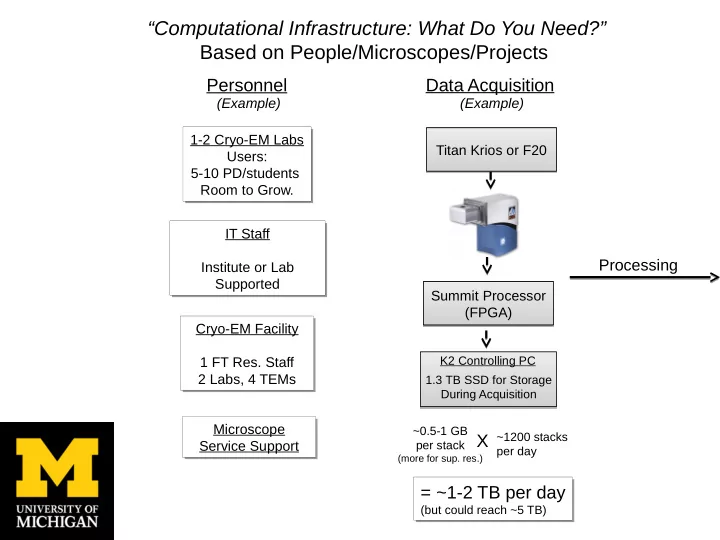
Computational Infrastructure: What Do You Need? Based on People/Microscopes/Projects Data Acquisition Personnel (Example) (Example) 1-2 Cryo-EM Labs 1-2 Cryo-EM Labs Titan Krios or F20 Titan Krios or F20 Users: Users: 5-10


slide-1
SLIDE 1

Summit Processor (FPGA) Summit Processor (FPGA)

K2 Controlling PC 1.3 TB SSD for Storage During Acquisition

Data Acquisition

~0.5-1 GB per stack

(more for sup. res.)

X ~1200 stacks

per day

= ~1-2 TB per day

(but could reach ~5 TB)

= ~1-2 TB per day

(but could reach ~5 TB)

Personnel

1-2 Cryo-EM Labs Users: 5-10 PD/students Room to Grow. 1-2 Cryo-EM Labs Users: 5-10 PD/students Room to Grow. IT Staff Institute or Lab Supported IT Staff Institute or Lab Supported Cryo-EM Facility 1 FT Res. Staff 2 Labs, 4 TEMs Cryo-EM Facility 1 FT Res. Staff 2 Labs, 4 TEMs

Processing

“Computational Infrastructure: What Do You Need?” Based on People/Microscopes/Projects

(Example) (Example) Microscope Service Support Microscope Service Support Titan Krios or F20 Titan Krios or F20

slide-2
SLIDE 2

215 TB On ZFS 215 TB On ZFS

10GbE Network 10GbE Network

Primary Storage

GPU Drift Correction Server

  • 4TB SSD RAID
  • 2 NVIDIA Tesla K20m

GPUs

Raw Stacks Processed Images

Cluster Cluster

GPU

4X GeForce GTX 770 2 Intel Xeon E5-2670

GPU

4X GeForce GTX 770 2 Intel Xeon E5-2670

CPU

20 nodes, 160 cores ~5yrs old

CPU

20 nodes, 160 cores ~5yrs old

Personal Workstations

iMacs/G5s/Linux

Personal Workstations

iMacs/G5s/Linux

2D/3D Processing Visualizing/Processing Storage/Backup Daily Backup to Tape

  • Institute-Wide
  • ~300 Tb capacity
  • 2 copies – onsite/offsite

Daily Backup to Tape

  • Institute-Wide
  • ~300 Tb capacity
  • 2 copies – onsite/offsite

“Computational Infrastructure: What Do You Need/Buy?”

Server 1

Intel Xeon 2.4 GHz 12 cores, 64 GB RAM

Server 1

Intel Xeon 2.4 GHz 12 cores, 64 GB RAM

Server 2

Intel Xeon 2.4 GHz 12 cores, 64 GB RAM

Server 2

Intel Xeon 2.4 GHz 12 cores, 64 GB RAM

Purchase piecemeal Needs: Expandability Updating Every 3-5 Years Purchase piecemeal Needs: Expandability Updating Every 3-5 Years (Example)

slide-3
SLIDE 3

“Are so called supercomputer centers of value?”

Depends on:

  • Data Transfer Rate – Can be to slow for back-and-forth requirements from

local storage source (main bottleneck).

  • Storage Availability – Ideally need reasonably large, long-term storage

(length of a project) to access data to avoid transferring from local storage drives .

  • Cost – Often pricing structure is not optimized for cryo-EM needs. Ex.

$6/cpu/month ‘rental’ use with ~1TB storage is very expensive long-term.

  • Architecture – May not be ideal for RAM-intensive cryo-EM processing

needs.

  • Possible Advantage: Buy-in with local/university resource – purchase own

CPU’s , storage that are maintained offsite.

  • Still need investment in local computation resources.

“What about cloud computing?”

  • Not an option - transfer rates too slow.
  • Perhaps for archiving, but cost may be high
slide-4
SLIDE 4

“What software do you need up and running?”

Data Acquisition

  • Digital Micrograph
  • FEI EPU
  • UCSF Image
  • Leginon
  • In-house scripts for data transfer

Drift Correction

  • Digital Micrograph
  • UCSF MOTION_CORR
  • RELION, and others

Particle Picking

  • E2 Boxer semi-automated
  • RELION, others

2D Classification/Analysis

  • SPIDER
  • ISAC, EMAN
  • RELION, jothers

CTF Cor./3D Class./Refinement

  • SPIDER, EMAN, FREALIGN, RELION

Many Others for:

Validation, Modeling, Visualizing

“How do you support the hardware and software?”

  • Leginon/Appion
  • Automation, many options for processing,

requires good IT/cryo-EM staff support, training.

  • SBGrid, Harvard
  • Good for smaller labs, limited IT time, but costly
  • Excellent local/dedicated IT support
  • Departmental/Institute support.

How do you validate the software

  • Use everything and compare results.
  • Validation of the reconstruction steps.
  • Talk to people, go to meetings.
slide-5
SLIDE 5

Our Current Bottlenecks

Transfer Rates

  • During Acquisition
  • For Processing
  • Backups after Acquisition

Drift-correction on the fly Storage

  • Short-term during acquisition
  • long-term (TB per person?)
  • Archive, backup

Processing

  • CPUs, availability, age
  • RAM per CPU
  • Head node, allocation
  • Optimal utilization by software