Component Design Version 1.0 1. Introduction This section will - - PDF document

component design
SMART_READER_LITE
LIVE PREVIEW

Component Design Version 1.0 1. Introduction This section will - - PDF document

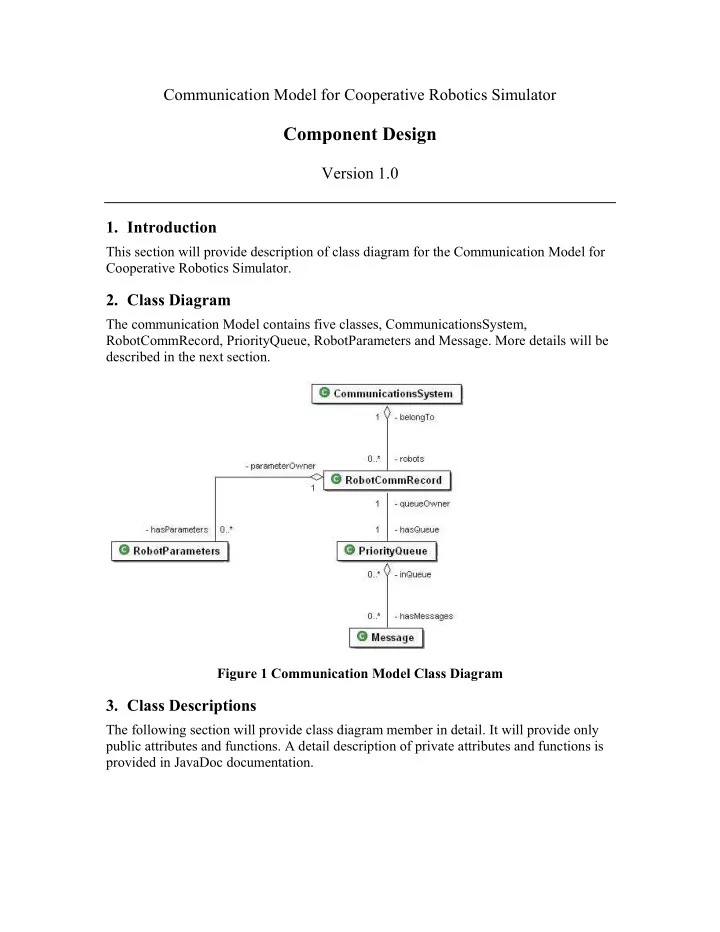
Communication Model for Cooperative Robotics Simulator Component Design Version 1.0 1. Introduction This section will provide description of class diagram for the Communication Model for Cooperative Robotics Simulator. 2. Class Diagram The


slide-1
SLIDE 1

Communication Model for Cooperative Robotics Simulator

Component Design

Version 1.0

  • 1. Introduction

This section will provide description of class diagram for the Communication Model for Cooperative Robotics Simulator.

  • 2. Class Diagram

The communication Model contains five classes, CommunicationsSystem, RobotCommRecord, PriorityQueue, RobotParameters and Message. More details will be described in the next section. Figure 1 Communication Model Class Diagram

  • 3. Class Descriptions

The following section will provide class diagram member in detail. It will provide only public attributes and functions. A detail description of private attributes and functions is provided in JavaDoc documentation.

slide-2
SLIDE 2

3.1 CommunicationsSystem Class Figure 2 CommunicationsSystem Class 3.1.1 Detailed Description The CommunicationsSystem class is served as a main interface, which interact with the

  • environment. It provides function for robot and environment control panel. It is also

responsible for sending message, delivering message to the right robot including the process of verifying participants. 3.1.2 Constructor

  • CommunicationsSystem(Environment env)
slide-3
SLIDE 3

This is default CommunicationsSystem constructor with Environment as

  • argument. This Environment is used for retrieving distance between two robots.

3.1.3 Public Member Attributes The following attributes are constant value using in the communication system

  • static final int BROADCAST

The constant value indicates broadcast ability. It is used to define that a robot has broadcast ability. It is one of communication types that uses in the registerRobot

  • method. For instances,

registerRobot(“robotA”,CommunicationsSystem.BROADCAST)

  • static final int BROADCASTANDP2P

The constant value indicates broadcast and point-to-point ability. It is used to define that a robot has both broadcast and point-to-point ability. It is one of communication types that uses in the registerRobot method. For instances, registerRobot(“robotA”,CommunicationsSystem.BROADCASTANDP2P)

  • static final int INFINITE

The constant value indicates infinite range limit. It is used to define that there is no range limit for a robot.

  • static final int POINT2POINT

The constant value indicates point-to-point ability. It is used to define that a robot has point-to-point ability. It is one of communication types that uses in the registerRobot method. For instances, registerRobot(“robotA”,CommunicationsSystem.POINT2POINT) 3.1.4 Public Member Functions

  • Vector getMessage(String name,long timeStep)

Retrieve message from the communication system. The parameters are robot name and time step. The robot name is the name of the owner, who would like to retrieve messages at the defined time step. Parameters: name - - the owner of the message timeStep - - the time step of messages which robot want to get messages. Returns: A vector of messages.

  • RobotCommRecord getRobotCommRecord(String name)

Get RobotCommRecord with identified name Parameters: name - - robot name Returns:

slide-4
SLIDE 4

Identified RobotCommRecord

  • int getRobotDelay(String robot1,String robot2)

Get delay time between a pair of robot. Parameters: robot1 - - first robot name robot2 - - second robot name Returns: Delay time between robot1 and robot2. The unit of delay time is in time step, which is about 500 milliseconds per time step

  • int getRobotDeliveryProb(String robot1,String robot2)

Get delivery probability of a pair of robot Parameters: robot1 - - first robot name robot2 - - second robot name Returns: Delivery probability between robot1 and robot2. (Delivery probability has value between 0-100)

  • int getRobotRange(String name)

Get maximum range limit of a robot. Parameters: name - - robot name Returns: maximum range limit (unit is meter)

  • boolean isMsgLost(int random, int prob)

Determine if message is lost or not by comparing random value of a message with total delivery probability. Parameters: random - - message random value prob - - total delivery probability (value between 0-100) Returns: true if random > prob , a message will be lost if random value is beyond the probability.

  • boolean isRobotBroadcastEnabled(String name)

Check if broadcast abililty is set to true Parameters: name - - robot name Returns: true - if broadcast is enabled, false otherwise

  • boolean isRobotExist(String name)

Check if this robot exists in the system.

slide-5
SLIDE 5

Parameters: name - - name of a robot Returns: true if this robot exists, false otherwise

  • boolean isRobotP2PEnabled(String name)

Check if point to point ability is set to true Parameters: name - - robot name Returns: true - if point to point is enabled, false otherwise

  • boolean isRobotReceiveEnabled(String name)

Check if robot's incoming link is set to true Parameters: name - - robot name Returns: true - if incoming link is enabled, false otherwise

  • boolean isRobotSendEnabled(String name)

Check if robot's outgoing link is set to true Parameters: name - - robot name Returns: true - if outgoing link is enabled, false otherwise

  • boolean isLinkEnabled()

Checking if system link is enabled or not Returns: Status of system link

  • boolean registerRobot(String name, int commType)

Register robot into the system before starting communication session. Parameters: name - - robot name commType - - communication types which registered robot can use to

  • communicate. The possible values are BROADCAST, POINT2POINT

and BROADCASTANDP2P. Returns: true if successfully registered, false otherwise

  • void sendMessage(Message msg, long timeStep)

Send message to other robots. There are two parameters, which are sending message and the current time step. Every message has sent time and received

  • time. Sent time is the time step, which this message is sending out. Received time
slide-6
SLIDE 6

is the time step which receiver should get this message. Received time is defined based on system delay and robot delay. Parameters: msg - - message to others robot. timeStep - - current time step.

  • void setRobotDelay(String robot1, String robot2,int delay)

Set delay between a pair of robots. Parameters: robot1 - - the first robot's name. robot2 - - the second robot’s name. delay - - delay time between these two robots. The unit of delay time is in time step, which is about 500 milliseconds per time step.

  • void setRobotDeliveryProb(String robot1, String robot2, int prob)

Set delivery probability between a pair of robot. Parameters: robot1 - - first robot's name robot2 - - second robot's name prob - - delivery probability (value between 0-100)

  • void setRobotRange(String name,int range)

Set maximum range limit, which is the maximum distance of receiver from which this robot receive message. Parameters: name - - robot name range - - maximum range limit (unit is meter)

  • void shutdownAllLink()

To shutdown system link

  • void shutdownReceiveLink(String name)

Shutdown robot's incoming link Parameters: name - - robot name

  • void shutdownSendLink(String name)

Shutdown robot's outgoing link Parameters: name - - robot name

  • void startupAllLink()

To start up system link

  • void startupReceiveLink(String name)

Startup robot's imcoming link

slide-7
SLIDE 7

Parameters: name - - robot name

  • void startupSendLink(String name)

Start up robot's outgoing link Parameters: name - - robot name 3.2 RobotCommRecord Class Figure 3 RobotCommRecord Class 3.2.1 Detailed Description RobotCommRecord class keeps communication parameters of each robot. Communication parameters include range, delay, link and delivery probability between each robot.

  • Range is the maximum distance, which a robot can send messages to other robots.
  • Delay is the delay time between each pair of robot to simulate traffic in the system.
  • Link includes send link and receive link which both can be start up or shutdown.
slide-8
SLIDE 8
  • Delivery Probability is the probability of message that will be delivered to the
  • destination. It will help generating message lost in the system.

This class manipulates the parameters and also determines if sender and receiver robot are qualified to pass and get of both point-to-point and broadcast message. 3.2.2 Constructor

  • RobotCommRecord(String name, int commType)

Default constructor of RobotCommRecord takes two parameters, robot name and communication type. Parameters: name - - Robot name commType - - Communication type (BROADCAST,POINT2POINT or BROADCASTANDP2P) 3.2.3 Public Member Attributes There is no public member attribute in RobotCommRecord class 3.2.4 Public Member Functions

  • void addMsgToQueue(Message msg)

Method to add a message to a priority queue Parameters: msg - - message adding to a queue

  • boolean addRobotParameters(RobotParameters robot)

Adding robot parameter, which related to this robotCommRecord. It will check if there exists. If not, the record will be added into the vector. Parameters: robot - - robot parameter adding to the vector Returns: true if sucessfully added, false otherwise

  • void disableBroadcast()

Disable Broadcast capability

  • void disableP2P()

Disable Point-to-point capability

  • void enableBroadcast()

Enable Broadcast capability

  • void enableP2P()

Enable Point-to-point capability

slide-9
SLIDE 9
  • int getDelay(String name)

Get delay time Parameters: name – robot name Returns: Delay time. The unit of delay time is in time step, which is about 500 milliseconds per time step

  • int getDeliveryProb(String name)

Get delivery probability Parameters: name – robot name Returns: Delivery probability value (between 0-100)

  • Vector getMessage(long time)

Get a Vector of message Parameters: time - - received time of messages which will be taking out from the queue. Returns: a vector of message

  • boolean isReceiveBroadcastEnabled()

Check if robot can get broadcast message Returns: true if robot can get broadcast message, false otherwise

  • boolean isReceiveP2PEnabled()

Check if robot can get point-to-point message Returns: true if robot can get point-to-point message, false otherwise

  • boolean isSendBroadcastEnabled()

Check if robot can send broadcast message Returns: true if robot can send broadcast message, false otherwise

  • boolean isSendP2PEnabled()

Check if robot can send Point-2-point message Returns: true if robot can send point-to-point message

  • void setDelay(String name, int delay)

Set delay time of a robot

slide-10
SLIDE 10

Parameters: name - - robot name delay - - delay time. The unit of delay time is in time step, which is about 500 milliseconds per time step

  • void setDeliveryProb(String name, int prob)

Set delivery probability of a robot Parameters: name - - robot name prob - - delivery probability (value between 0-100)

  • void shutdownReceiveLink()

Shutdown incoming link

  • void shutdownSendLink()

Shutdown outgoing link

  • void startupReceiveLink()

Start up incoming link

  • void startupSendLink()

Start up outgoing link 3.3 RobotParameters class Figure 4 RobotParameters Class 3.3.1 Detailed Description This RobotParameters class represents communication parameter. Each robot owns multiple records of RobotParameters. Each record of RobotParameters contains

  • Receiver Name - the communicating robot
  • Delay time - the communication delay time between the owner and this receiver.
  • Delivery Probability - the probability which messages will be delivered to the

receiver 3.3.2 Constructor

  • RobotParameters(String name)

RobotParameters Constructor with the name of the receiver

slide-11
SLIDE 11

Parameters: name - - Receiver name

  • RobotParameters(String name, int delay, int prob)

RobotParameters Constructor with the name of the receiver, delay time and delivery probability corresponds to this receiver. Parameters: name - - Receiver name delay - - Delay time. The unit of delay time is in time step, which is about 500 milliseconds per time step prob - - Delivery Probability (value between 0-100) 3.3.3 Public Member Attributes There is no public member attribute in this class. 3.3.4 Public Member Function The public member functions in this class are only Get and Set method. 3.4 PriorityQueue Class Figure 5 PriorityQueue Class 3.4.1 Detailed Description This PriorityQueue class is used to keep Message in Queue in ascending order of

  • receivedTime. Robots have their own priority queue. It keeps incoming message and wait

for the owner call getMessage operation to retrieve message from the queue. 3.4.2 Constructor

  • PriorityQueue()

PriorityQueue Constructor 3.4.3 Public Member Attributes There is no public member attribute in this class.

slide-12
SLIDE 12

3.4.4 Public Member Function

  • void add(Message msg)

Adding message to a queue in order of receivedTime Parameters: msg - - message adding to a queue

  • Message get(int index)

Get specific message from the queue without deleting Parameters: index - - the position of message Returns: a message

  • int getInsertIndex(long time)

Helper method to get the right adding position. Parameters: time - - receive time of new message adding to a queue

  • boolean isEmpty()

Check if queue is empty Returns: true if queue is empty, false otherwise

  • Message remove(int index)

Removing specific message from the queue Parameters: index - - the position of removing message Returns: a message

  • int size()

Get size of priority queue Returns: size of queue 3.5 Message Class

slide-13
SLIDE 13

Figure 6 Message Class 3.5.1 Detailed Description This class represents format of message, which passes back and forth between robots in the system. The content in a message is composed of

  • Sender
  • Receiver
  • The time that message was sent.
  • The expected time that message will be delivered to the receiver.
  • The real content of a message

The sent time will be automatically filled in with the current time step. By the time message is created the received time will be blank until the message is passed to the process of sending message. The received time will be filled out based on system delay and robot delay. 3.5.2 Constructor

  • Message()

This is a constructor of Message class without argument.

  • Message(String sender, String receiver, Object content)

This is a constructor of Message class. Parameters: sender - - message sender receiver - - message receiver content - - actual content of message 3.5.3 Public Member Attributes

slide-14
SLIDE 14
  • static final Message NULL_MESSAGE

Null message is used to verify that this is the last message. It is used by environment to check if it is the last message from and to a robot. 3.5.4 Public Member Function

  • boolean isBroadcastMessage()

Check if this message is broadcast message. Returns: true if receiver is broadcast, false otherwise

  • boolean isNullMessage()

Check is this message is null message. Returns: true if it is NULL_MESSAGE, false otherwise

  • boolean isP2PMessage()

Check if this message is point-to-point message. Returns: true if receiver is not broadcast, false otherwise