Classes ... making the manufacturer. Its now time to turn our - - PowerPoint PPT Presentation

classes making the manufacturer it s now time to turn our
SMART_READER_LITE
LIVE PREVIEW

Classes ... making the manufacturer. Its now time to turn our - - PowerPoint PPT Presentation

Classes ... making the manufacturer. Its now time to turn our attention to the manufacturer of all these reference objects. As an example ... cant access except via methods public class BankAcc { actually in the manufacturer class


slide-1
SLIDE 1

CS 211 Java structure

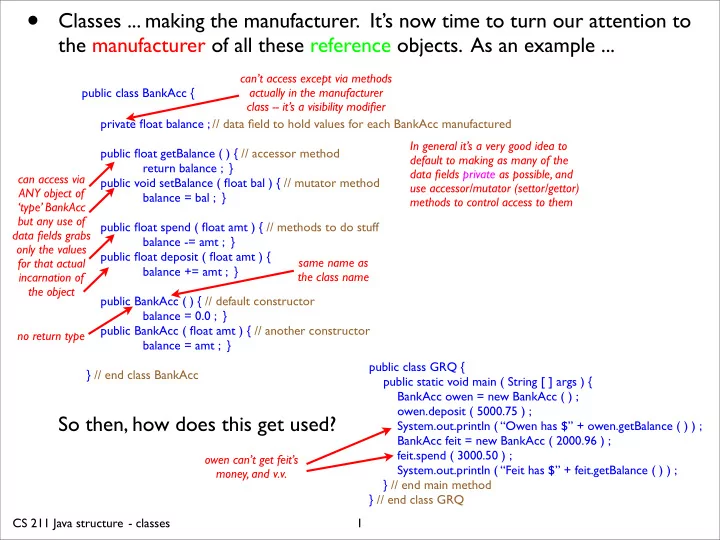
  • Classes ... making the manufacturer. It’s now time to turn our attention to

the manufacturer of all these reference objects. As an example ...

public class BankAcc {

private float balance ; // data field to hold values for each BankAcc manufactured public float getBalance ( ) { // accessor method return balance ; } public void setBalance ( float bal ) { // mutator method balance = bal ; } public float spend ( float amt ) { // methods to do stuff balance -= amt ; } public float deposit ( float amt ) { balance += amt ; } public BankAcc ( ) { // default constructor balance = 0.0 ; } public BankAcc ( float amt ) { // another constructor balance = amt ; } } // end class BankAcc

So then, how does this get used?

1 can’t access except via methods actually in the manufacturer class -- it’s a visibility modifier can access via ANY object of ‘type’ BankAcc but any use of data fields grabs

  • nly the values

for that actual incarnation of the object no return type same name as the class name public class GRQ { public static void main ( String [ ] args ) { BankAcc owen = new BankAcc ( ) ;

  • wen.deposit ( 5000.75 ) ;

System.out.println ( “Owen has $” + owen.getBalance ( ) ) ; BankAcc feit = new BankAcc ( 2000.96 ) ; feit.spend ( 3000.50 ) ; System.out.println ( “Feit has $” + feit.getBalance ( ) ) ; } // end main method } // end class GRQ

  • wen can’t get feit’s

money, and v.v. In general it’s a very good idea to default to making as many of the data fields private as possible, and use accessor/mutator (settor/gettor) methods to control access to them

  • classes
slide-2
SLIDE 2

CS 211 Java structure

  • We can enhance the previous class ...

public class BankAcc {

// static fields ‘belong’ to the manufacturer, not the made object, so only one copy of it is created, but each object can share it private static int numAccs = 0 ; // data field to hold CLASS values, initialised at compile time when the class is loaded private static int [ ] accNos = new int [ 100000 ] ; // data field to hold CLASS array for account numbers private static float totalAssets = 0.0 ; // to hold total assets of accounts, if it weren’t private then could get by BankAcc.totalAssets private float balance ; // data field to hold values for each instantiation static { // this is (surprisingly?) a method run at compile time (hence no name and no input parentheses!) for ( int i = 0 ; i < accNos.length ; i++ ) { accNos [ i ] = 100001 + i ; } // end for loop initialising account numbers } // end static compile-time method public static int getBankAssets ( ) { // this method can be called in main (for example) by BankAcc.getBankAssets ( ) ; return totalAssets ; } public float getBalance ( ) { // accessor method - perhaps should ask for authorisation? return balance ; } public void setBalance ( float balance ) { // mutator method - who should authorise this? totalAssets += balance; this.balance = balance ; } public float spend ( float amt ) { // methods to do stuff - should authenticate user? boolean bounce = ( balance < amt ) ; // bounce only exists within this method balance -= !bounce ? amt : 0.0 ; if (bounce) System.out.println ( “Sorry, not enough money there at the moment (: ” ) ; else totalAssets -= amt ; } public float deposit ( float amt ) { // perhaps should offer a receipt? totalAssets += balance ; balance += amt ; } public BankAcc ( float balance ) { // another constructor totalAssets += balance ; this.balance = balance ; numAccs++ ; } // note that this gets incremented each time a new account is created! public BankAcc ( ) { // default constructor this ( 0.0 ) ; } // note the use of this to refer to one of the constructor -- has to be first statement in the constructor } // end class BankAcc

2

  • classes

local name limited to the scope of the method definition the ‘balance’ of the current object

slide-3
SLIDE 3

CS 211 Java structure

  • So constructors are really just nifty methods for initialising the object just

after it’s been brought into existence but before it’s been named and hence accessed.

  • The word this is a reference to the current object.
  • One aspect of writing programs using classes is that it effectively allows us

to create our own types - not being restricted only to those already provided in Java.

  • We can inherit properties of classes in a natural way ...

public class Savings extends BankAcc { private float rate ; public Savings (float balance , float rate ) { super ( balance ) ; this.rate = rate ; } } // end class Savings

3

  • classes

also inherits its own private field for balance also inherits the spend( ) , getBalance( ) etc methods super( ) refers to the constructor of the parent class, and is analogous to this, so likewise has to be the first statement in a constructor if it’s to be used at all

slide-4
SLIDE 4

CS 211 Java structure

  • Suppose we had a Textbook class ...

public class Textbook {

  • }

then every time it gets invoked via TextBook FredBloggs = new TextBook ( ) ; the particular object (reference) just created is imbued with all the characteristics of a TextBook by this one line! This amounts to a tremendous saving of effort on our part together with a significant lessening of potential error. Assuming the relevant classes exist ...

public class TextBook {

String author , title , publisher ; int n , isbn , cryear ; Preface pre = new Preface ( ) ; Acknow ack = new Acknow ( ) ; Contents cont = new Contents ( ) ; Chapters [ ] chaps = new Chapters [ n ] ; Index indy = new Index ( ) ; Exercises trouble = new Exercises ( ) ;

  • } // end class TextBook

where the ------ would have the constructors plus any useful methods (like writeChapter ( int k ) { ...... } or makeIndex ( ) etc.).

  • Of course, not every book is a TextBook , we should also have classes for

Novels , Atlases , Cookbooks , Dictionarys , etc..

4

  • classes
slide-5
SLIDE 5

CS 211 Java structure

  • Thankfully, Java provides the mechanism of

inheritance to save us from too much repetition in dealing with this

  • situation. The essential idea is

that a child inherits everything a parent has, but can have some things of its own. This leads to the power of attorney rule: if in some situation you’re expecting a parent but only have a child, then that’s ok since a child can do everything a parent can; if however you’re expecting to see a child but only have a parent, then that is not ok since that child might have had properties the parent doesn’t have! Notice that in this model, no child can have more than one parent.

  • The idea then is to put as much

commonality as high up in the family tree as possible, so that a Book would have an author , title , publisher , isbn , cryear . A Sectional would have an array of Chapters called chaps, etc.

5

  • classes
slide-6
SLIDE 6

CS 211 Java structure

  • One point needs to be clarified: a child inherits the methods and fields of the

parent, it does not inherit the values of any of the parent’s fields! If a parent has a bank account, the child inherits the ability to have a bank account, it doesn’t inherit the money in the parent’s account!!

  • One other messy detail ... we can only reach up one level in the family hierarchy via

super . So if we have three classes with C extending B which extends A (so that A is the grandparent), and if x is a data field of A (thus inherited by B and C , then within the class C ...

x variable x in class C super.x variable x in class B this.x ditto ( (B) this ).x ditto ( (A) this ).x variable x in class A super.super.x illegal statement, sorry!!!

  • Actually, every class is in a hierarchy since even if you don’t specify a parent via

extends , Java provides a generic parent class Object ! Java does other things by

  • default. If your first statement in a derived ‘child’ class constructor isn’t super , then

Java calls super( ) with no arguments automatically. So if the superclass doesn’t have any constructors having no arguments, then the compiler will complain. This is also what happens is a non-explicitly-child class is formed; Java calls the default super( ) from the class Object , so providing a default constructor.

6

  • classes
slide-7
SLIDE 7

CS 211 Java structure

  • Exceptions. Bad errors cause programs (and sometimes machines!) to crash. It’s

better to design our programs to catch exceptional conditions before the become fatal errors.

import java.io.* ; public class PrintInt { public static void main ( String [ ] args ) { InputStreamReader isr = new InputStreamReader ( System.in ) ; BufferedReader br = new BufferedReader ( isr ) ; PrintWriter pw = new PrintWriter ( System.out , true ) ; int x ; String s ; pw.println ( “Enter an integer.” ) ; try { s = br.readLine ( ) ; x = Integer.parseInt ( s ) ; pw.println ( “The integer was ” + x ) ; } // end try block catch ( Exception e ) { pw.println ( e ) ; } // end catch block for Exception } // end main method } // end class PrintInt

As indicated in the example, the try block is run. If there are no problems then the catch block is ignored. If a problem occurs then the try block terminates immediately and any exception that’s thrown by the problem line gets caught by whichever catch line matches (or includes) the type of exception generated.

7

  • exceptions

could generate an IOException could generate a NumberFormatException we could be more specific, but this will nab the interesting

  • nes ... nice and general

runs this section goes down here only if exceptions thrown any catches are immediate

slide-8
SLIDE 8

CS 211 Java structure

  • If our example had been reading and writing from/to files instead of the keyboard/

screen, then if any exceptions had been generated in the try block, the program would have eventually stopped whilst leaving those files open! This is a bad thing. To deal with these sorts of situations, Java provides a finally block to be used after the last catch block. This finally block will be executed whether or not any exceptions are thrown or caught, and could contain lines to close each of the files that had been

  • pened. Essentially the control paths are ...
  • Some of the standard

run-time exceptions are ...

ArithmeticException NumberFormatException IndexOutOfBoundsException SecurityException NullPointerException NegativeArraySizeException

Some other standard checked exceptions ...

EOFException FileNotFoundException IOException

These checked exceptions must be dealt with either by try/catch blocks within the method, or by having a try/catch arrangement higher up in one of the calling programs to catch the exception coupled with an appropriate throws statement in the method declaration(s) to throw the exception “upstairs”.

8

  • exceptions
slide-9
SLIDE 9

CS 211 Java structure

  • We can even create our own exceptions by

extending (inheriting from) the Throwable class or one of its subclasses. For example ...

import java.io.* ; public class SnazzyProgram { public static void main ( String [ ] args ) { try { FileReader fr = new FileReader ( “crawled.txt” ) ; BufferedReader br = new BufferedReader ( fr ) ; String [ ] emails = new String [ 10000 ] ; String temp = br.readLine ( ) ; for ( int i = 0 ; i < emails.length && temp != null ; i++ ) { emails [ i ] = checkEmail ( temp ) ; temp = br.readLine ( ) ; } // end for loop reading file } // end try block catch ( BadEmailException bee ) { System.out.println ( bee.getMessage( ) ) ; } // catch BadEmail catch ( FileNotFoundException fnf ) { System.out.println ( fnf.getMessage( ) ) ; } // catch FileNotFound catch ( IOException io ) { System.out.println ( io,getMessage( ) ) ; } // catch IO hiccups finally { if ( fr != null ) fr.close ( ) ; } } // end main method } // end class SnazzyProgram public static String checkEmail ( String s ) throws BadEmailException { try { if ( s == null ) throw new BadEmailException ( ) ; for ( int i = 0 ; i < s.length( ) ; i++ ) if ( s.indexOf ( ‘@’ ) == -1 ) throw new BadEmailException(s); return s ; } // end try block } // end static checkEmail ( ) method 9

  • exceptions

fig from java.sun.com/docs/books/tutorial/essential/exceptions

public class BadEmailException extends Exception { public final String fake ; public BadEmailException ( String faked ) { super ( “This email address is missing an ” + “@ symbol. It was ” + faked ) ; this.fake = faked ; } // end constructor public BadEmailException ( ) { super ( “Something bad happened!” ) ; this.fake = null ; // or simply super( ) above } // end constructor } // end fresh exception class

FileNotFound Exception IOException BadEmail Exception

slide-10
SLIDE 10

CS 211 Java structure

  • Threads. So far, we have been running a single thread of control, but it’s
  • ften convenient to be able to run either several threads independently and

concurrently, or have threads branch off and yet still communicate with one

  • another. We’ll look at a few elementary approaches to multi-threading ...
  • There is a Thread class, so we could do ...

Thread sausage = new Thread ( ) ;

to create a new thread sausage which can be configured and run. However sausage.run( ); won’t do anything ... the computer doesn’t know anything special about running sausages!! Better would be to extend the Thread class and then redefine run( ) in the derived class ...

public class PingPong extends Thread { // from the java.sun.com thread tutorial private String word ; // the word to print private int delay ; // the delay in millisecs to pause public PingPong ( String parole , int pendant ) { this.word = parole ; this.delay = pendant ; } // end constructor public void run ( ) { // overriding Thread’s run ( ) method try { // since sleep can throw an InterruptedException for ( ; ; ) { // never stop (unless interrupted) !!!! System.out.print ( word + “ ” ) ; sleep ( delay ) ; } } catch ( InterruptedException ie ) { return ; } } // end overriding of the run ( ) method } // end class PingPong 10

  • threads

Then if we have ...

public static void main ( String [ ] args ) { new PingPong ( “ping” , 333 ).start ( ) ; new PingPong ( “PONG” , 1000 ).start ( ) ; } // end main method

we’ll get ping appearing on the screen every 1/3 second and PONG every second (they’ll have fractionally different start times) ...

ping PONG ping ping ping PONG ping ping ping PONG ping

Hence two separate and independently running threads.

slide-11
SLIDE 11

CS 211 Java structure

  • There’s another more or less equivalent way of doing this, especially useful

if you want to inherit from some class and don’t want to use up your one inheritance opportunity by having to extend the Thread class ...

public class RunPingPong implements Runnable { // from the “java programming language” book private String word ; private int delay ; public RunPingPong ( String parole , int pendant ) { this.word = parole ; this.delay = pendant ; } // end constructor public void run ( ) { try { for ( ; ; ) { System.out.print ( word + “ ” ) ; Thread.sleep ( delay ) ; } // only exit from for loop is via an interrupt } catch ( InterruptedException ie ) { return ; } } // end implementing the run ( ) method } // end class RunPingPong

  • We’ll say more about interfaces like Runnable in the next section. For now

you can think of them as mold-like superclasses which only have methods - declared, but never defined. They come with an implied contract to define every method they have if you want to implement (née extend) them. For the case of Runnable, it only declares one method, namely run( ).

11

  • threads

Then if we have ...

public static void main ( String [ ] args ) { Runnable little , bigger ; little = new RunPingPong ( “ping” , 333 ) ; bigger = new RunPingPong ( “PONG” , 1000 ) ; new Thread ( little ).start ( ) ; new Thread ( bigger ).start ( ) ; } // end main method

we’ll get the same behaviour as before.

slide-12
SLIDE 12

CS 211 Java structure

  • Suppose we want some rudimentary control on when particular data fields

can be accessed. Consider for example a bank account in a multi-threaded

  • environment. So what if the same account data (e.g. balance) could be

accessed simultaneously by independent threads? thread A ..... ......... ......... thread B ................... ........... ............... It could be argued that each thread ran ‘correctly’, but because thread B read the value of balance after thread A’s read but before thread A had completed its calculation, thread B incremented ‘the wrong’ value, hence leaving the balance as if that $2000 have never been deposited. Such a situation is called a race condition.

  • The same situation could occur even with a simple expression like oops++ ;

which technically comprises three operations: read oops, add one to oops, write oops back into memory. Concurrent writes or read/writes on a value are dangerous!!! (Concurrent reads are safe.) To safeguard this situation ...

12

  • threads

read the value of balance 93 deposit $2000 so balance 2093 read the value of balance 2093 read the value of balance 93 deposit $500 so balance 593 read the value of balance 593 timeline

slide-13
SLIDE 13

CS 211 Java structure

  • Synchronizing per se makes no

guarantee of the order of access, but does ensure that only one synchronized method at a time can have access to any data fields addressed within that method. (Synched methods of any given instantiated

  • bject block each other, and synched static methods

block each other at the class level, but there is no mutual blocking of static vs non-static methods. Note that because a child class could potentially override a parent’s synched method, it’s the case that in the child that method is actually synched only if it’s explicitly declared as synched in the child class.)

  • DANGER! Synchronizing is not a universal panacea, indeed it can be quite

devastating if used without care ........... Imagine a bunch of quick processes waiting while a synched laborious process rambles on. Worse still, suppose you have two instances x and y of a class G having synched methods hug( ) and hugback( ) which act on G’s, and suppose hug invokes hugback( ). Then

thread A ......... x.hug ( y ) ............................... y.hugback ( x ) ................... thread B ............................... y.hug ( x ) .......................................x.hugback ( y ) ..................

13

  • threads

whichever of these methods is in the first thread to access balance blocks any further access to balance by either of these methods until done public class BankAcc { private float balance ; ............... public synchronized float spend ( float amt ) { balance -= amt ; return balance ; } public synchronized float deposit ( float amt ) { balance += amt ; return balance ; } ................ } // end class BankAcc so thread A has a lock on y so thread B has a lock on x so now A wants a lock on x but is blocked by B so now B wants a lock on y but is blocked by A this’ll be ok as soon as B is done and releases the lock OOPS!!! “deadlock” waiting waiting

slide-14
SLIDE 14

CS 211 Java structure

  • We can also synch whole chunks of code as a ‘local’ statement. Consider

the following method to convert an int array to absolute values ...

public static void abs ( int [ ] values ) { synchronized ( values ) { for ( int i = 0 ; i < values.length ; i++ ) if ( values [ i ] < 0 ) values [ i ] = - values [ i ] ; } // end synched block on the values array } // end abs method (Although safe in a single-threaded environment without the ‘synchronized’ epithet, it must be synched if multi-threaded, otherwise some other thread might access value[i] after the abs method reads the boolean test, and then overwrite value[i] with 23, so that when abs multiplies and writes, it will leave the array with value[i] = -23. Being able to synch smaller chunks of code is a valuable option, since in general we don’t want to force other processes to have to wait longer than necessary, plus it can help evade some potential deadlocks.)

  • If you already have code written without any thought of multi-threading,

rather than rework the whole code with intricate synchs, you can create an extended class to override the appropriate methods, declare them synchronized, and then forward method calls through the super reference. If only occasional synchronised access is needed, then it’s usually easier just to use a synched statement as above. (More on threads later in the course.)

14

  • threads