Can your site work on IE3? By: Chen Hui Jing @hj_chen Talk CSS #39 - - PowerPoint PPT Presentation

can your site work on ie3
SMART_READER_LITE
LIVE PREVIEW

Can your site work on IE3? By: Chen Hui Jing @hj_chen Talk CSS #39 - - PowerPoint PPT Presentation

Can your site work on IE3? By: Chen Hui Jing @hj_chen Talk CSS #39 (22 May 2019) Yeo Kheng Meng @yeokm1 1 1 Agenda 1. Background 2. Quick Live Demo 3. How I got DOS 6.22, Win3.1 and networking to work 4. Live coding/debugging 2


slide-1
SLIDE 1

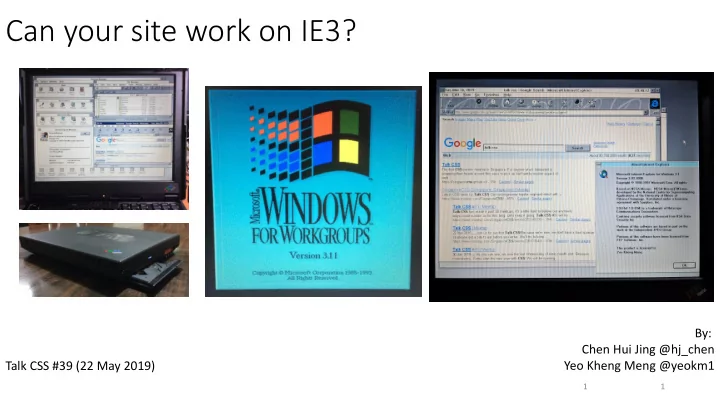
Can your site work on IE3?

Talk CSS #39 (22 May 2019) By: Chen Hui Jing @hj_chen Yeo Kheng Meng @yeokm1

1 1
slide-2
SLIDE 2

Agenda

  • 1. Background
  • 2. Quick Live Demo
  • 3. How I got DOS 6.22, Win3.1 and networking to work
  • 4. Live coding/debugging

2

slide-3
SLIDE 3

Motivation

3

  • Hack && Tell Singapore - March 2019
slide-4
SLIDE 4

Team 486 at Super Silly Hackathon (Dec 2017)

  • Huijing and I
  • 486 PC + Damn Small Linux + Web Page Hosting + Playing Music

4

slide-5
SLIDE 5

5

What is Internet Explorer 3 (IE3)?

  • First released in 1996
  • Final Update (1998): 3.03 SP1, 3.03.3006
  • Supported OSes:
  • Windows 3.1, 95, NT3.x, NT 4.0
  • System 7
  • Mac OS 8
  • First browser to support CSS
  • https://www.w3.org/Style/CSS/msie/
slide-6
SLIDE 6

So what is Windows 3.1x?

  • Windows 3.1x is a series of 16-bit operating systems by Microsoft
  • Windows 3.1 was released on April 6, 1992
  • Windows for Workgroups 3.11 was released on August 11, 1993
  • WFW first to have inbuilt networking facilities
  • All Windows 3.1x versions requires ≥MS-DOS 3.1 to be installed first
  • https://en.wikipedia.org/wiki/Windows_3.1x

6

slide-7
SLIDE 7

Microsoft Timeline of DOS/Windows

  • New Technology (NT) multi-user OS
  • DOS-based and Windows 9x single-user OS
  • PC-DOS (IBM Personal Computer Disk Operating System)
  • MS-DOS (Microsoft Disk Operating System)
  • Source 1: https://en.wikipedia.org/wiki/Timeline_of_Microsoft_Windows
  • Source 2: https://en.wikipedia.org/wiki/Timeline_of_DOS_operating_systems

PC-DOS 1.0 (1981) PC-DOS 1.1 (1982) PC-DOS 2.0 (1983) PC-DOS 2.1 (1983) PC-DOS 3.0 (1984) PC-DOS 3.1 (1985) PC/MS- DOS 3.2 (1986) MS-DOS 3.3 (1987) MS-DOS 5.0 (1991) MS-DOS 6.0-6.2 (1993) MS-DOS 6.22 (1994) MS-DOS 4.0 (1988) MS-DOS 3.0-3.1 (1984) 7

slide-8
SLIDE 8

Quick demo

8

slide-9
SLIDE 9

IBM Thinkpad 390e

  • Released in 1999 with Windows 98
  • Win3.1 drivers provided by IBM
  • Specifications
  • Intel Mobile Pentium II 300Mhz
  • Intel 440BX chipset
  • NeoMagic Media256AV 2.5MB VRAM
  • 384MB SDRAM
  • ESS Solo-1 Audio
  • 13.1” 1024×768
  • PATA hard drive (I used an CF card with CF-PATA converter)
  • CDROM + Floppy combo
  • Serial, Parallel, PS/2, USB 1.0, IrDA
  • 2x Cardbus slots
  • No Ethernet
  • 4.5cm thickness
  • 3.4kg weight
  • US$2700 (1999) = US$4100 (2018) = SG$5600 (2018)

9 9

slide-10
SLIDE 10

Installing DOS 6.22 and Win 3.1

  • 4x DOS 6.22 diskettes
  • 8x WFW 3.11 diskettes
  • Mac OS X El Capitan onwards does not support USB Floppy drives
  • Download links:
  • https://winworldpc.com/product/ms-dos/622
  • https://winworldpc.com/product/windows-3/wfw-311

10

slide-11
SLIDE 11

CONFIG.SYS and AUTOEXEC.BAT

  • Important DOS configuration files
  • CONFIG.SYS
  • Loads drivers on startup
  • HIMEM.SYS: Extended Memory Manager
  • DOS=HIGH: Load DOS to HMA to save conventional memory
  • CDROMDRV.SYS: Toshiba CD driver
  • POWER.EXE: Sends x86 HALT instruction to save CPU power when idle
  • AUTOEXEC.BAT
  • Stands for AUTOmatic EXECution
  • Batch file that starts at end of DOS boot process
  • SMARTDRV.EXE: Disk caching
  • MSCDEX.EXE: Assign CD drive letter to driver
  • DOSKEY.COM: Terminal history, auto-completion
  • CTMOUSE: Modern DOS mouse driver for PS/2 mouse

11

slide-12
SLIDE 12

Network Connection Attempt 1

12

  • PCMCIA/Cardbus network adapter
  • Xircom Realport Cardbus Ethernet 10/100
  • IBM’s Cardbus slot DOS drivers DID NOT WORK!!!
slide-13
SLIDE 13

Network Connection Attempt 2

13

  • Parallel Port network adapter
  • Xircom Pocket Ethernet PE3-10BT
  • 10Mbps
  • Powered by PS/2 passthrough cable
  • Wifi-Ethernet Bridge
  • TP-Link TL-WR702N
  • 100Mbps
  • 802.11n
  • DNS needs manual configuration