Arithmetic / Logic Unit ALU Overflow Carry out 32 B Design - - PowerPoint PPT Presentation

arithmetic logic unit alu
SMART_READER_LITE
LIVE PREVIEW

Arithmetic / Logic Unit ALU Overflow Carry out 32 B Design - - PowerPoint PPT Presentation

32-bit ALU CSE 675.02: Introduction to Computer Architecture ALU Control 32 A Result 32 32-bit ALU Zero Arithmetic / Logic Unit ALU Overflow Carry out 32 B Design Our ALU should be able to perform functions: logical and


slide-1
SLIDE 1

07/19/2005

Arithmetic / Logic Unit – ALU Design

Presentation F CSE 675.02: Introduction to Computer Architecture

Slides by Gojko Babić

  • g. babic

Presentation F 2

ALU Control

32 32 32

Result A B

32-bit ALU

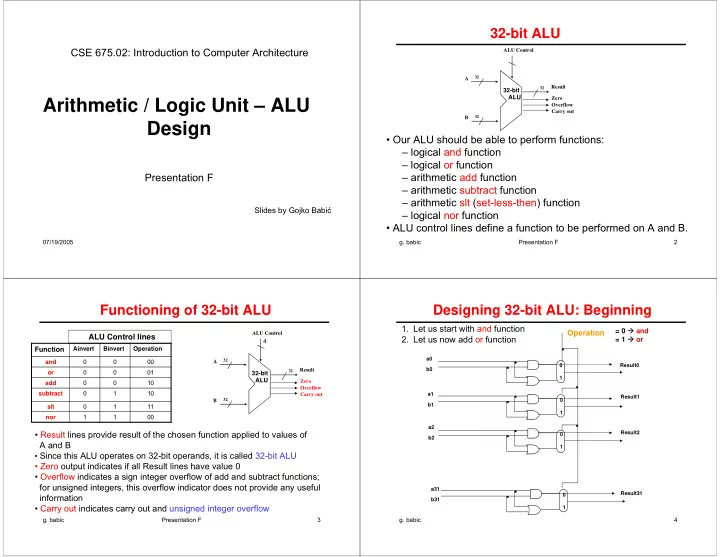
  • Our ALU should be able to perform functions:

– logical and function – logical or function – arithmetic add function – arithmetic subtract function – arithmetic slt (set-less-then) function – logical nor function

  • ALU control lines define a function to be performed on A and B.

32-bit ALU

Zero Overflow Carry out

  • g. babic

Presentation F 3

Functioning of 32-bit ALU

ALU Control

32 32 32

Result A B

32-bit ALU

Zero Overflow Carry out

ALU Control lines

  • Result lines provide result of the chosen function applied to values of

A and B

  • Since this ALU operates on 32-bit operands, it is called 32-bit ALU
  • Zero output indicates if all Result lines have value 0
  • Overflow indicates a sign integer overflow of add and subtract functions;

for unsigned integers, this overflow indicator does not provide any useful information

  • Carry out indicates carry out and unsigned integer overflow

4 00 1 1 nor 11 1 slt 10 1 subtract 10 add 01

  • r

00 and Operation Binvert Ainvert

Function

  • g. babic

4

Designing 32-bit ALU: Beginning

a0 b0 a1 b1 a2 b2 a31 b31 Result0 Result1 Result2 Result31

  • 1. Let us start with and function
  • 2. Let us now add or function

1 1 1 1

Operation

= 0 and = 1 or

slide-2
SLIDE 2
  • g. babic

5

Designing 32-bit ALU: Principles

a0 b0 a1 b1 a2 b2 a31 b31 Result0 Result1 Result2 Result31 1 1 1 1

Operation

  • Number of functions

are performed inter- nally, but only one result is chosen for the output of ALU

  • 32-bit ALU is built
  • ut of 32 identical

1-bit ALU’s

and

  • r

and

  • r

and

  • r

and

  • r

= 0 and = 1 or

  • g. babic

Presentation F 6

Designing Adder

Sum CarryIn CarryOut a b

b CarryOut a CarryIn

1 1 1 1 1 1 1 1 1 1 1 1 1 1 1 1 1 1 1 1 Carry Out Sum Carry In b a

  • 32-bit adder is built out of 32 1-bit adders

Input Output

Figure B.5.2 Figure B.5.5

1-bit Adder Truth Table 1-bit Adder From the truth table and after minimization, we can have this design for CarryOut

  • g. babic

Presentation F 7

32-bit Adder

+ + + +

a0 b0 a2 b2 a1 b1 a31 b31 sum0 sum31 sum2 sum1

Cout Cin Cout Cout Cout Cin Cin Cin

“0”

This is a ripple carry adder. The key to speeding up addition is determining carry out in the higher order bits sooner. Result: Carry look-ahead adder.

Carry out

  • g. babic

Presentation F 8

b 2 Result Operation a 1 CarryIn CarryOut

32-bit ALU With 3 Functions

1-bit ALU

CarryOut Result31 a31 b31 Result0 CarryIn a0 b0 Result1 a1 b1 Result2 a2 b2 Operation ALU0 CarryIn CarryOut ALU1 CarryIn CarryOut ALU2 CarryIn CarryOut ALU31 CarryIn =0

Operation = 00 and = 01 or = 10 add

Figure B.5.6 Figure B.5.7

+ carry out

slide-3
SLIDE 3
  • g. babic

Presentation F 9

32-bit Subtractor

“0”

a31 b31

+ + + +

a0 b0 a2 b2 a1 b1 Result0 Result31 Result2 Result1

Cout Cin Cout Cout Cout Cin Cin Cin

CarryOut

“1”

A – B = A + (–B) = A + B + 1

  • g. babic

10

32-bit Adder / Subtractor

“0”

1 1 1 1 a31 b31

+ + + +

a0 b0 a2 b2 a1 b1 Result0 Result31 Result2 Result1

Cout Cin Cout Cout Cout Cin Cin Cin

CarryOut

binvert

Binvert = 0 addition = 1 subtraction

1

  • g. babic

Presentation F 11

32-bit ALU With 4 Functions

10 1 subtract 10 add 01

  • r

00 and Operation (2 lines) Binvert (1 line)

Function Control lines

1-bit ALU

Carry Out

a31 ALU0 Result0 a0 Result1 a1 Result2 a2 Operation b31 b0 b1 b2 Result31 Binvert CarryIn CarryIn CarryOut ALU1 CarryIn CarryOut ALU2 CarryIn CarryOut ALU31 CarryIn 2 Result Operation a 1 CarryIn CarryOut 1 Binvert b

Figure B.5.8

1

  • g. babic

Presentation F 12

2’s Complement Overflow

3 R e s u lt O p e r a t i o n a 1 C a r r y I n 1 B in v e r t b 2 L e s s O v e r f lo w d e t e c t i o n O v e r f l o w

+

Carry Out

1-bit ALU for the most significant bit Other 1-bit ALUs, i.e. non-most significant bit ALUs, are not affected.

2’s complement overflow happens:

  • if sum of two positive numbers

results in a negative number

  • if sum of two negative numbers

results in a positive number

slide-4
SLIDE 4
  • g. babic

Presentation F

Carry Out

a31 ALU0 Result0 a0 Result1 a1 Result2 a2 Operation b31 b0 b1 b2 Result31 Overflow Binvert CarryIn CarryIn CarryOut ALU1 CarryIn CarryOut ALU2 CarryIn CarryOut ALU31 CarryIn

32-bit ALU With 4 Functions and Overflow

10 1 subtract 10 add 01

  • r

00 and Operation (2 lines) Binvert (1 line)

Function Control lines Missing: slt & nor functions and Zero output

Add correction for CarryOut

  • g. babic

Presentation F 14

  • slt function is defined as:

000 … 001 if A < B, i.e. if A – B < 0 A slt B = 000 … 000 if A ≥ B, i.e. if A – B ≥ 0

  • Thus each 1-bit ALU should have an additional input (called

“Less”), that will provide results for slt function. This input has value 0 for all but 1-bit ALU for the least significant bit.

  • For the least significant bit Less value should be sign of A – B

Set Less Than (slt) Function

3 Result Operation a 1 CarryIn CarryOut 1 Binvert b 2 Less

32-bit ALU With 5 Functions

1-bit ALU for non- most significant bits

Carry Out

Set a31 ALU0 Result0 a0 Result1 a1 Result2 a2 Operation b31 b0 b1 b2 Result31 Overflow Binvert CarryIn Less CarryIn CarryOut ALU1 Less CarryIn CarryOut ALU2 Less CarryIn CarryOut ALU31 Less CarryIn

Operation = 3 and Binvert =1 for slt function

3 Result Operation a 1 CarryIn 1 Binvert b 2 Less Set Overflow detection Overflow Carry Out

1-bit ALU for the most significant bits

+

Add correction for CarryOut

  • g. babic

Presentation F

Set a31 Result0 a0 Result1 a1 Result2 a2 Operation b31 b0 b1 b2 Result31 Overflow Bnegate Zero ALU0 Less CarryIn CarryOut ALU1 Less CarryIn CarryOut ALU2 Less CarryIn CarryOut ALU31 Less CarryIn

32-bit ALU with 5 Functions and Zero

11 1 slt 10 1 subtract 10 add 01

  • r

00 and Operation (2 lines) Binvert (1 line)

Function Control lines

Carry Out Binvert

Add correction for CarryOut

slide-5
SLIDE 5
  • g. babic

17

32-bit ALU with 6 Functions

A nor B = A and B

Figure B.5.10 (Top)

Carry Out

00 1 1 nor 11 1 slt 10 1 subtract 10 add 01

  • r

00 and Operation Binvert Ainvert

Function Figure B.5.12

+ Carry Out + Binvert

Binvert

Add correction for CarryOut

  • g. babic

Presentation F 18

  • We have now accounted for all but one of the arithmetic and

logic functions for the core MIPS instruction set. 32-bit ALU with 6 functions omits support for shift instructions.

  • It would be possible to widen 1-bit ALU multiplexer to

include 1-bit shift left and/or 1-bit shift right.

  • Hardware designers created the circuit called a barrel

shifter, which can shift from 1 to 31 bits in no more time than it takes to add two 32-bit numbers. Thus, shifting is normally done outside the ALU.

  • We now consider integer multiplication (but not division).

32-bit ALU Elaboration

  • g. babic

Presentation F 19

  • Multiplication is more complicated than addition:

– accomplished via shifting and addition

  • More time and more area required
  • Let's look at 3 versions based on elementary school

algorithm

  • Example of unsigned multiplication:

5-bit multiplicand 100012 = 1710 5-bit multiplier × 100112 = 1910 10001 10001 00000 00000 10001 . 1010000112 = 32310

  • But, this algorithm is very impractical to implement in hardware

Multiplication

  • g. babic

Presentation F 20

  • The multiplication can be done with intermediate additions.
  • The same example:

multiplicand 10001 multiplier × 10011 intermediate product 0000000000 add since multiplier bit=1 10001 intermediate product 0000010001 shift multiplicand and add since multiplier bit=1 10001 intermediate product 0000110011 shift multiplicand and no addition since multiplier bit=0 shift multiplicand and no addition since multiplier bit=0 shift multiplicand and add multiplier since bit=1 10001 final result 0101000011

Multiplication : Example

slide-6
SLIDE 6
  • g. babic

Presentation F 21

Multiplication Hardware: 1st Version

64-bit ALU Control test Multiplier Shift right Product Write Multiplicand Shift left 64 bits 64 bits 32 bits Done

  • 1. Test

Multiplier0

  • 1a. Add multiplicand to product and

place the result in Product register

  • 2. Shift the Multiplicand register left 1 bit
  • 3. Shift the Multiplier register right 1 bit

32nd repetition? Start Multiplier0 = 0 Multiplier0 = 1 No: < 32 repetitions Yes: 32 repetitions

Figure 3.5 Figure 3.6

  • g. babic

Presentation F 22

M ultiplier Shift right W rite 32 bits 64 bits 32 bits Shift right Multiplicand 32-bit ALU Product Control test Done

  • 1. Test

Multiplier0

  • 1a. Add multiplicand to the left half of

the product and place the result in the left half of the Product register

  • 2. Shift the Product register right 1 bit
  • 3. Shift the Multiplier register right 1 bit

32nd repetition? Start Multiplier0 = 0 Multiplier0 = 1 No: < 32 repetitions Yes: 32 repetitions

Multiplication Hardware: 2nd Version

  • g. babic

Presentation F 23

C o n tro l te s t W rite 3 2 b its 6 4 b it s S h ift rig h t P r o d u c t M u ltip lic a n d 3 2 - b it A L U Done

  • 1. Test

Product0

  • 1a. Add multiplicand to the left half of

the product and place the result in the left half of the Product register

  • 2. Shift the Product register right 1 bit

32nd repetition? Start Product0 = 0 Product0 = 1 No: < 32 repetitions Yes: 32 repetitions

Multiplication Hardware: 3rd Version

Figure 3.7

  • g. babic

Presentation F 24

  • A simple algorithm:

– Convert to positive integer any of operands (if needed) and remember original signs – Perform multiplication of unsigned numbers using the existing algorithm and hardware – Negate product if original signs disagree

  • This algorithm is not simple to implement in hardware, since

it has to: – account in advance about signs, – if needed, convert from negative to positive numbers, – if needed, convert back to negative integer at the end

  • Fast multiplication algorithms.

Multiplication of Signed Integers

slide-7
SLIDE 7
  • g. babic

Presentation F 25

  • Conversion from real binary to real decimal

– 1101.10112 = – 13.687510 since: 11012 = 23 + 22 + 20 = 1310 and 0.10112 = 2-1 + 2-3 + 2-4 = 0.5 + 0.125 + 0.0625 = 0.687510

  • Conversion from real decimal to real binary:

+927.4510 = + 1110011111.01 1100 1100 1100 ….. 927/2 = 463 + ½ LSB 0.45 × 2 = 0.9 463/2 = 231 + ½ 0.9 × 2 = 1.8 231/2 = 155 + ½ 0.8 × 2 = 1.6 155/2 = 57 + ½ 0.6 × 2 = 1.2 57/2 = 28 + ½ 0.2 × 2 = 0.4 28/2 = 14 + 0 0.4 × 2 = 0.8 14/2 = 7 + 0 0.8 × 2 = 1.6 7/2 = 3 + ½ 0.6 × 2 = 1.2 3/2 = 1 + ½ 0.2 × 2 = 0.4 1/2 = 0 + ½ 0.4 × 2 = 0.8 ……

Real Numbers

  • g. babic

Presentation F 26

  • The term floating point number refers to representation of real

binary numbers in computers.

  • IEEE 754 standard defines standards for floating point

representations

  • Single precision:

Floating Point Number Formats

31 30 23 22 s E Fraction

  • Double precision:

63 62 52 51 32 s E Fraction 31 Fraction

  • g. babic

Presentation F 27

  • 1. Normalize binary real number i.e. put it into the normalized

form: (-1)s × 1.Fraction * 2Exp

  • 1101.10112 = (-1)1 × 1.1011011 * 23

+1110011111.011100 = (-1)0 × 1.110011111011100 * 29

  • 2. Load fields of single or double precision format with values

from normalized form, but with the adjustment for E field. E = Exp + 12710 = Exp + 011111112 for single precision E = Exp + 102310 = Exp + 011111111112 for double precision

  • E is called a biased exponent.

Converting to Floating Point

  • g. babic

Presentation F 28

  • Find single and double precision of –13.687510

Normalized form: (-1)1 × 1.1011011 × 23 – single precision: E = 112 + 011111112 = 100000102 |1|10000010|10110110000000000000000| – double precision E = 112 + 011111111112 = 100000000102 |1|10000000010|10110110000000000000| |00000000000000000000000000000000|

Floating Point: Example 1

slide-8
SLIDE 8
  • g. babic

Presentation F 29

  • Find single and double precision of +927.4510

Normalized form: (-1)0 × 1.110011111011100 * 29 – single precision E = 10012 + 011111112 = 100010002 |0|10001000|11001111101110011001100|1100... truncation |0|10001000|11001111101110011001100| rounding |0|10001000|11001111101110011001101| – double precision E = 10012 + 011111111112 = 10000001000 |0|10000001000|11001111101110011001| |10011001100110011001100110011001|1001100… truncation |10011001100110011001100110011001| rounding |10011001100110011001100110011010|

Floating Point: Example 2

  • g. babic

Presentation F 30

  • Rules for biased exponents in single precision apply only for

real exponents in the range [-126,127], thus we can have biased exponents only in the range [1,254].

  • The number 0.0 is represented as S=0, E=0 and Fraction=0.

The infinite number is represented with E=255. There are some additional rules that are outside our scope.

  • Find the largest (non-infinite) real binary number (by

magnitude) which can be represented in a single precision. – Floating point overflow

  • Find the smallest (non-zero) real binary number (by

magnitude) which can be represented in a single precision. – Floating point underflow

Converting to Floating Point: Conclusion

  • g. babic

Presentation F 31

Floating Point Addition

Figure 3.16

  • g. babic

Presentation F 32

Arithmetic Unit for Floating Point Addition

Figure 3.17

slide-9
SLIDE 9
  • g. babic

33

32-bit ALU with 6 Functions

1 2 2 1 1 3 1