ADMIN Course paper topics due Mon Feb 26 via plain text email - - PowerPoint PPT Presentation

admin
SMART_READER_LITE
LIVE PREVIEW

ADMIN Course paper topics due Mon Feb 26 via plain text email - - PowerPoint PPT Presentation

ADMIN Course paper topics due Mon Feb 26 via plain text email IC220 Set #10: More Computer Arithmetic (Chapter 3) 1 2 An Arithmetic Logic Unit (ALU) A simple 32-bit ALU C a rry In O p e ra tio n The ALU is the brawn of the


slide-1
SLIDE 1

1 IC220 Set #10: More Computer Arithmetic (Chapter 3) 2

ADMIN

  • Course paper topics – due Mon Feb 26 via plain text email

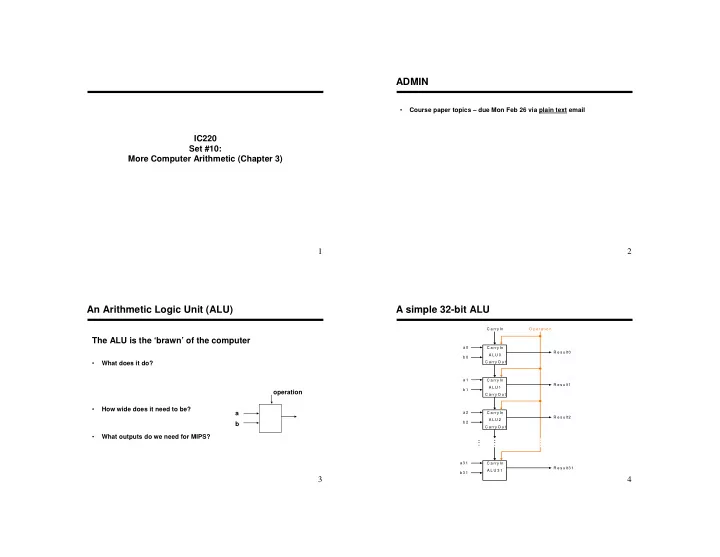
3 The ALU is the ‘brawn’ of the computer

  • What does it do?
  • How wide does it need to be?
  • What outputs do we need for MIPS?

b a

  • peration

An Arithmetic Logic Unit (ALU)

4

A simple 32-bit ALU

R e s u lt3 1 a 3 1 b 3 1 R e s u lt0 C a rry In a 0 b 0 R e s u lt1 a 1 b 1 R e s u lt2 a 2 b 2 O p e ra tio n A L U 0 C a rry In C a rry O u t A L U 1 C a rry In C a rry O u t A L U 2 C a rry In C a rry O u t A L U 3 1 C a rry In

slide-2
SLIDE 2

5

ALU Control and Symbol

Set on less than 0111 NOR 1100 Subtract 0110 Add 0010 OR 0001 AND 0000 Function ALU Control Lines

6

  • More complicated than addition

– accomplished via shifting and addition

  • Example: grade-school algorithm

0010

(multiplicand)

__x_1011

(multiplier)

  • Multiply m * n bits, How wide (in bits) should the product be?

Multiplication

7

Multiplication: Simple Implementation

6 4

  • bit A

L U C

  • ntrol te

st M u ltip lie r S h ift rig h t P rod uc t W rite M u ltip lic an d S h ift left 6 4 b its 6 4 b its 32 b its

slide-3
SLIDE 3

9

Using Multiplication

  • Product requires 64 bits

– Use dedicated registers – HI – more significant part of product – LO – less significant part of product

  • MIPS instructions

mult $s2, $s3 multu $s2, $s3 mfhi $t0 mflo $t1

  • Division

– Can perform with same hardware! (see book) div $s2, $s3 Lo = $s2 / $s3 Hi = $s2 mod $s3 divu $s2, $s3

10

Floating Point

  • We need a way to represent

– numbers with fractions, e.g., 3.1416 – very small numbers, e.g., .000000001 – very large numbers, e.g., 3.15576 × × × × 1023

  • Representation:

– sign, exponent, significand:

  • (–1)sign ×

× × × significand × × × × 2exponent(some power)

– Significand always in normalized form:

  • Yes:
  • No:

– more bits for significand gives more – more bits for exponent increases

11

IEEE754 Standard

Significand (20 bits) Exponent (11 Bits) S

1 2 3 4 5 6 7 8 9 . . . 17 18 19 20 21 . . . 28 29 30 31

Significand (23 bits) Exponent (8 Bits) S

1 2 3 4 5 6 7 8 9 . . . 20 21 22 23 24 25 26 27 28 29 30 31

Single Precision (float): 8 bit exponent, 23 bit significand Double Precision (double): 11 bit exponent, 52 bit significand

More Significand (32 more bits)

1 2 3 4 5 6 7 8 9 . . . 17 18 19 20 21 . . . 28 29 30 31

12

IEEE 754 – Optimizations

  • Significand

– What’s the first bit? – So…

  • Exponent is “biased” to make sorting easier

– Smallest exponent represented by: – Largest exponent represented by: – Bias values

  • 127 for single precision
  • 1023 for double precision
  • Summary: (–1)sign ×

× × × (1+ (1+ (1+ (1+significand) × × × × 2exponent – bias

slide-4
SLIDE 4

13

Example #1:

  • Represent -5.7510 in binary, single precision form:
  • Strategy

– Transfer into binary notation (fraction) – Normalize significand (if necessary) – Compute exponent

  • (Real exponent) = (Stored exponent) - bias

– Apply results to formula (–1)sign × × × × (1+ (1+ (1+ (1+significand) × × × × 2exponent – bias

Example #1:

Represent -9.7510 in binary single precision:

  • 9.7510 =
  • Compute the exponent:

– Remember (2exponent – bias) – Bias = 127

  • Formula(–1)sign ×

× × × (1+ (1+ (1+ (1+significand) × × × × 2exponent – bias

1 2 3 4 5 6 7 8 9 . . . 20 21 22 23 24 25 26 27 28 29 30 31

15

Floating Point Complexities

  • Operations are somewhat more complicated (see text)
  • In addition to overflow we can have “underflow”
  • Accuracy can be a big problem

– IEEE 754 keeps two extra bits, guard and round – four rounding modes – positive divided by zero yields “infinity” – zero divide by zero yields “not a number” – other complexities

  • Implementing the standard can be tricky

16

MIPS Floating Point Basics

  • Floating point registers

$f0, $f1, $f2, …., $f31 Used in pairs for double precision (f0, f1) (f2, f3), … $f0 not always zero

  • Register conventions:

– Function arguments passed in – Function return value stored in – Where are addresses (e.g. for arrays) passed?

  • Load and store:

lwc1 $f2, 0($sp) swc1 $f4, 4($t2)

slide-5
SLIDE 5

17

MIPS FP Arithmetic

  • Addition, subtraction:add.s, add.d, sub.s, sub.d

add.s $f1, $f2, $f3 add.d $f2, $f4, $f6

  • Multiplication, division: mul.s, mul.d, div.s, div.d

mul.s $f2, $f3, $f4 div.s $f2, $f4, $f6

18

MIPS FP Control Flow

  • Pattern of a comparison: c.___.s

(or c.___.d) c.lt.s $f2, $f3 c.ge.d $f4, $f6

  • Where does the result go?
  • Branching:

bc1t label10 bc1f label20

19

Example #1

  • Convert the following C code to MIPS:

float max (float A, float B) { if (A <= B) return A; else return B; }

20

Example #2

  • Convert the following C code to MIPS:

void setArray (float F[], int index, float val) { F[index] = val; }

EX: 3-21 …

slide-6
SLIDE 6

21

Chapter Four Summary

  • Computer arithmetic is constrained by limited precision
  • Bit patterns have no inherent meaning but standards do exist

– two’s complement – IEEE 754 floating point

  • Computer instructions determine “meaning” of the bit patterns
  • Performance and accuracy are important so there are many

complexities in real machines (i.e., algorithms and implementation).

  • We are (almost!) ready to move on (and implement the processor)

22

Chapter Goals

  • Introduce 2’s complement numbers

– Addition and subtraction – Sketch multiplication, division

  • Overview of ALU (arithmetic logic unit)
  • Floating point numbers

– Representation – Arithmetic operations – MIPS instructions