SLIDE 1
SLIDE 2
; and if
Please always put {} after if-statements The compiler will let you get away with not putting these (this leads to another issue) If you do not put {} immediately after an if, it will only associate the first command after with the if-statement (see: ifAndSemi.cpp)
SLIDE 3
Logical operators
> (greater than), e.g. 7 > 2.5 is true == (equals), e.g. 5 == 4 is false < (less than), e.g. 1 < 1 is false >= (greater than or equal to), e.g. 1 <= 1 is true != (not equal to), e.g. 8 != 7 is true <= (less than or equal to), e.g. 6 <= 2 is false ! (not, negation), e.g. !true is false These are all the operators that result in a bool:
SLIDE 4 Random numbers
To use random numbers, you need to do:
- 1. Run srand(time(0)) once
- 2. Use rand() to actually generate a number
(See: rng.cpp)
DO ONLY ONCE AT THE START OF MAIN AND NEVER AGAIN!
SLIDE 5
Complex expressions
Two boolean operators: && is the AND operations || is the OR operations
SLIDE 6
Complex expressions
AND operation removes Ts from the result The OR operation adds Ts to the result Evaluate (!p OR q) AND (p) p q !p !p OR q (!p OR q) AND (p) T T F T T T F F F F F T T T F F F T T F
SLIDE 7
Complex expressions
Write an if statement for checking if a variable (int) x is a positive odd number. Hint: You may want to use the remainder (also called modulus) operator (the % sign). For example, 5 % 3 = 2
SLIDE 8
Complex expressions
int x = 9, y = 7;
SLIDE 9
Complex expressions
Write boolean expressions for each of the following truth tables: 1. 2. 3. 4. XOR
SLIDE 10
Complex expressions
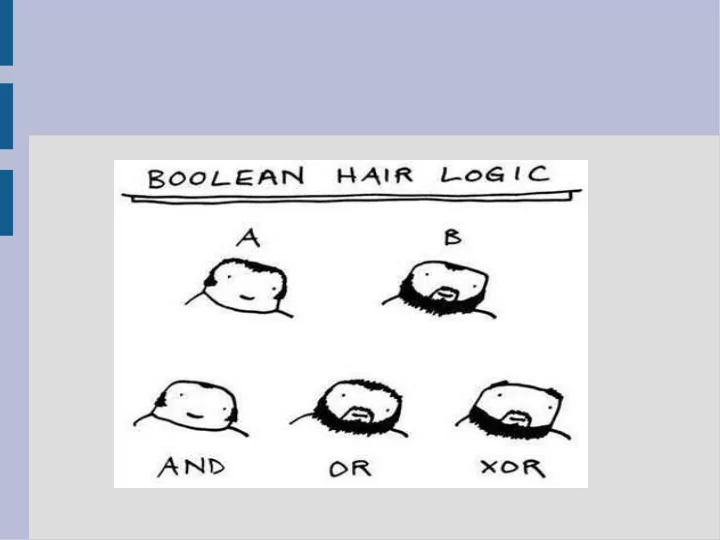
Humans tend to use the english word OR to describe XOR (exclusive or) “You can get a side order of a salad, fries or a soup.” Did you think the statement above meant you could get all three?
SLIDE 11
Complex expressions
If statements for when x... ... is between 10 and 20 (inclusive) Cannot say: 10 <= x <= 20 (why?) ... is a vowel (x is type char)
SLIDE 12
Short-circuit evaluation
Short-circuit evaluation is when you have a complex bool expression (&& or ||) but you don't need to compute all parts. If this is false, then it will not check next (See: shortCircuit.cpp)
SLIDE 13
Short-circuit evaluation
Simple cases of short-circuit: When you have a bunch of ORs if( expression || exp || exp || exp ) Once it finds any true expression, if statement will be true When you have a bunch of ANDs if( expression && exp && exp && exp ) Once it finds any false expression, if statement will be false
SLIDE 14
Complex expressions
Be careful when negating, that you follow De Morgan's Law: bool a, b; !(a OR b) is equivalent to (!a) AND (!b) !(a AND b) is equivalent to (!a) OR (!b) “Neither rainy or sunny” means “Both not rain and not sunny”
SLIDE 15
Nested if statements
You can have as many if statements inside each other as you want.
SLIDE 16
Nested if statements
From a truth table perspective, nested loops are similar to AND The previous if code is equivalent to: However, sometimes you want to do other code between these evaluations
SLIDE 17
Nested if statements
(See: bridgeOfDeath.cpp)
SLIDE 18
Scope
Where a variable is visible is called its scope Typically variables only live inside the block (denoted with matching { and } ) A variable lives until the block is closed, so inner blocks can see everything from the block it was created inside
SLIDE 19
Scope
(See: scope.cpp)
SLIDE 20
If... if... else!
SLIDE 21
If... if... else!
(See: ifIfElse.cpp) When in doubt, use parenthesis and blocks! (Some people like to put the first brace after the if, others on a new line) What happens if you have an if if else?
SLIDE 22
Multiway if/else
This is a special format if you put an if statement after an else. (See: grades.cpp) This second “if statement” only is tested when the first “if statement” is not true
SLIDE 23
Switch
A switch statement checks to see if a variable has a specific value. Controlling Variable Case label Break statement
SLIDE 24
Switch
If the value of the controlling variable is found in a case label, all code until a break statement is ran (or the switch ends) Switch statements only test equality with case labels (not greater or less than) (See: switch.cpp)
SLIDE 25
Switch
Switch statements can be written as multiway if/else statements. (See: switchToIf.cpp) Could use just “if statements” but “else if” shows only one of these will run
SLIDE 26
Conditional operator
We will not use in this class, but if you use other people's code you will encounter Example: max = (x>y) ? x : y; (See: max.cpp) Shorthand for an if-else statement (boolean) ? [if true] : [if false]