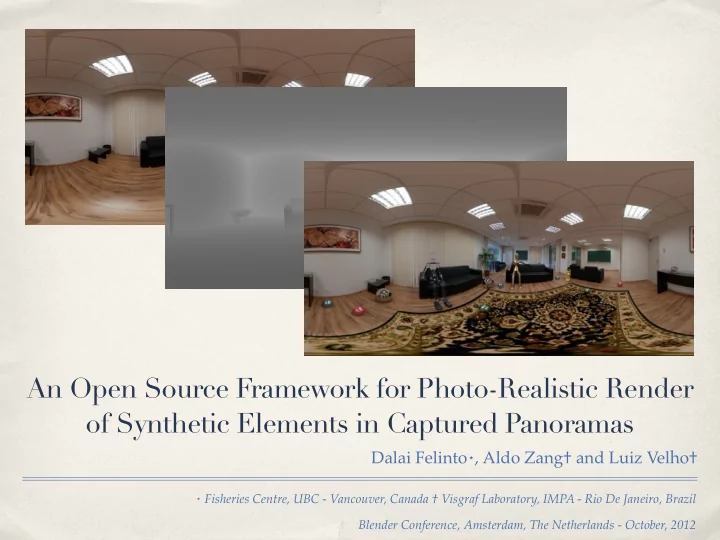
SLIDE 1 ⋆ Fisheries Centre, UBC - Vancouver, Canada † Visgraf Laboratory, IMPA - Rio De Janeiro, Brazil Blender Conference, Amsterdam, The Netherlands - October, 2012
An Open Source Framework for Photo-Realistic Render
- f Synthetic Elements in Captured Panoramas
Dalai Felinto⋆, Aldo Zang† and Luiz Velho†
SLIDE 2
w3.impa.br/~zang/blenderconf
?
SLIDE 3
SLIDE 4
SLIDE 5
SLIDE 6
SLIDE 7
SLIDE 8
SLIDE 9
Flight of the Navigator, 1986 Terminator 2, 1991 The Smurfs, 2011
SLIDE 10
Problems of panoramas-only solutions
SLIDE 11
SLIDE 12
SLIDE 13
SLIDE 14
So, how to make those wonderful Panoramas?
SLIDE 15
Environment capture Panorama calibration Scene reconstruction Scene depth computation Illumination setup Synthetic elements Integration and rendering
So, how to make those wonderful Panoramas?
SLIDE 16
Environment capture
SLIDE 17
SLIDE 18
SLIDE 19
EV -6 EV -4 EV -2 EV 0
SLIDE 20
SLIDE 21
SLIDE 22
SLIDE 23
Calibration system
SLIDE 24
Allow to move important sampling regions off the poles Less concern on tripod alignment for picture capturing It works with panoramas obtained from the internet Optimal aligned axis for the world reconstruction
Advantages of a calibration system
SLIDE 25
- riginal panorama: hdrlabs.com
SLIDE 26
SLIDE 27
- riginal panorama: hdrlabs.com
SLIDE 28
SLIDE 29
- riginal panorama: hdrlabs.com
SLIDE 30
Scene Reconstruction (IBL Toolkit)
SLIDE 31
Floor Reconstruction
SLIDE 32
Panorama Background
SLIDE 33 # v e r s i o n 120 uniform sampler2D color_buffer ; uniform sampler2D depth_buffer ; uniform sampler2D texture_buffer ; uniform mat4 projectionmodelviewinverse ; # define PI 3.14159265 vec3 glUnprojectGL( vec2 coords) { float u = coords . s * 2.0, 1.0 ; float v = coords . t * 2.0, 1.0 ; vec4 view = vec4 (u , v , 1 . 0 , 1 . 0 ) ; vec4 world = projectionmodelviewinverse * vec4 (view . x , - view . y , view . z , 1 . 0 ) ; return vec3 (world [ 0 ] * world [ 3 ] , world [ 1 ] * world [ 3 ] , - world [ 2 ] * world [ 3 ] ) ; } vec2 equirectangular( vec3 vert) { float theta = asin (vert.z) ; float phi = atan (vert . x , vert . y) ; float u = 0 . 5 * (phi / PI) + 0 . 2 5 ; float v = 0 . 5 + theta / PI ; return vec2 (u , v) ; } void main( void ) { vec2 coords = gl_TexCoord [ 0 ] . st ; vec4 foreground = texture2D (color_buffer , coords) ; vec3 world = glUnprojectGL(coords) ; vec4 background = texture2D (texture_buffer , - equirectangular( normalize (world) ) ) ; float depth = texture2D (depth_buffer, coords).s ; if (depth > 0 .99995 ) foreground = background ; gl FragColor = foreground ; }
SLIDE 34
SLIDE 35
Rendering
SLIDE 36
SLIDE 37
SLIDE 38
SLIDE 39
Shadows
SLIDE 40
Reflection
SLIDE 41
Results
SLIDE 42
SLIDE 43
SLIDE 44
SLIDE 45
- riginal panorama: blendedskies.com
SLIDE 46
- riginal panorama: blendedskies.com
SLIDE 47
- riginal panorama: blendedskies.com
SLIDE 48 The Light-positional approach gives the correct world based accounts for rendering. One pass rendering solution. We don’t need to make compositions
Extensible to Cycles render or other renderers. Light-depth map idea can be used for real time rendering in other contexts (games, interactive visualization, etc.) We can handle camera rotations and translations! It’s possible apply deformation of mesh and texture deformation to the modeled environment.
Conclusions
SLIDE 49
Extra 1 - Environment Texture
SLIDE 50
SLIDE 51
SLIDE 52
Extra 2 - Camera Travelling
SLIDE 53
SLIDE 54
SLIDE 55
Extra 3 - Fisheye
SLIDE 56
SLIDE 57
SLIDE 58
Djalma Lucio Juliano Kestenberg Blender and Luxrender Developers Sam Schad www.blenderskies.com
Acknowledgements
SLIDE 59
Questions?
SLIDE 60 ⋆ Fisheries Centre, UBC - Vancouver, Canada † Visgraf Laboratory, IMPA - Rio De Janeiro, Brazil Blender Conference, Amsterdam, The Netherlands - October, 2012
An Open Source Framework for Photo-Realistic Render
- f Synthetic Elements in Captured Panoramas
Dalai Felinto⋆, Aldo Zang† and Luiz Velho†
w3.impa.br/~zang/blenderconf