* Alternative technique not covered in this class Multivariate - - PowerPoint PPT Presentation

alternative technique not covered in this class
SMART_READER_LITE
LIVE PREVIEW

* Alternative technique not covered in this class Multivariate - - PowerPoint PPT Presentation

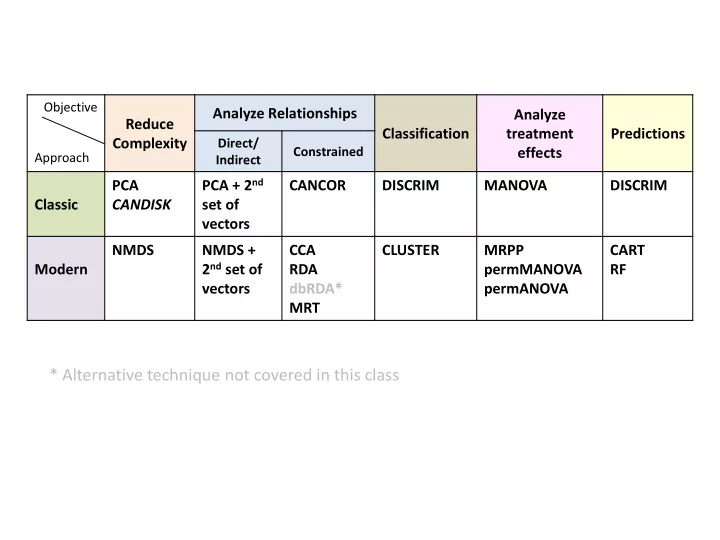
Objective Analyze Relationships Analyze Reduce Classification treatment Predictions Complexity Direct/ Constrained effects Approach Indirect PCA + 2 nd PCA CANCOR DISCRIM MANOVA DISCRIM Classic CANDISK set of vectors NMDS NMDS


slide-1
SLIDE 1

Objective Approach

Reduce Complexity Analyze Relationships Classification Analyze treatment effects Predictions

Direct/ Indirect Constrained

Classic PCA CANDISK PCA + 2nd set of vectors CANCOR DISCRIM MANOVA DISCRIM Modern NMDS NMDS + 2nd set of vectors CCA RDA dbRDA* MRT CLUSTER MRPP permMANOVA permANOVA CART RF

* Alternative technique not covered in this class

slide-2
SLIDE 2

Classification and Regression Trees (CART)

Multivariate Fundamentals: Prediction

MCMT>=-30.85 MCMT>=-25.8 MWMT< 16.45 MCMT< -30.85 MCMT< -25.8 MWMT>=16.45 0.674 n=103 0.534 n=99 0.172 n=64 1.2 n=35 0.601 n=26 2.92 n=9 4.15 n=4 Error : 0.214 CV Error : 0.412 SE : 0.122

slide-3
SLIDE 3

Objective: Determine what drives relationships between response

and predictor variables in more detail (unimodal or bimodal relationships) CART is Univariate MRT is Multivariate We aim to answer: “What distinguishes my groups within my predictor variables?” Classification and Regression Trees can use both categorical and continuous numeric response variables

– If response is categorical a classification tree is used to identify the "class" within which a target variable would likely fall into – If response is continuous a regression tree is used to predict it's value – We cover both in Lab 8

Also referred to as decision trees If we can specifically determine what drives a relationship, we can use that information to predict a response under new conditions

slide-4
SLIDE 4

The math behind CART (and MRT in multivariate space)

Consider: “What drives species frequency?”

MAT Try and look at a

  • rdination

When the relationship is not linear, ordinations do not work out cleanly E.g. Species are both low species frequency, but have very different MAT thresholds, so where do I draw the arrow to capture this information?

Species Frequency MAT °C

1 2 3 4 5 6 7

slide-5
SLIDE 5

The math behind CART

Alternatively we can build a decision tree to better define and illustrate the species frequency-temperature relationship Think of this as a cluster analysis where splits are constrained by environmental variables (like in Constrained Gradient Analysis)

Species Frequency MAT °C

1 2 3 4 5 6 7

High Low Low

≥ 2°C < 2°C < 6°C ≤ 6°C

Node Leaf

slide-6
SLIDE 6

The math behind CART

CART is an iterative top-down process that aims to minimize within group variation To start the tree, CART empirically investigating various thresholds in various predictor variables to find the first split in the response variable dataset that minimizing variation within groups (like Cluster Analysis) However unlike Cluster Analysis, the external variables (the predictors) are imposed as a constraint to create the clusters

E.g. Using environmental thresholds to create clusters of inventory plots with similar species composition

The process then repeats for the two sub-groups, until no significant amount of additional variation ca be explained by further splits

slide-7
SLIDE 7

CART in R

There are other R packages that build univariate Classification (categorical) and Regression (numeric) Trees – e.g. tree and rpart To simplify for this class we will use the package mvpart which is primarily designed to execute Multivariate Regression Trees (MRT), but can handle CART as well

CART in R:

library(mvpart) mvpart(ResponseVariable,EquationOfPredictors,data=predictorData, (mvpart package) xv="p", all.leaves=T)

Vector of response variable (univariate) Equation of Predictors :

Variable1 include single predictor Variable1+Variable2 include multiple predictors

To run CART you need to install the mvpart package Data table of your predictor variables E.g. Environmental Variables Turn on the option all.leaves=T to generate the number

  • f observations and the average frequency at each node

and leaf Specifying xv="p“ allows you to interactively pick the tree size you want to generate

slide-8
SLIDE 8

Green line – equivalent to “variance explained by each

split” statistic

CART in R

Picking the tree size is a good option to specify because it allows you to pick the best tree which includes well supported splits that explain a significant portion of the variation By specifying xv="p" R will generate a screen-plot for decision guidance Size of tree – number of splits Red line – minimum relative error corresponding to

minimum variance explained plus one standard error

Blue line – tree performance associated with splits

Cross-validation prediction

You should pick a tree size under the red line, between the orange and red marks The bigger the tree the bigger the breakdown among data points – you have to determine how far you want to breakdown your data (you might go too far and remove groupings that you want) If you don’t specify xv="p" in your mvpart statement then the tree size at the orange mark will be used Orange mark – well supported splits that explain

sufficient variation

Red mark – reasonably well supported splits

explaining some additional variation

slide-9
SLIDE 9

CART in R

R will output a regression tree

If you have a big tree the tree image will be crowded (this is a problem in mvpart), so save the image as a enhanced metafile (option in the save) You can then import the emf file into Powerpoint, ungroup it twice and move the labels around to make the image more legible and publishable

MCMT>=-30.85 MCMT>=-25.8 MWMT< 16.45 MCMT< -30.85 MCMT< -25.8 MWMT>=16.45 0.674 n=103 0.534 n=99 0.172 n=64 1.2 n=35 0.601 n=26 2.92 n=9 4.15 n=4 Error : 0.214 CV Error : 0.412 SE : 0.122

We build a model to look at a single species frequency with 5 predictor variables The number of data points that fall into this group

(e.g. n = 64 data points)

The average species frequency for the group

(e.g. 4.15%)

Predictor variable associated with data split Errors associated with the tree size:

Error: Residual error how much variation is not explained by the tree CV Error: Summarized cross-validated relative error for all predictors (zero for perfect predictor

to close to one for a poor predictor)

You want small values for both!
slide-10
SLIDE 10

CART in R

We build a model to look at a single species frequency with 5 predictor variables The variation explained by each split For each node (and leaf) details about the split are provided:

  • Number of observations used
  • Mean of the group
  • Mean square error of the group
  • How many observations are divided into each

side of the split

  • Primary splits (potential alternative

predictors) Improvement values indicate how much variation would be explained if that split was based on an alternative variable If the improve value at a split is the same for a different predictor variable, the alternative predictor variable could be used to explain the groupings

slide-11
SLIDE 11

Multivariate Regression Trees (MRT)

Multivariate Fundamentals: Prediction

MCMT>=-14.85 MAT>=0.6 MWMT>=16 MAT< -1.3 MAT>=-0.4 MSP< 304.5 MWMT< 15.9 MSP< 332 MCMT< -14.85 MAT< 0.6 MWMT< 16 MAT>=-1.3 MAT< -0.4 MSP>=304.5 MWMT>=15.9 MSP>=332 810 : n=136 334 : n=80 71.1 : n=64 9.93 : n=40 13.8 : n=24 154 : n=16 0.0026 : n=8 0.848 : n=8 303 : n=56 0.487 : n=8 6.12 : n=16 158 : n=32 58 : n=24 10.5 : n=16 0.495 : n=8 0.791 : n=8

ABIELAS PICEENG PINUCON PICEGLA POPUTRE PINUBAN

Error : 0.053 CV Error : 0.102 SE : 0.0313

slide-12
SLIDE 12

Objective: Determine what drives relationships between multiple

response and predictor variables in more detail (unimodal or bimodal

relationships )

Just like CART, but multivariate space We aim to answer: “What distinguishes my groups within my predictor variables?” Like CART, MRT can use both categorical and continuous numeric response variables If we can specifically determine what drives a relationship, we can use that information to predict a response under new conditions

slide-13
SLIDE 13

MRT in R

MRT in R:

library(mvpart) mvpart(ResponseMatrix,EquationOfPredictors,data=predictorData, (mvpart package) xv="p", all.leaves=T)

Matrix of response variables E.g: Frequencies for multiple species Equation of Predictors:

Variable1 include single predictor Variable1+Variable2 include multiple predictors

To run CART you need to install the mvpart package Data table of your predictor variables E.g. Environmental Variables Turn on the option all.leaves=T to generate the number

  • f observations and the average frequency at each node

and leaf Specifying xv="p“ allows you to interactively pick the tree size you want to generate

To make the MRT output easier to interpret, response variables should be normalized prior to conducting the MRT analysis

slide-14
SLIDE 14

Green line – equivalent to “variance explained by each

split” statistic

MRT tree size (same as CART)

Picking the tree size is a good option to specify because it allows you to pick the best tree which includes well supported splits that explain a significant portion of the variation By specifying xv="p" R will generate a screen-plot for decision guidance Size of tree – number of splits Red line – minimum relative error corresponding to

minimum variance explained plus one standard error

Blue line – tree performance associated with splits

Cross-validation prediction

You should pick a tree size under the red line, between the orange and red marks The bigger the tree the bigger the breakdown among data points – you have to determine how far you want to breakdown your data (you might go too far and remove groupings that you want) If you don’t specify xv="p" in your mvpart statement then the tree size at the orange mark will be used Orange mark – well supported splits that explain

sufficient variation

Red mark – reasonably well supported splits

explaining some additional variation

slide-15
SLIDE 15

MRT in R

Each leaf on the tree has a barplot associated with it that tells us how the response variables similarly respond in each group E.g: Species frequency in each community group Because data is normalized, all of the bars above the line are the ones driving the split Unfortunately you CANNOT change the colours of these barplots in R – you will have to modify everything in Powerpoint

MCMT>=-14.85 MAT>=0.6 MWMT>=16 MAT< -1.3 MAT>=-0.4 MSP< 304.5 MWMT< 15.9 MSP< 332 MCMT< -14.85 MAT< 0.6 MWMT< 16 MAT>=-1.3 MAT< -0.4 MSP>=304.5 MWMT>=15.9 MSP>=332 810 : n=136 334 : n=80 71.1 : n=64 9.93 : n=40 13.8 : n=24 154 : n=16 0.0026 : n=8 0.848 : n=8 303 : n=56 0.487 : n=8 6.12 : n=16 158 : n=32 58 : n=24 10.5 : n=16 0.495 : n=8 0.791 : n=8

ABIELAS PICEENG PINUCON PICEGLA POPUTRE PINUBAN

Error : 0.053 CV Error : 0.102 SE : 0.0313

The number of data points that fall into this group

(e.g. n = 40 data points)

Predictor variable associated with data split Errors associated with the tree size:

Error: Residual error how much variation is not explained by the tree CV Error: Summarized cross- validated relative error for all predictors (zero for perfect

predictor to close to one for a poor predictor)

You want small values for both!

slide-16
SLIDE 16

MRT in R

MCMT>=-14.85 MAT>=0.6 MWMT>=16 MAT< -1.3 MAT>=-0.4 MSP< 304.5 MWMT< 15.9 MSP< 332 MCMT< -14.85 MAT< 0.6 MWMT< 16 MAT>=-1.3 MAT< -0.4 MSP>=304.5 MWMT>=15.9 MSP>=332 810 : n=136 334 : n=80 71.1 : n=64 9.93 : n=40 13.8 : n=24 154 : n=16 0.0026 : n=8 0.848 : n=8 303 : n=56 0.487 : n=8 6.12 : n=16 158 : n=32 58 : n=24 10.5 : n=16 0.495 : n=8 0.791 : n=8

ABIELAS PICEENG PINUCON PICEGLA POPUTRE PINUBAN

Error : 0.053 CV Error : 0.102 SE : 0.0313

These 8 plots have similar species communities with high frequencies of ABIELAS (subalpine fir) and PICEENG (Englemann spruce) and moderate frequency of PINUCON (lodgepole pine) compared to the average on all sites Interpretation: Due to climate (Cool temperatures), and species composition, these are likely high elevation sites These 16 plots have similar species communities with high frequency of POPUTRE (aspen) and moderate frequency of PICEGLA (white spruce) compared to the average on all sites Interpretation: Due to climate (Cold winters, wet summers), and species composition, these are likely boreal mixedwood sites These 24 plots have similar species communities with moderate frequency of PINUCON (lodgepole pine) and moderately low frequency of PINUBAN (jack pine) compared to the average on all sites Interpretation: Due to climate (Cold winters, cool summers), and species composition, these are likely boreal highland sites These 8 plots have similar species communities with very high frequency of POPUTRE (aspen), moderately frequency of PICEGLA (white spruce), and moderately low frequency of other the species compared the average on all sites Interpretation: Due to climate (Cold winters, warm summers), and species composition, these are likely northern boreal sites

slide-17
SLIDE 17

MRT in R

We build a model to look at a single species frequency with 5 predictor variables The variation explained by each split For each node (and leaf) details about the split are provided:

  • Number of observations used
  • Mean of the group
  • Mean square error of the group
  • How many observations are divided into each

side of the split

  • Primary splits (potential alternative

predictors) Improvement values indicate how much variation would be explained if that split was based on an alternative variable If the improve value at a split is the same for a different predictor variable, the alternative predictor variable could be used to explain the groupings See full output in Lab 8

slide-18
SLIDE 18

Random Forest

Multivariate Fundamentals: Prediction

Current Climate 2050s

slide-19
SLIDE 19

Objective: Determine what drives relationships between response and

predictor variables in more detail then use this relationship to predict response at a new location Bootstrapped version of CART (univariate) that allows you to better investigate if a relationship between response and predictors exists and what predictor variables drive that relationship (more reliable) Like CART & MRT, Random Forest can use both categorical (Classification technique) and continuous numeric (Regression technique) response variables

Leo Breiman (1928-2005) Adele Cutler (1950- Present )

slide-20
SLIDE 20

The math behind Random Forest

MANY trees are iteratively built (bootstrap) based on subsets of the data (typically 70% of the data) then the remaining portion of the data is used to test the tree that was built Think of the Price is Right Game Plinko  For each tree you use a subset of the data to “set up the pegs” on the board E.g. Environmental predictors Then the remaining portion of the data represents the “disks” you will play A.K.A. Out-

  • f-bag sample

The “slots” at the bottom ($) represent the group classes (categorical response) or numeric values (numeric response) in our data E.g. Species Classes, Ecosystem Classes When you slide your disks down the board, the set-up of the pegs will determine what slot the disk will fall into If the pegs are set up well (e.g. there is a strong relationship between response and predictors) the disk will fall into the correct slot

slide-21
SLIDE 21

Random Forest in R

Random Forest in R:

library(randomForest) mvpart(ResponseVector,EquationOfPredictors,data=predictorData, trees=n, importance=T) (randomForest package)

Vector of response variable (univariate) E.g: Species frequency (numeric) : Regression Ecosystem classes (categorical) : Classification Equation of Predictors:

Variable1 include single predictor Variable1+Variable2 include multiple predictors

To run Random Forest you need to install the randomForest package Data table of your predictor variables E.g. Environmental Variables Turn on the option importance=T to generate the a statistic as to how important each predictor variable contributed to achieving correct answers The number of trees you want to generate The fewer trees you use, the faster the program But the less reliable the prediction

slide-22
SLIDE 22

Random Forest in R – Regression (numeric response variable)

You should look at the summary of the error in your predictions (disks that fell into the wrong slot) based on the number of trees you use using The fewer the trees you use the faster the Random Forest program will run, but the less reliable the predictions More trees give Random Forest a better chance to establish a strong relationship between response and predictors You want to pick your number of trees where your error asymptotes In this example we should increase the number of trees from 100 to either 200

  • r 300
slide-23
SLIDE 23

Random Forest in R – Classification (categorical response variable)

For classification trees (categorical response variable) curves will be generated for each class included Again you want to pick your number of trees where your error asymptotes for all classes In this example 100 trees seems sufficient

slide-24
SLIDE 24

Random Forest in R – Regression (numeric response variable)

mean decrease in accuracy mean decrease in MSE at node

Importance measures show how much MSE or Impurity increase when that variable is randomly permuted within tree construction If you randomly permute a variable that does not gain you anything in prediction, then you will only see small changes in Impurity and MSE Important variables will change the predictions by quite a bit if randomly permuted, so you will see bigger changes The further the importance variable is to the right, the MORE important that predictor variable is within the tree

slide-25
SLIDE 25

Random Forest in R – Classification (categorical response variable)

Importance will give you values of mean decrease in accuracy for each predictor for each class as well as overall for all classes Additionally you will get a measure of mean decrease in Gini – which represents how often each predictor variable contributed to a correct classification The further the importance variable is to the right, the MORE important that predictor variable is within the tree

slide-26
SLIDE 26

For classification random forest ONLY we can also look at the classification error rate for all categories

Random Forest in R – Classification (categorical response variable)

Rows represent the actual Group classes Columns represent the predicted Group classes based on the random forest analysis The class.error column indicate the % of the row Group class that we misidentified

E.g. a value of 0.125 for Group 16 indicates 12.5% of data points known to belong to Group 16 were misclassified across all trees under random forest

Ideally we want all classification errors to be small as that indicates Random Forest is a GOOD Prediction Model For regression (numeric) you can use mean(out4$rsq) to get a pdeudo R2 value as an indication of the goodness-of-fit for the random forest model

slide-27
SLIDE 27

Random Forest Predictions – Regression (numeric response variable)

Current Climate 2050s

We can simply apply the output from random forest to a new set of environmental variables to see how the modelled variable (e.g. species frequency) will respond

slide-28
SLIDE 28

Random Forest Predictions – Classification (categorical response variable)

Current Climate 2050s

We can simply apply the output from random forest to a new set of environmental variables to see how the modelled variable (e.g. ecosystem class) will correspond