Action on Screen Narration Approving Confidential Income Welcome to - - PDF document

action on screen narration approving confidential income
SMART_READER_LITE
LIVE PREVIEW

Action on Screen Narration Approving Confidential Income Welcome to - - PDF document

Action on Screen Narration Approving Confidential Income Welcome to the CACFP Training Approving Statements (PPT SCREEN) Confidential Income Statements presented by the Oregon Department of Education, Child Nutrition Programs This is a how


slide-1
SLIDE 1

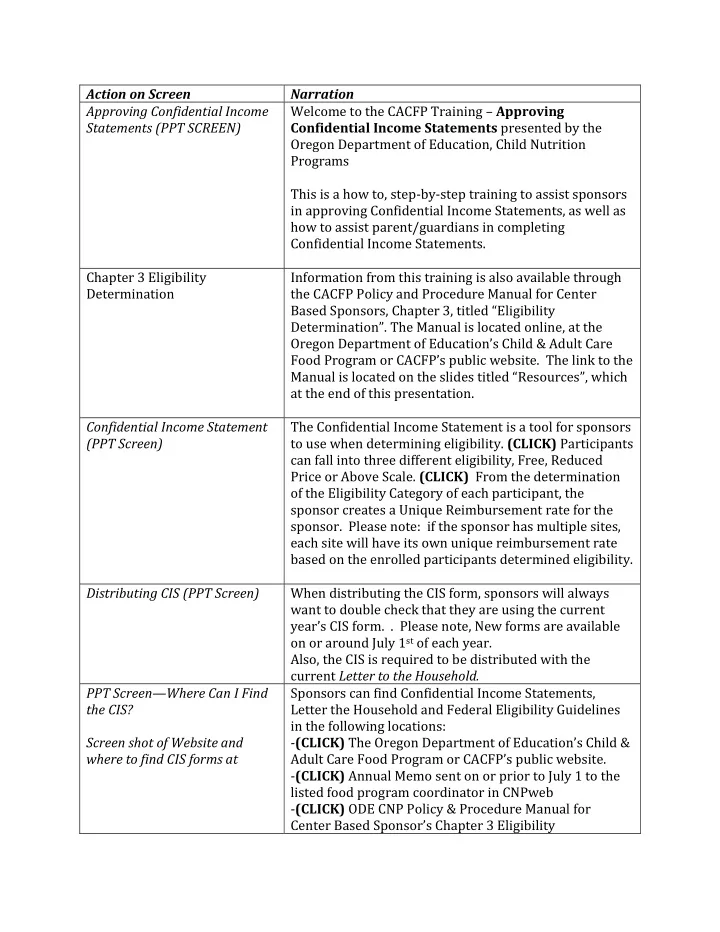
Action on Screen Narration Approving Confidential Income Statements (PPT SCREEN) Welcome to the CACFP Training – Approving Confidential Income Statements presented by the Oregon Department of Education, Child Nutrition Programs This is a how to, step-by-step training to assist sponsors in approving Confidential Income Statements, as well as how to assist parent/guardians in completing Confidential Income Statements. Chapter 3 Eligibility Determination Information from this training is also available through the CACFP Policy and Procedure Manual for Center Based Sponsors, Chapter 3, titled “Eligibility Determination”. The Manual is located online, at the Oregon Department of Education’s Child & Adult Care Food Program or CACFP’s public website. The link to the Manual is located on the slides titled “Resources”, which at the end of this presentation. Confidential Income Statement (PPT Screen) The Confidential Income Statement is a tool for sponsors to use when determining eligibility. (CLICK) Participants can fall into three different eligibility, Free, Reduced Price or Above Scale. (CLICK) From the determination

  • f the Eligibility Category of each participant, the

sponsor creates a Unique Reimbursement rate for the

  • sponsor. Please note: if the sponsor has multiple sites,

each site will have its own unique reimbursement rate based on the enrolled participants determined eligibility. Distributing CIS (PPT Screen) When distributing the CIS form, sponsors will always want to double check that they are using the current year’s CIS form. . Please note, New forms are available

  • n or around July 1st of each year.

Also, the CIS is required to be distributed with the current Letter to the Household. PPT Screen—Where Can I Find the CIS? Screen shot of Website and where to find CIS forms at Sponsors can find Confidential Income Statements, Letter the Household and Federal Eligibility Guidelines in the following locations:

  • (CLICK) The Oregon Department of Education’s Child &

Adult Care Food Program or CACFP’s public website.

  • (CLICK) Annual Memo sent on or prior to July 1 to the

listed food program coordinator in CNPweb

  • (CLICK) ODE CNP Policy & Procedure Manual for

Center Based Sponsor’s Chapter 3 Eligibility

slide-2
SLIDE 2

Determinations

  • (CLICK) ODE CNP has the documents available in

English, Spanish Chinese, Russian, and Vietnamese, on the ODE CACFP public website, for all other translations, please visit the USDA’s Food and Nutrition Services Website. For links to these resources, please see the slide titled “Resources” at the end of this presentation. Assisting Parents in the Completing A Confidential Income Statement (PPT Screen) First, we will review how to assist parents in completing a Confidential Income Statement. (PAUSE) When requesting parents to complete Confidential Income Statements, it is beneficial to discuss the areas that are required for the parent to complete. Highlight Instructions in red

  • box. (CIS FORM)

First, we will review where the instructions are located

  • n the CIS form. The instructions highlight the different

ways for the parent/guardian to complete the CIS form. Highlight Household Information When completing the CIS, the person who is completing the application should complete Part 1. Household Information. Highlight Child Information The parent/guardian should list only the child who is enrolled in Child Care. Please note that the name, date of birth, along with the age of the child is required in Part 2. Highlight Public Benefits If the household currently receives, SNAP, TANF, or FDPIR, the parent/guardian will indicate which benefit the household currently receives and list the case number.

slide-3
SLIDE 3

Highlight Household Members & Gross Monthly Income If the household does not receive Public Benefits, Part 4: Household Members & Gross Monthly Income is required to be completed. The parent/guardian who is completing the form will need to list all the household members including children not attending school or enrolled in your center and the income for each individual listed. If a household member does not receive an income, column 6 needs to be marked. Highlight Part 5, signature, date and last 4 SSN To submit a completed application, the parent/ guardian that is completing the CIS must sign, date and include the last 4 digits of their social security number. If the parent/guardian does not have a social security number, they will need to check the box to the left stating “I do not have a Social Security Number.” Highlight Part 6 Part 6: Racial and Ethnic Group is optional, and is not required for completion of the form. Reviewing the CIS for Completeness (PPT Slide) Next, we will review a sample Confidential Income Statement for completeness. If a parent returns a confidential income statement that is not complete, the form may be returned to the parent/guardian for completion, or it is determined above scale. Categorical Eligibility (PPT Slide) First, we will review a returned CIS using categorical eligibility. Highlight sections 1, 2, 3, 5 For a household receiving SNAP, TANF or FDPIR, the adult household member will need to complete sections 1, 2, 3, and 5. Case Number Reminder (PPT Slide Here are some reminders about case numbers listed in part 3 of the application. An acceptable SNAP case number are 8 numbers and one letter, or nine numbers

  • r a letter with numbers and in the last section a letter

with numbers. (CLICK) An acceptable TANF case number is two letters and four numbers or three letters and three numbers. (CLICK) An indication the household mark that they are participating in FDPIR. (CLICK) If an acceptable case number is listed, you do not look at the household income. The household is automatically free. Income Eligibility (PPT Slide) Next, we will review a returned CIS form based on income eligibility. Highlight sections 1,2,4 and 5 When a household does not receive public benefits, they will need to complete sections 1, 2, 4 and 5. Reminder: if there is no income listed, ensure that the parent/guardian has marked Column 6 “No Income” Zero Income When a household submits a CIS with “zero” income entered in Section 4 and does not provide a current

slide-4
SLIDE 4

SNAP or TANF case number or an indication that the household receives FDPIR benefits, sponsors may approve the CIS in the Free Category. Like all complete income applications, zero income applications are valid for 12 months from the date the Sponsor’s Eligibility Official signs and dates the form. Parents/guardians must enter “zero” or mark the box in Column 6 “Check if no income” in section 4 for all household members listed. The CIS is considered incomplete if the section is left blank without other categorical eligibility information entered in Section 3. Blank CIS with highlights on monthly income and column 6 Parents/guardians must enter “zero” or mark the box in Column 6 “Check if no income” in section 4 for all household members listed. The CIS is considered incomplete if the section is left blank without other categorical eligibility information entered in Section 3. Foster Children (PPT Slide) Finally, we will review the CIS for completion for Foster Children. Highlight sections 1, 2, and 5 For households that include Foster Children, sections 1, 2, and 5 are to be completed. Highlight Section 2, Check if Foster Care Child When checking for completeness for Foster Children, ensure that the Check if Foster Child box has been completed in Section 2. Foster Children (PPT Slide) There are 3 different ways a household can complete a CIS for Foster Children. (PAUSE) (CLICK) They may be considered part of the household and included on a CIS submitted by the household. (PAUSE)(CLICK) A separate CIS can be completed for a foster child, (PAUSE)(CLICK)

  • r if there is one or more foster children in a home, they

can all be included on the same form. Approving Confidential Income Statements (PPT Slide) Now, we will review how to approve a confidential income statement. We will be looking at how to approve the three different eligibility types. Reminders (PPT Slide) Only complete CIS applications containing all required information can be approved as Free or Reduced-Price

  • Eligible. (CLICK) If the form is not complete when

received, the sponsors can ask the parent or guardian to complete the missing information, or determine the CIS as Above Scale. (CLICK) Sponsors will document the determination in the Sponsor Use Only section of the CIS

  • form. Sponsor officials may not complete any part of the

household section of a CIS for a parent or guardian, unless the parent or guardian cannot read or write; has a

slide-5
SLIDE 5

disability and requires assistance; or, requests or requires Sponsor assistance to complete the CIS for any reason identified by them. (PAUSE) ODE CNP recommends if a sponsor assists the parent or guardian in completing the CIS, that they document why assistance was provided and what sections they assisted in. Sponsor Use Only Section The sponsor use section of the CIS form is to be completed by the sponsors Determining Official. Once the application has been reviewed for completeness, the Determining Official will then approve the application based on the identified eligibility type. In the Sponsor Use Section of the CIS is where the determining official will make the eligibility determination. Approving CIS: Categorical Eligibility First we will approve a completed Confidential Income Statement with Categorical Eligibility. Screen shot of completed CIS form- Categorical Eligibility Here is an example of a complete CIS form to be determined for categorical eligibility. The sponsor’s determining official has reviewed the form for completeness and has determined that the form is complete Zoom to sponsor use Section In the sponsor use section of the CIS, the sponsor will check the Eligibility as Free, based on SNAP. Sign and date the application as approved. Show completed and approved CIS- Categorical Eligibility ODE CNP highly recommends the sponsor to have an employee as a 2nd check for all approved CIS applications. Approving CIS: Income Based Next, let’s look at a CIS that has been completed based on income. Screen Shot of Completed CIS form- Income Based Here is an example of a completed CIS Form to be determined based on income. The sponsor’s determining

  • fficial has reviewed the form for completeness and has

determined that the form is complete. Screen Shot of Federal Income Guidelines The sponsors determining official will now use the Federal Income Eligibility Guidelines and the income provided and the number in the household to determine the eligibility of the participant. Each July the Federal Government sets the Income Guidelines for Free, Reduced Price and Above Scale Eligibility. The guidelines are based on household income and household size. Section 3 of CIS From section 1 of the complete Confidential Income Statement, it is determined that there are 3 household

slide-6
SLIDE 6

members with 2 receiving income and 1 who has no

  • income. The total income equals 2000 dollars.

Please Note: Children listed in part 2 should not be included in section 4 unless they receive regular income per the instructions. Sponsor Use Only The determining official will document the total household income and the number of household members in the sponsor use section. Highlight household size 3 on both Free and reduced price With the provided information on the CIS we have determined that the household size is 3 and the total household income is 2000 dollars, therefore, the household qualifies as free. Screenshot of Income Eligibility Check the total monthly income and compare on the income eligibility chart to determine if the applicant is counted as free, reduced or above scale. If income is above the amount in the reduced price meals table, than the income application is approved as above scaled. If the income is at or below the amount in the reduced price table, and above the amount in the free meals table than the application is approved for reduced price. If the income amount is at or below the free table amount than the application is approved as free. Sponsor Use Only In the sponsor use only section, the determining official will now check the Eligibility as Free, based on Household Income. The determining official will sign and date the approved application. Screenshot of complete approved income based CIS form ODE CNP highly recommends the sponsor to have an employee as a 2nd check for all approved CIS applications. Screenshot of Foster Child CIS form Finally, we will approve a completed CIS application completed for a Foster Child. The sponsor’s determining

  • fficial has determined that the application is complete.

Sponsor Use Only If the guardian has listed the foster child’s person discretionary income on Section 4, Column 5, Other Monthly income, the determining official will list the

  • income. If the foster child has no personal-use income,

write 0. The sponsor will now check the eligibility, as Free, based on the child being in Foster Care. The determining official will sign and date the approved application. Foster Child Reminder Slide (PPT) (CLICK) Foster Children are categorically eligible for free meals (CLICK) if the sponsor obtains documentation from an appropriate state or local foster care agency or court indicating the status of the child as

slide-7
SLIDE 7

a foster child whose care and placement is the responsibility of the State or that the foster child has been placed with a caretaker household by a court. (CLICK) Children formally placed in kinship care by a child welfare agency or a court also are eligible. (CLICK) Households with more than one foster child may include all foster children residing in the home on a single CIS. Foster children who are siblings and reside in the same foster home may be included on the same form. Screen Shot of Complete Approved Foster Child Based CIS form ODE CNP highly recommends the sponsor to have an employee as a 2nd check for all approved CIS applications. Resources Slide On this slide, we have listed some of the resources that have been referenced in the training Resource Slide (2) On this slide, we have included more resources regarding Confidential Income Statements Civil Rights PPT Slide Thank you for participating in Approving Confidential Income Statements Training for Child and Adult Care Food Program. If you have any questions please contact your assigned Child Nutrition Specialist. We greatly appreciate the work that you do to fuel Oregon’s future.