SLIDE 1 1
Computer Graphics
CSE 167 [Win 19], Lecture 5: Viewing Ravi Ramamoorthi
http://viscomp.ucsd.edu/classes/cse167/wi19
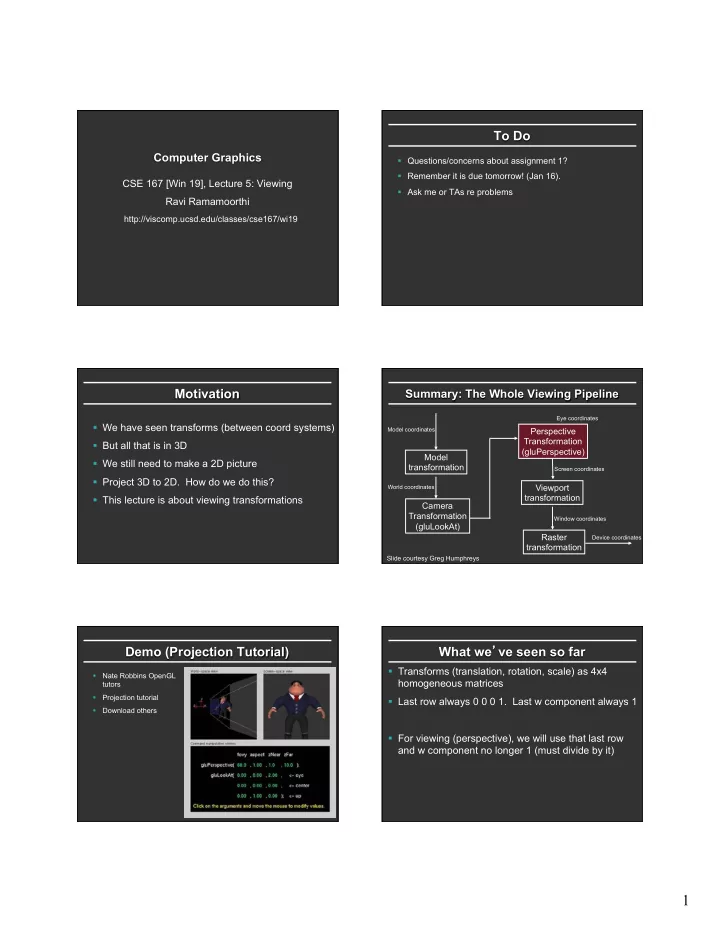
To Do
§ Questions/concerns about assignment 1? § Remember it is due tomorrow! (Jan 16). § Ask me or TAs re problems
Motivation
§ We have seen transforms (between coord systems) § But all that is in 3D § We still need to make a 2D picture § Project 3D to 2D. How do we do this? § This lecture is about viewing transformations
Summary: The Whole Viewing Pipeline
Model transformation Camera Transformation (gluLookAt) Perspective Transformation (gluPerspective) Viewport transformation Raster transformation
Model coordinates World coordinates Eye coordinates Screen coordinates Window coordinates Device coordinates
Slide courtesy Greg Humphreys
Demo (Projection Tutorial)
§ Nate Robbins OpenGL tutors § Projection tutorial § Download others
What we’ve seen so far
§ Transforms (translation, rotation, scale) as 4x4 homogeneous matrices § Last row always 0 0 0 1. Last w component always 1 § For viewing (perspective), we will use that last row and w component no longer 1 (must divide by it)
SLIDE 2
2
Outline
§ Orthographic projection (simpler) § Perspective projection, basic idea § Derivation of gluPerspective (handout: glFrustum) § Brief discussion of nonlinear mapping in z
Projections
§ To lower dimensional space (here 3D -> 2D) § Preserve straight lines § Trivial example: Drop one coordinate (Orthographic)
Orthographic Projection
§ Characteristic: Parallel lines remain parallel § Useful for technical drawings etc. Orthographic Perspective
Example
§ Simply project onto xy plane, drop z coordinate
In general
§ We have a cuboid that we want to map to the normalized or square cube from [-1, +1] in all axes § We have parameters of cuboid (l,r ; t,b; n,f)
x z y l r t b n f x z Translate y x z y Scale
Orthographic Matrix
§ First center cuboid by translating § Then scale into unit cube
x z y l r t b n f x z Translate y x z y Scale
SLIDE 3
3
Transformation Matrix
M = 2 r − l 2 t − b 2 f − n 1 ⎛ ⎝ ⎜ ⎜ ⎜ ⎜ ⎜ ⎜ ⎜ ⎜ ⎞ ⎠ ⎟ ⎟ ⎟ ⎟ ⎟ ⎟ ⎟ ⎟ 1 − l + r 2 1 − t + b 2 1 − f + n 2 1 ⎛ ⎝ ⎜ ⎜ ⎜ ⎜ ⎜ ⎜ ⎜ ⎜ ⎞ ⎠ ⎟ ⎟ ⎟ ⎟ ⎟ ⎟ ⎟ ⎟
Scale Translation (centering)
Caveats
§ Looking down –z, f and n are negative (n > f) § OpenGL convention: positive n, f, negate internally
x z y l r t b n f x z Translate y x z y Scale
Final Result
M = 2 r − l − r + l r − l 2 t − b − t + b t − b 2 f − n − f + n f − n 1 ⎛ ⎝ ⎜ ⎜ ⎜ ⎜ ⎜ ⎜ ⎜ ⎜ ⎞ ⎠ ⎟ ⎟ ⎟ ⎟ ⎟ ⎟ ⎟ ⎟ glOrtho = 2 r − l − r + l r − l 2 t − b − t + b t − b −2 f − n − f + n f − n 1 ⎛ ⎝ ⎜ ⎜ ⎜ ⎜ ⎜ ⎜ ⎜ ⎜ ⎞ ⎠ ⎟ ⎟ ⎟ ⎟ ⎟ ⎟ ⎟ ⎟
Outline
§ Orthographic projection (simpler) § Perspective projection, basic idea § Derivation of gluPerspective (handout: glFrustum) § Brief discussion of nonlinear mapping in z
Perspective Projection
§ Most common computer graphics, art, visual system § Further objects are smaller (size, inverse distance) § Parallel lines not parallel; converge to single point
B A’ B’ Center of projection (camera/eye location) A Plane of Projection
Slides inspired by Greg Humphreys
Funny things happen…
SLIDE 4
4
Overhead View of Our Screen
Looks like we’ve got some nice similar triangles here?
x z = ′ x d ⇒ ′ x = d ∗ x z y z = ′ y d ⇒ ′ y = d * y z
′ x , ′ y ,d
( )
x,y,z
( ) d
0,0,0
( )
In Matrices
§ Note negation of z coord (focal plane –d) § (Only) last row affected (no longer 0 0 0 1) § w coord will no longer = 1. Must divide at end
P = 1 1 1 − 1 d ⎛ ⎝ ⎜ ⎜ ⎜ ⎜ ⎜ ⎞ ⎠ ⎟ ⎟ ⎟ ⎟ ⎟
Verify
1 1 1 − 1 d ⎛ ⎝ ⎜ ⎜ ⎜ ⎜ ⎜ ⎞ ⎠ ⎟ ⎟ ⎟ ⎟ ⎟ x y z 1 ⎛ ⎝ ⎜ ⎜ ⎜ ⎜ ⎞ ⎠ ⎟ ⎟ ⎟ ⎟ = ? x y z − z d ⎛ ⎝ ⎜ ⎜ ⎜ ⎜ ⎜ ⎜ ⎞ ⎠ ⎟ ⎟ ⎟ ⎟ ⎟ ⎟ = − d * x z − d * y z −d 1 ⎛ ⎝ ⎜ ⎜ ⎜ ⎜ ⎜ ⎜ ⎜ ⎞ ⎠ ⎟ ⎟ ⎟ ⎟ ⎟ ⎟ ⎟
Outline
§ Orthographic projection (simpler) § Perspective projection, basic idea § Derivation of gluPerspective (handout: glFrustum) § Brief discussion of nonlinear mapping in z
Remember projection tutorial Viewing Frustum
Near plane Far plane
SLIDE 5
5
Screen (Projection Plane)
Field of view (fovy) width height Aspect ratio = width / height
gluPerspective
§ gluPerspective(fovy, aspect, zNear > 0, zFar > 0) § Fovy, aspect control fov in x, y directions § zNear, zFar control viewing frustum
Overhead View of Our Screen
θ = ? d = ?
′ x , ′ y ,d
( )
x,y,z
( )
d 0,0,0
( ) θ = fovy 2 d = cotθ
In Matrices
§ Simplest form: § Aspect ratio taken into account § Homogeneous, simpler to multiply through by d § Must map z vals based on near, far planes (not yet) P = 1 aspect 1 1 − 1 d ⎛ ⎝ ⎜ ⎜ ⎜ ⎜ ⎜ ⎜ ⎜ ⎞ ⎠ ⎟ ⎟ ⎟ ⎟ ⎟ ⎟ ⎟
In Matrices
§ A and B selected to map n and f to -1, +1 respectively
P = 1 aspect 1 1 − 1 d ⎛ ⎝ ⎜ ⎜ ⎜ ⎜ ⎜ ⎜ ⎜ ⎞ ⎠ ⎟ ⎟ ⎟ ⎟ ⎟ ⎟ ⎟ → d aspect d A B −1 ⎛ ⎝ ⎜ ⎜ ⎜ ⎜ ⎜ ⎜ ⎞ ⎠ ⎟ ⎟ ⎟ ⎟ ⎟ ⎟
Z mapping derivation
§ Simultaneous equations?
A B −1 ⎛ ⎝ ⎜ ⎞ ⎠ ⎟ z 1 ⎛ ⎝ ⎜ ⎞ ⎠ ⎟ = ? Az + B −z ⎛ ⎝ ⎜ ⎞ ⎠ ⎟ = −A − B z −A + B n = −1 −A + B f = +1 A = − f + n f − n B = − 2fn f − n
SLIDE 6 6
Outline
§ Orthographic projection (simpler) § Perspective projection, basic idea § Derivation of gluPerspective (handout: glFrustum) § Brief discussion of nonlinear mapping in z
Mapping of Z is nonlinear
§ Many mappings proposed: all have nonlinearities § Advantage: handles range of depths (10cm – 100m) § Disadvantage: depth resolution not uniform § More close to near plane, less further away § Common mistake: set near = 0, far = infty. Don’t do
- this. Can’t set near = 0; lose depth resolution.
§ We discuss this more in review session
Az + B −z ⎛ ⎝ ⎜ ⎞ ⎠ ⎟ = −A − B z
Summary: The Whole Viewing Pipeline
Model transformation Camera Transformation (gluLookAt) Perspective Transformation (gluPerspective) Viewport transformation Raster transformation
Model coordinates World coordinates Eye coordinates Screen coordinates Window coordinates Device coordinates
Slide courtesy Greg Humphreys