1 Content and Context: Archiving Social Media for Future Use - - PDF document

1 content and context archiving social media for future
SMART_READER_LITE
LIVE PREVIEW

1 Content and Context: Archiving Social Media for Future Use - - PDF document

1 Content and Context: Archiving Social Media for Future Use Sylvie-Rollason-Cass (Web Archivist, Internet Archive) Julie Swierczek (Digital Asset Manager and Archivist, Harvard Art Museums) These are Julies presentation notes. (Contact info


slide-1
SLIDE 1

1 Content and Context: Archiving Social Media for Future Use Sylvie-Rollason-Cass (Web Archivist, Internet Archive) Julie Swierczek (Digital Asset Manager and Archivist, Harvard Art Museums) These are Julie’s presentation notes. (Contact info at https://tpverso.wordpress.com/.)

  • Why save social media?
  • Institutional records
  • Fabric of society that is part of understanding an era
  • It is history itself
  • What do we mean when we say we are going to ‘archive’ social media?
  • Tweets are not books (or papers or articles or other things we know)
  • 200 billion tweets per year - if you gather them together, how could you use

them?

  • Keyword searching is not going to help
  • See: Beall, Jeffrey. 2008. “The Weakness of Full-Text Searching.” The Journal of

Academic Librarianship 34(5): 438-444.

  • All the ways that keyword searching fails
  • Synonyms, homonyms, language barriers (‘French distemper’ = syphilis)
  • But even more - user-generated abbreviations, to fit into 140 characters
  • Hashtags that are not like words
  • Hashtags used in a different way than you would expect
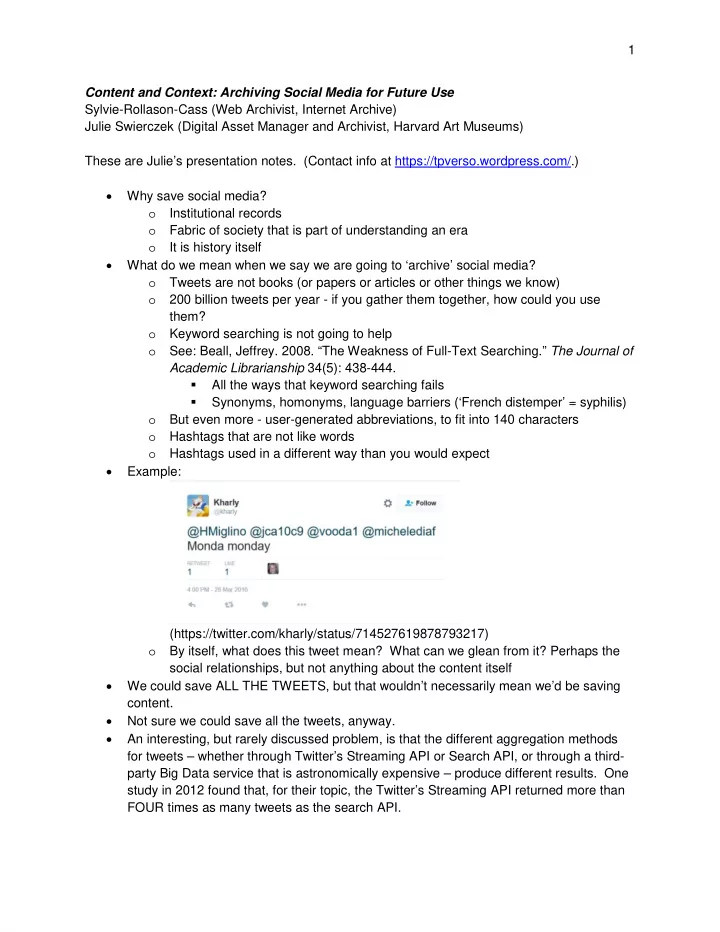
  • Example:

(https://twitter.com/kharly/status/714527619878793217)

  • By itself, what does this tweet mean? What can we glean from it? Perhaps the

social relationships, but not anything about the content itself

  • We could save ALL THE TWEETS, but that wouldn’t necessarily mean we’d be saving

content.

  • Not sure we could save all the tweets, anyway.
  • An interesting, but rarely discussed problem, is that the different aggregation methods

for tweets – whether through Twitter’s Streaming API or Search API, or through a third- party Big Data service that is astronomically expensive – produce different results. One study in 2012 found that, for their topic, the Twitter’s Streaming API returned more than FOUR times as many tweets as the search API.

slide-2
SLIDE 2

2

  • See: Driscoll, Kevin, and Shawn Walker. 2014. “Working Within a Black Box:

Transparency in the Collection and Production of Big Twitter Data.” International Journal of Communication 8: 1745-1764.

  • Everyone is running around saying the sky is falling - there is too much information and

we can’t save it all!

  • But the real question is this: even if we saved ALL THE TWEETS, what would that

mean? What BENEFIT would there be?

  • Aside: new book about digital memory shaping our future
  • Smith Rumsey, Abby. 2016. When We Are No More: How Digital Memory

Is Shaping Our Future. New York: Bloomsbury Press.

  • Tries to place this in the history of humanity’s attempts to deal with

information overload

  • Let’s talk about an example we probably all know: the family photo.
  • What’s missing here? LABELS.
  • Why? Probably for the simple reason that in early photography, everyone

*knew* who was in the pictures. Also, photographs were rare, so people passed

  • n information as they passed on the photos.
  • Only needed the advanced technology of the pen to fix this problem.
  • In a way, the photos are still valuable. (They demonstrate something about the

culture and about wedding practices.)

  • But not as family history, since the critical info is lost.
  • Compare that to this tweet.

(https://twitter.com/PorterAutumn/status/688179478019715074)

  • I have no idea what this means. At all.
  • First tweet in 2006
  • Hashtag invented by a user in 2007
  • Later the hashtag became part of the platform
  • Hashtags have grown into something else entirely: #blacklivesmatter. Arab

spring.

  • Technological form – the limitations (and strengths) of a platform due to the way it is

built.

  • Character limits (140 for Twitter)
  • Types of files (yes for images, no for audio)
  • Text formatting
  • How you ‘promote’ a post
slide-3
SLIDE 3

3

  • Google ‘plus one’
  • Twitter star - now a heart
  • Facebook ‘like’
  • This is a GREAT example of why understanding the technological

platform is important

  • Like button on Facebook has evolved to ‘reactions’.
  • I used to ‘like’ when your dog died. Now I can use a sad face.
  • Researchers of the future need to know about the platform change

so that they don’t think people in the pre-Reactions era were barbarians who liked when dogs died.

  • Order
  • Originally in reverse chronological order, with new stuff at the top
  • But that meant important info could be pushed further down the page.
  • Facebook timeline - give priority to some posts
  • Algorithm now used to sort based on user’s history of interacting with

content

  • Facebook - sorted based on your past behavior
  • Now also for Twitter and Instagram
  • This is a black box
  • Not good, because it creates the filter bubble effect
  • Think of researchers of the future: why aren’t any people in this

group participating in this thing with this other group? - they didn’t see it because it was hidden by the filter bubble

  • Social form - The practices we do that are not part of the requirement of the platform
  • Practices, often based on communities
  • #winning and Charlie Sheen
  • Charlie Sheen was on the media circuit talking about how he was

‘winning’ at life, but he clearly was having a very public breakdown.

  • This generated a sarcastic use of ‘winning’.
  • (https://twitter.com/cloexstyles/status/577464433884164096)
  • But it also can be used in the context of winning something:
slide-4
SLIDE 4

4

  • (https://twitter.com/CFAAndSC/status/586164347203940352)
  • Hashtags as a marketing trick, where businesses tweet about something that is trendy,

so that their business name shows up in people’s Twitter streams

  • Hashtags co-opted from conference to spread political message
  • Other ways we use hashtags that are not a requirement of the platform:
  • Jokes
  • Sarcasm
  • Stage whisper
  • Or Throwback Thursday
  • Also, there are community practices. On Instagram, there is a practice in eating

disorder recovery practice of photographing ‘decorated mush’ (beautiful food: smoothie bowls, salads, plates of food)

  • Some people photograph something on a theme: Diner food. Food truck
  • food. Farmer’s market vegetables.
  • So, why is this important?
  • In these examples, future researchers will not understand what is happening

unless we provide some context for them

  • Context of social practices, events, etc.
  • Context of the platform itself
  • Early on, Facebook had a character limit too. It was increased over time. If a

researcher doesn’t know that, she could conclude that people first used Facebook for brief messages, but it grew over time to longer posts - when the truth is, the messages were brief because users had no choice

  • What do we do?
  • Figure out ways to capture context
  • Could be as simple as providing a readme file to explain your social context
  • Would be nice to see academic articles about platform changes, so we won’t

have to rely on click-bait articles for that information (click-bait - written to grab your attention, but usually are overly dramatic and sometimes just flat wrong)

slide-5
SLIDE 5

5

  • Would be best if we could get the platforms themselves to record changes over

time, but they probably want to keep that secret (especially about their sorting algorithms)

  • Would love to see a way to annotate captured content to say things like:
  • this was during the era of the ‘like’ button, and the ‘reactions’ were

introduced at this date

  • this was during the period where I participated in a group who posted

pictures of diner food on Instagram with these tags

  • Scholarly articles that trace the evolution of the technological forms (information

science research) and social forms (sociological research?) - also a role for archivists in this.

  • Convince companies to keep their own records for this purpose. For example,

get Twitter to agree to put its development information in the trust of the Library

  • f Congress, for future reference
  • Definitely something we need to consider moving forward
  • It’s not just about capturing the stuff. It is making the captured information

meaningful for the future.

  • One of the best ways we can deal with this now is simply to group our content

together in whatever meaningful way we can. DEMOS

  • First, the ridiculously expensive:
  • e-discovery and regulatory compliance, public sector FOIA laws
  • http://www.smarsh.com/social-media-compliance
  • actually not bad, given the scope: ranges from $75/month to $1000/month
  • you would probably need to use the $150/month plan
  • HOWEVER, consider that this is just a capture and store platform; it

doesn’t necessarily have preservation support in the way that we mean when we think of digital preservation

  • https://www.pagefreezer.com/social-media-archiving
  • $99/month for five accounts, can get a custom quote for an ‘unlimited’

plan

  • http://archivesocial.com
  • $199/month to $599/month or more with a custom quote. Note that it

refers to it as a ‘low-cost service’. Ahem.

  • Open source options?
  • Not ready for ‘real people’ to use
  • Also, these platforms change a lot.
  • Lentil is an open source project developed to harvest your Instagram content. It

will stop working in a few months because Instagram changed its policies.

  • Social Feed Manager is an open source project for harvesting tweets. They are

rebuilding the program using a different architecture.

slide-6
SLIDE 6

6

  • Leave these sorts of issues to the institutions who have the expertise and/or

money to deal with them.

  • Screen capture
  • I won’t judge you. You have my permission to print the pages out and keep them

in a filing cabinet if you want. Is that ideal? No. Does it work? Sort of. And sometimes that is the best you can do.

  • If I had to go this route, I would ‘print to PDF’ in my browser and save the file that

way.

  • Freemydata.co: http://freemydata.co/
  • Manual option: just periodically export your data. This is a great idea. Do what

you can and move on with your other jobs.

  • Just make sure you see what you are, in fact, getting.
  • Look at Evernote, for example. It only exports in html or a proprietary

Evernote format. Not particularly helpful.

  • Most give you a PDF and/or a zip file with other files in it.
  • Note that Facebook only allows individual profile downloads, not Facebook

Pages downloads.

  • DIgi.me: https://get.digi.me/
  • Obviously intended for personal use
  • Stores your data on your own computer - they do not have any of the information

(so make sure you back up the folder on your computer!)

  • Note how my window bar says digime (10) - I am subscribing to the service that

allows me to back up ten accounts per year, for $16.99/year.

  • Mac and PC
  • Home - shows you some recent activity
  • Accounts - add the accounts you want to preserve
  • Currently handles Facebook profiles and Facebook Pages, Pinterest,

RSS, Flickr, Instagram, Twitter, LinkedIn, Google Plus, and Viadeo

  • Sync
  • There is a setting you can check to make the software launch on startup

with automatic sync. I use that feature.

  • But you can also manually sync.
  • “Collections” - provides you with a way to bring content together. This might be

really useful if you want to track a single thing across several accounts

  • Demo a collection, grab content from several sources
  • Flashback
  • What were you doing on this date (or roughly around this date) in the past

few years?

  • Photos
  • Accounts
  • See the list of content you can view per account type
slide-7
SLIDE 7

7

  • JOURNAL - bring everything together into a single stream AND be able to add your own

entries!

  • GOOD ENOUGH PRESERVATION?!?!?
  • Export
  • Export all content – of limited use in the ‘raw’ format they provide
  • Note the spreadsheets – they have metadata
  • No posts?
  • No images?
  • Evernote (proprietary, so not the best option)
  • PDF
  • If you decide to export to PDF, you really can’t do it all at once. You will

have to work through chunks at a time.

  • Neat trick: instead of going to the PDF button and seeing everything and

having to select content there, FIRST go to the date range and select a new date range. Now, if you go to export the content, you can select ALL the content without having to go through an item at a time.

  • One great thing about this is that the data is YOURS. It’s not in their

cloud.

  • But their database is encrypted (they say), so the only way to get the

content out is through the export feature in the application. That requires a subscription to the software.

  • (They take privacy very seriously, which is actually really nice for a

change.)

  • So, best model is to use the software and periodically export content into

PDF and/or the raw format they provide.

  • IFTTT: https://ifttt.com/
  • Twitter
  • Note that the captures are very brief. Some include pictures, but those

are USER pictures, not pictures from the tweet

  • Seem to rely on the fact that they are storing the URL, but we know just

how permanent URLs can be

  • Instagram
  • Captures tiny, tiny thumbnails
  • Again, seems to be relying on the URL as the main feature
  • Facebook pages
  • Images with the post content as titles … ok
  • FB page uploads spreadsheet
  • Again, more tiny thumbnails, mostly just the URL for access
  • My Link Posts spreadsheet
  • VERDICT: free. But a little too much of a black box. I don’t know what is going on here,

and there really isn’t a way for me to find out.

slide-8
SLIDE 8

8

  • Zapier: https://zapier.com/
  • Paying $5/month for more ‘zaps’
  • Twitter
  • Export tweets into a spreadsheet
  • Export tweets into an individual text file (to make them searchable and

possibly useful in the future for some sort of database? But the information is incomplete - this is not the full metadata of a tweet)

  • Show Zapier_Twitter spreadsheet - looks a little weird, again relying on

URLs for content

  • Facebook
  • Spreadsheet - relies on URLs
  • Individual text entries - allow for searching, but are not particularly useful
  • VERDICT: a little easier to do, and slightly better than IFTTT, but still not great
  • TAGS: https://tags.hawksey.info/
  • Requires setting up an API key
  • But actually very nicely documented
  • There is even a way to make this collection public. It’s explained on the bottom
  • f the TAGS document
  • Free to use, but it again uses URLs to link to images
  • Thoughts so far
  • You could figure out how to run a script to download the images from services

that don’t provide them

  • I really think a multi-pronged approach is best:
  • Use Zapier or IFTTT or TAGS to capture some data into a spreadsheet, since

that is helpful for sorting and date order and so on

  • Use something like digi.me to capture the images
  • That way you will have your data in both forms if something better comes along

in the future

  • If you use a web-archiving service, that might also work for you.
  • Still a lot missing here, too - the most glaring one being that the methods I’ve
  • utlined so far have not done anything to capture the INTERACTION - the actual

SOCIAL part - of the information stream

  • Also, social interaction continues to change the information stream over time -

people replying to your posts, liking them, retweeting them, etc. The methods I’ve described here don’t do anything to preserve those aspects.

  • So, we still have a long way to go.
  • At the Personal Digital Archiving conference in 2015, Professor Lori Kendall (UIUC) said

that we can’t save everything, so the question we should ask ourselves is: “What stories do you want to tell?”

  • I think it may be useful to consider tweets and other posts more like parts of a story than

like discrete objects we can catalog and search in a database. So, to decide what to capture and how to capture it, ask yourself what stories you want to tell.