You Can Do That Cloud & Distributed Computing Scripting & - - PowerPoint PPT Presentation

you can do that
SMART_READER_LITE
LIVE PREVIEW

You Can Do That Cloud & Distributed Computing Scripting & - - PowerPoint PPT Presentation

16.1 16.2 You Can Do That Cloud & Distributed Computing Scripting & (CyberPhysical, Databases, Data Networked Interfaces Mining,etc.) Applications Applications SW (AI, Robotics, Graphics, Mobile) Applications C / C++ / Java


slide-1
SLIDE 1

16.1

Unit 16

Computer Organization and Instruction Sets

16.2

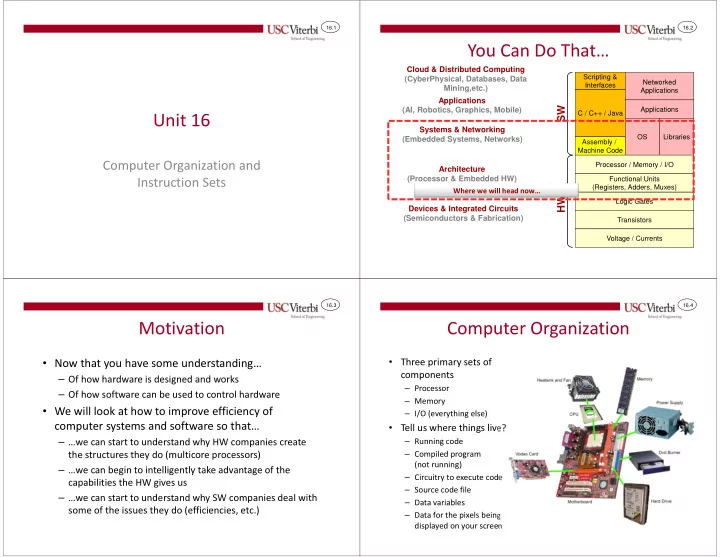
You Can Do That…

C / C++ / Java Logic Gates Transistors

HW SW

Voltage / Currents Assembly / Machine Code Applications Libraries OS Processor / Memory / I/O Functional Units (Registers, Adders, Muxes)

Devices & Integrated Circuits (Semiconductors & Fabrication) Architecture (Processor & Embedded HW) Systems & Networking (Embedded Systems, Networks) Applications (AI, Robotics, Graphics, Mobile) Cloud & Distributed Computing (CyberPhysical, Databases, Data Mining,etc.)

Scripting & Interfaces Networked Applications

Where we will head now…

16.3

Motivation

  • Now that you have some understanding…

– Of how hardware is designed and works – Of how software can be used to control hardware

  • We will look at how to improve efficiency of

computer systems and software so that…

– …we can start to understand why HW companies create the structures they do (multicore processors) – …we can begin to intelligently take advantage of the capabilities the HW gives us – …we can start to understand why SW companies deal with some of the issues they do (efficiencies, etc.)

16.4

Computer Organization

  • Three primary sets of

components

– Processor – Memory – I/O (everything else)

  • Tell us where things live?

– Running code – Compiled program (not running) – Circuitry to execute code – Source code file – Data variables – Data for the pixels being displayed on your screen

slide-2
SLIDE 2

16.5

Input / Output

  • Processor performs reads and writes to communicate with I/O

devices just as it does with memory

– I/O devices have locations (i.e. __________) that contain data that the processor can access – These registers are assigned unique ____________ just like memory

Video Interface

FE may signify a white dot at a particular location … 800

Processor Memory

A D C 800 FE WRITE … 3FF FE 01

Keyboard Interface

61 400 ‘a’ = 61 hex in ASCII This could just as easily be the command and data register from the LCD shield… Or the PORT/DDR registers. 16.6

Processor

  • 3 Primary Components inside a processor

– ALU – Registers – Control Circuitry

  • Connects to memory and I/O via address, data, and control

buses (bus = _________________)

Processor

Addr Data Control

Memory

1 2 3 4 5 6

Bus

16.7

Arithmetic and Logic Unit (ALU)

  • Executes arithmetic operations like addition

and subtraction along with logical operations (AND, OR, etc.)

Processor

Addr Data Control

Memory

1 2 3 4 5 6

ALU

ADD, SUB, AND, OR

  • p.

in1 in2

  • ut

16.8

Registers

  • Some are for general use by software

– Registers provide ________________ storage locations within the processor (to avoid having to read/write slow memory)

  • Others are required for specific purposes to ensure

proper operation of the hardware

Processor

Addr Data Control

Memory

1 2 3 4 5 6

ALU

ADD, SUB, AND, OR

  • p.

in1 in2

  • ut

PC R0-R15

slide-3
SLIDE 3

16.9

General Purpose Registers

  • Registers available to software instructions for use

by the __________________

  • Instructions use these registers as inputs (_______

locations) and outputs (____________ locations)

Processor

Addr Data Control

Memory

1 2 3 4 5 6

ALU

ADD, SUB, AND, OR

  • p.

in1 in2

  • ut

R0-R15 PC 16.10

What if we didn’t have registers?

  • Example w/o registers: F = (X+Y) – (X*Y)

– Requires an ADD instruction, MULtiply instruction, and SUBtract Instruction – w/o registers

  • ADD: Load X and Y from memory, store result to memory
  • MUL: Load X and Y again from mem., store result to memory
  • SUB: Load results from ADD and MUL and store result to memory
  • 9 memory accesses

Processor

Addr Data Control

Memory

1 2 3 4 5 6

ALU

ADD, SUB, AND, OR

  • p.

in1 in2

  • ut

R0-R15 X Y F PC 16.11

What if we have registers?

  • Example w/ registers: F = (X+Y) – (X*Y)

– Load X and Y into registers – ADD: R0 + R1 and store result in R2 – MUL: R0 * R1 and store result in R3 – SUB: R2 – R3 and store result in R4 – Store R4 back to memory – 3 total memory access

Processor

Addr Data Control

Memory

1 2 3 4 5 6

ALU

ADD, SUB, AND, OR

  • p.

in1 in2

  • ut

R0-R15 X Y X Y F PC 16.12

Other Registers

  • Some bookkeeping information is needed to make the

processor operate correctly

  • Example: Program Counter (PC)

– Recall that the processor must fetch instructions from memory before decoding and executing them – PC register holds the address of the currently executing instruction

Processor

Addr Data Control

Memory

1 2 3 4 5 6

ALU

ADD, SUB, AND, OR

  • p.

in1 in2

  • ut

PC R0-R15

slide-4
SLIDE 4

16.13

Fetching an Instruction

  • To fetch an instruction

– PC contains the address of the instruction – The value in the PC is placed on the address bus and the memory is told to read – The PC is incremented, and the process is repeated for the next instruction

Processor

Addr Data Control

Memory

  • inst. 2

1 2 3 4 FF

ALU

ADD, SUB, AND, OR

  • p.

in1 in2

  • ut

PC R0-R15

  • inst. 1
  • inst. 3
  • inst. 4
  • inst. 5

PC = Addr = 0 Data = inst.1 machine code Control = Read 16.14

Fetching an Instruction

  • To fetch an instruction

– PC contains the address of the instruction – The value in the PC is placed on the address bus and the memory is told to read – The PC is incremented, and the process is repeated for the next instruction

Processor

Addr Data Control

Memory

  • inst. 2

1 2 3 4

ALU

ADD, SUB, AND, OR

  • p.

in1 in2

  • ut

1

PC R0-R15

  • inst. 1
  • inst. 3
  • inst. 4
  • inst. 5

PC = Addr = 1 Data = inst.2 machine code Control = Read FF

16.15

Control Circuitry

  • Control circuitry is used to __________ the instruction and

then generate the necessary signals to complete its execution

  • Controls the ALU
  • _____________ registers to be used as source and destination

locations (using ____________)

Processor

Addr Data Control

ALU

ADD, SUB, AND, OR

  • p.

in1 in2

  • ut

R0-R15

Control Memory

  • inst. 2

1 2 3 4

  • inst. 1
  • inst. 3
  • inst. 4
  • inst. 5

PC FF

16.16

Control Circuitry

  • Assume 0x0201 is machine code for an ADD instruction of R2

= R0 + R1

  • Control Logic will…

– select the registers (R0 and R1) – tell the ALU to add – select the destination register (R2)

Processor

Addr Data Control

ALU

ADD

ADD in1 in2

  • ut

PC R0-R15

Control Memory

  • inst. 2

1 2 3 4

0201

  • inst. 3
  • inst. 4
  • inst. 5

0201 FF

slide-5
SLIDE 5

16.17

INSTRUCTION SETS

16.18

INSTRUCTION SET OVERVIEW

16.19

Instruction Sets

  • Defines the software _____________ of the

processor and memory system

  • Instruction set is the ___________ the HW processor

can understand and the SW is composed with

– Usually the compiler is the one that translates the software

  • Most assembly/machine instructions fall into one of

three categories

– ___________________ – ___________________ (to and from memory) – ___________________ (branch, subroutine call, etc.)

16.20

Instruction Set Architecture (ISA)

  • 2 approaches

– ________ = ____________ instruction set computer

  • ________________ vocabulary
  • More work per instruction, slower clock cycle

– ________ = ____________ instruction set computer

  • Small, basic, but _____________ vocabulary
  • Less work per instruction, faster clock cycle
  • Usually a simple and small set of instructions with regular format

facilitates building faster processors

slide-6
SLIDE 6

16.21

Historical Instruction Format Options

  • Instruction sets limit the number of operands used in an instruction due to…

– To limit the complexity of the __________________ – So that when an instruction is coded to binary it can _____ in a certain # of bits

  • Different instruction sets specify these differently

– 3 operand instruction set (ARM, PPC) -> (32-bit processors)

  • Usually all 3 operands in registers
  • Format: ADD DST, SRC1, SRC2 (DST = SRC1 + SRC2)

– 2 operand instructions (Intel / Motorola 68K)

  • Second operand doubles as source and destination
  • Format: ADD SRC1, S2/D

(S2/D = SRC1 + S2/D)

– 1 operand instructions (Low-End Embedded, Java Virtual Machine)

  • Implicit operand to every instruction usually known as the Accumulator (or ACC)

register

  • Format: ADD SRC1

(ACC = ACC + SRC1)

– 0 operand instructions / stack architecture

  • Push operands on a stack: PUSH X, PUSH Y
  • ALU operation: ADD (Implicitly adds top two items on stack: X + Y

& replaces them with the sum)

16.22

General Instruction Format Issues

  • Consider the high-level code

– F = X + Y – Z – G = A + B

  • Simple embedded computers often use single operand format

– Smaller data size (8-bit or 16-bit machines) means limited instruction size

  • Modern, high performance processors (Intel, ARM) use 2- and 3-operand formats

Three-Operand Two-Operand Single-Operand Stack Arch.

ADD F,X,Y SUB F,F,Z ADD G,A,B MOVE F,X ADD F,Y SUB F,Z MOVE G,A ADD G,B LOAD X ADD Y SUB Z STORE F LOAD A ADD B STORE G PUSH Z PUSH Y SUB PUSH X ADD POP F

(+) More natural program style (+) Smaller instruction count (+) Smaller size to encode each instruction

16.23

Operand Addressing

  • Most modern processors use a ___________

architecture

– Load operands from memory into a register – Perform operations on registers and put results back into other registers – Store results back to memory – Because ALU instructions only access registers, the CPU design can be simpler and thus faster

  • Older designs

– Register/Memory Architecture (Intel)

  • Operands of ALU instruc. can be in a reg. or mem.

– Memory/Memory Architecture (DEC VAX)

  • Operands of ALU instruc. Can be in memory
  • ADD addrDst, addrSrc1, addrSrc2

Proc.

1.) Load operands to proc. registers

Mem. Proc.

2.) Proc. Performs operation using register values

Mem. Proc.

3.) Store results back to memory

Mem. Load/Store Architecture

16.24

Addressing Modes

  • Addressing modes refers to how an instruction specifies

where the operands are

– Can be in a __________, __________ location, or a _________ that is part of the instruction itself (aka. ________________ value)

  • Most RISC processors: All data operands for arithmetic

instructions must be in a __________________

– This allows the hardware to be simpler and faster

  • But what about something like: r8 = r8 + A[i] (A[i] is in mem.}

– Intel instructions would allow: ADD r8,A[i]

  • A[i] is read from memory AND added to r8 in a single instruction

– Other processors requires all data to be in a register before performing an arithmetic or logic operation (aka Load/Store Architecture)

  • Must use a separate instruction to read data from memory into a register
  • LOAD r9, A(i)
  • ADD r8, r9 (r8 = r8 + r9)
slide-7
SLIDE 7

16.25

Load/Store Addressing

  • When we load or store from/to memory how do

we specify the address to use?

– Note: Everything is a pointer at the instruction level

  • Option 1: Direct Addressing

– Address must be a constant: LOAD r8, (0xa140)

  • 0xa140 is just a made up address where we will assume A[0]

lives

– __________________! – Would have to translate to:

  • LOAD r8, (0xa140)
  • LOAD r9, (0xa144)
  • LOAD r10, (0xa144)

00 00 00 00 A[0] @ 0xa140 MEM A[1] @ 0xa144 A[2] @ 0xa148 A[3] @ 0xa14C i = 0; while(i < MAX){ x = x + A[i++]; }

Proc.

16.26

Load/Store Addressing

  • Option 2: Indirect Addressing

– Put address in a register: r9 = 0xa140 – LOAD uses contents of reg. as the address – Then we can increment the address to prepare for next iteration – loop: LOAD r8, (r9) ADD r9, _____, _____ repeat – __________!

00 00 00 00 A[0] @ 0xa140 MEM A[1] @ 0xa144 A[2] @ 0xa148 A[3] @ 0xa14C i = 0; while(i < MAX) x = x + A[i++];

Proc.

16.27

PICOBLAZE

Hardware/Software Interfacing

16.28

Picoblaze

  • Picoblaze (aka KCPSM6) is an 8-bit soft-processor

– It is not "hard" in that there is ___________ you can buy with just a Picoblaze processor – It is "soft" in that the processor design is given as _________________________ – It is intended to be integrated with other hardware designs and used to execute software to control those other hardware designs – The whole system can then be implemented on a chip or FPGA

slide-8
SLIDE 8

16.29

Picoblaze Internals

  • _______ registers named ________

– Each register stores an 8-bit value

  • PC is 12-bits allowing it to handle programs of up to

________ instructions

Picoblaze ALU

ADD

ADD in1 in2

  • ut

01c

PC

s0-sf (8-bits each)

Control

Data Memory Instruc Memory Custom HW I/O Device 3rd Party IP I/O Device

16.30

Normal Processor Bus Topology

  • Most processors talk to memory and I/O devices over

a common bus

Video Interface

FE may signify a white dot at a particular location … 800

Processor Memory

A D C 800 254 WRITE … 399 254 01

Keyboard Interface

61 400 16.31

PicoBlaze Processor Bus Topology

  • Picoblaze has a separate:

– ____________ memory / bus – ____________ memory / bus – _______ bus

LCD Interface

… 80

Processor Data Memory

  • ut_port

in_port 80 254 … 63 254 01

Keyboard Interface

61 40

Instruc Memory

… 255 port_id addr (PC) data (instruc) addr data data addr addr data 16.32

PICOBLAZE INSTRUCTION SET

slide-9
SLIDE 9

16.33

SAMPLE ARITHMETIC/LOGIC INSTRUCTIONS

Performing operations on our data

16.34

ADD Instruction

  • Example: add s3, 01

– Performs register s3 = s3 + 1

  • Example: add s3, sb

– Performs register s3 = s3 + sb

Derived from the KCPSM6 Manual

  • Adds a register value with a constant or two

register values

– add sx, ________ // sx = sx + ______ – add sx, _______

// sx = sx + ______

18 s3 Before: + 19 s3 01 After: 18 s3 Before: + 15 s3 After:

  • 3 sb

16.35

SUB Instruction

  • Example: sub s3, 01

– Performs register s3 = s3 - 1

  • Example: sub s3, sb

– Performs register s3 = s3 - sb

Derived from the KCPSM6 Manual

  • Subtracts a register value with a constant or

two register values

– sub sx, constant // sx = sx - const. – sub sx, sy

// sx = sx - sy

18 s3 Before:

  • 17 s3

01 After: 15 s3 Before:

  • 18 s3

After:

  • 3 sb

16.36

AND Instruction

  • Example: and s3, 01

– Performs register s3 = s3 & 1

  • Example: and s3, sb

– Performs register s3 = s3 & sb

Derived from the KCPSM6 Manual

  • ANDs a register value with a constant or two

register values

– and sx, constant // sx = sx & const. – and sx, sy

// sx = sx & sy

0xcf s3 Before: & 0x01 s3 0x01 After: 0x18 s3 Before: & 0x08 s3 After: 0x0f sb

slide-10
SLIDE 10

16.37

DATA TRANSFER INSTRUCTIONS

Getting data in and out of our processor

16.38

LOAD Instruction

  • Example: load s3, 05

– Performs register s3 = 05

Derived from the KCPSM6 Manual

  • Loads a register value with a constant

– load s3, constant // sx = const.

?? s3 Before: s3 After:

16.39

FETCH Instruction

  • Example: fetch s3, 20

– Reads data from memory address 20 and puts result into register s3

  • Example: fetch s3, (sf)

– Uses value in reg. sf as the mem. address, reading the data and placing it into register s3

Derived from the KCPSM6 Manual

  • Reads (loads, fetches) data from a given address in

memory into a register – fetch sx, const_addr – fetch sx, (sy)

Data 78 … fe 58 … 00 … 20 21 … c4 3a … …

Mem

Addr

Proc

1 s0 78 … s3 78 ... 3a sf Data 78 … fe 58 … 00 … 20 21 … c4 3a … … Addr 1 s0 78 … s3 78 ... 3a sf fetch s3,20 fetch s3,(sf) 16.40

STORE Instruction

  • Example: store s3, 20

– Stores data from s3 to memory address 20

  • Example: store s3, (sf)

– Stores data in s3 using the value in reg. sf as the mem. address

Derived from the KCPSM6 Manual

  • Writes (stores) data from a processor register into

memory at a given address – store sx, const_addr – store sx, (sy)

Data 78 … fe 58 … 00 … 20 21 … c4 3a … …

Mem

Addr

Proc

1 s0 78 … fe s3 78 ... 3a sf Data 78 … fe 58 … 00 … 20 21 … 78 3a … … Addr 1 s0 78 … 78 s3 78 ... 3a sf store s3,20 store s3,(sf)

slide-11
SLIDE 11

16.41 LCD

Output Instruction

  • Example: output s3, 40

– Outputs data in s3 and sets the port_id (I/O address) to 40

  • Example: output s3, (sf)

– Outputs data in s3 and uses the value in sf as the port_id (I/O address)

Derived from the KCPSM6 Manual

  • Writes (stores) data from a processor register onto the

I/O bus for the given port_id (I/O address) – output sx, const_addr // out_port = sx

// port_id = const_addr

– output sx, (sy) // out_port = sx

// port_id = sy

Data ?? 28

I/O

Addr

Proc

1 s0 78 … fe s3 78 ... 3a sf 1 s0 78 … 78 s3 78 ... 28 sf

  • utput s3,40
  • utput s3,(sf)

Speaker Ctrl. Data fe 40 Addr LCD Data 78 28 Addr Speaker Ctrl. Data ?? 40 Addr 16.42 LCD

Input Instruction

  • Example: input s3, 40

– Reads the data at I/O port address 40 and places the data into processor reg. s3

  • Example: input s3, (sf)

– Uses the contents of sf as the I/O port address and reads the data into processor reg. s3

Derived from the KCPSM6 Manual

  • Reads (loads) data from an I/O register at the given

port_id (I/O address) into a processor register – input sx, const_addr // sx = in_port = sx

// port_id = const_addr

– input sx, (sy) // sx = in_port

// port_id = sy

Data ?? 28

I/O

Addr

Proc

1 s0 78 … fe s3 78 ... 3a sf 1 s0 78 … 78 s3 78 ... 28 sf input s3,40 input s3,(sf) Speaker Ctrl. Data fe 40 Addr LCD Data 78 28 Addr Speaker Ctrl. Data ?? 40 Addr 16.43

PROGRAM (CONTROL) FLOW INSTRUCTIONS

16.44

COMPARE Instruction

  • Example: compare s3, 17

– Performs register s3-17

  • Example: compare s3, sf

– Performs register s3-sf

Derived from the KCPSM6 Manual

  • Compares a register value with a constant or two

register values by performing subtraction and updating the condition codes based on the result [if it is Negative (C) or Zero (Z)] – compare sx, constant // sx <=> const. – compare sx, sy

// sx <=> sy

16 s3 Before: After

(sets condition codes):

  • 17

C,Z 85 s3 Before: After

(sets condition codes):

  • C,Z

85 sf

slide-12
SLIDE 12

16.45

JUMP Instruction

  • Example: jump Z, 100

– Sets PC=100 only if Z=1, else PC++

  • Example: jump NC, 100

– Sets PC=100 only if C=0, else PC++

Derived from the KCPSM6 Manual

  • Jumps (changes the PC) to a new instruction if the

given condition is true, or continues sequentially if condition is false – jump const_addr

// PC=const_addr

– jump Z, const_addr

// if(z) PC=const_addr

– jump NZ, const_addr

// if(!z) PC=const_addr

– jump {C,NC}, cons_addr

40 PC Before: After: PC 0,1 C,Z 40 PC Before: After: PC 1,1 C,Z

16.46

Picoblaze Assembly 1

  • Suppose a button is attached

to the Picoblaze responding to PORT_ID=4

  • Suppose an LED is attached

to the Picoblaze responding to PORT_ID=12

  • Turn on the LED when the

button is pressed (i.e. btn => 0) and off when not pressed (i.e. btn => 1)

L1: input s1, __ // read button ______________ // btn == 1 ______________ // jump if btn==1 // btn was pressed (btn == 0) load s3, __

  • utput s3, __ // LED = 1

jump __ // loop to top L2: // btn was not pressed (btn == 1) load s3, __

  • utput s3, __ // LED = 0

jump __; // loop to top while(1) { if( btn == 0) // pressed LED = 1; else LED = 0; } 16.47

LED/Button Example

  • HW/SW connections for a Button and LED

LED Interface

Addr: 12

Processor Data Memory

  • ut_port

in_port … 63

Keyboard Interface Instruc Memory

… 255 port_id addr (PC) data (instruc) addr data wire from bit 0 of register to LED Addr: 04 port_id[7:0] (address) 12 hex = 0001 0010 bin. 04 hex = 0000 0100 bin.

D[7:0] Q[7:0]

EN CLK

Q[7:0] D[7:0]

EN CLK

0000000

16.48

Picoblaze Assembly 2

  • Suppose an ADC is connected

to our Picoblaze with the ADCSRA at PORT_ID 20 and ADCH at PORTID 21

  • Use polling to take a

conversion and add that value to 10 elements in an array starting at memory address 80

L1: load s1, 40 // (1 << 6)=0x40 input s2, 20 // get ADCSRA

  • r s2, s1 // OR w/ (1 << 6)
  • utput s2, 20 // set ADCSRA

L2: input s3, 20 // get ADCSRA and s3, s1 // AND w/ (1<<6) compare s3, 0 // Check if 0 jump NZ, L2 // Loop if not input s4, 21 // res = ADCH load s5, 0 // i=0 load s6, 80 // array address L3: fetch s7, (s6)// Load A[i] add s7, s4 // A[i] += res store s7, (s6)// Store A[i] add s5, 1 // i++ add s6, 1 // Move ptr over compare s5, 10 // Check if last jump NZ, L3 // i != 10, loop jump L1 // Done, goto top while(1) { ADCSRA |= (1 << 6); while((ADCSRA & (1 << 6)) != 0); unsigned char res = ADCH; for(int i=0; i < 10; i++){ A[i] = A[i] + res; } }

slide-13
SLIDE 13

16.49

A-to-D Example

  • HW/SW connections for communicating with the

A-to-D converter

A-to-D Converter

ADCSRA Addr: 20

Processor Data Memory

  • ut_port

in_port … 63

Instruc Memory

… 255 port_id[7:0] addr (PC) data (instruc) addr data 20 hex = 0010 0000 bin. 21 hex = 0010 0001 bin.

Q[7:0] D[7:0]

EN CLK

0000000 Q[7:0] D[7:0] EN CLK

Analog Conversion Circuitry