
SLIDE 1
Why use a small 8-bit processor when there are cheap powerful 32-bit?
William Sandqvist william@kth.se
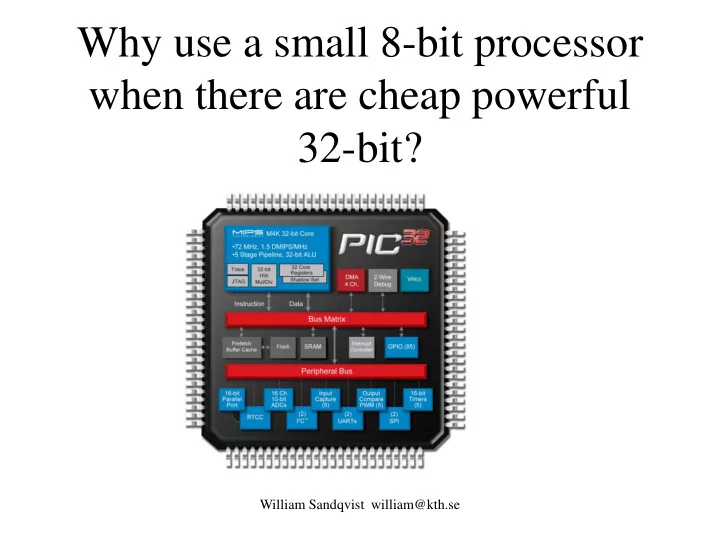
Why use a small 8-bit processor when there are cheap powerful - - PowerPoint PPT Presentation
Why use a small 8-bit processor when there are cheap powerful 32-bit? William Sandqvist william@kth.se 8-bit processor close to the sensor? A simple sensor often has a weak output signal. It may need to be connected with an expensive cable
William Sandqvist william@kth.se
William Sandqvist william@kth.se
William Sandqvist william@kth.se
Analog signal transfer Digital signal transfer
processor
cable
William Sandqvist william@kth.se
William Sandqvist william@kth.se
William Sandqvist william@kth.se
Programmemory: 384 words RAM-memory: 16 Byte 8 bit AD-converter 2 channels Internal oscillator 4 MHz TIMER0 Voltage 2…5,5 V Typical current consumption: 175μA
William Sandqvist william@kth.se
William Sandqvist william@kth.se
William Sandqvist william@kth.se
William Sandqvist william@kth.se
William Sandqvist william@kth.se
William Sandqvist william@kth.se
William Sandqvist william@kth.se
William Sandqvist william@kth.se
To get compact code a thorough ”page planning ” is needed, something that one hardly cares about during prototype development.
William Sandqvist william@kth.se
Mapped RAM, same register is found in all banks - you do not have to change rambank!
William Sandqvist william@kth.se
William Sandqvist william@kth.se
Best use of RAM banks requires a lot of planning, something one hardly cares about during prototype development.
William Sandqvist william@kth.se
William Sandqvist william@kth.se
William Sandqvist william@kth.se
William Sandqvist william@kth.se
No at KIA's factory outside Zilina it will take 18 manhours to build a car (this is worldrecord! Toyota will need 30 manhours). The solution is a Pipeline. 18 hours is 1080 minuts, så build is done in parallell at 1080 one minute stations. The factory has 3000 employees working in three shifts, ie 1000 workers per shift. Many of the station are thus completely robotized.
William Sandqvist william@kth.se
William Sandqvist william@kth.se
William Sandqvist william@kth.se
William Sandqvist william@kth.se
William Sandqvist william@kth.se
William Sandqvist william@kth.se
William Sandqvist william@kth.se
William Sandqvist william@kth.se
This counterintuitive thinking ”don’t jump if ..." is a bit special for PIC and no longer common to other processor types.
William Sandqvist william@kth.se
William Sandqvist william@kth.se
William Sandqvist william@kth.se
William Sandqvist william@kth.se
William Sandqvist william@kth.se
William Sandqvist william@kth.se
William Sandqvist william@kth.se
init CLRF PORTB; MOVLW 10111111b; MOVWF TRISB; loop BTFSS PORTB,7; GOTO lampoff; lampon BSF PORTB,6; GOTO loop; lampoff BCF PORTB,6; GOTO loop; end;
William Sandqvist william@kth.se
Assembly language program is called "spaghetti programming". It becomes easier to follow the program jumps when you draw out the arrows.
init CLRF PORTB; reset register portB MOVLW 10111111b; get a constant to the working register W MOVWF TRISB; copy the constant to trisB register loop BTFSS PORTB,7; skip next instruction if portb.7 = 1 GOTO lampoff; jump to ”lampoff” lampon BSF PORTB,6; Set portB.6 -> light up LED GOTO loop; go on from ”loop” lampoff BCF PORTB,6; reset portB.6 -> turn off LED GOTO loop; go on from ”loop” end;
William Sandqvist william@kth.se
/* onoff.c */ /* B Knudsen Cc5x */ /* C-compiler */ /* not ANSI-C */ #include "16F690.h " #pragma config |= 0x00D4 void main( void) { TRISB.6 = 0; PORTB.7 = 1; while(1) { if ( PORTB.7==1 ) PORTB.6=1; else PORTB.6=0; } }
William Sandqvist william@kth.se
:1000000001288316031307108312071483120313A6 :10001000871C0C28071406288312031307100628D0 :02400E00D400DC :00000001FF End of file.
William Sandqvist william@kth.se
RAM: 00h : -------- -------- -------- -------- RAM: 20h : ==.***** ******** ******** ******** RAM: 40h : ******** ******** ******** ******** RAM: 60h : ******** ******** ******** ******** RAM: 80h : -------- -------- -------- -------- RAM: A0h : ******** ******** ******** ******** RAM: C0h : ******** ******** ******** ******** RAM: E0h : ******** ******** ******** ******** Codepage 0 has 68 word(s) : 3 % Codepage 1 has 0 word(s) : 0 % Symbols: * : free location
= : local variable(s) . : global variable
William Sandqvist william@kth.se
char W; char INDF, TMR0, PCL, STATUS, FSR, PORTA, PORTB; char OPTION, TRISA, TRISB; /* STATUS : */ bit Carry, DC, Zero_, PD, TO, PA0, PA1, PA2; /* FSR : */ bit FSR_5, FSR_6; char PORTC, TRISC; char PCLATH, INTCON; /* OPTION : */ bit PS0, PS1, PS2, PSA, T0SE, T0CS, INTEDG, RBPU_; /* STATUS : */ bit Carry, DC, Zero_, PD, TO, RP0, RP1, IRP; /* INTCON : */ bit RBIF, INTF, T0IF, RBIE, INTE, T0IE, GIE;
William Sandqvist william@kth.se
btsc(Carry); // void btsc(char); - BTFSC f,b btss(bit2); // void btss(char); - BTFSS f,b clrwdt(); // void clrwdt(void); - CLRWDT i = decsz(i); // char decsz(char); - DECFSZ f,d W = incsz(i); // char incsz(char); - INCFSZ f,d nop(); // void nop(void); - NOP nop2(); // void nop2(void); - GOTO next address retint(); // void retint(void); - RETFIE W = rl(i); // char rl(char); - RLF i,d i = rr(i); // char rr(char); - RRF i,d sleep(); // void sleep(void); - SLEEP skip(i); // void skip(char); - computed goto k = swap(k); // char swap(char); - SWAPF k,d
The internal functions provide "direct access" to some of the PIC processor instructions:
clearRAM(); // void clearRAM(void); An internal function that can be called to reset all data memory in the processor.
William Sandqvist william@kth.se
William Sandqvist william@kth.se
William Sandqvist william@kth.se
main ; nop(); /* to do something once */ NOP ;} SLEEP GOTO main END
void main( void) { nop(); /* to do something once */ }
William Sandqvist william@kth.se
main ; nop(); /* something once */ NOP ; while(1) ; m001 GOTO m001 END
void main( void) { nop(); /* something once */ while(1); }
while (PORTB & 0x01 == 0) /* do nothing */ ; PORTB bit 0 gets 1 when you press
while (!PORTB.0) /* do nothing */ ;
Many times the CPU has not so much to do, then you can use blocking code.
/* OK, now you have pressed the button ... */ /* OK, now you have pressed the button ... */
William Sandqvist william@kth.se
≈3 ms ≈3 ms
William Sandqvist william@kth.se
≈? ms
void main( void) { TRISB = 0b10111111; /* RB7 in, RB6 out */ while(1) { while( !PORTB.7 ) ; /* wait key pressed */ PORTB.6 = !PORTB.6; /* toggle led */ while( PORTB.7 ) ; /* wait for key released */ } } Nothing else than a random number generator, anything can happen/not happen when you press the button!
William Sandqvist william@kth.se
generator!
void main( void) { TRISB = 0b10111111; /* RB7 in, RB6 out */ while(1) { while( !PORTB.7 ) ; /* wait key pressed */ PORTB.6 = !PORTB.6; /* toggle led */ delay(5); while( PORTB.7 ) ; /* wait for key released */ delay(5); } } Wait out the contact bounces. A contact can bounce both when pressing it and when you release it!
Wait out the contact bounces (>5ms)
William Sandqvist william@kth.se
Wait out the contact bounces (>5ms)
William Sandqvist william@kth.se
void delay(char); void main( void) { TRISB = 0b10111111; /* RB7 in, RB6 out */ while(1) { while( !PORTB.7 ) ; /* wait key pressed */ PORTB.6 = !PORTB.6; /* toggle led */ delay(5); while( PORTB.7 ) ; /* wait for key released */ delay(5); } }
William Sandqvist william@kth.se
/* Delays a multiple of 1 milliseconds at 4 MHz */ /* (16F690 internal clock) using the TMR0 timer */ void delay( char millisec) { OPTION = 2; /* prescaler divide by 8 */ do { TMR0 = 0; while ( TMR0 < 125) /* 125 * 8 = 1000 */ ; } while ( -- millisec > 0); } 1000 µs millisec Nr of turns do {
} while(---); It is the after-tested loop that is the iteration procedure that best fits the PIC processor.
William Sandqvist william@kth.se
TIMER0 is an internal 8-bit modulo 256-counter which can be read/written from program. When the timer “turns around” the bit T0IF is set. If bit TOCS in OPTION register is "0" then the processor clock is counted. If bit TOCS is "1" then edges on pin T0CKI is counted. The bit PSA=0 inserts a prescaler, a frequency divider. With it active only a fraction of the incoming pulses are counted. Bits PS2 PS1 PS0 sets the prescaler division ratio.
TMR0=0; /* reset timer0 */ time=TMR0; /* store timer0 value in char variable time */ TMR0=17; /* preset timer0 to 17 */
William Sandqvist william@kth.se
TMR0 T0IF 1 MHz
William Sandqvist william@kth.se
William Sandqvist william@kth.se
while(!PORTB.0 || !PORTB.1) /* do nothing */ ; /* now one or both buttons are pressed */ if(PORTB.0) /* action for red button */ ; if(PORTB.1) /* action for black button */ ;
William Sandqvist william@kth.se
PORTB bit 0 gets 1 when one presses the key PORTB bit 1 gets 1 when one presses the key
bit flagbit; While(1) /* main programloop */ { /* examine button status */ if(PORTB.0) /* direct action for red button */ ; if(PORTB.1) flagbit = 1; else flagbit = 0; /* . . . */ /* later, act on the flagbit */ if(flagbit) /* action for black button */ ; }
Two keys, nonblocking code
One can react directly on the key status or share the information with a bitvariabel, a flag bit.
William Sandqvist william@kth.se
PORTB bit 0 gets 1 when one presses the key PORTB bit 1 gets 1 when one presses the key
bit flagbit; While(1) /* main programloop */ { /* examine button status */ if(PORTB.0) /* direct action for red button */ ; if(PORTB.1) flagbit = 1; else flagbit = 0; /* . . . */ /* later, act on the flagbit */ if(flagbit) /* action for black button */ ; delay(5); }
Wait out (>5ms) contact bounces before the nect turn in the main-loop
William Sandqvist william@kth.se
Two keys, nonblocking code
PORTB bit 0 gets 1 when one presses the key PORTB bit 1 gets 1 when one presses the key
William Sandqvist william@kth.se
William Sandqvist william@kth.se
William Sandqvist william@kth.se
William Sandqvist william@kth.se
switch(d) { case 0×00 : k='1'; break; case 0×01 : k='2'; break; case 0×02 : k='3'; break; case 0×04 : k='4'; break; case 0×05 : k='5'; break; case 0×06 : k='6'; break; case 0×08 : k='7'; break; case 0×09 : k='8'; break; case 0×0A : k='9'; break; case 0×0C : k='*'; break; case 0×0D : k='0'; break; case 0×0E : k='#'; break; /* 0×03,0×07,0×0B,0×0F */ default : k=' '; }
William Sandqvist william@kth.se
William Sandqvist william@kth.se
UML-state chart
William Sandqvist william@kth.se
/* Blink1: 1s ON - 1s OFF */ /* Blink2: 0,2s ON - 0,2s OFF - 1s ON - 1s OFF */
William Sandqvist william@kth.se
while(1) { /* Blink1: 1s ON - 1s OFF */ switch(State1) { case 0: PORTB_copy.6=1; /* Blink1 = ON */ Time1++; if( Time1 == 10 ) { State1 = 1; Time1 = 0; } break; case 1: PORTB_copy.6=0; /* Blink1 = OFF */ Time1++; if( Time1 == 10 ) { State1 = 0; Time1 = 0; } } PORTB = PORTB_copy; delay10(10); /* 0,1 sec delay each lap */ }
William Sandqvist william@kth.se
while(1) { /* Blink2: 0,2s ON - 0,2s OFF - 1s ON - 1s OFF */ switch(State2){ case 0: PORTB_copy.5 = 1; Time2++; /* Blink2 ON */ if( Time2 == 2 ) { State2 = 1; Time2 = 0; } break; case 1: PORTB_copy.5 = 0; Time2++; /* Blink2 OFF */ if( Time2 == 2 ) { State2 = 2; Time2 = 0; } break; case 2: PORTB_copy.5 = 1; Time2++; /* Blink2 ON */ if( Time2 == 10 ) { State2 = 3; Time2 = 0; } break; case 3: PORTB_copy.5 = 0; Time2++; /* Blink2 OFF */ if( Time2 == 10 ) { State2 = 0; Time2 = 0; } } PORTB=PORTB_copy: delay10(10); /* 0,1 sek delay */ }
William Sandqvist william@kth.se
while(1) { /* Blink1: 1s ON - 1s OFF */ switch(State1) { case 0: ... ; break; case 1: ... ; } /* Blink2: 0,2s ON - 0,2s OFF - 1s ON - 1s OFF */ switch(State2) { case 0: ... ; break; case 1: ... ; break; case 2: ... ; break; case 3: ... ; } PORTB = PORTB_copy; delay10(10); /* 0,1 sek delay */ }
William Sandqvist william@kth.se
William Sandqvist william@kth.se