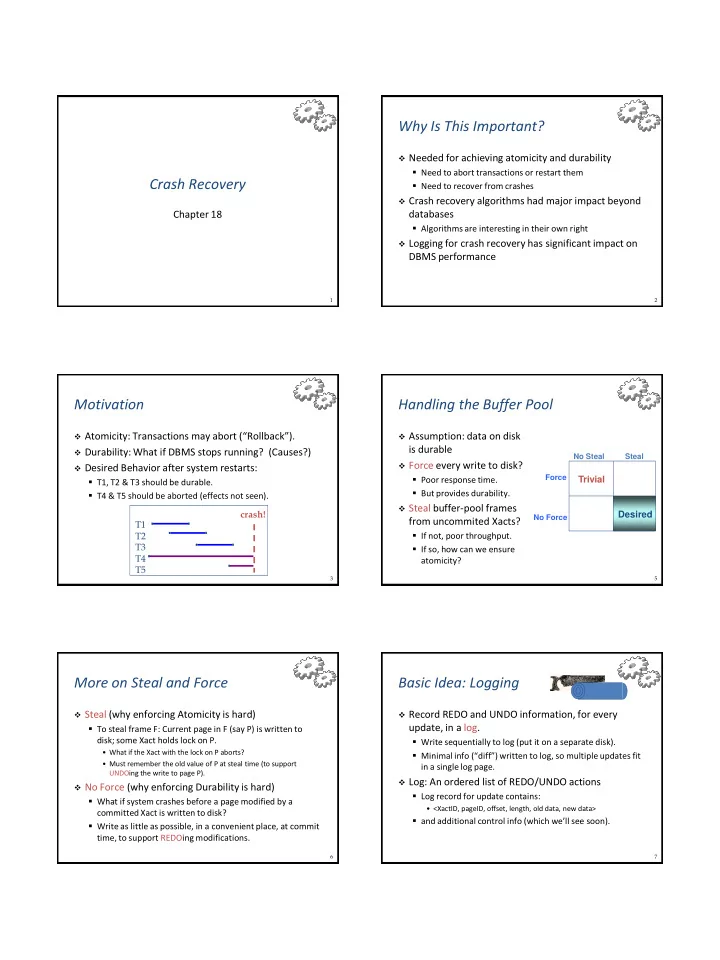
Why Is This Important? Needed for achieving atomicity and durability - - PDF document

why is this important
SMART_READER_LITE
LIVE PREVIEW

Why Is This Important? Needed for achieving atomicity and durability - - PDF document

Why Is This Important? Needed for achieving atomicity and durability Need to abort transactions or restart them Crash Recovery Need to recover from crashes Crash recovery algorithms had major impact beyond Chapter 18 databases


slide-1
SLIDE 1

1

Crash Recovery

Chapter 18

2

Why Is This Important?

 Needed for achieving atomicity and durability

  • Need to abort transactions or restart them
  • Need to recover from crashes

 Crash recovery algorithms had major impact beyond

databases

  • Algorithms are interesting in their own right

 Logging for crash recovery has significant impact on

DBMS performance

3

Motivation

 Atomicity: Transactions may abort (“Rollback”).  Durability: What if DBMS stops running? (Causes?)  Desired Behavior after system restarts:

  • T1, T2 & T3 should be durable.
  • T4 & T5 should be aborted (effects not seen).

crash! T1 T2 T3 T4 T5

5

Handling the Buffer Pool

 Assumption: data on disk

is durable

 Force every write to disk?

  • Poor response time.
  • But provides durability.

 Steal buffer-pool frames

from uncommited Xacts?

  • If not, poor throughput.
  • If so, how can we ensure

atomicity?

Force No Force No Steal Steal

Trivial Desired

6

More on Steal and Force

 Steal (why enforcing Atomicity is hard)

  • To steal frame F: Current page in F (say P) is written to

disk; some Xact holds lock on P.

  • What if the Xact with the lock on P aborts?
  • Must remember the old value of P at steal time (to support

UNDOing the write to page P).  No Force (why enforcing Durability is hard)

  • What if system crashes before a page modified by a

committed Xact is written to disk?

  • Write as little as possible, in a convenient place, at commit

time, to support REDOing modifications.

7

Basic Idea: Logging

 Record REDO and UNDO information, for every

update, in a log.

  • Write sequentially to log (put it on a separate disk).
  • Minimal info (“diff”) written to log, so multiple updates fit

in a single log page.

 Log: An ordered list of REDO/UNDO actions

  • Log record for update contains:
  • <XactID, pageID, offset, length, old data, new data>
  • and additional control info (which we’ll see soon).
slide-2
SLIDE 2

8

Write-Ahead Logging (WAL)

 The Write-Ahead Logging Protocol:

  • Must force the log record for an update before the

corresponding data page gets to disk.

  • Needed for atomicity
  • Must write all log records for a Xact before commit.
  • Needed for durability

 Exactly how is logging (and recovery!) done?

  • We’ll study the ARIES algorithms.

9

WAL & the Log

 Each log record has a unique Log

Sequence Number (LSN).

  • LSN is always increasing.

 Each data page contains a

pageLSN.

  • The LSN of the most recent log record

for an update to that page.

 System keeps track of flushedLSN.

  • The max LSN flushed to disk so far.

 WAL: Before a page is written,

  • pageLSN  flushedLSN

LSNs DB pageLSNs RAM flushedLSN

pageLSN

Log records flushed to disk “Log tail” in RAM

10

Log Record Fields

 prevLSN: LSN of previous log record for the same

transaction

 XactID: ID of transaction generating the log record  type: Type of log record  Update log records also contain

  • pageID: ID of modified page
  • length: number of bytes changed
  • offset: offset where change occurred
  • before-image: value of changed bytes before the change
  • after-image: value of changed bytes after the change

11

Actions Logged

 Page update

  • PageLSNset to LSN of log record

 Commit

  • Force-writes log record: appends record to log, flushes log up to this log record to

stable storage

  • Xact is considered to have committed only after its commit log record is written to

stable storage

 Abort  End

  • Indicates that all additional steps required after writing a commit or abort log

record are completed (e.g., undo of Xact)

 Undoing an update

  • Compensation log record (CLR), indicating that an action described by a log record

is undone (important if database crashes again during recovery!)

  • Written just before the action is undone
  • Action described by CLR will never be undone, because decision to roll back Xact is

final

12

Other Log-Related State

 Transaction Table:

  • One entry per active Xact.
  • Contains XactID, status (running, committed, aborted), and

lastLSN.

 Dirty Page Table:

  • One entry per dirty page in buffer pool.
  • Contains recLSN—the LSN of the log record which first

caused the page to be dirty.

  • Earliest log record that might have to be redone for this page

during restart from crash

13

Normal Execution of an Xact

 Series of reads and writes, followed by commit or

abort.

  • We will assume that an individual write is atomic on disk.
  • In practice, additional details to deal with non-atomic writes.

 Strict 2PL.  STEAL, NO-FORCE buffer management, with Write-

Ahead Logging.

slide-3
SLIDE 3

14

Checkpointing

 Periodically, the DBMS creates a checkpoint, in order to

minimize the time taken to recover in the event of a system crash. Write to log:

  • begin_checkpoint record: Indicates when chkpt began.
  • end_checkpoint record: Contains current Xact Table and Dirty

Page Table. This is a `fuzzy checkpoint’:

  • Other Xacts continue to run; so these tables are accurate only as of

the time of the begin_checkpointrecord.

  • No attempt to force dirty pages to disk
  • Effectiveness of checkpoint limited by oldest unwritten change to a

dirty page. (So it’s a good idea to periodically flush dirty pages to disk!)

  • Store LSN of chkpt record in a known safe place (master record).

15

The Big Picture: What’s Stored Where

DB Data pages

each with a pageLSN

Xact Table

lastLSN status

Dirty Page Table

recLSN

flushedLSN RAM

prevLSN XactID type length pageID

  • ffset

before-image after-image

LogRecords LOG master record

16

Simple Transaction Abort

 For now, consider an explicit abort of a Xact.

  • No crash involved.

 We want to “play back” the log in reverse order,

UNDOing updates.

  • Get lastLSN of Xact from Xact table.
  • Can follow chain of log records backward via the prevLSN

field.

  • Before starting UNDO, write an Abort log record.
  • For recovering from crash during UNDO!

17

Abort (cont.)

 To perform UNDO, must have a lock on data.

  • No problem!

 Before restoring old value of a page, write a CLR:

  • You continue logging while you UNDO!
  • CLR has one extra field: undoNextLSN
  • Points to the next LSN to undo (= the prevLSN of the record we’re

currently undoing).

  • CLRs never Undone (but they might be Redone when

repeating history: guarantees Atomicity!)

 At end of UNDO, write an “end” log record.

18

Transaction Commit

 Write commit record to log.  All log records up to Xact’s lastLSN are flushed.

  • Guarantees that flushedLSN  lastLSN.
  • Note that log flushes are sequential, synchronous writes to

disk.

  • Many log records per log page.

 Commit() returns.  Write end record to log.

19

Crash Recovery: Big Picture

 Start from a checkpoint

  • Found via master record.

 Three phases. Need to:

  • Figure out which Xacts

committed and which failed since checkpoint (Analysis).

  • REDO all actions of committed

Xacts.

  • UNDO effects of failed Xacts.

Oldest log

  • rec. of Xact

active at crash Smallest recLSN in dirty page table after Analysis Last chkpt CRASH

A R U

slide-4
SLIDE 4

20

Recovery: The Analysis Phase

 Reconstruct state at latest checkpoint.

  • Get dirty page table and transaction table from end_checkpoint

record.

 Scan log forward from begin_checkpoint.

  • End record: Remove Xact from Xact table.
  • Other records: Add new Xact to Xact table, set lastLSN=LSN,

change Xact status on commit.

  • Update record: If P not in Dirty Page Table,
  • Add P to D.P.T., set its recLSN=LSN.

 After reaching end of log:

  • Know all Xacts that were active at time of crash
  • Know all dirty pages (maybe some false positives, but that’s ok)
  • Know smallest recLSN of all dirty pages
  • That’s where the REDO phase has to start

21

Recovery: The REDO Phase

 We repeat History to reconstruct state at crash:

  • Reapply all updates (even of aborted Xacts!), redo CLRs.

 Scan forward from log record with smallest recLSN of

all dirty pages. For each CLR or update log record with LSN L, REDO the action unless:

  • Affected page is not in the Dirty Page Table, or
  • Affected page is in D.P.T., but has recLSN > L, or
  • pageLSN (in DB)  L. (need to read page from disk for this)

 To REDO an action:

  • Reapply logged action.
  • Set pageLSN to L. No additional logging!

22

Recovery: The UNDO Phase

 Know “loser” Xacts from reconstructed Xact Table

  • Xact Table has lastLSN (most recent log record) for each Xact

1.

ToUndo={ L | L is lastLSN of a loser Xact}

2.

Repeat:

  • Choose largest LSN L among ToUndo.
  • If L is a CLR record and its undoNextLSN is NULL
  • Write an End record for this Xact.
  • If L is a CLR record and its undoNextLSN is not NULL
  • Add undoNextLSN to ToUndo
  • Else this LSN is an update. Undo the update, write a CLR, add

update log record’s prevLSN to ToUndo.

3.

Until ToUndo is empty.

23

Example of Recovery

begin_checkpoint end_checkpoint update: T1 writes P5 update T2 writes P3 T1 abort CLR: Undo T1 LSN 10 T1 End update: T3 writes P1 update: T2 writes P5 CRASH, RESTART

LSN LOG

00 05 10 20 30 40 45 50 60 Xact Table lastLSN status Dirty Page Table recLSN flushedLSN

ToUndo

prevLSNs

RAM

24

Example: Crash During Restart!

begin_checkpoint, end_checkpoint update: T1 writes P5 update T2 writes P3 T1 abort CLR: Undo T1 LSN 10, T1 End update: T3 writes P1 update: T2 writes P5 CRASH, RESTART CLR: Undo T2 LSN 60 CLR: Undo T3 LSN 50, T3 end CRASH, RESTART CLR: Undo T2 LSN 20, T2 end

LSN LOG

00,05 10 20 30 40,45 50 60 70 80,85 90 Xact Table lastLSN status Dirty Page Table recLSN flushedLSN

ToUndo

undonextLSN

RAM

25

Additional Crash Issues

 Previous example showed crash during UNDO  What happens if system crashes during Analysis?

  • Just start Analysis phase again

 What about crash during REDO?

  • Standard restart, but changes written to disk during partial

REDO need not be performed again

 How do you limit the amount of work in REDO?

  • Flush asynchronously in the background.
  • Watch “hot spots”!

 How do you limit the amount of work in UNDO?

  • Avoid long-running Xacts.
slide-5
SLIDE 5

26

Summary of Logging/Recovery

 Recovery Manager guarantees Atomicity and

Durability.

 Use WAL to allow STEAL/NO-FORCE without

sacrificing correctness.

 LSNs identify log records; linked into backwards

chains per transaction (via prevLSN).

 pageLSN allows comparison of data page and log

records.

27

Summary (cont.)

 Checkpointing: A quick way to limit the amount of

log to scan on recovery.

 Recovery works in three phases:

  • Analysis: Forward from checkpoint.
  • Redo: Forward from oldest recLSN of dirty page.
  • Undo: Backward from log end to first LSN of oldest Xact

alive at crash.

 Upon Undo, write CLRs.  Redo “repeats history”: Simplifies the logic!