What is state? You see a DPS officer approaching you. Are you happy? - - PowerPoint PPT Presentation

what is state
SMART_READER_LITE
LIVE PREVIEW

What is state? You see a DPS officer approaching you. Are you happy? - - PowerPoint PPT Presentation

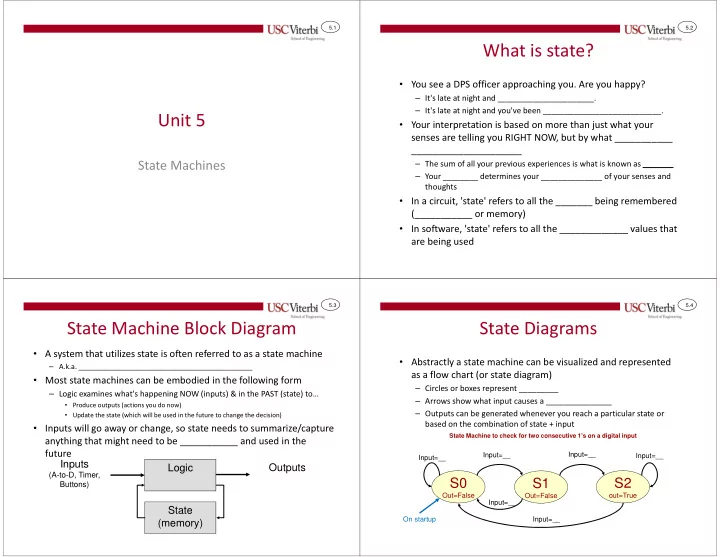
5.1 5.2 What is state? You see a DPS officer approaching you. Are you happy? It's late at night and ______________________. It's late at night and you've been ___________________________. Unit 5 Your interpretation is based on


slide-1
SLIDE 1

5.1

Unit 5

State Machines

5.2

What is state?

  • You see a DPS officer approaching you. Are you happy?

– It's late at night and ______________________. – It's late at night and you've been ___________________________.

  • Your interpretation is based on more than just what your

senses are telling you RIGHT NOW, but by what ___________ _____________________

– The sum of all your previous experiences is what is known as _______ – Your ________ determines your ______________ of your senses and thoughts

  • In a circuit, 'state' refers to all the _______ being remembered

(___________ or memory)

  • In software, 'state' refers to all the _____________ values that

are being used

5.3

State Machine Block Diagram

  • A system that utilizes state is often referred to as a state machine

– A.k.a. ____________________________________________

  • Most state machines can be embodied in the following form

– Logic examines what's happening NOW (inputs) & in the PAST (state) to…

  • Produce outputs (actions you do now)
  • Update the state (which will be used in the future to change the decision)
  • Inputs will go away or change, so state needs to summarize/capture

anything that might need to be ___________ and used in the future Logic Inputs

(A-to-D, Timer, Buttons)

Outputs State (memory)

5.4

State Diagrams

  • Abstractly a state machine can be visualized and represented

as a flow chart (or state diagram)

– Circles or boxes represent _________ – Arrows show what input causes a _______________ – Outputs can be generated whenever you reach a particular state or based on the combination of state + input

S0

Out=False

S1

Out=False

S2

  • ut=True

Input=__ Input=__ Input=__ Input=__ Input=__ Input=__

State Machine to check for two consecutive 1's on a digital input

On startup

slide-2
SLIDE 2

5.5

Washing Machine State Diagram

We move through the states based on the

  • conditions. Outputs

get asserted when the machine is in that state and the transition is true.

Idle N=2 Fill WV = 1 Agitate Motor = 1 Drain DV = 1 N = N - 1 N > 0 N = 0 COINS + DOOR COINS • DOOR FULL FULL 5 MIN 5 MIN / Reset_Timer=1 EMPTY EMPTY /RESET

Stay in the initial state until there is enough money (coins) and the door is closed

5.6

Washing Machine State Diagram

Idle N=2 Fill WV = 1 Agitate Motor = 1 Drain DV = 1 N = N - 1 N > 0 N = 0 COINS + DOOR COINS • DOOR FULL FULL 5 MIN 5 MIN / Reset_Timer=1 EMPTY EMPTY /RESET

Move to the Fill state when there is enough money (coins) and the door is closed

5.7

Washing Machine State Diagram

Stay in the Fill state until it is full…also set the Water Valve Open output to be true

Idle N=2 Fill WV = 1 Agitate Motor = 1 Drain DV = 1 N = N - 1 N > 0 N = 0 COINS + DOOR COINS • DOOR FULL FULL 5 MIN 5 MIN / Reset_Timer=1 EMPTY EMPTY /RESET 5.8

Washing Machine State Diagram

Move to the Agitate state after it is full

Idle N=2 Fill WV = 1 Agitate Motor = 1 Drain DV = 1 N = N - 1 N > 0 N = 0 COINS + DOOR COINS • DOOR FULL FULL 5 MIN 5 MIN / Reset_Timer=1 EMPTY EMPTY /RESET

slide-3
SLIDE 3

5.9

Thermostat

  • Sample state machine to control a thermostat

INRANGE

heater = off ac = off

HEAT

heater = on

COOL

ac = on

PROGRAM

(Update THRESH_HI & THRESH_LO)

OFF

heater = off ac = off

temp < THESH_LO temp > THESH_HI temp >= THRESH_LO temp <= THRESH_HI PROG_BTN DONE_BTN RUN_BTN RUN_BTN OFF_BTN PROG_BTN temp > THESH_HI temp < THESH_LO 5.10

Counter Example

  • Consider a system that has two button inputs: UP and DOWN and a

1-decimal digit display. It should count up or down at a rate of 500 milliseconds and change directions only when the appropriate direction button is pressed

  • Every time interval we need to _______________ to check for a direction

change, _______ the state and then based on the current state, ______________________ the count

UP

cnt++ (wrap to 0 after 9)

DOWN

cnt-- (wrap to 9 after 0)

____________ ______ ____________

State Machine to count up or down (and continue counting) based on 2 pushbutton inputs: UP and DOWN

On startup ______

Counter

UP DOWN DIGIT DISPLAY

5.11

Software vs. Hardware

  • Software

– State = just a variable(s) – Logic = if statements to update the next state

  • if(state == 'A' && input == 1)

{ state = 'B'; }

– Transitions triggered by input

  • r timers

– We'll start by implementing state machines in SW

  • Hardware

– State = Register (D-Flip-Flops) – Logic = AND/OR Gates to produce the next state & outputs – Transitions triggered by clock signal – More on this later in the semester

Logic Inputs

(ADC, Timer, Buttons)

Outputs State (memory)

5.12

int main() { bool coins, door; int currst = 0, nextst = 0, n = 2; while(1) { _delay_ms(10); coins = PIND & (1 << PD0); door = PIND & (1 << PD1); if(currst == 0){ if( coins && door ){ nextst = 1; } } else if(currst == 1){ ... } ... currst = nextst; // update state } return 0; }

Software Implementation

  • Store 'state' in some variable and assign ________ to

represent state (0=Idle, 1=Fill, etc.)

  • Use a timer or just ______

certain inputs and then make appropriate transitions

State Diagram for a Washing Machine

Idle N=2 Fill WV = 1 Agitate Motor = 1 Drain DV = 1 N = N - 1 N > 0 N = 0 COINS + DOOR COINS • DOOR FULL FULL 5 MIN 5 MIN / Reset _Timer=1 EMPTY EMPTY /RESET

Use nested 'if' statements:

  • uter 'if' selects

state then inner 'if' statements examine inputs

slide-4
SLIDE 4

5.13

More Implementation Tips

  • Continuously loop
  • Each iteration:

– Poll inputs – Use _____________ to decide current state – In each state, update state appropriately based on desired transitions from that state – Produce appropriate output from that state

// input = PD0, output = PD7 int main() { // be sure to init. state unsigned char state=0, nstate=0; unsigned char input, output; while(1) { _delay_ms(10); input = PIND & (1 << PD0); if(state == 0){ PORTD &= ~(1 << PD7); if( input ){ nstate = 1; } } else if(state == 1){ PORTD &= ~(1 << PD7); if( input ){ nstate = 2; } else { state = 0; } } else { // state == 2 PORTD |= (1 << PD7); if( !input ) { nstate = 0; } } state = nstate; // update state } return 0; }

5.14

State Machine Implementation Template

int main() { ... unsigned char cstate=0, nstate=0; // be sure to init. state unsigned char input, output; while(1) { _delay_ms(10); // choose appropriate delay // Capture inputs input = PIND & (1 << PD0); // Use if..else if statement to select current state // Don't use if..if..if since many can trigger if(cstate == 0){ PORTD &= ~(1 << PD7); // Perform outputs based on state // In each state use if..else if statement // to determine input and go to next state if( input ){ nstate = 1; /* transition */ // Perform outputs based on state + inputs } else { nstate = 2; /* transition */ // Perform outputs based on state + inputs } } else if(cstate == 1){ if( input ){ nstate = 2; } else { nstate = 0; } } else if(cstate == 2) { if( !input ) { nstate = 0; } } } return 0; }

Select current state

Select input val. Select input val. 5.15

State Machines as a Problem Solving Technique

  • Modeling a problem as a state machine is a powerful

problem-solving tool

  • When you need to write a program, design HW, or

solve a more abstract problem at least consider if it can be modeled with a state machine

– Ask questions like:

  • What do I need _______________ to interpret my inputs or

produce my outputs? [e.g. Checking for two consecutive 1's]

  • Is there a distinct sequence of __________________ that are used

(each step/mode is a ________) [e.g. Thermostat, washing machine, etc.]

5.16

Formal Definition

  • Mathematically, a state machine is defined by a 6-tuple (a

tuple is just several pieces of information that go together):

– A set of possible _____________ – A set of possible _____________ – A set of possible _____________ – An _______________ – A transition function: {______ x ______} -> ______________ – An output function: {______ x _______} -> ________________

slide-5
SLIDE 5

5.17

Formal Definition

  • Mathematically, a state machine consists of:

– A set of possible input values: {________} – A set of possible states: {____________} – A set of possible outputs: {___________} – An initial state = ____ – A transition function:

  • {States x Inputs} -> the Next state

– An output function:

  • {States x Inputs} -> Output value(s)

Inputs State 1 S0 S1 S2

State Transition Function

State Outputs S0 S1 S2

Output Function

5.18

MORE EXAMPLES IF TIME

HW (Instruction Cycle) & Software (String Matching)

5.19

More State Machines

  • State machines are all over the place in digital

systems

  • Instruction Cycle of a computer processor

Fetch Decode

Execute

! Error && ! Interrupt Error || Interrupt On Startup

Process Exception

5.20

Another Example

  • On the Internet, packets of data are transferred between

“router” devices

  • Each router receives thousands of packet per second each of

100’s-1000’s of bytes of data

  • These packets may contain viruses, spam, etc.
  • Given patterns (common spam words or virus definitions), can

we find these in the data and filter them out?

1110 0010 0101 1001 0110 1011 0000 1100 0100 1101 0111 1111 1010 1100 0010 1011 0001 0110 0011 1000

slide-6
SLIDE 6

5.21

Looking for Signatures

  • Look for specific patterns (i.e. signatures) such

as data that would indicate a specific virus, words that are typically spam, etc.

  • Databases of these signatures are available
  • We take a packet and search for the presence
  • f any of these signatures in our database
  • If we find a signature we can drop the packet

and not deliver it

5.22

String/Pattern Matching

  • Given a large array of data (let's say text

characters) how can we efficiently find the

  • ccurrence of specific strings (patterns)?

Hello, I am Barr. Phillip Butulezi, an attorney

  • f law to a deceased Immigrant property

Magnate, who was based in the U.K, also referred to as my client. On the 25th of July 2000, my client, his wife, and their two Children died in the Air France concord plane crash bound for New York. They were on their way to a world cruise. win

  • ffer

cash free deceased inherit ...

Database of signatures Data stream (e.g. packet of data)

5.23

Brute Force

  • Take each character in the data stream

– Compare each string in the database to the string starting at the character in the data stream – Use strncmp()

I t w a s t h e b e s t

  • f ...

w i n

  • f f e r

Database of signatures Data stream (e.g. packet of data) 1 LARGE string (packet) Iteration: 1 2 3 On each iteration, search for each target string… Data Stream = N chars with T Targets => Run Time proportional to N*T

5.24

A Better way

  • Can we avoid checking each of the T target strings for each

character in the data stream

  • Can we take a letter from the data stream and simultaneously

track possible (partial) target string matches

– Example strings: her, hers, here, rest – Data Stream: heresthers

  • Don’t check all 4 target strings, just grab ‘h’ and see what options are possible and

which are ruled out… (i.e. keep track of all options simultaneously)

  • h [could be her or hers or here]
  • e [could still be her or hers or here]
  • r [found her! But could also be hers or here or start of rest]
  • e [found here! Could be start of rest]
  • s [Could be rest ]
  • t [Found rest ]
  • h [Could be start of her or hers or here]
slide-7
SLIDE 7

5.25

Use a state machine

  • '!' represents 'null' state

– No part of a definition found

  • Slightly different notation

used

– State label indicates the input character that would put you into that state

  • What state you’re in

"tracks" what you’ve seen thus far AND what target strings you might be about to find…

! h e r e r e s t

Terminal / Pattern Found State (i.e. output should be True)

s

Internal state

5.26

Finite State Automaton

  • Data Stream: heresthers

! h e r e r e s t s ! h e r e r e s t s ! h e r e r e s t s ! h e r e r e s t s

1 2 3 4

Run-Time proportional to N