
SLIDE 1
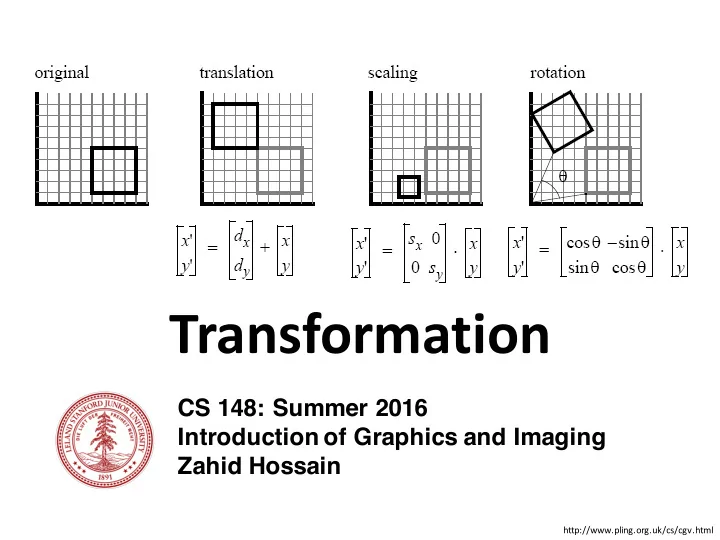
CS 148: Summer 2016 Introduction of Graphics and Imaging Zahid Hossain
Transformation
http://www.pling.org.uk/cs/cgv.html
Transformation CS 148: Summer 2016 Introduction of Graphics and - - PowerPoint PPT Presentation
Transformation CS 148: Summer 2016 Introduction of Graphics and Imaging Zahid Hossain http://www.pling.org.uk/cs/cgv.html Placement of Objects Fisher et al. (2012) 2 CS 148: Introduction to Computer Graphics and Imaging (Summer 2016)
CS 148: Summer 2016 Introduction of Graphics and Imaging Zahid Hossain
http://www.pling.org.uk/cs/cgv.html
Fisher et al. (2012)
CS 148: Introduction to Computer Graphics and Imaging (Summer 2016) – Zahid Hossain 2
Fisher et al. (2012)
CS 148: Introduction to Computer Graphics and Imaging (Summer 2016) – Zahid Hossain 3
Fisher et al. (2012)
CS 148: Introduction to Computer Graphics and Imaging (Summer 2016) – Zahid Hossain 4
5
Origin x y z
CS 148: Introduction to Computer Graphics and Imaging (Summer 2016) – Zahid Hossain
6
Origin x y z Vector Points
CS 148: Introduction to Computer Graphics and Imaging (Summer 2016) – Zahid Hossain
7
CS 148: Introduction to Computer Graphics and Imaging (Summer 2016) – Zahid Hossain 8
CS 148: Introduction to Computer Graphics and Imaging (Summer 2016) – Zahid Hossain 9
CS 148: Introduction to Computer Graphics and Imaging (Summer 2016) – Zahid Hossain 10
CS 148: Introduction to Computer Graphics and Imaging (Summer 2016) – Zahid Hossain 11
12
13
CS 148: Introduction to Computer Graphics and Imaging (Summer 2016) – Zahid Hossain 14
First Rotate 45°
CS 148: Introduction to Computer Graphics and Imaging (Summer 2016) – Zahid Hossain 15
Then Scale 2x along y
CS 148: Introduction to Computer Graphics and Imaging (Summer 2016) – Zahid Hossain 16
Rotation Scale Order of transformations
CS 148: Introduction to Computer Graphics and Imaging (Summer 2016) – Zahid Hossain 17
Rotate -> Scale Scale -> Rotate
CS 148: Introduction to Computer Graphics and Imaging (Summer 2016) – Zahid Hossain 18
CS 148: Introduction to Computer Graphics and Imaging (Summer 2016) – Zahid Hossain 19
CS 148: Introduction to Computer Graphics and Imaging (Summer 2016) – Zahid Hossain 20
CS 148: Introduction to Computer Graphics and Imaging (Summer 2016) – Zahid Hossain 21
CS 148: Introduction to Computer Graphics and Imaging (Summer 2016) – Zahid Hossain 22
4D Homogenous Coordinate 3D Cartesian Coordinate
CS 148: Introduction to Computer Graphics and Imaging (Summer 2016) – Zahid Hossain 23
CS 148: Introduction to Computer Graphics and Imaging (Summer 2016) – Zahid Hossain 24
Decrease w
CS 148: Introduction to Computer Graphics and Imaging (Summer 2016) – Zahid Hossain 25
Decrease w
CS 148: Introduction to Computer Graphics and Imaging (Summer 2016) – Zahid Hossain 26
CS 148: Introduction to Computer Graphics and Imaging (Summer 2016) – Zahid Hossain 27
(Homogenous Coordinates express both Vectors and Points)
CS 148: Introduction to Computer Graphics and Imaging (Summer 2016) – Zahid Hossain 28
Homogenous Coordinate Homogenous Coordinate
CS 148: Introduction to Computer Graphics and Imaging (Summer 2016) – Zahid Hossain 29
Convert 3D Cartesian Coordinate to Homogenous Coordinate
CS 148: Introduction to Computer Graphics and Imaging (Summer 2016) – Zahid Hossain 30
Convert 3D Cartesian Coordinate to Homogenous Coordinate
CS 148: Introduction to Computer Graphics and Imaging (Summer 2016) – Zahid Hossain 31
Convert 3D Cartesian Coordinate to Homogenous Coordinate Convert Homogenous Coordinate to Cartesian Coordinate
CS 148: Introduction to Computer Graphics and Imaging (Summer 2016) – Zahid Hossain 32
Convert 3D Cartesian Coordinate to Homogenous Coordinate Convert Homogenous Coordinate to Cartesian Coordinate
CS 148: Introduction to Computer Graphics and Imaging (Summer 2016) – Zahid Hossain 33
CS 148: Introduction to Computer Graphics and Imaging (Summer 2016) – Zahid Hossain 34
CS 148: Introduction to Computer Graphics and Imaging (Summer 2016) – Zahid Hossain 35
CS 148: Introduction to Computer Graphics and Imaging (Summer 2016) – Zahid Hossain 36
CS 148: Introduction to Computer Graphics and Imaging (Summer 2016) – Zahid Hossain 37
CS 148: Introduction to Computer Graphics and Imaging (Summer 2016) – Zahid Hossain 38
CS 148: Introduction to Computer Graphics and Imaging (Summer 2016) – Zahid Hossain 39
CS 148: Introduction to Computer Graphics and Imaging (Summer 2016) – Zahid Hossain 40
CS 148: Introduction to Computer Graphics and Imaging (Summer 2016) – Zahid Hossain 41
CS 148: Introduction to Computer Graphics and Imaging (Summer 2016) – Zahid Hossain 42
CS 148: Introduction to Computer Graphics and Imaging (Summer 2016) – Zahid Hossain 43
CS 148: Introduction to Computer Graphics and Imaging (Summer 2016) – Zahid Hossain 44
CS 148: Introduction to Computer Graphics and Imaging (Summer 2016) – Zahid Hossain 45
CS 148: Introduction to Computer Graphics and Imaging (Summer 2016) – Zahid Hossain 46
CS 148: Introduction to Computer Graphics and Imaging (Summer 2016) – Zahid Hossain 47
CS 148: Introduction to Computer Graphics and Imaging (Summer 2016) – Zahid Hossain 48
CS 148: Introduction to Computer Graphics and Imaging (Summer 2016) – Zahid Hossain 49
Combined = Translate(0,1) Rotate(45°) Translate(1,1) Translate(1,1) Rotate(45°) Translate(0,1) Order of Transforms
CS 148: Introduction to Computer Graphics and Imaging (Summer 2016) – Zahid Hossain 50
Combined = Translate(0,1) Rotate(45°) Translate(1,1) Translate(0,1) Rotate(45°) Translate(1,1) Order of Transform
CS 148: Introduction to Computer Graphics and Imaging (Summer 2016) – Zahid Hossain 51
Combined = Translate(0,1) Rotate(45°) Translate(1,1) Translate(0,1) Rotate(45°) Translate(1,1) Order of Transform
CS 148: Introduction to Computer Graphics and Imaging (Summer 2016) – Zahid Hossain 52 translate(0,4) drawTorso() pushMatrix() translate(1.5,0) rotateX(leftHipRotate) drawThigh() pushMatrix() translate(0,-2) rotateX(leftKneeRotate) drawLeg() ... popMatrix() popMatrix() pushMatrix() translate(-1.5,0) rotateX(rightHipRotate) // Draw the right side ... ...
x y
CurrentMatrix = Translate(0,4) Matrix Stack
CS 148: Introduction to Computer Graphics and Imaging (Summer 2016) – Zahid Hossain 53 translate(0,4) drawTorso() pushMatrix() translate(1.5,0) rotateX(leftHipRotate) drawThigh() pushMatrix() translate(0,-2) rotateX(leftKneeRotate) drawLeg() ... popMatrix() popMatrix() pushMatrix() translate(-1.5,0) rotateX(rightHipRotate) // Draw the right side ... ...
x y
CurrentMatrix = Translate(0,4) Matrix Stack Translate(0,4)
CS 148: Introduction to Computer Graphics and Imaging (Summer 2016) – Zahid Hossain 54 translate(0,4) drawTorso() pushMatrix() translate(1.5,0) rotateX(leftHipRotate) drawThigh() pushMatrix() translate(0,-2) rotateX(leftKneeRotate) drawLeg() ... popMatrix() popMatrix() pushMatrix() translate(-1.5,0) rotateX(rightHipRotate) // Draw the right side ... ...
x y
CurrentMatrix = translate(0,4) translate(1.5,0) rotateX(leftHipRotate) translate(0,-2) rotate(leftKneeRotate) Matrix Stack
translate(0,4) translate(0,4) translate(1.5,0) rotateX(leftHipRotate)
CS 148: Introduction to Computer Graphics and Imaging (Summer 2016) – Zahid Hossain 55 translate(0,4) drawTorso() pushMatrix() translate(1.5,0) rotateX(leftHipRotate) drawThigh() pushMatrix() translate(0,-2) rotateX(leftKneeRotate) drawLeg() ... popMatrix() popMatrix() pushMatrix() translate(-1.5,0) rotateX(rightHipRotate) // Draw the right side ... ...
x y
CurrentMatrix = translate(0,4) translate(1.5,0) rotateX(leftHipRotate) Matrix Stack
translate(0,4)
CS 148: Introduction to Computer Graphics and Imaging (Summer 2016) – Zahid Hossain 56 translate(0,4) drawTorso() pushMatrix() translate(1.5,0) rotateX(leftHipRotate) drawThigh() pushMatrix() translate(0,-2) rotateX(leftKneeRotate) drawLeg() ... popMatrix() popMatrix() pushMatrix() translate(-1.5,0) rotateX(rightHipRotate) // Draw the right side ... ...
x y
CurrentMatrix = translate(0,4) Matrix Stack
CS 148: Introduction to Computer Graphics and Imaging (Summer 2016) – Zahid Hossain 57 translate(0,4) drawTorso() pushMatrix() translate(1.5,0) rotateX(leftHipRotate) drawThigh() pushMatrix() translate(0,-2) rotateX(leftKneeRotate) drawLeg() ... popMatrix() popMatrix() pushMatrix() translate(-1.5,0) rotateX(rightHipRotate) // Draw the right side ... ...
x y
CurrentMatrix = translate(0,4) translate(-1.5,0) rotateX(rightHipRotate) Matrix Stack
translate(0,4)
CS 148: Introduction to Computer Graphics and Imaging (Summer 2016) – Zahid Hossain 58
x y
Torso RightThigh RightLeg translate(0,4) translate(1.5,0) rotateX(rightHipRotate) translate(0,-2) rotateX(rightLegRotate) popMatrix()
Left Side
pushMatrix() pushMatrix() pushMatrix()
CS 148: Introduction to Computer Graphics and Imaging (Summer 2016) – Zahid Hossain 59
world.
CS 148: Introduction to Computer Graphics and Imaging (Summer 2016) – Zahid Hossain 60
CS 148: Introduction to Computer Graphics and Imaging (Summer 2016) – Zahid Hossain 61
CS 148: Introduction to Computer Graphics and Imaging (Summer 2016) – Zahid Hossain 62
CS 148: Introduction to Computer Graphics and Imaging (Summer 2016) – Zahid Hossain 63
CS 148: Introduction to Computer Graphics and Imaging (Summer 2016) – Zahid Hossain 64
CS 148: Introduction to Computer Graphics and Imaging (Summer 2016) – Zahid Hossain 65
http://www.songho.ca/opengl/gl_projectionmatrix.html
NDC (Normalized Device Coordinate)
CS 148: Introduction to Computer Graphics and Imaging (Summer 2016) – Zahid Hossain 66
CS 148: Introduction to Computer Graphics and Imaging (Summer 2016) – Zahid Hossain 67
CS 148: Introduction to Computer Graphics and Imaging (Summer 2016) – Zahid Hossain 68
CS 148: Introduction to Computer Graphics and Imaging (Summer 2016) – Zahid Hossain 69
Solving for A and B
CS 148: Introduction to Computer Graphics and Imaging (Summer 2016) – Zahid Hossain 70
CS 148: Introduction to Computer Graphics and Imaging (Summer 2016) – Zahid Hossain 71
0.5 1.0
CS 148: Introduction to Computer Graphics and Imaging (Summer 2016) – Zahid Hossain 72
0.5 1.0
CS 148: Introduction to Computer Graphics and Imaging (Summer 2016) – Zahid Hossain 73
CS 148: Introduction to Computer Graphics and Imaging (Summer 2016) – Zahid Hossain 74
CS 148: Summer 2016 Introduction of Graphics and Imaging Zahid Hossain
http://www.pling.org.uk/cs/cgv.html