The Internet Network Layer 15 February, 2001 1 The Internet - - PDF document

the internet network layer
SMART_READER_LITE
LIVE PREVIEW

The Internet Network Layer 15 February, 2001 1 The Internet - - PDF document

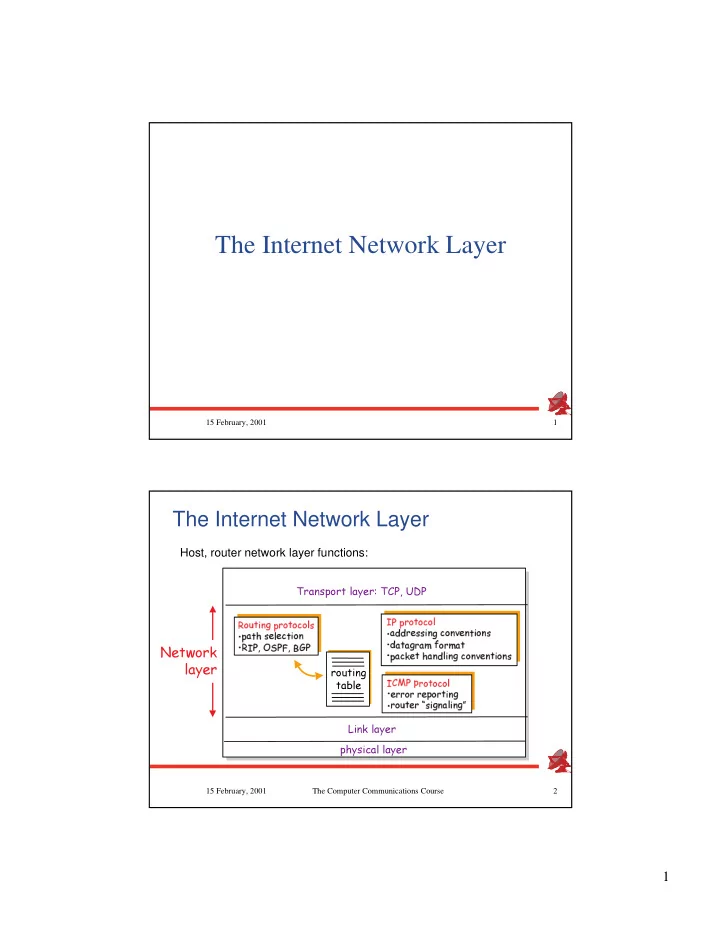
The Internet Network Layer 15 February, 2001 1 The Internet Network Layer Host, router network layer functions:


slide-1
SLIDE 1

1

15 February, 2001 1

The Internet Network Layer

2 15 February, 2001 The Computer Communications Course

The Internet Network Layer

  • Host, router network layer functions:
✂✁☎✄✝✆✟✞ ✠☛✡✌☞✎✍✏✁✎✆✑✁☎✒✝✁✔✓ ✕ ✖ ☞✝✗✎✆✝✘✙✕☛✚✛✓ ✚✂✒✝✆✜✞ ✁✂✠ ✖ ✔✢☎✣✥✤✎✦★✧✩✣☎✪✛✤☎✫✔✬✩✣ ✢☎✣✭☞☎✍✏✁✎✆✑✁☎✒☛✁✔✓ ✖ ✗✟✮✂✮✛✍✑✚☎✕✝✕✟✞ ✠✯✡✌✒☛✁✂✠☛✰✯✚✛✠✯✆✟✞ ✁✂✠☛✕ ✖ ✮✥✗✟✆✯✗✟✡☎✍✑✗☎✱✳✲☛✁✥✍✝✱✴✗✟✆ ✖ ☞✝✗☎✒✎✵☛✚✥✆★✘✟✗✂✠✯✮✶✓ ✞ ✠☛✡✌✒☛✁✂✠☛✰✯✚✔✠☛✆✟✞ ✁✂✠☛✕ ✢☎✷✛✸✹✣✭☞☎✍✏✁✎✆✑✁☎✒☛✁✔✓ ✖ ✚✂✍✝✍✏✁✥✍✺✍✏✚✂☞✝✁✥✍✑✆✟✞ ✠☛✡ ✖ ✍✏✁☎✄✜✆✑✚✔✍✼✻✽✕✟✞ ✡✥✠✯✗✔✓ ✞ ✠✯✡☎✾
slide-2
SLIDE 2

2

3 15 February, 2001 The Computer Communications Course

IP: the Internet Network Layer Protocol

  • 4

15 February, 2001 The Computer Communications Course

IP Philosophy

slide-3
SLIDE 3

3

5 15 February, 2001 The Computer Communications Course

IP Addressing

  • IP address: 32-bit identifier

for host / router network interface

  • Network interface:

connection between host, router and physical link

routers typically have multiple interfaces

host may have multiple interfaces, too

IP addresses associated with interface, not host, router

223.1.1.1 223.1.1.2 223.1.1.3 223.1.1.4 223.1.2.9 223.1.2.2 223.1.2.1 223.1.3.2 223.1.3.1 223.1.3.27 223.1.1.1 = 11011111 00000001 00000001 00000001 223 1 1 1

6 15 February, 2001 The Computer Communications Course

IP Addressing

  • IP address:

network part (high order bits)

host part (low order bits)

  • Whats a network ?

(from IP address perspective)

device interfaces with same network part of IP address

can physically reach each

  • ther without intervening

router

223.1.1.1 223.1.1.2 223.1.1.3 223.1.1.4 223.1.2.9 223.1.2.2 223.1.2.1 223.1.3.2 223.1.3.1 223.1.3.27

slide-4
SLIDE 4

4

7 15 February, 2001 The Computer Communications Course

IP Addressing

How to find the networks?

  • Detach each interface from

router, host

  • create islands of isolated

networks

223.1.1.1 223.1.1.3 223.1.1.4 223.1.2.2 223.1.2.1 223.1.2.6 223.1.3.2 223.1.3.1 223.1.3.27

223.1.1.2

223.1.7.0 223.1.7.1 223.1.8.0 223.1.8.1 223.1.9.1 223.1.9.2

  • 8

15 February, 2001 The Computer Communications Course

IP Addresses

  • ✂✁
✄☎✁ ✄✆✁ ✄ ✆✑✁ ✂✝✟✞✠✁ ✝☛✡☞✡☛✁ ✝☞✡☛✡☛✁ ✝☛✡☞✡ ✂✝☞✌☛✁ ✄✆✁ ✄✆✁ ✄ ✆✑✁ ✎✍✆✂✁ ✝☞✡☛✡☛✁ ✝☛✡☞✡☛✁ ✝☞✡☛✡ ✎✍☎✝☞✁ ✄✆✁ ✄✆✁ ✄ ✆✑✁ ✝☛✏✑✍☎✁ ✝☞✡☛✡☞✁ ✝☛✡☞✡☛✁ ✝☞✡☛✡ ✝✓✒☛✄✆✁ ✄☎✁ ✄☎✁ ✄ ✆✑✁ ✝✓✒✠✞☎✁ ✝☞✡☛✡☞✁ ✝☛✡☞✡☛✁ ✝☞✡☛✡
slide-5
SLIDE 5

5

9 15 February, 2001 The Computer Communications Course

Special IP Addresses

Convention: 0 means “this”, 1 means “all” Try: ping -s 132.65.255.255

00000000 00000000 00000000 00000000 000 ... 00 Host 11111111 11111111 11111111 11111111 Network 1111 ... 1111 127 (Anything)

This host A host on this network Broadcast on the local network Broadcast on a distant network Loopback

10 15 February, 2001 The Computer Communications Course

IP Datagram Format

4-bit Version 4-bit Header Length 8-bit Type of Service (TOS)

16-bit Total Length 16-bit Identification 3-bit Flags 13-bit Fragment Offset

8-bit Time To Live (TTL)

8-bit Protocol 16-bit Header Checksum 32-bit Source IP Address 32-bit Destination IP Address Padding Data Options (if any)

slide-6
SLIDE 6

6

11 15 February, 2001 The Computer Communications Course

IP Header Fields (I)

  • 12

15 February, 2001 The Computer Communications Course

IP Header Fields (II)

slide-7
SLIDE 7

7

13 15 February, 2001 The Computer Communications Course

IP Header Fields (III)

  • 14

15 February, 2001 The Computer Communications Course

IP Fragmentation & Reassembly

  • network links have MTU

(max.transfer size) - largest possible link-level frame.

different link types, different MTUs

  • large IP datagram divided

(fragmented) within net

  • ne datagram becomes

several datagrams

reassembled only at

final destination

IP header bits used to identify, order related fragments

✲✟✍✏✗✎✡☎✱✴✚✛✠☛✆✑✗✟✆✟✞ ✁✂✠✁ ✞ ✠✁ ✁✂✠✯✚ ✓ ✗✥✍✑✡✟✚✌✮✥✗✟✆✑✗✎✡☎✍✑✗☎✱ ✁☎✄✜✆✂ ✏✌✕✜✱ ✗✂✓ ✓ ✚✂✍✼✮✥✗✎✆✑✗✟✡✥✍✏✗☎✱✼✕ ✍✏✚☎✗✟✕☛✕☛✚✂✱☎✄✔✓ ✆
slide-8
SLIDE 8

8

15 15 February, 2001 The Computer Communications Course

Support for Fragmentation in IP Header

  • .

.

16 15 February, 2001 The Computer Communications Course

IP Fragmentation and Reassembly

slide-9
SLIDE 9

9

17 15 February, 2001 The Computer Communications Course

Fragmentation Pros and Cons

  • 18

15 February, 2001 The Computer Communications Course

ICMP: Internet Control Message Protocol

  • Type Code description

0 0 echo reply (ping) 3 0 dest. network unreachable 3 1 dest host unreachable 3 2 dest protocol unreachable 3 3 dest port unreachable 3 6 dest network unknown 3 7 dest host unknown 4 0 source quench (congestion control - not used) 8 0 echo request (ping) 9 0 route advertisement 10 0 router discovery 11 0 TTL expired 12 0 bad IP header

slide-10
SLIDE 10

10

19 15 February, 2001 The Computer Communications Course

IP Packet Forwarding: Overview (I)

Network X Network Z Network Y R1 R2 Host X.S Host Y.D

X.S => Y.D

  • IP layer on Host

IP layer on Host X.S X.S is about to send an IP packet to host is about to send an IP packet to host Y.D Y.D

IP MAC

20 15 February, 2001 The Computer Communications Course

IP Packet Forwarding: Overview (II)

Network X Network Z Network Y R1 R2 Host X.S Host Y.D

X.S => Y.D X.S => Y.D MAC(S) => MAC(R1)

  • X != Y

X != Y: Send the packet to the default router R1 : Send the packet to the default router R1

  • discover R1’s MAC address
  • encapsulate packet into the frame
  • send the frame directly to R1’s MAC address

IP MAC

slide-11
SLIDE 11

11

21 15 February, 2001 The Computer Communications Course

IP Packet Forwarding: Overview (III)

Network X Network Z Network Y R1 R2 Host X.S Host Y.D

X.S => Y.D X.S => Y.D MAC(S) => MAC(R1) X.S => Y.D

  • IP layer on R1 gets the packet from its MAC layer and consults its

IP layer on R1 gets the packet from its MAC layer and consults its routing table routing table

IP MAC

22 15 February, 2001 The Computer Communications Course

IP Packet Forwarding: Overview (IV)

Network X Network Z Network Y R1 R2 Host X.S Host Y.D

X.S => Y.D X.S => Y.D MAC(S) => MAC(R1) X.S => Y.D MAC(R1) => MAC(R2) X.S => Y.D

  • R1 routes to the network Y through R2

R1 routes to the network Y through R2

  • Discover R2’s MAC address
  • Encapsulate the packet into a frame
  • Send the frame directly to the

R2’s MAC address

IP MAC

slide-12
SLIDE 12

12

23 15 February, 2001 The Computer Communications Course

Network X Network Z Network Y R1 R2 Host X.S Host Y.D

X.S => Y.D X.S => Y.D MAC(S) => MAC(R1) X.S => Y.D MAC(R1) => MAC(R2) X.S => Y.D X.S => Y.D

IP Packet Forwarding: Overview (V)

  • IP layer on R2 gets the packet from its MAC layer and consults its

IP layer on R2 gets the packet from its MAC layer and consults its routing table routing table

IP MAC

24 15 February, 2001 The Computer Communications Course

IP Packet Forwarding: Overview (VI)

Network X Network Z Network Y R1 R2 Host X.S

X.S => Y.D X.S => Y.D MAC(S) => MAC(R1) X.S => Y.D MAC(R1) => MAC(R2) X.S => Y.D X.S => Y.D X.S => Y.D MAC(R1) => MAC(R2)

  • R2 is directly connected to the network Y

R2 is directly connected to the network Y

  • Discover Y.D’s MAC address
  • Encapsulate the packet into a frame
  • Send the frame directly to the

Y.D’s MAC address

Host Y.D

slide-13
SLIDE 13

13

25 15 February, 2001 The Computer Communications Course

IP Packet Forwarding: Overview (VII)

Network X Network Z Network Y R1 R2 Host X.S

X.S => Y.D X.S => Y.D MAC(S) => MAC(R1) X.S => Y.D MAC(R1) => MAC(R2) X.S => Y.D X.S => Y.D X.S => Y.D MAC(R1) => MAC(R2) X.S => Y.D

Host Y.D

  • IP layer on Y.D gets the packet from its MAC layer

IP layer on Y.D gets the packet from its MAC layer