The following four slides are borrowed from: Janice Redish (2011). - - PDF document
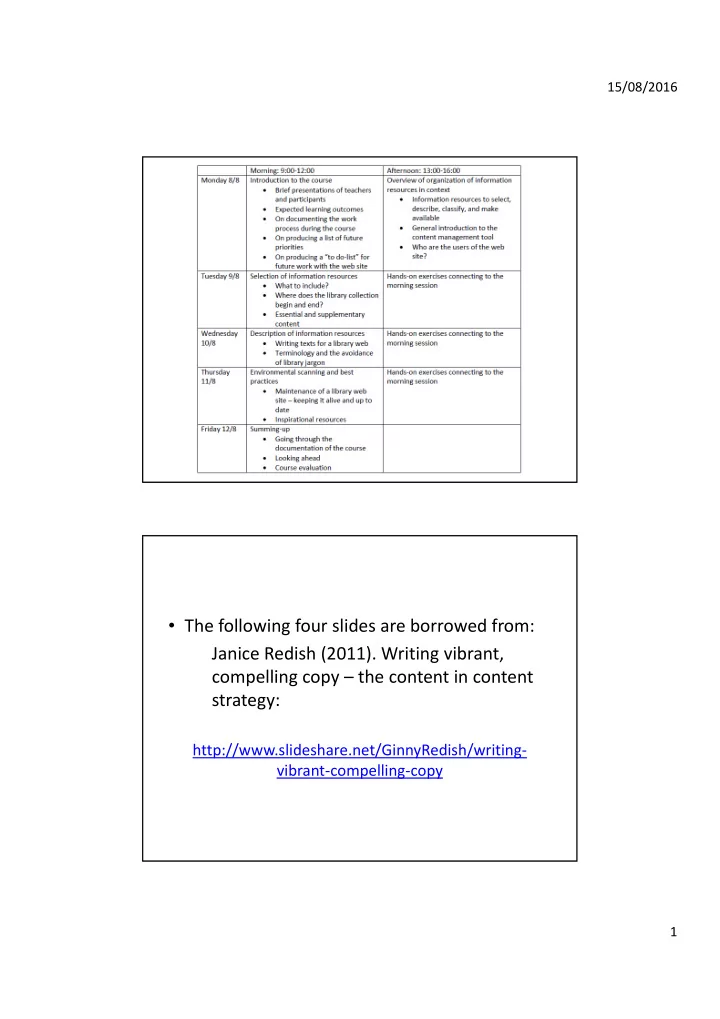
the following four slides are borrowed from janice redish
SMART_READER_LITE
LIVE PREVIEW

The following four slides are borrowed from: Janice Redish (2011). - - PDF document

15/08/2016 The following four slides are borrowed from: Janice Redish (2011). Writing vibrant, compelling copy the content in content strategy: http://www.slideshare.net/GinnyRedish/writing vibrant compelling copy 1 15/08/2016


slide-1
SLIDE 1

15/08/2016 1

  • The following four slides are borrowed from:

Janice Redish (2011). Writing vibrant, compelling copy – the content in content strategy:

http://www.slideshare.net/GinnyRedish/writing‐ vibrant‐compelling‐copy

slide-2
SLIDE 2

15/08/2016 2

Why do people visit a website?

  • They want to…

– Answer their questions(s) – Solve a problem – Do a task

  • Access content!
  • Navigation and search are critical
  • Good, clear design is critical
  • Technology that works is critical

But…

  • They all support the content
slide-3
SLIDE 3

15/08/2016 3

Content = everything

  • Text
  • Illustrations
  • Charts
  • Graphs
  • Tables
  • Forms
  • pdfs
  • Videos
  • Podcasts
  • Blogs
  • Forums
  • Facebook

LinkedIn Twitter

  • ther social media

Content strategy = Think strategically about your content

  • Planned
  • Coordinated
  • Managed
  • Reviewed
  • Maintained
  • Removed

Message Tone Style

slide-4
SLIDE 4

15/08/2016 4

Selecting material

  • Analyze user groups
  • Overview what is published/produced – both

feebased and open access

  • Assess and evaluate material with reference to

user group‐analysis

  • Make decisions regarding what to obtain

– Informed by

  • Budget frames (freely available – fee‐based)
  • Acquisition policy (balance: digital‐printed)
  • Infrastructure for storage and archive
slide-5
SLIDE 5

15/08/2016 5

slide-6
SLIDE 6

15/08/2016 6

  • When writing for the web, using plain language allows users to find what

they need, understand what they have found, and then use it to meet their needs. It should also be actionable, findable, and shareable.

  • People come to your website with a specific task in mind. When

developing your site’s content, keep your users’ tasks in mind and write to ensure you are helping them accomplish those tasks. If your website doesn’t help them complete that task, they’ll leave.

  • People read differently online than they do when they read print materials

‐‐ web users typically scan for information. In a study of online reading behavior Site exit disclaimer, Jakob Nielsen found that “on the average webpage, users have time to read at most 28% of the words during an average visit; 20% is more likely”.

From: Writing for the Web, at usability.gov

slide-7
SLIDE 7

15/08/2016 7

Writing style and tone

From: Library Terms That Users Understand (2012) John Kupersmith

slide-8
SLIDE 8

15/08/2016 8

  • Task:

– Find a university library website that you find attractive and good, present the website and explain why it is attractive and good. – Use the web – e.g. Google – to search for good library websites – For example: “academic library websites” or “best library websites”

slide-9
SLIDE 9

15/08/2016 9

Horton, F.W. Jnr., & Keiser, B.E. (2008). Encouraging global information

  • literacy. Computers in Libraries, 28(10), 6‐7.

Authors Year Article title Journal title Volume Issue Pages

slide-10
SLIDE 10

15/08/2016 10

slide-11
SLIDE 11

15/08/2016 11

slide-12
SLIDE 12

15/08/2016 12

slide-13
SLIDE 13

15/08/2016 13

slide-14
SLIDE 14

15/08/2016 14

slide-15
SLIDE 15

15/08/2016 15

slide-16
SLIDE 16

15/08/2016 16

!

slide-17
SLIDE 17

15/08/2016 17

  • Classifying databases according to Topic, Type and

College

  • Types

– Identified types:

  • News content

Reference Online lectures E‐books Tutorials Full‐text …

  • Topic
  • College
  • https://olapilerot.net/rwanda‐toolbox/
slide-18
SLIDE 18

15/08/2016 18

  • “To do‐list” for future work with the web site:

– Develop a proper controlled vocabulary for the database list – Make sure ALL databases are included in the list! – Join the Drupal group/community for libraries – Take as a habit to “constantly” scan the web for useful resources (e.g. free databases) that can be included in our list

  • Future priorities:

– Create working groups with specific responsibilities, e.g. 1) controlled voc.; 2) “drupal experts”; 3) guidelines for language & presentation of the info. on the site; 4) Overview and structure

  • f the site; 5) “day‐to‐day business”; 6) BEING CAREFUL!