TDDC17 Computer systems Robotic architectures Robotics/Perception - - PowerPoint PPT Presentation

tddc17
SMART_READER_LITE
LIVE PREVIEW

TDDC17 Computer systems Robotic architectures Robotics/Perception - - PowerPoint PPT Presentation

Outline Sensors - summary TDDC17 Computer systems Robotic architectures Robotics/Perception II Navigation: Mapping and Localization Mariusz Wzorek Motion planning IDA/AIICS Motion control 1 2 TDDC17


slide-1
SLIDE 1

Mariusz Wzorek IDA/AIICS

TDDC17 Robotics/Perception II

1

Outline

  • Sensors - summary
  • Computer systems
  • Robotic architectures
  • Navigation:
  • Mapping and Localization
  • Motion planning
  • Motion control

2

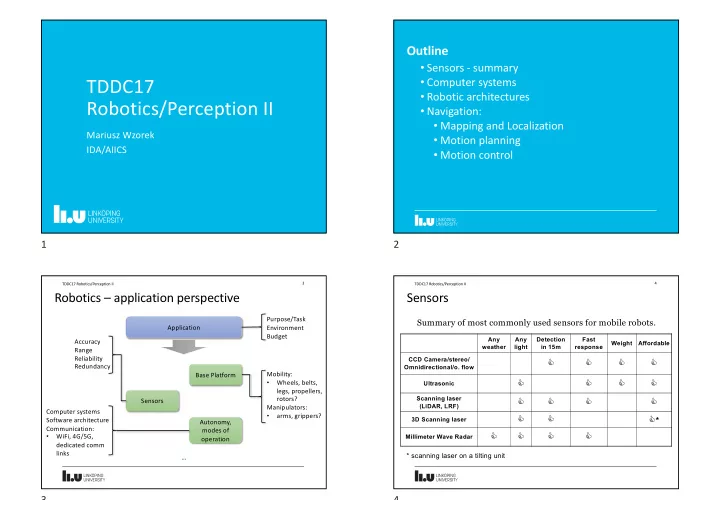
Robotics – application perspective

3 TDDC17 Robotics/Perception II

Application Base Platform Sensors Autonomy, modes of

  • peration

Computer systems Software architecture Communication:

  • WiFi, 4G/5G,

dedicated comm links Purpose/Task Environment Budget Mobility:

  • Wheels, belts,

legs, propellers, rotors? Manipulators:

  • arms, grippers?

Accuracy Range Reliability Redundancy …

3

Sensors

Summary of most commonly used sensors for mobile robots.

4 TDDC17 Robotics/Perception II

Any weather Any light Detection in 15m Fast response Weight Affordable CCD Camera/stereo/ Omnidirectional/o. flow

C C C C

Ultrasonic

C C C C

Scanning laser (LiDAR, LRF)

C C C C

3D Scanning laser

C C C*

Millimeter Wave Radar

C C C C

* scanning laser on a tilting unit

4

slide-2
SLIDE 2

Sensors cont’d

5 TDDC17 Robotics/Perception II

waymo.com

5

Sensors cont’d

6 TDDC17 Robotics/Perception II

tesla.com

6

Sensors - common interfaces

  • analog - voltage level
  • digital:
  • serial connections e.g.:
  • RS232
  • I2C
  • SPI
  • USB
  • Ethernet
  • pulse width modulation - PWM

7 TDDC17 Robotics/Perception II

7

Outline

  • Sensors - summary
  • Computer systems
  • Robotic architectures
  • Navigation:
  • Mapping and Localization
  • Motion planning
  • Motion control

8

slide-3
SLIDE 3

Computer systems

Many challenges and trade-offs!

  • power consumption
  • size & weight
  • computational power
  • robustness
  • different operational conditions moisture, temperature, dirt,

vibrations, etc.

  • cloud computing?

9 TDDC17 Robotics/Perception II

9

Computer systems cont’d

PC104 - standardised form factor

  • industrial grade
  • relatively small size
  • highly configurable
  • >200 vendors world-wide
  • variety of components
  • variety of processors

10 TDDC17 Robotics/Perception II ~10x10cm

10

Computer systems cont’d

Custom made embedded systems

  • with integrated sensor suite
  • micro scale, light weight
  • fitted for platform design

11 TDDC17 Robotics/Perception II

  • fitted for platform design

11

Computer systems cont’d

Example system design:

12 TDDC17 Robotics/Perception II

!"#$

  • !"#$!%&'!()*+,-./!
  • !"!%0!12/!
  • !"!%0!3456!789:)!

%&#$

  • !;<<!/&'!()*+,-!===!
  • !>?@!/0!12/!
  • !?">!/0!3456!789:)!

'%#$

  • !;<<!/&'!()*+,-!===!
  • !>?@!/0!12/!
  • !?">!/0!3456!789:)!

AB6)8*)B! CD9BE6! FFG!FHIH8! F4-)84! J6)8-4I! F4-)84! (4*! J9IB! K*9B! L4-464!1/2M!NL2CO!L2FCP! 048H-)B89E!(8)55,8)!2I+-)B)8! %(C!1)E)9:)8! Q45)8!14*R)!S9*7)8! /H7,I)! AB6)8*)B!T97)H!C)8:)8! U<>#""V!W98)I)55!0897R)! %C/!/H7)-5!

()8E)X+H*!C)*5H8!C,9B)! FH--,*9E4+H*!/H7,I)! (SF!C)*5H8!C,9B)!

CB)8)H.T959H*! /H7,I)! (HD)8!/4*4R)-)*B!K*9B! AB6)8*)B! 1C>Y>! 2*4IHR! S98)D98)! /9*9GT! 1)EH87)85!

12

slide-4
SLIDE 4

Ground Robot at AIICS LiU

13 TDDC17 Robotics/Perception II

13

14 TDDC17 Robotics/Perception II

Base platform

  • Husky unmanned ground

vehicle by Clearpath

  • run time: up to 3h
  • Max speed: 1 m/s
  • Weight: 50 kg
  • Max payload: 75 kg

14

15 TDDC17 Robotics/Perception II

Robot Arm UR5 – Universal Robotics

  • Weight: 20.6 kg
  • Max payload: 5 kg
  • Working radius: 850 mm
  • 6 DOF

LiDAR (Light Detection and Ranging) sensor - Velodyne

  • Range: 100m
  • Vertical FOV: 30deg
  • Horizontal FOV: 360deg

Battery pack for arm Gripper Gripper – Weiss Robotics

  • Weight: 1.2 kg
  • Max payload: 8 kg

15

16 TDDC17 Robotics/Perception II

Network switch Stereo camera Inertial Measurement Unit GPS antenna WiFi router Robot arm power and control system Intel NUC i7 computer GPU – Jetson TK1

16

slide-5
SLIDE 5

Outline

  • Sensors - summary
  • Computer systems
  • Robotic architectures
  • Navigation:
  • Mapping and Localization
  • Motion planning
  • Motion control

17

Telesystems/Telemanipulators

18 TDDC17 Robotics/Perception II

Delay

18

Telepresence

Experience of being fully present at live event without actually being there

  • see the environment through robot’s cameras
  • feel the surrounding through robot sensors
  • Realised by for example:
  • stereo vision
  • sound feedback
  • cameras that follow the operator’s head movements
  • force feedback and tactile sensing
  • VR system

19 TDDC17 Robotics/Perception II

19

Reactive systems

Robot responses directly to sensor stimuli. Intelligence emerges from combination of simple behaviours. For example - subsumption architecture (Rodney Brooks, MIT):

  • concurrent behaviours
  • higher levels subsume behaviours of lower layers
  • no internal representation
  • finite state machines

20 TDDC17 Robotics/Perception II

Sense Act

https://www.youtube.com/watch?v=9u0CIQ8P_qk

20

slide-6
SLIDE 6

Limitations of Reactive Systems

  • Agents without environment models must have sufficient

information available from local environment

  • If decisions are based on local environment, how does it take

into account non-local information (i.e., it has a “short-term” view)

  • Difficult to make reactive agents that learn
  • Since behaviour emerges from component interactions plus

environment, it is hard to see how to engineer specific agents (no principled methodology exists)

  • It is hard to engineer agents with large numbers of behaviours

(dynamics of interactions become too complex to understand)

21 TDDC17 Robotics/Perception II

21

Hierarchical Systems

Sensors

22 TDDC17 Robotics/Perception II

Sense

Act Plan

Actuators Extract features combine features into model Plan task Execute task Control motors

22

Hierarchical Systems (Shakey Example)

Shakey (1966 - 1972)

  • Developed at the Stanford Research Institute
  • Used STRIPS planner (operators, pre and post conditions)
  • Navigated in an office environment, trying to satisfy a goal

given to it on a teletype. It would, depending on the goal and circumstances, navigate around obstacles consisting of large painted blocks and wedges, push them out of the way, or push them to some desired location.

  • Primary sensor: black-and-white television camera
  • Sting symbolic logic model of the world in the form of first
  • rder predicate calculus
  • Very careful engineering of the environment

23 TDDC17 Robotics/Perception II

https://www.youtube.com/watch?v=GmU7SimFkpU

23

Hybrid systems (three-layer architecture)

24 TDDC17 Robotics/Perception II

Sense

Act Plan

24

slide-7
SLIDE 7

Hybrid systems (Minerva Example)

Tour guide at the Smithsonian's National Museum of American History (1998)

25 TDDC17 Robotics/Perception II

http://www.cs.cmu.edu/~thrun/movies/minerva.mpg

25

Hybrid systems (HDR3 – AIICS/IDA @ LiU Example)

26 TDDC17 Robotics/Perception II

26

Outline

  • Sensors - summary
  • Computer systems
  • Robotic architectures
  • Navigation:
  • Mapping and Localization
  • Motion planning
  • Motion control

27

Navigation

Mapping – Localization – SLAM – State Estimation – Control

28 TDDC17 Robotics/Perception II

Navigation Mapping

Create a model of the environment. Assumes that we know where the robot and its sensors are.

Localization SLAM Motion Planning Control State Estimation

How do I safely get from point A to B? Estimate position (pose) of a robot in the environment,

  • r poses of landmarks in the

environment – sensor data can be noisy Where am I? Application of state estimation to calculate robot location (e.g. x, y, orientation - pose). One of the basic functionalities required for any real world deployment:

  • need to know where

we are

  • what the

environment looks like Simultaneous Localization and Mapping How do I execute planned motion? E.g. generate control signals to follow planned trajectory (velocity, position commands, etc.)

28

slide-8
SLIDE 8

0o View from top

LiDAR – recap

Active sensor based on time of flight principle

  • emits light waves from a laser
  • measures the time it took for the signal to return to calculate the

distance

29 TDDC17 Robotics/Perception II

29

View from top

LiDAR – recap cont’d

SICK LMS (single line sensor):

  • Range (d): 80m
  • Field of View - horizontal (a):

0o-180o

  • Angular resolution - horizontal (b):

0.25o-1o

30 TDDC17 Robotics/Perception II

a b d View from side

Velodyne Puck (multi-line sensor):

  • Range (d): 100m
  • Field of View - horizontal (a):

360o

  • Angular resolution - horizontal (b):

0.1o-0.4o

  • Field of View - vertical (g): ±15o
  • Angular resolution - vertical (f): 2o

g f

30

LiDAR – recap cont’d

31 TDDC17 Robotics/Perception II

Velodyne: https://www.youtube.com/watch?v=WPtHRVdWXSI https://www.youtube.com/watch?v=KxWrWPpSE8I SICK LMS stationary

range data at certain height

SICK LMS with tilt mechanism Velodyne stationary

31

Mapping

Assume we use a mobile robot platform equipped with a LiDAR sensor Simple idea: combine measurement of robot motion with LiDAR sensor readings Measurement of robot motion - state estimation, e.g. odometry, dead reckoning

  • Simple odometry - wheel encoders that calculate how many times wheels turned
  • Visual odometry etc. – e.g. optical flow sensor, or use sensor fusion to produce more

accurate estimation of motion There will always be a measurement error when calculating the state - depending on the technique/sensor used it can be smaller or larger

32 TDDC17 Robotics/Perception II

Scan at x0,y0 Scan at x1,y1 Scans added y x

32

slide-9
SLIDE 9

Mapping cont’d

33 TDDC17 Robotics/Perception II

Based only on odometry + LiDAR range data

33

Scan matching

Calculate rotation and translation between two consecutive LiDAR scans, which will correct for

  • dometry error.

Iterative Closest Point (ICP) – iteratively minimize the sum of square differences between two pairs of points which are selected from reference and a source scan. Input: reference scan (blue), source scan (red). Output: rotation and translation between reference and source scans.

34 TDDC17 Robotics/Perception II

https://en.wikipedia.org/wiki/Iterative_closest_point

?

34

Mapping cont’d

35 TDDC17 Robotics/Perception II

Based only on odometry + LiDAR range data + scan matching (ICP)

35

Mapping cont’d

36 TDDC17 Robotics/Perception II

Based only on odometry + LiDAR range data + scan matching (ICP)

36

slide-10
SLIDE 10

Outline

  • Sensors - summary
  • Computer systems
  • Robotic architectures
  • Navigation:
  • Mapping and Localization
  • Motion planning
  • Motion control

37

Robotic perception

Robot perception viewed as temporal inference from sequences of actions and measurements → dynamic Bayes network of first order Markov process Example: localization - holonomic robot with range sensor, estimate pose while moving next belief state? → Bayesian inference problem

38 TDDC17 Robotics/Perception II

Xt = (xt, yt, q) – state of the robot at time t -> not observable Zt = (range1, range2, range3, …) – sensor reading at time t -> observable At = (vt, wt) – known action executed at time t P(Xt) = P(Xt|z1:t , a1:t-1) – current believe state (captures past) P(Xt+1 |z1:t+1 , a1:t) = ? given P(Xt) and new observation zt+1

38

Graphical Model

39 TDDC17 Robotics/Perception II

known actions unknown sensor readings M known map

39

Recursive filtering equation

using Bayes’ rule, Markov assumption, theorem of total probability Motion model: deterministic state prediction + noise Sensor model: likelihood of making observation zt+1 when robot is in state Xt+1

40 TDDC17 Robotics/Perception II

P(Xt+1 |z1:t+1 , a1:t) = ! P(zt+1 |Xt+1) ∫ P(Xt+1 | xt, at) P(Xt | z1:t, a1:t-1) dxt sensor model motion model previous believe state

40

slide-11
SLIDE 11

Motion and sensor model

Assume Gaussian noise in motion prediction, sensor range measurements

41 TDDC17 Robotics/Perception II

41

Graphical Model

42 TDDC17 Robotics/Perception II

known actions unknown sensor readings sensor model motion model M known map

42

Localization algorithms

Particle filter (Monte Carlo localization):

  • belief state - a collection of particles that correspond to states
  • belief state sampled, each sample weighted by likelihood it assigns to

new evidence, population resampled using weights Kalman filter:

  • belief state - a single multivariate Gaussian
  • each step maps a Gaussian into a new Gaussian, i.e. it computes a new

mean and covariance matrix from the previous mean and covariance matrix

  • assumes linear motion and measurement models (linearisation

→extended KF)

43 TDDC17 Robotics/Perception II

43

Global Localization (Particle Filter Examples)

44 TDDC17 Robotics/Perception II

P(Xt+1 |z1:t+1 , a1:t) = ! P(zt+1 |Xt+1)

∫ P(Xt+1 | xt, at) P(Xt | z1:t, a1:t-1) dxt

sensor model motion model previous believe state

44

slide-12
SLIDE 12

Global Localization (Particle Filter Examples)

45 TDDC17 Robotics/Perception II

Intuitive explanation:

  • initialize particles
  • execute known action
  • apply motion model
  • update particle

weights based on sensor model

  • resample based on

weights

  • repeat

45

Global Localization (Particle Filter Examples)

46 TDDC17 Robotics/Perception II

After several iterations – two likely robot position estimates: After more iterations – converged to a single robot position estimation:

46

Global Localization (Particle Filter Examples; sonar vs laser)

47 TDDC17 Robotics/Perception II

47

Extended Kalman Filter (EKF) - example

48 TDDC17 Robotics/Perception II

48

slide-13
SLIDE 13

EKF example

49 TDDC17 Robotics/Perception II

49

SLAM

Localization: given map and observed landmarks, update pose distribution Mapping: given pose and observed landmarks, update map distribution SLAM: given observed landmarks, update pose and map distribution Probabilistic formulation of SLAM: add landmark locations L1, . . . , Lk to the state vector, proceed as for localization Problems:

  • dimensionality of map features has to be adjusted dynamically
  • identification of already mapped features

50 TDDC17 Robotics/Perception II

50

SLAM Example

51 TDDC17 Robotics/Perception II

https://youtu.be/F8pdObV_df4 http://wiki.ros.org/hector_slam

51

Outline

  • Sensors - summary
  • Computer systems
  • Robotic architectures
  • Navigation:
  • Mapping and Localization
  • Motion planning
  • Motion control

52

slide-14
SLIDE 14

Motion Planning

Motion types:

  • point-to-point
  • compliant motion (screwing, pushing boxes)

Representations: configuration space vs workspace Kinematic state: robot’s configuration (location, orientation, joint angles), no velocities, no forces Path planning: find path from one configuration to another Problem: continuous state space, can be high-dimensional

53 TDDC17 Robotics/Perception II

53

Motion Planning - representations

Workspace - physical 3D space (e.g. joint positions) Robot has rigid body of finite size Well-suited for collision checking Problem: linkage constraints (not all workspace coordinates attainable) makes path planning difficult in workspace Configuration Space (C-space) - space of robot states (e.g. joint angles) Robot is a point, obstacles have complex shapes Problem: tasks are expressed in workspace coordinates, obstacle representation problematic

54 TDDC17 Robotics/Perception II

54

Workspace vs. Configuration Space

55 TDDC17 Robotics/Perception II

55

Workspace vs. Configuration Space

56 TDDC17 Robotics/Perception II

56

slide-15
SLIDE 15

Cfree

Workspace vs. Configuration Space

57 TDDC17 Robotics/Perception II

O Cobs O

x x y y

q – a robot configuration e.g. (x1,y1,q1) A(q) – set of points on the robot in configuration q .

x1 y1 q1 x1 y1 A(q)

W – workspace world either ℝ2 or ℝ3 O – obstacle region, O⊂W C – all possible robot configurations Cobs = {q : q ∈ C and A(q) ∩ O ≠ {} } Cfree=C – Cobs

57

Motion Planning - representations

Free space (attainable configurations) ->occupied space (not attainable configurations, obstacles) Planner may generate configuration in configuration space, apply kinematics and check in workspace for obstacles

58 TDDC17 Robotics/Perception II

Workspace Configuration Space

Inverse kinematics (often hard and ill-posed problem) Forward Kinematics (simple, well-posed problem)

58

Path Planning

Basic problem: convert infinite number of states into finite state space Cell decomposition:

  • divide up space into simple cells,
  • each of which can be traversed “easily”

Skeletonization:

  • identify a finite number of easily connected points/lines
  • form a graph such that any two points are connected by a path

Graph search and colouring algorithms Assumptions: motion deterministic, localization exact, static scenes Not robust with respect to small motion errors, does not consider limits due to robot dynamics

59 TDDC17 Robotics/Perception II

59

Cell Decomposition

60 TDDC17 Robotics/Perception II

Grayscale shading - cost from the grid cell do the goal

60

slide-16
SLIDE 16

Cell Decomposition

Problem: may be no path in pure free space cells Soundness (wrong solution if cells are mixed) vs. Completeness (no solution if only pure free cells considered) Solution: recursive decomposition of mixed (free+obstacle) cells or exact

  • decomposition. Doesn’t scale well for higher dimensions.

61 TDDC17 Robotics/Perception II

61

Skeletonization

Visibility graphs: find lines connecting obstacle vertices through free space, build and search graph; not for higher dimensions Voronoi graphs: find all points in free space equidistant to two or more

  • bstacles, build and search graph; maximizes clearance, creates unnecessarily

large detours, does not scale well for higher dimensions Sample-based path planners. Probabilistic roadmaps (PRM):

  • generate randomly large number of configurations in free space, build

graph (construction phase)

  • search graph (query phase)

Rapidly exploring Random Trees (RRT):

  • generate a tree rooted in start configuration by random sampling of free

space until goal configuration is reached (query phase) Scales better to higher dimensions but incomplete

62 TDDC17 Robotics/Perception II

62

Visibility and Voronoi Graph

63 TDDC17 Robotics/Perception II

63

PRM and RRT planning procedure example

64 TDDC17 Robotics/Perception II

64

slide-17
SLIDE 17

PRM Example (construction phase)

65 TDDC17 Robotics/Perception II

Generate random configurations Make connections Generate random configurations Resulting free space graph representation

65

PRM Example (query phase)

66 TDDC17 Robotics/Perception II

Add start and goal configurations to the roadmap A* search (+optional postprocessing)

start goal start goal start goal

66

PRM Example

67 TDDC17 Robotics/Perception II

67

RRT

68 TDDC17 Robotics/Perception II

https://en.wikipedia.org/wiki/Rapidly-exploring_random_tree RAND_CONF – samples random configuration from free space qrand. NEAREST_VERTEX – find qnear i.e. the closest vertex in existing graph G from qrand. NEW_CONF – select new configuration qnew by moving at incremental distance Dq from qnear in the direction of qrand.

qrand1 qnear qrand2 qnew1 qnew2 Dq Dq

Demo: https://demonstrations.wolfram.com/RapidlyExploringRandomTreeRRTAndRRT/

68

slide-18
SLIDE 18

RRT*

Asymptotically optimal: Converges to the optimal solution as more and more milestones are sampled.

69 TDDC17 Robotics/Perception II

https://www.youtube.com/watch?v=YKiQTJpPFkA

69

PRM/RRT - Post Processing Example

Example curve replacement and path optimization:

70 TDDC17 Robotics/Perception II

Transformation from linear to cubic (smooth) path segments: Alignment of nodes for improved path quality:

70

Outline

  • Sensors - summary
  • Computer systems
  • Robotic architectures
  • Navigation:
  • Mapping and Localization
  • Motion planning
  • Motion control

71

Motion Control

  • Path following involves forces: friction, gravity, inertia,
  • Dynamic state: kinematic state + robot’s velocities
  • Transition models expressed as differential equations
  • Path planner assumes robot can follow any path
  • Robot’s inertia limits manoeuvrability
  • Problem: including dynamic state in planners makes motion planning

intractable

  • Solution: simple kinematic planners + low-level controller for force

calculation

  • Other solution: motion control without planning: potential field and reactive

control

72 TDDC17 Robotics/Perception II

72

slide-19
SLIDE 19

Controllers

  • Techniques for generating robot controls in real time

using feedback from the environment to achieve a control

  • bjective
  • Reference controller: keep robot on pre-planned path

(reference path)

  • Optimal controller: controller that optimises a global cost

function, e.g. optimal policies for MDPs

  • Stable: small perturbations lead to bounded error between

robot and reference signal

  • Strictly stable: able to return to reference signal

73 TDDC17 Robotics/Perception II

73

Closed-loop control

Performance of controller:

  • stability
  • overshoot ← inertia
  • steady-state error ← friction
  • rise time
  • settling time

P controller:

74 TDDC17 Robotics/Perception II

74

PID Example

75 TDDC17 Robotics/Perception II

x0=0; v0=0 xgoal=15 e(t0)=xgoal-x0=15 present past future

75

Closed-loop control

PD controller:

  • decreases overshoot
  • decreases settling time

PID controller:

  • eliminates steady-state error

76 TDDC17 Robotics/Perception II

76

slide-20
SLIDE 20

Closed-loop control

77 TDDC17 Robotics/Perception II

P control: KP= 1.0 P control: KP= 0.1 PD control: KP= 0.3 KD=0.3

77

Model Predictive Control

1. At time k, solve open loop optimal control problem over a specified finite time horizon 2. Apply first input 3. At time k+1, repeat from step 1.

78 TDDC17 Robotics/Perception II

https://en.wikipedia.org/wiki/Model_predictive_control

78

Model Predictive Control

79 TDDC17 Robotics/Perception II

https://www.youtube.com/watch?v=dL_ZFSvLXlU Optimizer Predictor (Model)

Reference trajectory Predicted outputs +

  • Future errors

Process

Cost function Constraints Output Future inputs MPC Predictor/Model: fundamental or empirical Constraints e.g. on inputs, outputs, state are respected

79

MPC – simple example

80 TDDC17 Robotics/Perception II

https://medium.com/@david010/vehicle-mpc-controller-33ae813cf3be https://github.com/cipher982/MPC-vehicle-controller

80

slide-21
SLIDE 21

MPC and Learning

81 TDDC17 Robotics/Perception II

https://www.youtube.com/watch?v=QYYknZ20Zcw https://www.youtube.com/watch?v=xa53w1tyZl0 https://doi.org/10.3384/diss.diva-163419

81

MPC and Learning

82 TDDC17 Robotics/Perception II

https://www.youtube.com/watch?v=QYYknZ20Zcw https://www.youtube.com/watch?v=xa53w1tyZl0 https://doi.org/10.3384/diss.diva-163419

82

MPC and Learning

83 TDDC17 Robotics/Perception II

https://www.youtube.com/watch?v=dL_ZFSvLXlU

83

Questions?

84