Status ! Next project (after exam) will be similar to last year BUT - - PDF document

status
SMART_READER_LITE
LIVE PREVIEW

Status ! Next project (after exam) will be similar to last year BUT - - PDF document

Status ! Next project (after exam) will be similar to last year BUT using a different strategy perhaps stride scheduling. CSCI [4|6] 730 ! Scheduling ( 2-3 lectures, 2 before the exam 3 rd lecture (if needed) will not on the exam)


slide-1
SLIDE 1

Maria Hybinette, UGA

CSCI [4|6] 730 Operating Systems

CPU Scheduling

Maria Hybinette, UGA

Status

! Next project (after exam) – will be similar to last year BUT

using a different strategy – perhaps stride scheduling.

! Scheduling ( 2-3 lectures, 2 before the exam – 3rd lecture

(if needed) will not on the exam)

! Exam 1 coming up – Thursday Oct 6

» OS Fundamentals & Historical Perspective » OS Structures (Micro/Mono/Layers/Virtual Machines) » Processes/Threads (IPC,/ RPC, local & remote) » Scheduling (material/concepts covered in 2 lectures, Tu, Th) » ALL Summaries (all – form a group to review) 30% » What you read part of HW » Movie » MINIX structure

Maria Hybinette, UGA

Scheduling Plans

! Introductory Concepts ! Embellish on the introductory concepts ! Case studies, real time scheduling.

» Practical system have some theory, and lots of tweaking (hacking).

Maria Hybinette, UGA

CPU Scheduling Questions?

! Why is scheduling needed? ! What is preemptive scheduling? ! What are scheduling criteria? ! What are disadvantages and advantages of

different scheduling policies, including:

» Fundamental Principles:

– First-come-first-serve? – Shortest job first? – Preemptive scheduling?

» Practical Scheduling:

– Hybrid schemes (Multilevel feedback scheduling?) that includes hybrids of SJF, FIFO, Fair Schedulers ! How are scheduling policies evaluated?

Maria Hybinette, UGA

Why Schedule? Management Resources

! Resource: Anything that can be used by only a

single [set] process(es) at any instant in time

» Not just the CPU?

! Hardware device or a piece of information

» Examples:

– CPU (time), – Tape drive, Disk space, Memory (spatial) – Locked record in a database (information, synchronization) ! Focus today managing the CPU

Maria Hybinette, UGA

I/O Device CPU

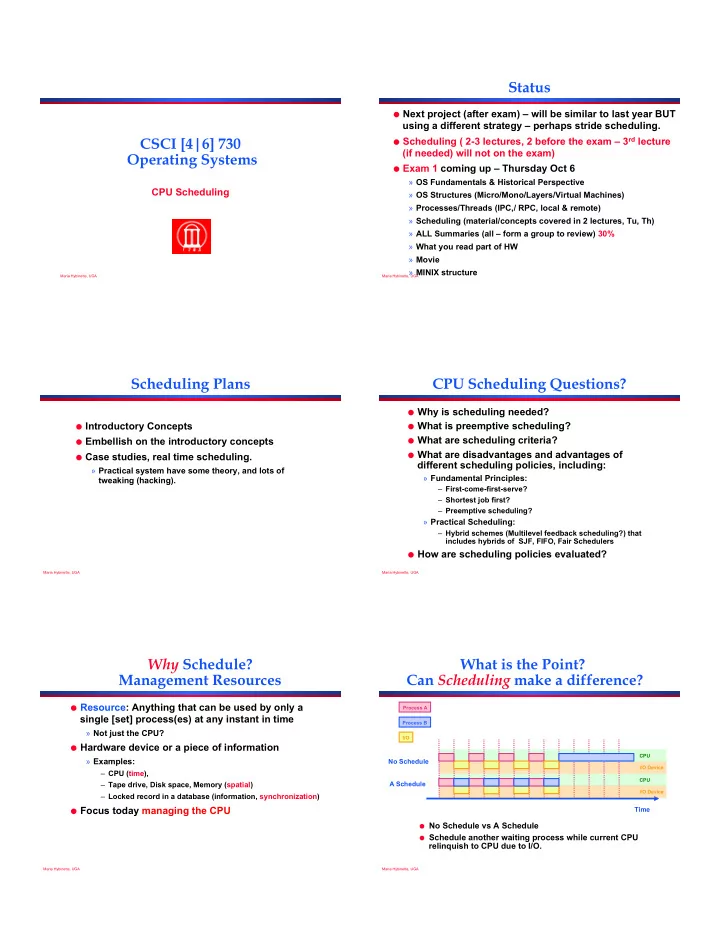
What is the Point? Can Scheduling make a difference?

Process A Process B I/O

No Schedule A Schedule Time

I/O Device CPU

! No Schedule vs A Schedule ! Schedule another waiting process while current CPU

relinquish to CPU due to I/O.

slide-2
SLIDE 2

Maria Hybinette, UGA

Resource Classification

! Pre-emptable

» Can forcibly removed the resource from a process (and possibly return it later) without ill effects.

! Non-preemptable

» Cannot take a resource away from its current ‘owner’ without causing the computation to fail.

Maria Hybinette, UGA

“Resource” Classification

! Preemptable (forcible removable)

» Characteristics (desirable):

– small state (so that it is not costly too preempt it). – only one resource

» Examples:

– CPU or Memory are typically a preemptable resources ! Non-preemptable (not forcible removable)

» Characteristics:

– Complicated state – May need many instances of this resource

» Examples:

– CD recorder - once starting to burn a CD needs to record to completion otherwise the end up with a garbled CD. – Blocks on disk

Maria Hybinette, UGA

Resources Management Tasks

! Allocation (Space):

» Space Sharing: Which process gets which resource (control access to resource)?

! Scheduling (Time):

» Time Sharing: In which order should requests be serviced; Which process gets resource and at what time (order and time)?

Time and Space

Maria Hybinette, UGA

10

The CPU Management Team

! (how?)“The Dispatcher” (low level mechanism – the worker)

» Context Switch

– Save execution of old process in PCB – Add PCB to appropriate queue (ready or blocked) – Load state of next process from PCB to registers – Switch from kernel to user mode – Jump to instruction in user process ! (when?) “The Scheduler” (higher level mechanism - upper

management,) (time)

» Policy to determine when a specific process gets the CPU

! (where?) Sometimes also “The Allocator” (space)

» Policy to determine which processes compete for which CPU » Needed for multiprocessor, parallel, and distributed systems

Maria Hybinette, UGA

11

Dispatch Mechanism

! OS runs dispatch loop:

while( forever ) { run process A for some time slice stop process A and save its context load context of another process B jump to proper location and restart program }

! How does the dispatcher gain control?

Dispatcher is the module that gives control of the CPU to the process selected by the scheduler.

Maria Hybinette, UGA

12

Same as - How does OS (scheduler) get control?

! Synchronous interrupts, or traps

» Event internal to a process that gives control to OS » Examples: System calls, page faults (access page not in main memory), or errors (illegal instruction or divide by zero)

! Asynchronous interrupts

» Events external to a process, generated by hardware » Examples: Characters typed, or completion of a disk transfer

How are interrupts handled?

! Each type of interrupt has corresponding routine (handler or

interrupt service routine (ISR)

! Hardware saves current process and passes control to ISR

Entering System Mode

slide-3
SLIDE 3

Maria Hybinette, UGA

13

Option 1: Cooperative Multi-tasking

! (internal events) Trust process to relinquish CPU

through traps

» Trap: Event internal to process that gives control to OS » Examples: System call, an explicit yield, page fault (access page not in main memory), or error (illegal instruction or divide by zero)

! Disadvantages: Processes can misbehave

» By avoiding all traps and performing no I/O, can take over entire machine » Only solution: Reboot!

! Not performed in modern operating systems

How does the dispatcher run?

Maria Hybinette, UGA

14

How does dispatcher run?

Option 2: (external stimulus) True Multi-tasking

! Guarantee OS can obtain control periodically ! Enter OS by enabling periodic alarm clock

» Hardware generates timer interrupt (CPU or separate chip) » Example: Every 10 ms

! User must not be able to mask timer interrupt ! Dispatcher counts interrupts between context switches

» Example: Waiting 20 timer ticks gives the process 200 ms time slice » Common time slices range from 10 ms to 200 ms (Linux 2.6)

Maria Hybinette, UGA

15

Scheduler Types

! Non-preemptive scheduler (cooperative multi-tasking)

» Process remains scheduled until voluntarily relinquishes CPU (yields) – Mac OS 9. » Scheduler may switch in two cases:

– When process exits – When process blocks (e.g. on I/O) ! Preemptive scheduler (Most modern OS, including

most UNIX variants)

» Process may be ‘de-scheduled’ at any time » Additional cases:

– Process creation (another process with higher process enters system) – When an I/O interrupt occurs – When a clock interrupt occurs

Maria Hybinette, UGA Maria Hybinette, UGA

17

Scheduling Goals: Performance Metrics

! There is a tension between maximizing:

» System’s point of view: Overall efficiency (favoring the whole, the forest, the whole system). » User’s point of view: Giving good service to individual processes (favoring the ‘individuals’, the trees).

Satisfy both : fast process response time (low latency) and high process throughput.

Maria Hybinette, UGA

18

System View: Threshold - Overall Efficiency

! System Load (uptime):

» The amount of work the system is doing

! Throughput:

» Want many jobs to complete per unit time

! System Utilization:

» Keep expensive devices busy » Jobs arrive infrequently and both throughput and system utilization is low

! Example: Lightly loaded system - jobs

arrive infrequently - both throughput and system utilization is low.

! Scheduling Goal: Ensure that throughput

increase linearly with load

Offered Load Throughput

slide-4
SLIDE 4

Maria Hybinette, UGA

19

Utilization / Throughput

! Problem type:

» 3 jobs:

– 1st job enters at time 0, – 2nd job at time 4, and – 3rd job at 8 second

» Each job takes 2 seconds to process. » Each job is processed immediately – unless a job is on the CPU, then it waits

! Questions:

» (1) What is the CPU utilization at time t = 12?

– Consider the CPU utilization from t =0 to t=12. – Percentage used over a time period.

» (2) What is the I/O device utilization at time t = 12? » (3) What is the throughput (jobs/sec) at time = 12 – (10)

Job 1 Job 2 Job 3

4 8 12

Maria Hybinette, UGA

20

User View: Good Service (often measured as an average)

! Ensure that processes quickly start, run and completes. ! (average) Turnaround time: The time between job arrival and

job completion.

! (average) Response time: The length of time when the job

arrive and when if first start to produce output

» e.g. interactive jobs, virtual reality (VR) games, click on mouse see VR change

! Waiting time: Time in ready queue - do not want to spend a lot

  • f time in the ready queue

» Better ‘scheduling’ quality metric than turn-around time since scheduler does not have control over blocking time or time a process does actual computing.

! Fairness: all jobs get the same amount of CPU over time ! Overhead: reduce number of context switches ! Penalty Ratio: Elapsed time / Required Service time

(normalizes according to the ‘ideal’ service time) - next week

Maria Hybinette, UGA

21

Which Criteria is Appropriate? Depends on Expectation of the System

! All Systems:

» Fairness (give processes a fair shot to get the CPU). » Overall system utilization » Policy enforcement (priorities)

! Batch Systems (not interactive)

» Throughput » Turn-around time » CPU utilization

! Real-time system (real time constraints)

» Meeting deadlines (avoid losing data) » Predictability - avoid quality degradation in multimedia systems.

Maria Hybinette, UGA

22

Gantt Chart (it has a name)!

! Shows how jobs are scheduled over time on the

CPU.

A

Time

B C D 10 14.2 17.3 22

Maria Hybinette, UGA

23

A Simple Policy: First-Come- First-Served (FCFC)

! The most basic scheduling policy is first-

come-first-served, also called first-in-first-out (FIFO).

» FCFS is just like the checkout line at the Publix. Maintain a queue ordered by time of arrival. GetNextToRun selects from the front of the queue.

! FCFS with pre-emptive time slicing is called

round robin (more on that later)

Wakeup or ReadyToRun GetNextToRun() ready list List::Append RemoveFromHead

CPU Maria Hybinette, UGA

24

Evaluate: First-Come-First- Served (FCFS)

! Idea: Maintain FIFO list of jobs as they arrive

» Non-preemptive policy » Allocate CPU to job at head of list (oldest job).

Time

B C 10

Job Arrival CPU burst A 10 B 1 2 C 2 4

A Average wait time: Average turnaround time (enter/exit system): 12 16

2 14 4 6 8

slide-5
SLIDE 5

Maria Hybinette, UGA

25

First-Come-First-Served (FCFS)

! Idea: Maintain FIFO list of jobs as they arrive

» Non-preemptive policy » Allocate CPU to job at head of list (oldest job).

Time

B C 10

Job Arrival CPU burst A 10 B 1 2 C 2 4

A Average wait time:

(0 +(10-1)+(12-2))/3 = 6.33

Average turnaround time (enter/exit system):

((10-0) +(12-1)+(16-2))/3 = 11.67

12 16

2 14 4 6 8

Maria Hybinette, UGA

26

FCFS Discussion

! Advantages:

» Simple implementation (less error prone) » Throughput is as good as any non-pre-emptive policy, if the CPU is the only schedulable resource in the system » Fairness – sort of – everybody eventually gets served (but not in terms of favoring long jumps NOT FAIR!). » Intuitive

! Disadvantages:

» Waiting time depends on arrival order » Response time: Tend to favor long bursts (CPU bound processes)

– But : better to favor short bursts since they will finish quickly and not crowd the ready list.

» Does not work on time-sharing systems (kind of! unless it is ‘pre-emptive’).

Maria Hybinette, UGA

27 ! Response time rise rapidly with load and are

unbounded.

» At 50% utilization, a 10% load increase, increase response time by 10% (this is OK!) » At 90% utilization, a 10% load increase, increase response time by 10 times. (Oh my!).

R U

1(100%)

Small increase in load c a u s e s a l a r g e i n c r e a s e i n t h e expected response time

Maria Hybinette, UGA

28

Pre-emptive FCFC: Round-Robin (RR)

! Idea: Run each job/burst for a time-slice (e.g.,

q=1) and then move to back of FIFO queue

» Preempt job if still running at end of time-slice B 1

Job Arrival CPU burst A 10 B 1 2 C 1 4

A Average wait: C 2 A B C A C A C A

Maria Hybinette, UGA

29

Pre-emptive FCFC: Round-Robin (RR)

! Another Example (quantum 1): Suppose jobs

arrives at ‘about’ the same time (0), but A is before B and B is before C (time difference is insignificant, but not in terms of ordering)

B

Job Arrival CPU burst A 3 B 2 C 1

A Average response time: A B C A C A A A B

E: preemptive overhead

B

Maria Hybinette, UGA

30

Pre-emptive FCFC: Round-Robin (RR)

! Another Example (quantum 1): Suppose jobs

arrives at ‘about’ the same time (0), but A is before B (time difference is insignificant, but not in terms of ordering)

B

Job Arrival CPU burst A 5 B 1

A Average response time: (5+6)/2 = 5.5 (2+6+e)/2 = 4 + e A B A A A

E: preemptive overhead

A A A A A

  • Response time: RR reduces response

time for short jobs

  • Fairness: RR reduces variance in wait

time (but older jobs wait for newly arrived jobs)

  • Throughput: extra context switch
  • verhead (a Q is 5-100 ms, e is on the
  • rder of micro seconds (us)
slide-6
SLIDE 6

Maria Hybinette, UGA

31

RR Discussion

! Advantages

» Jobs get fair share of CPU » Shortest jobs finish relatively quickly

! Disadvantages

» Poor average waiting time with similar job lengths

– Example: 3 jobs that each requires 3 time slices – RR: All complete after about 9 time slices – FCFS performs better!

! ABCABCABC = 2+5+6=13/3 ! AAABBBCCC = 0+3+6=9/3

» Performance depends on length of time-slice

– If time-slice too short, pay overhead of context switch – If time-slice too long, degenerate to FCFS (see next slide)

Maria Hybinette, UGA

32

RR Time-Slice Consideratoins

! IF time-slice too long, degenerate to problem of FCFS

(short jobs wait behind long jobs).

» Example:

– Job A w/ 1 ms compute and 10 ms I/O – Job B always computes – Time-slice is 50 ms ! What about a really short time slices?

B A CPU Disk Idle

Goal: Adjust length of time-slice to match CPU burst Time

B A A A Idle

Maria Hybinette, UGA

33

Minimizing Response Time: SJF

! Shortest job first, optimal if the goal is to

minimize response time or/and wait time.

» Express lanes at public (fewer groceries, prioritize those customers).

! Idea: get short jobs out of the way quickly to

minimize the number of jobs waiting while a long job runs.

! Lets review FCFC and see how SJF improves

  • n FCFC (hopefully!).

Maria Hybinette, UGA

34

Another Example FIFO

Time

X C

Job Arrival CPU burst X 4 A 1 10 B 3 2 C 2 4

A Average wait time: Average turnaround time: 2 B 4 14 18 20

Maria Hybinette, UGA

35

Shortest-Job-First (SJF)

! Idea: Minimize average wait time by running shortest

CPU-burst next

» Non-preemptive policy » Use FCFS if jobs are of same length

Time

X C 6

Job Arrival CPU burst X 4 A 1 10 B 3 2 C 2 4

A Average wait time: Average turnaround time: 2 B 4 10 20

Maria Hybinette, UGA

36

Optimality (Book)

! Proof Outline: (by contraction) SJF is not optimal

» Suppose we have a set of bursts ready to run and we run them in some order OTHER than SJF.

– OTHER is the one that is Optimal

» Then there must be some burst b1 that is run before the shortest burst b2 (otherwise OTHER is SJF).

– b1 > b2 – If we reversed the order we would:

! increase the waiting time of b1 by b2 and (+b2) ! decrease the waiting time of b2 by b1 (-b1)

» Net decrease in the total (waiting time)!!!!!

! Continuing in this manner to move shorter bursts ahead of longer

  • nes, we eventually end up with the bursts sorted in increasing
  • rder of size (bubble sort). And now we are left with SJF.

b2 b1

slide-7
SLIDE 7

Maria Hybinette, UGA

37

Optimality!!!

! SJF only optimal when all jobs are available

simultaneously.

! See book for example why this is true.

Maria Hybinette, UGA

38

Shortest-Time-to-Completion- First (STCF/SCTF)

! Idea: Add preemption to SJF

» Schedule newly ready job if it has shorter than remaining burst for running job B D 8

Job Arrival CPU burst A 8 B 1 4 C 2 9 D 3 5

A SJF Average wait: STCF Average wait: 12 17 C 26 A A B D C 1 5 10 17 26

Maria Hybinette, UGA

39

SJF Discussion

! Advantages

» Provably optimal for minimizing average wait time (with no preemption)

– Moving shorter job before longer job improves waiting time

  • f short job more than it harms waiting time of long job

» Helps keep I/O devices busy

! Disadvantages

» Problem: Cannot predict future CPU burst time » Approach: Make a good guess - Use past behavior to predict future behavior

! Starvation: Long jobs may never be scheduled

Maria Hybinette, UGA

40

Predicting Bursts in SJF

! Key Idea: The past is a good predictor of the future (an

  • ptimistic idea) – ‘habits’

» Weighted averages of the most recent burst and the previous guesses (recursive) » Approximate next CPU-burst duration from the durations of the previous burst and the previous guess). Average them. » Where we are going:

– A recursive formula: accounts for entire past history, previous burst always important – previous guesses and their importance drops of ‘exponentially’ with the time of their burst. guess = previous burst 2 + previous guess 2

Maria Hybinette, UGA

41

Example

! Suppose process p is given default expected burst

length of 5 time units when it is initially run.

! Assume: The ACTUAL bursts length are:

» 10, 10, 10, 1, 1,1 » Note that these are of-course these are not known in advance.

! The predicted burst times for this process works as

follows:

» Let G(1) = 5 as default value » When process p runs, its first burst actually runs 10 time units (see above)

! so A(1) = 10.

G(n + 1) = w ∗ A(n) + (1 − w)G(n)

Maria Hybinette, UGA

42 ! We could weigh the importance of the past

with the most recent burst differently (but they need to add up to 1).

! w = 1 (past doesn’t matter). ! How do we get started – no bursts before we

start so what is the ‘previous’ burst G(1).

» G(1) is a default burst size (e.g., 5). G(n + 1) = w ∗ A(n) + (1 − w)G(n)

slide-8
SLIDE 8

Maria Hybinette, UGA

43 ! Let b1 be the most recent burst, b2 the burst

before that b3 the burst before that b4

guess = previous burst 2 + previous guess 2

guess = b1 2 + b2 4 + b3 8 + b4 16

Maria Hybinette, UGA

44

Example

! G(1) = 5 as default value ! A(1) = 10. G(2) = 1/2 * G(1) + 1/2 A(1) = 1/2 * 5.00 + 1/2 * 10 = 7.5 G(3) = 1/2 * G(2) + 1/2 A(2) = 1/2 * 7.50 + 1/2 * 10 = 8.75 G(4) = 1/2 * G(3) + 1/2 A(3) = 1/2 * 8.75 + 1/2 * 10 = 9.38

G(n + 1) = w ∗ A(n) + (1 − w)G(n)

Maria Hybinette, UGA

45

Priority Based (typical in modern OSs)

! Idea: Each job is assigned a priority

» Schedule highest priority ready job » May be preemptive or non-preemptive » Priority may be static or dynamic

! Advantages

» Static priorities work well for real time systems » Dynamic priorities work well for general workloads

! Disadvantages

» Low priority jobs can starve » How to choose priority of each job?

! Goal: Adjust priority of job to match CPU burst

» Approximate SCTF by giving short jobs high priority

Maria Hybinette, UGA

46

How Well do the Algorithms Stack UP

! Utilization ! Throughput ! Turnaround time: The time between job arrival and job

completion.

! Response time: The length of time when the job arrive and

when if first start to produce output

» e.g. interactive jobs, virtual reality (VR) games, click on mouse see VR change

! Meeting Deadlines (not mentioned) ! Starvation

Maria Hybinette, UGA

47

How to the Algorithms Stack Up?

CPU Utilization Through put Turn Around Time Response Time Deadline Handling Starvation Free

FIFO Low Low High High No Yes Shortest Remaining Time Medium High Medium Medium No No Fixed Priority Preemptive Medium Low High High Yes No Round Robin High Medium Medium Low No Yes

Maria Hybinette, UGA

48

Penalty Ratio (normalized to an ideal system)

! Comparison to an ideal system: How much time worse is

the turn-around time compared to an ideal system that would only consist of ‘service time’ (includes waiting)

» Note this really measure of how well the scheduler is doing.

! Lower penalty ratio is better (actual elapsed time takes the

same time as an idea system).

! Examples:

» Value of “1” indicates ‘no’ penalty (the job never waits) » 2 indicates it takes twice as long than an ideal system.

Total elapsed time (actual) Service time: doing actual work (on CPU + doing I/O) Penalty ratio

slide-9
SLIDE 9

Maria Hybinette, UGA

49

Example using

! First Come First Serve ! Penalty Ratio – turn-around

time (over ideal)

Job Arrival CPU burst A 3 B 1 5 C 3 2 D 9 5 E 12 5 Job Start Time Finish Time Waiting Time Penalty Ratio A 3 1.0 B 1 5 2 1.4 C 3 2 5 3.5 D 9 5 1 1.2 E 12 5 3 1.6 avg 2.2 1.74

A B

3

C

8 10

D E

15 20 Maria Hybinette, UGA

50

Example using (CPU Only)

! First Come First Serve ! Penalty Ratio – turn-around

time (over ideal – the burst itself)

Job Arrival CPU burst A 3 B 1 5 C 3 2 D 9 5 E 12 5 Job Start Time Finish Time Waiting Time Penalty Ratio A 3 1.0 B 1 5 2 1.4 C 3 2 5 3.5 D 9 5 1 1.2 E 12 5 3 1.6 avg 2.2 1.74

A B

3

C

8 10

D E

15 20

! Shortest Burst worst PR. ! Even worse: ! long burst at 0, takes

100 units

! short burst at 1 ! Wait 99. ! (101-1)/1 = 100

3/3 7/5

Maria Hybinette, UGA

51

Multilevel Queue Scheduling

! Classify processes and put them in different

scheduling queues

» Interactive, batch, etc.

! Different scheduling priorities depending on

process group priority

! Schedule processes with highest priority first,

then lower priority processes.

! Other possibility : Time slice CPU time

between the queues (higher priority queue gets more CPU time).

Maria Hybinette, UGA

52

Multilevel Queue Scheduling

Maria Hybinette, UGA

53

Multilevel Feedback Queue

! Give new processes

high priority and small time slice (preference to smaller jobs)

! If process doesn’t finish

job bump it to the next lower level priority queue (with a larger time-slice).

! Common in interactive

system

Maria Hybinette, UGA

54

Case Studies: Early Scheduling Implementations

! Windows and Early MS-DOS

» Non-Multitasking (so no scheduler needed)

! Mac OS 9

» Kernel schedule processes:

– A Round Robin Preemptive (fair, each process gets a fair share of CPU

» Processes

– schedules multiple (MACH) threads that use a cooperative thread schedule manager

! each process has its own copy of the scheduler.

slide-10
SLIDE 10

Maria Hybinette, UGA

55

Case Studies: Modern Scheduling Implementations

! Multilevel Feedback Queue w/ Preemption:

» FreeBSD, NetBSD Solaris, Linux pre 2.5 » Example Linux: 0-99 real time tasks (200ms quanta), 100-140 nice tasks (10 ms quanta -> expired queue)

! Cooperative Scheduling (no preemption)

» Windows 3.1x, Mac OS pre3 (thread level)

! O(1) Scheduling

» time to schedule independent of number of tasks in system » Linux 2.5-2.6.24 ((v2.6.0 first version ~2003/2004)

! Completely Fair Scheduler

» Maximizes CPU utilization while maximizing interactive performance / Red/Black Tree instead of Queue » Linux 2.6.23+