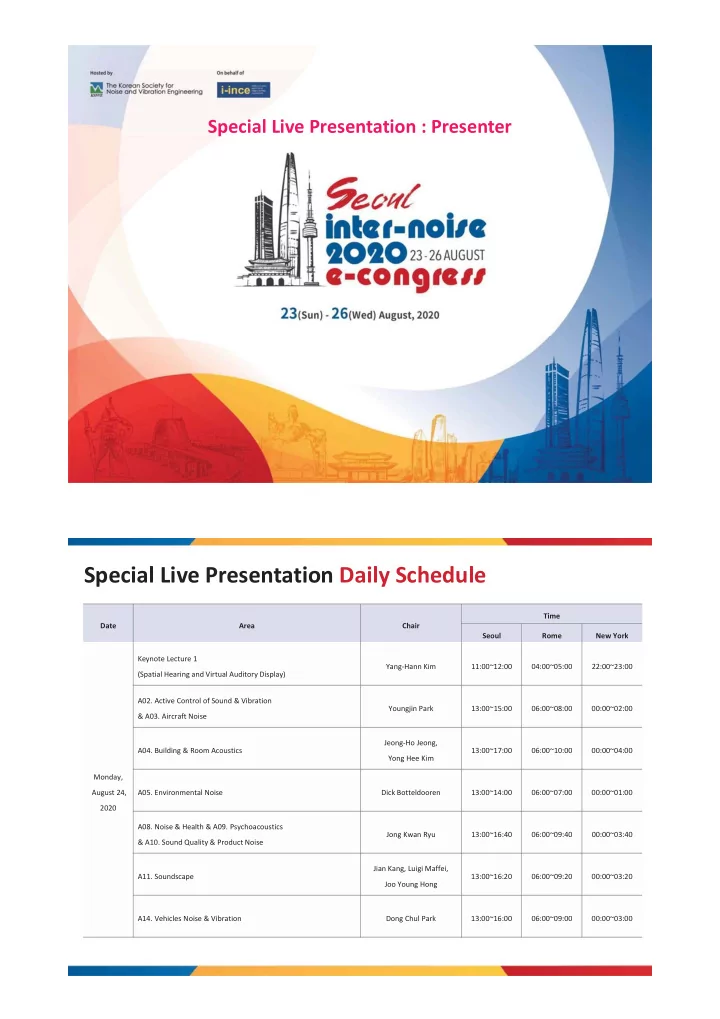
Special Live Presentation Daily Schedule Time Date Area Chair - - PDF document

special live presentation daily schedule
SMART_READER_LITE
LIVE PREVIEW

Special Live Presentation Daily Schedule Time Date Area Chair - - PDF document

Special Live Presentation : Presenter Special Live Presentation Daily Schedule Time Date Area Chair Seoul Rome New York Keynote Lecture 1 Yang-Hann Kim 11:00~12:00 04:00~05:00 22:00~23:00 (Spatial Hearing and Virtual Auditory Display)


slide-1
SLIDE 1

Special Live Presentation : Presenter

Special Live Presentation Daily Schedule

Date Area Chair Time Seoul Rome New York Monday, August 24, 2020 Keynote Lecture 1 (Spatial Hearing and Virtual Auditory Display) Yang-Hann Kim 11:00~12:00 04:00~05:00 22:00~23:00

  • A02. Active Control of Sound & Vibration

& A03. Aircraft Noise Youngjin Park 13:00~15:00 06:00~08:00 00:00~02:00

  • A04. Building & Room Acoustics

Jeong-Ho Jeong, Yong Hee Kim 13:00~17:00 06:00~10:00 00:00~04:00

  • A05. Environmental Noise

Dick Botteldooren 13:00~14:00 06:00~07:00 00:00~01:00

  • A08. Noise & Health & A09. Psychoacoustics

& A10. Sound Quality & Product Noise Jong Kwan Ryu 13:00~16:40 06:00~09:40 00:00~03:40

  • A11. Soundscape

Jian Kang, Luigi Maffei, Joo Young Hong 13:00~16:20 06:00~09:20 00:00~03:20

  • A14. Vehicles Noise & Vibration

Dong Chul Park 13:00~16:00 06:00~09:00 00:00~03:00

slide-2
SLIDE 2

Special Live Presentation Daily Schedule

Date Area Chair Time Seoul Rome New York Tuesday, August 25, 2020 Keynote Lecture 2 (Acoustic Black Hole)

  • J. Stuart Bolton

11:00~12:00 04:00~05:00 22:00~23:0

  • A01. Acoustic Material

Wonju Jeon, Siu-kit Lau, Joong Suk Lee 13:00~16:20 06:00~09:20 00:00~03:20

  • A04. Building & Room Acoustics

Jeong-Ho Jeong, Birgit Rasmussen 13:00~17:00 06:00~10:00 00:00~04:00

  • A06. Flow Induced Noise & Vibration

& A07. Industrial Noise Seongkyu Lee, Chan-Jung Kim 13:00~15:20 06:00~08:20 00:00~02:20

  • A11. Soundscape

Jian Kang, Luigi Maffei, Joo Young Hong 13:00~16:20 06:00~09:20 00:00~03:20

  • A12. Signal Processing, Measurements, General Modeling

and Model Validation & A13. Underwater & Maritime Acoustics Jung-Woo Choi 13:00~17:20 06:00~10:20 00:00~04:20

  • A14. Vehicles Noise & Vibration

Sang Kwon Lee 13:00~15:20 06:00~08:20 00:00~02:20

  • A15. Railroad Noise

Sunghoon Choi 13:00~14:00 06:00~07:00 00:00~01:00

  • A17. Vibro-Acoustics

Li Cheng 13:00~16:00 06:00~09:00 00:00~03:00

  • A18. Artificial Intelligence for Noise/Vibration Engineering

Cheol Ho Jeong 16:00~17:00 09:00~10:00 03:00~04:00

Special Live Presentation Daily Schedule

Date Area Chair Time Seoul Rome New York Wednesday, August 26, 2020 Plenary Lecture 2 (A cognitive approach to urban soundscapes) Dick Botteldooren 11:00~12:00 04:00~05:00 22:00~23:00 Keynote Lecture 3 (Floor impact sound transmission and control) Carl Hopkins 15:00~16:00 08:00~09:00 02:00~03:00

slide-3
SLIDE 3
  • 1. Please download Zoom Cloud Meeting Program in advance.

* download : https://zoom.us/download * Recommend accessing in quite environment and wired internet connection and using desktop computer. (camera and mic mandatory)

  • 2. Please check the general instructions and technical specifications for Zoom.

* https://support.zoom.us/hc/en-us/categories/200101697

  • 3. Please check the instructions for using Zoom HERE
  • 4. All participants who do not commonly work with Zoom are requested to log onto Zoom at HERE to test their devices

in advance. This is to make sure that devices can be supplemented before the presentation. It is mandatory.

  • 5. Please check Zoom video tutorials linked below;

* https://support.zoom.us/hc/en-us/articles/206618765-Zoom-video-tutorials

  • 6. Please log in to HERE(main website) and access to e-congress page by clicking ‘go to e-congress’ button.

And then click ‘Special Live Presentation’ menu in the e-congress page.

  • 7. Please access ‘Special Live Presentation page’ at least 30 minutes before the presentation starts and enter the

Zoom meeting room which area you belong to. (Zoom access link will be open the day of presentation holds. Until then, the access button will be deactivated)

Special Live Presentation Preparation

  • 8. When you enter the Zoom meeting room, please set user’s name to ‘presenter_name(affiliation)’.

ex) Presenter_Sa man Hong(Hyundai Motor Company)

  • 9. Please check if your camera and mic works well.
  • 10. Assistants will be the host of each Zoom meeting room and every participants will be in MUTE for easy entrance.

However when the chair checks presenters’ attendance, turn off the mute and show that you are attended.

  • 11. When it’s time for presentation, the presenter’s introduction ppt slide will be shared on the screen.

Following the chair’s sign, assistants will be playing pre-recorded presentation video.

  • 12. When the video is played, presenter also listens to the lecture and should check the questions from

audience in real-time chat.

  • 13. When there is some time left after the video ends, the assistant will share Q&A slide.

Audience can use one of zoom’s program functions “Raise Hand”. Once the chair notify questions, chair will choose one and let them speak.

Special Live Presentation Preparation

slide-4
SLIDE 4
  • 14. The presenters should be ready 30 minutes before their arranged schedule.

And if presenters are difficult to attend, they should inform the Secretariat in advance for making the conference flow smooth.

  • 15. If there is additional content to present, presenter can speak within given 20 minutes under chair’s permission.
  • 16. After the Q&A time is over and if there is some time left, sponsor advertisements can be played.
  • 17. Even if your presentation is over, please keep participating the session until it is completely over

for active operation.

Special Live Presentation Preparation Special Live Presentation Process

  • Example of shared screen slide -
slide-5
SLIDE 5

Special Live Presentation Participation Guide

  • 1. How to access Inter-Noise2020 e-congress website

1 2

Special Live Presentation Participation Guide

  • 2. Once you enter the e-congress page, then access to Special Live Presentation
slide-6
SLIDE 6

Special Live Presentation Participation Guide

  • 3. Find Special Live Presentation schedule and Zoom access link

Zoom access link will be activated on the day when each presentation holds 1 2 3

Special Live Presentation Zoom Example

Zoom access link will be activated on the day when each presentation holds