Sorted Type Class Interface Diagram SortedType class MakeEmpty - - PDF document

sorted type class interface diagram
SMART_READER_LITE
LIVE PREVIEW

Sorted Type Class Interface Diagram SortedType class MakeEmpty - - PDF document

Chapter 4 ADT Sorted List Sorted Type Class Interface Diagram SortedType class MakeEmpty Private data: IsFull length GetLength info [ 0 ] [ 1 ] GetItem [ 2 ] PutItem [MAX_ITEMS-1] DeleteItem currentPos ResetList GetNextItem Member


slide-1
SLIDE 1

Chapter 4

ADT Sorted List

Sorted Type Class Interface Diagram

SortedType class

IsFull GetLength ResetList DeleteItem PutItem MakeEmpty GetItem

Private data: length info [ 0 ]

[ 1 ] [ 2 ] [MAX_ITEMS-1]

currentPos
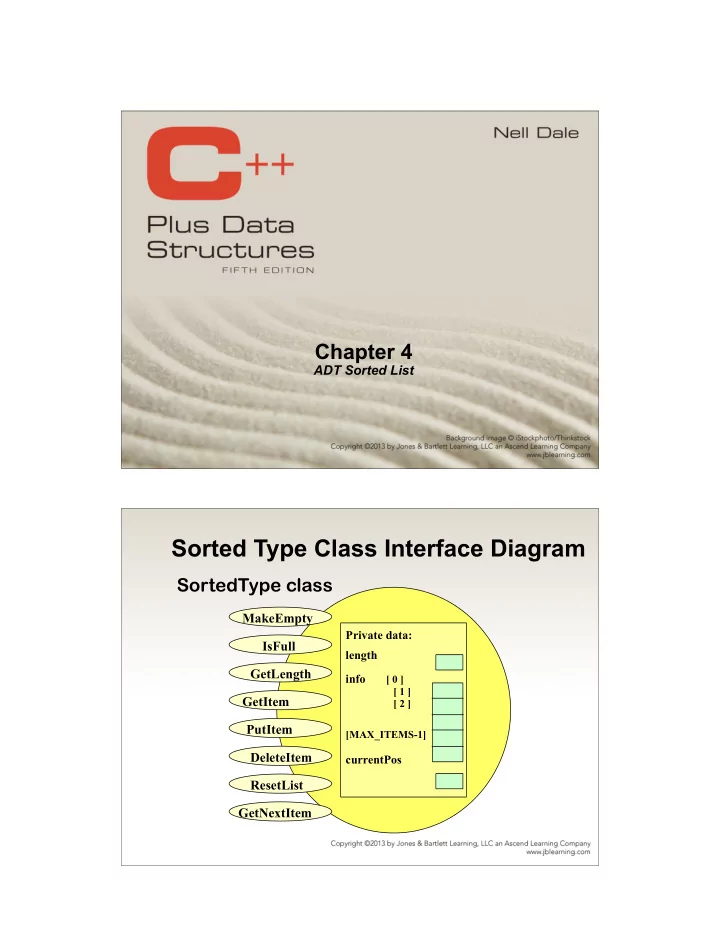
GetNextItem

slide-2
SLIDE 2

Member functions

Which member function specifications and implementations must change to ensure that any instance of the Sorted List ADT remains sorted at all times?

  • PutItem
  • DeleteItem

InsertItem algorithm for SortedList ADT

  • Find proper location for the new

element in the sorted list.

  • Create space for the new element by

moving down all the list elements that will follow it.

  • Put the new element in the list.
  • Increment length.
slide-3
SLIDE 3

Implementing SortedType 
 member function PutItem

// IMPLEMENTATION FILE (sorted.cpp) #include “itemtype.h” // also must appear in client code void SortedType :: PutItem ( ItemType item ) // Pre: List has been initialized. List is not full. // item is not in list. // List is sorted by key member using function ComparedTo. // Post: item is in the list. List is still sorted. { . . . } void SortedType :: PutItem ( ItemType item ) { bool moreToSearch; int location = 0; // find proper location for new element moreToSearch = ( location < length ); while ( moreToSearch ) { switch ( item.ComparedTo( info[location] ) ) { case LESS : moreToSearch = false; break; case GREATER : location++; moreToSearch = ( location < length ); break; } } // make room for new element in sorted list for ( int index = length ; index > location ; index-- ) info [ index ] = info [ index - 1 ]; info [ location ] = item; length++; }

slide-4
SLIDE 4

DeleteItem algorithm for 
 SortedList ADT

  • Find the location of the element to

be deleted from the sorted list.

  • Eliminate space occupied by the

item by moving up all the list elements that follow it.

  • Decrement length.

Implementing SortedType 
 member function DeleteItem

// IMPLEMENTATION FILE continued (sorted.cpp) void SortedType :: DeleteItem ( ItemType item ) // Pre: List has been initialized. // Key member of item is initialized. // Exactly one element in list has a key matching item’s key. // List is sorted by key member using function ComparedTo. // Post: No item in list has key matching item’s key. // List is still sorted. { . . . }

slide-5
SLIDE 5

void SortedType :: DeleteItem ( ItemType item ) { int location = 0; // find location of element to be deleted while ( item.ComparedTo ( info[location] ) != EQUAL ) location++; // move up elements that follow deleted item in sorted list for ( int index = location + 1 ; index < length; index++ ) info [ index - 1 ] = info [ index ]; length--; }

Improving member function GetItem

Recall that with the Unsorted List ADT we examined each list element beginning with info[ 0 ], until we either found a matching key, or we had examined all the elements in the Unsorted List. How can the searching algorithm be improved for Sorted List ADT?

slide-6
SLIDE 6

Retrieving Eliot from a
 Sorted List

The sequential search for Eliot can stop when Hsing has been examined.

length 4 info [ 0 ] Asad [ 1 ] Bradley

[ 2 ]

Hsing

[ 3 ]

Maxwell . . .

[MAX_ITEMS-1]

Why?

Binary Seach in a Sorted List

  • Examines the element in the middle of the array. Is

it the sought item? If so, stop searching. Is the middle element too small? Then start looking in second half of array. Is the middle element too large? Then begin looking in first half of the array.

  • Repeat the process in the half of the list that

should be examined next.

  • Stop when item is found, or when there is nowhere

else to look and item has not been found.

slide-7
SLIDE 7

ItemType SortedType::GetItem ( ItemType item, bool& found ) // Pre: Key member of item is initialized. // Post: If found, item’s key matches an element’s key in the list // and a copy of that element is returned; otherwise, // original item is returned. { int midPoin; int first = 0; int last = length - 1; bool moreToSearch = ( first <= last ); found = false; while ( moreToSearch && !found ) { midPoint = ( first + last ) / 2 ; // INDEX OF MIDDLE ELEMENT switch ( item.ComparedTo( info [ midPoint ] ) ) { case LESS : . . . // LOOK IN FIRST HALF NEXT case GREATER : . . . // LOOK IN SECOND HALF NEXT case EQUAL : . . . // ITEM HAS BEEN FOUND } } }

Trace of Binary Search

info[0] [1] [2] [3] [4] [5] [6] [7] [8] [9]

15 26 38 57 62 78 84 91 108 119

item = 45

first midPoint last

info[0] [1] [2] [3] [4] [5] [6] [7] [8] [9]

15 26 38 57 62 78 84 91 108 119 first midPoint last

LESS last = midPoint - 1 GREATER first = midPoint + 1

slide-8
SLIDE 8

Trace continued

info[0] [1] [2] [3] [4] [5] [6] [7] [8] [9]

15 26 38 57 62 78 84 91 108 119

item = 45

first, midPoint, last

info[0] [1] [2] [3] [4] [5] [6] [7] [8] [9]

15 26 38 57 62 78 84 91 108 119 first, last midPoint

LESS last = midPoint - 1 GREATER first = midPoint + 1

Trace concludes

info[0] [1] [2] [3] [4] [5] [6] [7] [8] [9]

15 26 38 57 62 78 84 91 108 119

item = 45

last first

first > last found = false

slide-9
SLIDE 9

ItemType SortedType::GetItem ( ItemType item, bool& found ) // ASSUMES info ARRAY SORTED IN ASCENDING ORDER { int midPoint; int first = 0; int last = length - 1; bool moreToSearch = ( first <= last ); found = false; while ( moreToSearch && !found ) { midPoint = ( first + last ) / 2 ; switch ( item.ComparedTo( info [ midPoint ] ) ) { case LESS : last = midPoint - 1; moreToSearch = ( first <= last ); break; case GREATER : first = midPoint + 1; moreToSearch = ( first <= last ); break; case EQUAL : found = true ; item = info[ midPoint ]; break; } } return item; }

Allocation of memory

STATIC ALLOCATION

Static allocation is the allocation

  • f memory space

at compile time.

DYNAMIC ALLOCATION

Dynamic allocation is the allocation of memory space at run time by using

  • perator new.
slide-10
SLIDE 10

3 Kinds of Program Data

  • STATIC DATA: memory allocation exists

throughout execution of program.

static long SeedValue;

  • AUTOMATIC DATA: automatically created at

function entry, resides in activation frame of the function, and is destroyed when returning from function.

  • DYNAMIC DATA: explicitly allocated and

deallocated during program execution by C++ instructions written by programmer using unary

  • perators new and delete

Arrays created at run time

If memory is available in an area called the free store (or heap), operator new allocates memory for the

  • bject or array and returns the address of

(pointer to) the memory allocated. Otherwise, the NULL pointer 0 is returned. The dynamically allocated object exists until the delete operator destroys it.

slide-11
SLIDE 11

Dynamic Array Allocation

char *ptr; // ptr is a pointer variable that // can hold the address of a char ptr = new char[ 5 ]; // dynamically, during run time, allocates // memory for 5 characters and places into // the contents of ptr their beginning address

ptr 6000 6000

Dynamic Array Allocation

char *ptr ; ptr = new char[ 5 ]; strcpy( ptr, “Bye” ); ptr[ 1 ] = ‘u’; // a pointer can be subscripted std::cout << ptr[ 2] ;

ptr 6000 6000 ‘B’ ‘y’ ‘e’ ‘\0’ ‘u’

slide-12
SLIDE 12

class SortedType<char>

MakeEmpty ~SortedType DeleteItem

. . .

InsertItem SortedType RetrieveItem GetNextItem ‘C’ ‘L’ ‘X’

Private data: length 3 listData currentPos ?

  • Find proper position for the new element in

the sorted list using two pointers predLoc and location, where predLoc trails behind location.

  • Create a new node and place item in it.
  • Insert the node by adjusting pointers of

predLoc and location .

  • Increment length.
slide-13
SLIDE 13

Inchworm Effect: moving two pointers

Inserting ‘S’ into a Sorted List

‘C’ ‘L’ ‘X’

Private data: length 3 listData currentPos ?

predLoc location moreToSearch

slide-14
SLIDE 14

Finding proper position for ‘S’

‘C’ ‘L’ ‘X’

Private data: length 3 listData currentPos ?

predLoc location NULL moreToSearch true

as location->info < ’s’, move forward: predLoc = location; //predLoc catches up location = location->next; //location move one step forward

Finding proper position for ‘S’

‘C’ ‘L’ ‘X’

Private data: length 3 listData currentPos ?

predLoc location moreToSearch true

location->info is still less than ’s’ move ahead…

slide-15
SLIDE 15

Finding Proper Position for ‘S’

‘C’ ‘L’ ‘X’

Private data: length 3 listData currentPos ?

predLoc location moreToSearch false

location->info is still larger than ’s’ stop! ’s’ should be inserted before ‘x’!

Inserting ‘S’ into Proper Position

‘C’ ‘L’ ‘X’

Private data: length 4 listData currentPos

predLoc location moreToSearch false

‘S’

slide-16
SLIDE 16

How do the SortedList implementations compare? Why is a destructor needed?

When a local list variable goes out of scope, the memory space for data member listPtr is

  • deallocated. But the nodes to which listPtr

points are not deallocated. A class destructor is used to deallocate the dynamic memory pointed to by the data member.

slide-17
SLIDE 17

Implementing the Destructor

UnsortedType::~UnsortedType() // Post: List is empty; all items have // been deallocated. { NodeType* tempPtr; while (listData != NULL) { tempPtr = listData; listData = listData->next; delete tempPtr; } }

Object-Oriented Design Methodology

  • Four stages to the decomposition

process

  • Brainstorming
  • Filtering
  • Scenarios
  • Responsibility algorithms
slide-18
SLIDE 18

Brainstorming

  • A group problem-solving technique that

involves the spontaneous contribution of ideas from all members of the group

  • All ideas are potential good ideas
  • Think fast and furiously first, and ponder later
  • A little humor can be a powerful force
  • Brainstorming is designed to produce a list of

candidate classes

Filtering

  • Determine which are the core classes in the

problem solution

  • There may be two classes in the list that have

many common attributes and behaviors

  • There may be classes that really don’t belong

in the problem solution

slide-19
SLIDE 19

Scenarios

  • Simulate class interactions
  • Ask “What if?” questions
  • Assign responsibilities to each class
  • There are two types of responsibilities
  • What a class must know about itself

(knowledge)

  • What a class must be able to do (behavior)

Responsibility Algorithms

  • The algorithms must be written for the

responsibilities

  • Knowledge responsibilities usually just

return the contents of one of an object’s variables

  • Action responsibilities are a little more

complicated, often involving calculations

slide-20
SLIDE 20

Computer Example

  • Let’s repeat the problem-solving process

for creating an address list

  • Brainstorming and filtering
  • Circling the nouns and underlining the verbs

Computer Example

  • First pass at a list of 


classes

slide-21
SLIDE 21

Computer Example

  • Filtered list

CRC Cards

slide-22
SLIDE 22

Responsibility Algorithms