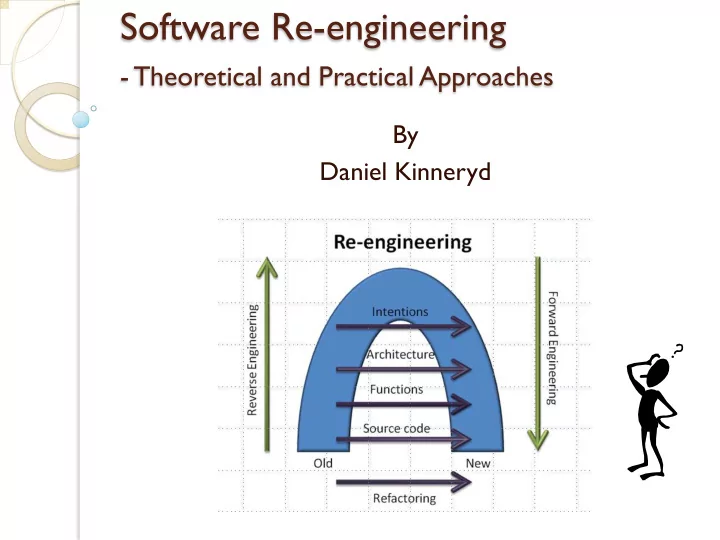
SLIDE 1 Software Re-engineering
- Theoretical and Practical Approaches
By Daniel Kinneryd
SLIDE 2 Software Re-engineering
- Theoretical and Practical Approaches
By Daniel Kinneryd
- Software Developer at the company Tieto
- Recently done Master Thesis on the subject
SLIDE 3 Software Re-engineering
- Theoretical and Practical Approaches
"Any fool can write code that a computer can
- understand. Good programmers write code that
humans can understand." - Fowler et. al.
SLIDE 4 Structure of Presentation
Some Theory
- Basic knowledge of Re-engineering
Real Life (RL) Example
- Thesis Work
- How one can use the Theory
Conclusions
SLIDE 5
Theory
Basic knowledge of Re-engineering
SLIDE 6 Some Basics
Software Component
- Replaced or changed as the system evolves
- Individual interface
- Encapsulates internal details
- Separate documentation
Software Module
- Implementation unit
- Independently developed
- Do not need each other to function
SLIDE 7 Lehman’s Laws
Program evolution The Law of Continuing Change
- A program that is used in reality must change, or
become progressively less useful.
The Law of Increasing Complexity
- As a program evolves, it becomes more complex. This
will continue until work is done to maintain or reduce the complexity.
SLIDE 8 What is Re-engineering?
Understand and then improve existing
software system
- Examination > Analysis > Alteration
Does not change the functionality Three basic steps:
- Reverse engineering
- Restructuring/Refactoring
- Forward engineering
SLIDE 9 Why Re-engineering?
Make the system “better”!
- More maintainable
- Easier to understand
- Better performance
Cope with changes outside the system
- New software
- New hardware
SLIDE 10 Re-engineering Steps
- 1. Reverse engineering
- Analyze components and their relationships.
- Creates a description of the system
- The more complex a program is the harder it
is to reverse engineer
SLIDE 11 Re-engineering Steps
- 2. Refactoring/Restructuring
- (x - 1) * (x + 1) = x^2 - 1
- Does not change the external behavior
- Not same as Rewriting
Rewriting changes the behavior
- Improve the design of the code after it has
been written
- Refactoring is typically Object-Oriented,
Restructuring might not be
SLIDE 12 Re-engineering Steps
- 3. Forward engineering
- Move from abstract or high implementation-
independent design to a physical implementation of a system
- This is the traditional way of designing
systems
You know this stuff by now… ;)
SLIDE 13 Re-engineering: Different levels
Source Code Level
- Change structure
- Improve algorithms
- New language porting
Function Level
- Updates to the Class (if OO)
- Interface changes (ex Method names)
Architecture Level
- Types of components
- Interactions between components
- Modules
- Will mostly talk about this level
SLIDE 14 New level needed?
If we fail to understand the architecture of the system What to do? Can we abstract further?
SLIDE 15 New level needed?
If we fail to understand the architecture of the system What to do? Can we abstract further? New abstraction level: Intentions level
- What the system is supposed to do
- Abstraction level that captures the essence of the application
- Can be seen as a start of a new architecture
SLIDE 16
Re-engineering Model
SLIDE 17 Reverse Engineering: Problems at Architecture Level
Insufficient documentation
- Documentation either does not exist or is not up to date
Improper layering
- Missing or improper layering decreases portability and
adaptability
Lack of modularity
- Strong coupling between modules hinders evolution
Duplicated code
- It is quick to copy-paste code, but it is really bad for
maintenance.
Duplicated functionality
- Similar functionality exists in several places of the code.
SLIDE 18
How to Refactor?
SLIDE 19
How to Refactor?
Do NOT do it all from scratch!
SLIDE 20 How to Refactor?
Do NOT do it all from scratch!
- Save Time, reuse Knowledge
- Use existing Tools and Techniques
SLIDE 21 How to Refactor?
Do NOT do it all from scratch!
- Save Time, reuse Knowledge
- Use existing Tools and Techniques
- Because key point is to:
Increase cohesion Decrease coupling Modularize system parts Decrease class sizes Better Class- and Method-names And so on
SLIDE 22 Refactor: Existing Knowledge and Tools
Design principles
- Fundamentals in software areas
Design Patterns
- Reusable software designs
- Build on design principles
Frameworks
- Skeleton for an application
- Many exists in vastly different areas
- Often uses existing Design Patterns
SLIDE 23 Refactor: Different Levels
Different Design Patterns on different
levels
Architectural Patterns on higher levels Can do Refactoring at lower levels
- Fowler (see next slide) promotes this
- Can use ”Refactoring Patterns”
SLIDE 24 Refactor: Low Levels
Check out Refactoring catalog
- http://refactoring.com/
- Tons of Refactoring on this site!
- Many stuff really basic IF you know basics,
principles and patterns
- Example:
- You have two classes with similar features
Create a superclass and move the common features to the superclass
SLIDE 25 Software Framework
Dictates the architecture of an application
- Components
- Flow of control
- Design parameters: what to change
Hot spots
Frozen spots
- Hidden from normal development
SLIDE 26 Example Design Pattern: Model-View-Controller (MVC)
Architectural compound design pattern
very well suited for web applications.
Model
- Core functionality and data.
View
- Displays information to the user.
- Interchangeable.
Controller
View and Model. Handles user input.
SLIDE 27
Example Design Pattern: Model-View-Controller (MVC)
SLIDE 28
Real Life Example
Thesis Work
SLIDE 29 Thesis Purpose
Re-engineer a web application
- To follow good system design
Make program source code easier to:
Other words: Increase maintainability and
understandability
SLIDE 30 MemoryLane
Life-logging
- Digitally record aspects of one's life
Web application
Review activities
- Digitally stored pictures grouped into
activities
Support people with dementia
SLIDE 31
Camera for life-logging
SLIDE 32
MemoryLane: Create activity
SLIDE 33
MemoryLane: Activity Recognition
SLIDE 34
MemoryLane: First looks…
First look on the source code for the
MemoryLane application
SLIDE 35
SLIDE 36
SLIDE 37
SLIDE 38
SLIDE 39
SLIDE 40
SLIDE 41
SLIDE 42
SLIDE 43 Example Re-engineering
Uh-oh! Alot of problems:
- No documentation
- No layers
- Lack of modularity
- Duplicated functionality and code
Example: Database login done in 59 different files.
Very hard to refactor at lower abstraction
levels!
SLIDE 44 Example: Reverse Engineering
Big Bang Approach
Represent at the Intentions level. How? Features:
- A feature is a realized functional requirement
for a system.
- It can be seen as an observable behavior of
the system that can be triggered by a user.
- Can keep external behavior of the system.
SLIDE 45 Example: Refactoring
Keep functionality intact with features
Once Big Bang all done:
- Refactor my new code in small steps
Can be an iterative process
SLIDE 46 Example: Forward Engineering
Documentation
Design Patterns and Principles
- MVC, Separation of Concerns, Dependency
Injection, etc…
- Build on other’s experience
No duplicated functionality or code
- Component based object oriented system
through frameworks.
SLIDE 47 Example: Frameworks
Zend Framework 2 (ZF2): Web Framework
- Open source PHP
- Object-Oriented
- MVC: Different layouts
- Modules: Easy to add independent components
Doctrine 2 Object Relational Mapping
- Mapping the records of a relational database into
the object-instances
- Complex to build, easy to use.
SLIDE 48
SLIDE 49
SLIDE 50
New MemoryLane: Model
SLIDE 51
New MemoryLane: Model
SLIDE 52
New MemoryLane: View
SLIDE 53
New MemoryLane: View
SLIDE 54
New MemoryLane: Controller
SLIDE 55
New MemoryLane: Controller
SLIDE 56 Uh-huh, but is it ”better”?
If we can show that the maintainability
and understandability is better, the new application should be better.
- From a non-functional re-engineering point of
view
Very hard to prove it is better
- “It feels better”, might not cut it
SLIDE 57 Thesis: Code Complexity
Code complexity
- Difficulty of maintaining, changing and
understanding an application.
- Greater complexity => less maintainable and
understandable code
Lines of Code (LOC)
- Count of lines of source code not including
comments or blank lines.
- Dependent on programming language.
SLIDE 58 Thesis: Lines Of Code (LOC)
10000 20000 30000 40000 50000 60000 70000 80000 XML SQL PHP Javascript CSS HTML PHTML Code Old Code New
SLIDE 59 Thesis: LOC with Frameworks
50000 100000 150000 200000 250000 300000 XML SQL PHP Javascript CSS HTML PHTML Code Old Code New Code Vendor
SLIDE 61 Summary: Re-engineering
Do not do it from scratch, use: Existing knowledge
- Design Principles
- Design Patterns
Existing tools
SLIDE 62 Summary: Working steps
Three basic steps:
- Reverse engineering
- Restructuring/Refactoring
- Forward engineering
Do not be afraid to use your own
technique or model!
- Needs to fit the project at hand
- Example: No Architecture -> Work from
Intentions Abstraction Level
SLIDE 63 Summary: Thesis Example
Transforming the static implementation to
an open, modularized, and flexible platform.
Model-View-Controller layering Frameworks like the Zend Framework 2 and the Doctrine 2 ORM.
Code complexity analysis
- New application should have a better
understandability and maintainability
SLIDE 64 Lessons Learned
Build on other’s shoulders
- Do not reinvent the wheel
Document important stuff
- Comments in code
- Later developers will thank you
Conservation of Familiarity
SLIDE 65 Lehman’s Laws again…
Conservation of Familiarity
As a system evolves, developers must maintain mastery
- f its content and behavior to achieve satisfactory
evolution.
Without a familiarity of how and why the system was
designed in the way it was, it becomes very difficult to implement changes to it without compromising the ability to understand it.
SLIDE 66
SLIDE 67
SLIDE 68
The End
Questions?
SLIDE 69
Appendix
SLIDE 70
Old prototype
SLIDE 71
New prototype
SLIDE 72
SLIDE 73
OO Design Principles
Single responsibility principle Open/closed principle Liskov substitution principle Interface segregation Dependency inversion principle
SLIDE 74 OO Design Principles
Single responsibility principle
- A class should have only a single responsibility
- Only one potential change in the software's
specification should be able to affect the specification of the class
Open/closed principle
- Software entities should be open for
extension, but closed for modification
SLIDE 75 OO Design Principles
Liskov substitution principle
- Objects in a program should be replaceable
with instances of their subtypes without altering the correctness of that program
Interface segregation
- Many client-specific interfaces are better than
- ne general-purpose interface
SLIDE 76 OO Design Principles
Dependency inversion principle
- Depend upon Abstractions. Do not depend
upon concretions
- Dependency injection is one method of
following this principle
SLIDE 77 Example: Design Pattern
Dependency Injection (DI) Builds on”Inversion of Control”
- Design Principle
- Also called ”The Hollywood Principle”
Don't call us, we'll call you!
- Difference between Framework and Library
Increases Modularity (Design Principle) Increases Extensibility (Design Principle)
SLIDE 78 Design Pattern: Dependency Injection
Definition
- Dependency Injection: Authoritative
component inject any dependencies into
SLIDE 79 Design Pattern: Dependency Injection
Definition
- Dependency Injection: Authoritative
component inject any dependencies into
Wait…WHAT??
SLIDE 80
Example Design Pattern: Without Dependency Injection
SLIDE 81
Example Design Pattern: With Dependency Injection
SLIDE 82
RL Implementation: Service Locator with DI
Service Locator: An object that knows
how to get hold of all the services needed by the application.