Software Design See Alan Cooper, The Essentials of User Interface - - PowerPoint PPT Presentation

software design
SMART_READER_LITE
LIVE PREVIEW

Software Design See Alan Cooper, The Essentials of User Interface - - PowerPoint PPT Presentation

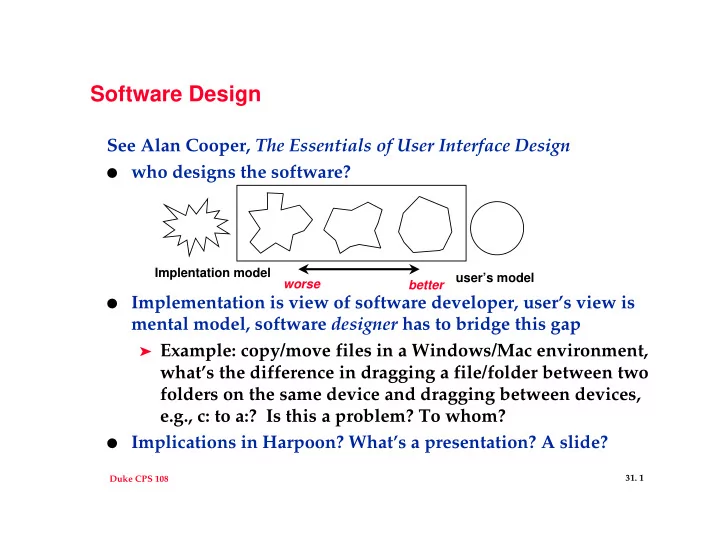
Software Design See Alan Cooper, The Essentials of User Interface Design who designs the software? Implentation model users model worse better Implementation is view of software developer, users view is mental model, software


slide-1
SLIDE 1

Duke CPS 108

  • 31. 1

Software Design

See Alan Cooper, The Essentials of User Interface Design

  • who designs the software?
  • Implementation is view of software developer, user’s view is

mental model, software designer has to bridge this gap

➤ Example: copy/move files in a Windows/Mac environment,

what’s the difference in dragging a file/folder between two folders on the same device and dragging between devices, e.g., c: to a:? Is this a problem? To whom?

  • Implications in Harpoon? What’s a presentation? A slide?

Implentation model user’s model worse better

slide-2
SLIDE 2

Duke CPS 108

  • 31. 2

You’re comfortable with technology and mathematics

  • “Show me all the first year students who live in Pegram and

in Brown”

➤ what does “and” mean here? Does the average user

understand Boolean? Does the average programmer understand Boolean? Recursion? Threads? Queues?

  • How you solve a problem in your program isn’t (necessarily)

how the user solves the problem, keep these distinctions clear

  • “Saying that someone is ‘computer literate’ is really a

euphemism meaning he has been indoctrinated and trained in the irrational and counter-intuitive way that file systems work, and once you have been properly subverted into thinking like a computer nerd, the obvious ridiculousness

  • f the way the file system presents itself to the user doesn’t

seem so foolish.”

slide-3
SLIDE 3

Duke CPS 108

  • 31. 3

What’s familiar isn’t necessarily what’s best

  • Hierarchical/cascading menus

➤ what’s the purpose ➤ are they good? (“not user

friendly, but very software.dot.dweeb friendly”)

  • What’s in the File menu? Why?

➤ Graphics in menus?

  • What about redundancies, e.g.,

menu and shortcut and toolbar

➤ users become more expert ➤ pedagogic vector (the program

should instruct)

  • What about ‘OK’, ‘Apply’, ‘Cancel’

➤ what do these mean?

Which of these slider interfaces is best? Why?

Copying

Is this a good dialog?

slide-4
SLIDE 4

Duke CPS 108

  • 31. 4

Issues in Harpoon Outline/Text widget

  • What should the outline/text widget do? What should it be

called?

➤ What does user want? ➤ What can programmer do? ➤ How can these be reconciled?

  • What are alternatives?

➤ Complete rich-text widget? ➤ Bulleted lines (what’s a bullet, what’s a line)? ➤ What about adding new lines/bullets? ➤ What about font selection?

  • Other issues?

slide-5
SLIDE 5

Duke CPS 108

  • 31. 5

Views and Styles

  • What are the potential different views in harpoon

➤ where do you look for ideas?

  • Existing programs
  • Your own ideas
  • focus group/users?

➤ Slide show, creation view, hand-out view, other views?

  • What about styles?

➤ Standard presentations, clone a slide and change info ➤ different kinds of slides within a presentation ➤ different kinds of paragraphs/bullet lists within a slide ➤ how to chose, how to create

slide-6
SLIDE 6

Duke CPS 108

  • 31. 6

Undo/redo and other issues

  • Facilitate undo/redo using the Command pattern with

encapsulated state for undo/redo

➤ facilitates multiple levels of undo/redo, not just one ➤ each command encapsulates an action, supports

execute() and unexecute() [see Pixmap]

➤ How is a move undone, what’s the state? ➤ How is a drawing undone, what’s the state?

  • Is every command undoable? How can you inform the user

what cannot be undone --- pop up a dialog box on every undoable command (“warning, this command is undoable, cancel or proceed”)