Simergy training 102 DWG Model-Over Editing HVAC Loops Results - - PowerPoint PPT Presentation

simergy
SMART_READER_LITE
LIVE PREVIEW

Simergy training 102 DWG Model-Over Editing HVAC Loops Results - - PowerPoint PPT Presentation

Simergy training 102 DWG Model-Over Editing HVAC Loops Results Visualization Tobias Maile & Richard See Agenda Introduction (k eep it simple ) Lesson 1: DWG Model over basic geometry External building elements Single


slide-1
SLIDE 1

Tobias Maile & Richard See

Simergy training 102

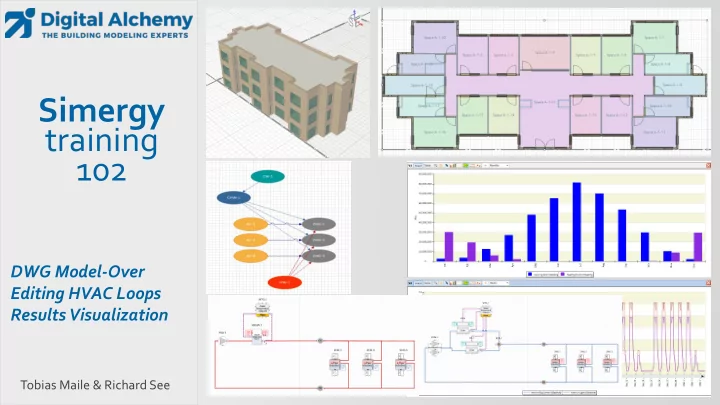
DWG Model-Over Editing HVAC Loops Results Visualization
slide-2
SLIDE 2

Agenda

  • Introduction (keep it simple)
  • Lesson 1: DWG Model over – basic geometry

External building elements

Single zone per story

  • Lesson 2: DWG Model over – simplified geometry

Simple zoning (5 zones per story)

  • Lesson 3: HVAC system: Active beam with DOAS (gas heating and dx cooling)

System creator

System Edits

  • Lesson 4: HVAC system: Active beam with DOAS (water heating and cooling)

Creation and editing of HVAC systems

  • Lesson 5: Result visualization
  • Lesson 6: DWG Model over – detailed geometry

Detailed zoning (20 zones)

Fenestration

slide-3
SLIDE 3

How this training works!

1.

Step by step instructions to create this model

in this video

in the related script (step by step)

2.

Please ask questions

In chat

by voice

  • r after the training via email: Support@D-Alchemy.com

3

slide-4
SLIDE 4

Geometry Loads HVAC

Simergy

Geometry options in Simergy

IFC IDF gbXML Simple Shapes Model over Freeform dwg dxf Simergy data model

slide-5
SLIDE 5
  • What are space boundaries?
  • 2D surfaces as basis for 1D heat transfer
  • Generation of space boundaries from buildings elements and spaces

(just in time or via IFC import)

Heat transfer based on space boundaries

Wall

Space 1 Space 2 Space 3

Architectural model Thermal model

Space boundaries

slide-6
SLIDE 6

Wall

  • Real 3D geometry compared to traditional center line geometry

Simergy 3D geometry

Space 1 Space 2 Space 3 Space boundaries

Real 3D Center line

Wall

Space 1 Space 2 Space 3

slide-7
SLIDE 7

Space 2

  • Real 3D geometry compared to traditional center line geometry

Simergy 3D geometry

Space boundary areas increase Space floor areas increase => Inaccuracies compared to real building

Bazjanac et al.: Generation of building geometry for energy performance simulation using Modelica, BauSim 2016

Wall

Space 1 Space 2 Space 3 Space boundaries

Real 3D Center line

Space 1 Space 3

slide-8
SLIDE 8

Building Model CreatorTM Library

DWG model generation workflow – Building Model Creator

Geometry Zoning/Grouping Internal loads Material and constructions Library objects

8

1) Define Materials and constructions 2) Define Occupancy templates 3) Create Building sections 4) Trace External footprint

Building Systems CreatorTM

Run simulation Analyze results Fine tune model Library Templates/Objects Iteration A) Simple zoning Iteration B) Detailed zoning

slide-9
SLIDE 9

Keep it simple

slide-10
SLIDE 10

Common problems

  • Slight offsets between stories
  • Too much detail that slows down simulation
  • Too detailed geometry modeling that does not add value
slide-11
SLIDE 11

Results Visualization workspace

11

All available variables Variables for current graph View layout options Template configuration Chart types:

  • Time series
  • Bar
  • Surface
  • Area
  • Scatter (xy)

Data table Customizable legends Dynamic interval Filter

slide-12
SLIDE 12

Lesson 1: DWG Model over – basic geometry

  • Focus on external envelope (for now)
  • 3 identical floors
  • Load calculations
  • Look at monthly heating and cooling as well as hourly electricity
slide-13
SLIDE 13

Lesson 2: DWG Model over – simple geometry

  • Adding simplified zoning (internal walls and space seeding)
  • Keep it simple yet meaningful
slide-14
SLIDE 14

Lesson 3: HVAC system: Active beam with DOAS (gas heating and dx cooling)

  • Use system creator to generate Active Beam system
  • Adjust sizing parameters
slide-15
SLIDE 15

Lesson 4: HVAC system: Active beam with DOAS (water heating and cooling)

  • Change DOAS from gas heating and DX cooling to water based heating and cooling
  • Add two more water loops to enable two different temperature supplies

SupplyTemp: 65 F SupplyTemp: 44.6 F SupplyTemp: 100 F SupplyTemp: 140 F

slide-16
SLIDE 16

Lesson 5: Result visualization

  • Filtering
  • Graph layout
  • Legend
  • Graph types
  • Time interval
  • Zoom
slide-17
SLIDE 17

Lesson 6: DWG Model over – advanced geometry

  • Adding more detail (internal walls, actual spaces, thermal zoning, windows)
  • Ground floor is a little different then the other two floors
  • Load calculations
slide-18
SLIDE 18

Demo - Lesson 1: DWG Model over – basic geometry

  • external envelope
  • 3 identical floors
  • Load calculations
  • Look at monthly heating and cooling as well as hourly electricity
slide-19
SLIDE 19

Demo - Lesson 2: DWG Model over – simple geometry

  • Adding simplified zoning (internal walls and space seeding)
  • Keep it simple yet meaningful
slide-20
SLIDE 20

Demo - Lesson 3: HVAC system: Active beam with DOAS (gas heating and dx cooling)

  • Use system creator to generate Active Beam system
  • Detailed HVAC
slide-21
SLIDE 21

Demo - Lesson 4: HVAC system: Active beam with DOAS (water heating and cooling)

  • Change DOAS from gas heating and DX cooling

to water-based heating and cooling

  • Add two more water loops

to enable two different temperature supplies

slide-22
SLIDE 22

Demo - Lesson 5: Result visualization

Create

  • Bar charts
  • Surface plots
  • Area plots
  • Time series
  • Zoom
  • Etc.
slide-23
SLIDE 23

Demo - Lesson 6: DWG Model over – advanced geometry

  • Adding more detail
  • internal walls
  • actual spaces
  • detailed windows
  • Two different floor layouts
slide-24
SLIDE 24

New features in Simergy 3.2

Simergy (application framework)

BIM Schedule editor MLS editor Scripting via Measures Energy simulation Daylighting simulation Title24 certification Results Visualization SimModel IDF model over predicting building performance through IFC

1. Updated ASHRAE content to 2016 2. Added ASHRAE system 9 & 10 3. Dimensions in plan view 4. Auto adjusting schedules for mixed

  • ccupancy

5. Improvements throughout 1. Building Model and Systems Creator 2. Space boundary generation 3. Import/Export/Validation 4. More samples, etc..

1 2

Parametric model creation with Building Model CreatorTM Building Systems CreatorTM Multiple Buildings Occupancy templ.

slide-25
SLIDE 25

New features in Simergy V3.3 (to be released soon)

  • Support for the latest EnergyPlusVersion 9.2
  • Support for additional HVAC components, more heat exchanger, new

components in 9.2

  • Support for refrigeration loops
  • Improved and faster IDF import
  • Improved Building Creator (e.g., zone ceiling/floor configurations)
  • Improved startup time/dashboard
  • Improved unit testing
  • Enhanced System Creator (support for secondary loops)
  • More online content (e.g., FAQs)

25

slide-26
SLIDE 26

Feedback and/or Questions?

  • New website: d-alchemy.com
  • Email support:

Support@D-Alchemy.com

  • Topics you would need help with?