Setting DBMS must allow concurrent access to databases. Imagine - - PDF document

setting
SMART_READER_LITE
LIVE PREVIEW

Setting DBMS must allow concurrent access to databases. Imagine - - PDF document

Setting DBMS must allow concurrent access to databases. Imagine a bank where account information is Database Transactions stored in a database not allowing concurrent access. Then only one person could do a withdrawal in an ATM machine


slide-1
SLIDE 1

1

Database Transactions Setting

  • DBMS must allow concurrent access to

databases.

– Imagine a bank where account information is stored in a database not allowing concurrent

  • access. Then only one person could do a

withdrawal in an ATM machine at the time – anywhere!

  • Uncontrolled concurrent access may lead

to problems.

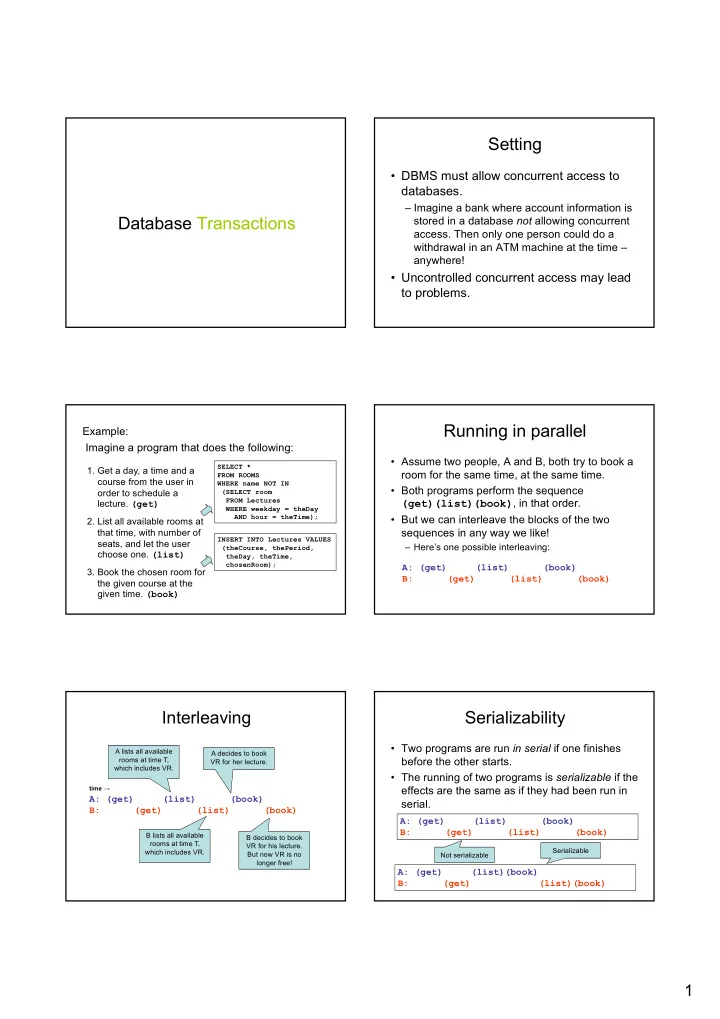
Example: Imagine a program that does the following:

  • 1. Get a day, a time and a

course from the user in

  • rder to schedule a
  • lecture. (get)
  • 2. List all available rooms at

that time, with number of seats, and let the user choose one. (list)

  • 3. Book the chosen room for

the given course at the given time. (book)

SELECT * FROM ROOMS WHERE name NOT IN (SELECT room FROM Lectures WHERE weekday = theDay AND hour = theTime); INSERT INTO Lectures VALUES (theCourse, thePeriod, theDay, theTime, chosenRoom);

Running in parallel

  • Assume two people, A and B, both try to book a

room for the same time, at the same time.

  • Both programs perform the sequence

(get)(list)(book), in that order.

  • But we can interleave the blocks of the two

sequences in any way we like!

– Here’s one possible interleaving: A: (get) (list) (book) B: (get) (list) (book)

Interleaving

A: (get) (list) (book) B: (get) (list) (book)

time →

A lists all available rooms at time T, which includes VR. B lists all available rooms at time T, which includes VR. A decides to book VR for her lecture. B decides to book VR for his lecture. But now VR is no longer free!

Serializability

  • Two programs are run in serial if one finishes

before the other starts.

  • The running of two programs is serializable if the

effects are the same as if they had been run in serial.

A: (get) (list) (book) B: (get) (list) (book) A: (get) (list)(book) B: (get) (list)(book)

Not serializable Serializable

slide-2
SLIDE 2

2

Example: Assume we perform the following operations to transfer 100 SEK from account X to account Y.

  • 1. Check account

balance in account X.

  • 2. Subtract 100 from

account X.

  • 3. Add 100 to account Y.

SELECT balance FROM Accounts WHERE accountID = X; UPDATE Accounts SET balance = balance - 100 WHERE accountID = X; UPDATE Accounts SET balance = balance + 100 WHERE accountID = Y; Two things can go wrong: We can have strange interleavings like

  • before. But also, assume the program crashes after executing 1 and 2

– we’ll have lost 100 SEK!

Atomicity

  • For many programs, we require that ”all or

nothing” is executed.

– We say a sequence of actions is executed atomically if it is executed either in entirety, or not at all.

  • The state in the middle is never visible from
  • utside the sequence.
  • cf. Greek atom = indivisible.
  • In case of a crash in the middle, any changes that

were made up until that point must be undone.

ACID Transactions

  • A DBMS is expected to support ”ACID

transactions”, which are

– Atomic: Either the whole transaction is run, or nothing. – Consistent: Database constraints are preserved. – Isolated: Different transactions may not interact with each other. – Durable: Effects of a transaction are not lost in case of a system crash.

Transactions in SQL

  • SQL supports transactions, often behind the

scenes.

– An SQL statement is a transaction.

  • E.g. an update of a table can’t be interrupted after half the

rows.

  • Any triggers, procedures, functions etc. that are started by

the statement is part of the same transaction.

Controlling transactions

  • We can explicitly start transactions using the

START TRANSACTION or BEGIN statement, and end them using COMMIT or ROLLBACK:

– COMMIT causes an SQL transaction to complete successfully.

  • Any modifications done by the transaction are now permanent in

the database.

– ROLLBACK or ABORT causes an SQL transaction to end by aborting it.

  • Any modifications to the database must be undone.
  • Rollbacks could be caused implicitly by errors e.g. division by 0.

Read-only vs. Read-write

  • A transaction that does not modify the database

is called read-only.

– A read-only transaction can never interfere with another transaction (but not the other way around!). – Any number of read-only transactions can be run concurrently.

  • A transaction that both reads and modifies the

database is called read-write.

– No other transaction may write between the read and write.

slide-3
SLIDE 3

3

SET TRANSACTION

  • We can hint the DBMS that a transaction
  • nly does reading, by issuing the

statement:

– Possibly the DBMS can make use of the information and optimize scheduling. SET TRANSACTION READ ONLY;

Drawbacks

  • Serializability and atomicity are necessary,

but don’t come without a cost.

– We must retain old data until the transaction commits. – Other transactions may need to wait for one to complete.

  • In some cases some interference may be

acceptable, and could speed up the system greatly.

Example: Recall the first example of booking rooms: It could take time for the user to decide which room to choose after getting the list. If we make this a serializable transaction, all other users would have to wait as well. The worst thing that could happen is that B is told to choose another room when he tries to book the room that A just booked.

A: (get) (list) (book) B: (get) (list) (book)

time →

Isolation levels

  • ANSI SQL standard defines four isolation

levels, which are choices about what kinds

  • f interference are allowed between

transactions.

  • Each transaction chooses its own isolation

level, deciding how other transactions may interfere with it.

  • Isolation level is defined in terms of three

phenomena that can occur.

Kinds of interference

The ANSI SQL standard describes:

  • Dirty read
  • Non-repeatable read
  • Phantom

(These, and other kinds of interference, are discussed in: Berenson, H., Bernstein, P., Gray, J., Melton, J., O'Neil, E., & O'Neil, P. (1995). A critique of ANSI SQL isolation levels. ACM SIGMOD Record, 24(2), 1-10.)

Dirty read example

a b c 19 a b c a b c 42

T1 B := 19 …woops... B := 42 COMMIT T2 B? 19! T2 performs dirty read

  • f uncommitted value
slide-4
SLIDE 4

4

Non-repeatable read example

a b c 19 a b c 42

T2 B := 19 commit T3 B := 42 commit T1 B? 19! ... B? 42!

19 != 42 B changed during T1 due to non-repeatable read

Phantom example

a b c

T2 Add 2 rows commit T1 Data? ... data?

Rows have changed and phantom rows introduced during T1 a b c

Isolation levels - differences

Dirty reads Non-repeatable reads Phantoms READ UNCOMMITTED Yes Yes Yes READ COMMITTED No Yes Yes REPEATABLE READ No No Yes SERIALIZABLE No No No

What kinds of interference are possible?

Increasing Isolation strictness

Choosing isolation level

  • Within a transaction we can choose the

isolation level:

where X is one of SET TRANSACTION ISOLATION LEVEL X;

  • SERIALIZABLE
  • READ COMMITTED
  • READ UNCOMMITTED
  • REPEATABLE READ

Database Authorization Authorization

  • Not every user can be allowed to do

everything.

– Some data are secret and may only be seen by some users. – Some data are high integrity and may only be modified by certain users.

slide-5
SLIDE 5

5

Privileges on relations

  • SELECT (attributes) ON table

– Allows the user to select data from the specified table. – Can be parametrized on attributes, meaning the user may only see certain attributes of the table.

  • INSERT (attributes) ON table

– Allows the user to insert tuples into the table. – Can be parametrized on attributes, meaning the user may only supply values for certain attributes of the

  • table. Other attributes are then set to NULL.

Privileges on relations

  • DELETE ON table

– Allows the user to delete tuples from the table. – Cannot be parametrized on attributes.

  • UPDATE (attributes) ON table

– Allows the user to update data in the table. – Parametrizing means the user may only update values of certain attributes.

Other privileges

  • REFERENCES (attributes) ON table

– Allows the user to create a foreign reference to (attributes of) that table.

  • TRIGGER ON table

– Allows the user to create triggers for events on that table.

  • EXECUTE ON procedure

– Allows the user to execute the procedure or function, and use it in declarations.

  • USAGE, UNDER, TRUNCATE, CREATE, ALL,

Quiz!

What privileges are needed to perform the following insertion?

INSERT INTO Lectures(course, period, weekday) SELECT course, period, ’Monday’ FROM GivenCourses G WHERE NOT EXISTS (SELECT course, period FROM Lectures L WHERE L.course = G.course AND L.period = G.period AND weekday = ’Monday’); We need privileges INSERT on Lectures(course, period, weekday), SELECT on GivenCourses(course, period), and SELECT on Lectures(course, period, weekday).

Granting privileges

  • You have all possible privileges on

elements that you have created.

  • You may grant privileges to other users on

those elements.

– A user is referred to by an authorization ID, which is typically a user name. – There is a special authorization ID, public – Granting a privilege to public makes it available to all users.

GRANT statement

  • Granting a privilege in SQL:

– Example: GRANT list of privileges ON element TO list of authorization Ids;

GRANT SELECT(course, period, teacher) ON GivenCourses TO public;

slide-6
SLIDE 6

6

WITH GRANT OPTION

  • A user that can grant privileges on some

element can choose to grant WITH GRANT OPTION.

– The grantee can then grant this privilege further. – Example:

GRANT SELECT(course, period, teacher) ON GivenCourses TO nibro WITH GRANT OPTION;

Revoking privileges

  • Privileges can be revoked with the inverse

statement:

  • Your grant of these privileges can no longer be

used by these users to justify their use of the privilege.

– But they may still have the privilege because they have it from another independent source.

  • CASCADE and RESTRICT: like UPDATE/DELETE

policies (see foreign keys from before) REVOKE list of privileges ON element FROM list of authorization Ids;

Grant diagrams

  • Nodes = user + privilege + option

– Option is either owner, WITH GRANT OPTION, or neither. – UPDATE ON T, UPDATE(a) ON T, UPDATE(b) ON T and UPDATE ON T WITH GRANT OPTION all live in different nodes.

  • Edge X → Y means that node X was used

to grant Y.

Example:

A:

SELECT ON Courses

**

C:

SELECT (code) ON Courses

C:

SELECT ON Courses

B:

SELECT(code) ON Courses

* ** means A

is the owner

  • f this

privilege.

* means B has

this privilege WITH GRANT OPTION. Arrow means B has this privilege from A.

Manipulating edges

  • If A grants P to B, we draw an edge from AP* (or

AP**) to BP(* if with grant option).

  • Revoking a privilege means deleting the edge

corresponding to the privilege.

  • Fundamental rule: User U has privilege P as

long as there is a path from XP** to either UP, UP* or UP**, where X is the owner of P.

– Note that X could be U, in which case the path is 0 steps.

Example:

A:

SELECT ON Courses

**

B:

SELECT(code) ON Courses

*

C:

SELECT (code) ON Courses

*

C:

SELECT ON Courses

A revokes SELECT(code) ON Courses from B. Even though C had granted the privilege to B, both nodes are deleted since they are cut off from the root. C still retains SELECT ON Courses, but without the

  • ption to grant

it further.

slide-7
SLIDE 7

7

Database Indexes

"We should forget about small efficiencies, say about 97% of the time: premature

  • ptimization is the root of all evil“
  • Donald Knuth, 1974

This does not imply: do not optimize, But instead: focus on functionality first, and then optimize

Quiz!

How costly is this operation (naive solution)?

SELECT * FROM Lectures WHERE course = ’TDA357’ AND period = 3;

course per weekday hour room

TDA356 2 VR Monday 13:15 TDA356 2 VR Thursday 08:00 TDA356 3 HB1 Tuesday 08:00 TDA356 3 HB1 Friday 13:15 TIN090 1 HC1 Wednesday 08:00 TIN090 1 HA3 Thursday 13:15

n

Go through all n rows, compare with the values for course and period = 2n comparisons

Index

  • When relations are large, scanning all

rows to find matching tuples becomes very expensive.

  • An index on an attribute A of a relation is a

data structure that makes it efficient to find those tuples that have a fixed value for attribute A.

– Example: a hash table gives amortized O(1) lookups.

Disk and main memory

x = y = Program Main memory input()

  • utput()

read() write() Disk Costly! Cheap!

Typical costs

  • Some (over-simplified) typical costs of disk

accessing for database operations on a relation stored over n blocks:

– Query the full relation: n (disk operations) – Query with the help of index: k, where k is the number of blocks pointed to (1 for key). – Access index: 1 – Insert new value: 2 (one read, one write) – Update index: 2 (one read, one write)

slide-8
SLIDE 8

8

Example:

SELECT * FROM Lectures WHERE course = ’TDA357’ AND period = 3;

Assume Lectures is stored in n disk blocks. With no index to help the lookup, we must look at all rows, which means looking in all n disk blocks for a total cost of n. With an index, we find that there are 2 rows with the correct values for the course and period attributes. These are stored in two different blocks, so the total cost is 3 (2 blocks + reading index).

Quiz!

How costly is this operation?

SELECT * FROM Lectures, Courses WHERE course = code;

Go through all n blocks in Lectures, compare the value for course from each row with the values for code in all rows of Courses, stored in all m

  • blocks. The total cost is thus n * m

accessed disk blocks.

Lectures: n disk blocks Courses: m disk blocks

Index on code in Courses: No index: Go through all n blocks in Lectures, compare the value for course from each row with the index. Since course is a key, each value will exist at most once, so the cost is 2 * n + 1 accessed disk blocks (1 for fetching the index once).

CREATE INDEX

  • Most DBMS support the statement

CREATE INDEX index name ON table (attributes); – Example: – Statement not in the SQL standard, but most DBMS support it anyway. – Primary keys are given indexes implicitly (by the SQL standard). – In PostgreSQL, use \di to list indexes

CREATE INDEX courseIndex ON Courses (code);

Important properties

  • Indexes are separate data stored by itself.

§ Can be created

üon newly created relations üon existing relations

  • will take a long time on large relations.

§ Can be dropped without deleting any table data.

  • SQL statements do not have to be

changed

– a DBMS automatically uses any indexes.

Quiz!

Why don’t we have indexes on all (combinations

  • f) attributes for faster lookups?

– Indexes require disk space. – Modifications of tables are more expensive.

  • Need to update both table and index.

– Not always useful

  • The table is very small.
  • We don’t perform lookups over it (Note: lookups ≠ queries).

– Using an index costs extra disk block accesses.

EXPLAIN

  • Show the execution plan of a statement
  • Used to identify performance issues in a query
  • Several options to show more detail
  • Don’t forget: query is actually executed! Use a

transaction to EXPLAIN without consequences

EXPLAIN SELECT * FROM Lectures; EXPLAIN (Analyze true, Timing true) SELECT * FROM Lectures; BEGIN; EXPLAIN DELETE FROM Lectures; ROLLBACK;

slide-9
SLIDE 9

9

Example: Suppose that the Lectures relation is stored in 20 disk blocks, and that we typically perform three operations on this table:

– insert new lectures (Ins) – list all lectures of a particular course (Q1) – list all lectures in a given room (Q2)

Let’s assume that in an average week there are:

– 2 lectures for each course, and – 10 lectures in each room.

Let’s also assume that

– each course has lectures stored in 2 blocks, and – each room has lectures stored in 7 (some lectures are stored in the same block).

Costs

Case A Case B Case C Case D No index Index on (course, period, weekday) Index on room Both indexes Ins 2 4 4 6 Q1 20 3 20 3 Q2 20 20 8 8 Ins Q1 Q2 Case A Case B Case C Case D 0.2 0.4 0.4 16.4 10 12 5.6 0.8 0.1 0.1 5.6 5.5 6 5.9 0.1 0.6 0.3 18.2 8.2 14.8 4.8 Insert new lectures (Ins) List all lectures of a particular course (Q1) List all lectures in a given room (Q2) The amortized cost depends on the proportion of operations of each kind. What cost? What cost? What cost?