Segmentation and Contour Detection Image segmentation is the process - - PowerPoint PPT Presentation

segmentation and contour detection
SMART_READER_LITE
LIVE PREVIEW

Segmentation and Contour Detection Image segmentation is the process - - PowerPoint PPT Presentation

Segmentation and Contour Detection Image segmentation is the process of assigning a label to every pixel in an image such that pixels with the same label share certain visual characteristics. Contours are the lines separating


slide-1
SLIDE 1

Segmentation and Contour Detection

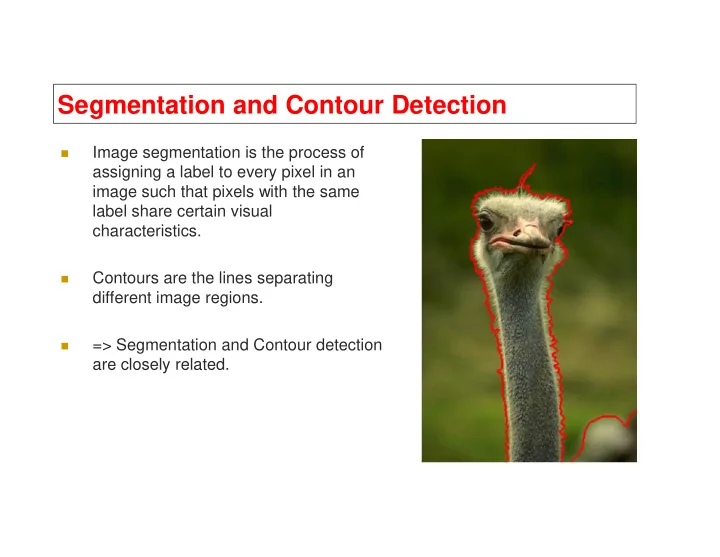
Image segmentation is the process of assigning a label to every pixel in an image such that pixels with the same label share certain visual characteristics.

Contours are the lines separating

  

Contours are the lines separating different image regions.

=> Segmentation and Contour detection are closely related.

slide-2
SLIDE 2

What is segmentation?

Dividing image into its constituent regions or objects

slide-3
SLIDE 3
slide-4
SLIDE 4
slide-5
SLIDE 5
slide-6
SLIDE 6

Problem Statement

slide-7
SLIDE 7

Berkeley Segmentation Dataset

Berkeley Segmentation dataset (BSDS500).

500 Manually segmented images.

Manual Segmentations

slide-8
SLIDE 8

Hard Edges vs. Soft Edges Hard Edges vs. Soft Edges

slide-9
SLIDE 9

λ= λ= 8 λ=3 2

slide-10
SLIDE 10

Consistency

A

Image BG L-bird R-bird

Perceptual organization forms a tree:

B C

  • A,C are refinements of B
  • A,C are mutual refinements
  • A,B,C represent the same percept
  • Attention accounts for differences

BG L-bird R-bird grass bush head eye beak far body head eye beak body

Two segmentations are consistent when they can be explained by the same segmentation tree (i.e. they could be derived from a single perceptual organization).

slide-11
SLIDE 11

Combining Segmentations Combining Segmentations

slide-12
SLIDE 12

How To Combine How To Combine Segmentations Segmentations? ?

Option A: Spectral Clustering

1.

Choose N nearest neighbors for each pixel.

2.

Calculate sparse affinity matrix.

3.

Use spectral clustering to get K segments.

4.

Find contours.

4.

Find contours. . . . 1 2 3 4

slide-13
SLIDE 13

How To Combine How To Combine Segmentations Segmentations? ?

Option B: Directly combine contours of segmentations

1.

Find contour of a single segmentation

2.

Combine all contours. 1 . . . 1 2

slide-14
SLIDE 14

Segmentation Discontinuity detection Detection of:    Gray value Similarity Thresholding   Detection of:  Isolated points  Lines  Edges Thresholding Region growing Region splitting and merging

slide-15
SLIDE 15

Dealing with textures

Similarity in Color Similarity in Texture

16

slide-16
SLIDE 16

Why supervised?

17

slide-17
SLIDE 17

Dimensionality Reduction

Color & Texture Descriptor

 Reduced noise  Curse of dimensionality  Less computational load

18

slide-18
SLIDE 18

Converting textures to “color” channels

19

slide-19
SLIDE 19

Measures color mixtures in small windows (11x11)

Clustering the histograms of the image into 10 groups.

Assigning each pixel to the centroid of its cluster.

Local Color Histogram

20

slide-20
SLIDE 20

Gabor Filters – Cont.

21

slide-21
SLIDE 21

Gabor filters

Zsa Zsa Gabor 6 February 1917, Budapest, Hungary

Dennis Gabor

5 June 1900, Budapest, Hungary

slide-22
SLIDE 22

Gabor Filters

slide-23
SLIDE 23

Gabor Filter Bank Example

1

θ

1

σ

2

σ

3

σ

Scale

Example Gabor filter bank with 3 scale values and 4

  • rientation values:

2

θ

3

θ

4

θ

Orientation

slide-24
SLIDE 24
slide-25
SLIDE 25

Gabor filter responses

slide-26
SLIDE 26

Standard way to handle texture

 Apply Gabor filter bank and generate a

texture vector for each pixel.

 Perform Kmeans/GMM/pca on the texture

vector space, each group centroid is called

  

vector space, each group centroid is called texton

 For each pixel(texton) neighborhood,

calculate texton histogram

 The resulting histogram values are the

texton vector space.

slide-27
SLIDE 27

i j Chi-square 0.1

Chi square distance between texton histograms

j k 0.1 0.8

 

  

K m j i j i j i

m h m h m h m h h h

1 2 2

) ( ) ( )] ( ) ( [ 2 1 ) , ( χ

slide-28
SLIDE 28
slide-29
SLIDE 29
slide-30
SLIDE 30

Scale-Space Basics

slide-31
SLIDE 31
slide-32
SLIDE 32