
SLIDE 1
RX-10
Enhance Your Jacketed Lab Reactor
Beat Dietrich October 2015
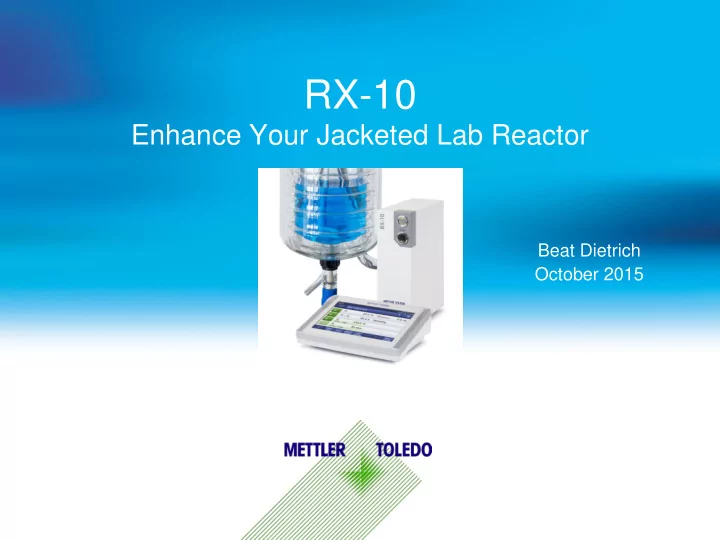
RX-10 Enhance Your Jacketed Lab Reactor Beat Dietrich October 2015 - - PowerPoint PPT Presentation
RX-10 Enhance Your Jacketed Lab Reactor Beat Dietrich October 2015 Content Jacketed Lab Reactor (JLR) Challenges RX-10 Overview Voice of the Customer 1 What is a JLR System? Stirrer PAT Probe Temperature Jacketed Lab Reactor 2
Beat Dietrich October 2015
1
2 Jacketed Lab Reactor PAT Probe Stirrer Temperature
3
Inconsistent Controls Means time- consuming task of relearning controls Lost or Missing Data Failing to Document Leads to Repeat Experiments Manual Documentation and Reporting Time Consuming and Error Prone Manual Parameter Control Scientists must be in lab to change process parameters Increase waste of materials and time Lack of integration Increases risk of inconsistent results Inefficient use of resources and limited ability to run safe overnight experiments Bottlenecks post experiment delay timely decisions
Operate it
4
5
Integrated Control for all Equipment
No training required
parameters (dosing, temperature, stirring) No need to learn multiple interfaces
6 Heat to 70 °C Stir at 250 rpm Dose 200 g Chiller failure
Productivity
How to avoid going back to the lab for every activity?
Safety
Behavior in case of an unexpected event? Take Sample Wait
Sample Method
Wait Wait Readjust parameters
7
Touchscreen or in iControl
control means experiments can be run overnight
quickly repeated
equipment failure
8
may not be logged or stored
analysis difficult
Temperature pH Stirring
9
trended on touchscreen
documentation and process knowledge
experiments based on previously captured data
10 Tr (°C) Vr (mL) As Dosing Begins, Exotherm is Observed
Temperature °C Volume (mL) Time (h)
11
For Advanced Analysis Using iControl Software:
reaction parameters with dosing trends and process analytical data for a full understanding of the process
at the Onset of Crystallization
12
Temperature °C # of particles <50 microns Detect Nucleation Measure Temperature
Equipment and Recipe) is Difficult and Very Time Consuming Resulting in Lost or Inaccurate Information
13
No stirrer speed, temperature or set point documented (poor reproducibility) Data is not digital (information is not searchable) Captured in local language (reuse
Personal Document, not backed up or shared
Real Extract from Lab Journal
report documenting the recipe and equipment.
creates flexible reports with custom trend graphs
14
15
Record complete and accurate process data for improved experiment documentation and process knowledge An integrated controller for all process chemistry equipment increases accessibility and consistency Sequences of automated parameter controls means experiments can be run safely overnight Quickly prepare reports for accurate history and effective communicaiton 100 % Data Capture One Simple, Standard Interface Powerful Reporting Unattended 24/7
16
17
Existing Jacketed Lab Reactor RX-10 Base Unit
Touchscreen Operation
SmartConnect™ Sensor Port
Third party sensors such as:
iControl / iC DC PC-based recipe control and data analysis with PAT integration
Tr RS232
Network Accessories
Peripherals
18
USB ports Data Export Firmware Upgrades SmartConnect™ sensor port Plug & play of Pt100, voltage and current sensors CAN accessories Plug & play connectivity to DU-SP50, EasySampler, ECB, etc. Ethernet (Network) iControl / iC Data Center Touchscreen port 1 m or 3 m cable length Thermostat/Stirrer RS232 port, plug & play recognition of equipment Safety relay Acoustic or visual alerts Emergency button To trigger emergency program Easy-to-use touchscreen Basic functions learned within 60 seconds
SmartConnect Cable
standard laboratory instrumentation for immediate control and data collection
No need for added adaptors or specialized setup time/cost Moving instrumentation from one vessel to another is fast and easy
PT100 (Temperature) Pressure sensors, Mass Flow Meters Any Other Analog Sensor with Voltage or Current Output
20
Thermostats Huber, Julabo – all models with RS232 port. Stirrers IKA, Heidolph, J-KEM – all models with RS232 port Temperature Range Full range supported by Huber or Julabo thermostats (-120 °C – 425 °C) Volume range / Reactors Choose what is best for your application. There are no volume or reactor limits given by RX-10. SmartConnectTM Port (plug & play) Pt100 4 wires (RTD) Voltage
Current 0 to 20mA Connectivity and data transfer Ethernet: Communication to PC (iControl/iC Data Center) CAN: Interface for peripherals (ECB, DU-SP50, EasySampler) USB: Data Export to USB stick Supported languages English, German, French, Spanish, Japanese, Chinese Safety features
Dimensions, W x D x H 70 mm x 152 mm x 215 mm (2.75” x 5.98” x 8.46”) Weight 2,88 kg, including touchscreen
21
30208790: RX-10 with 1m touch- screen cable 30217050: RX-10 with 3m touch- screen cable 1 RX-10 main unit 1 1 2 Touchscreen 7’’ (1m cable) 1 3 Touchscreen 7’’ (3m cable) 1 4 Power Supply 1 1 5 Lab Bar Holder 1 1 6 Thermostat/Stirrer RS232 cables 1 1 7 USB memory stick 2GB 1 1 8 iControl DVD 1 1 9 iControl Office License 1 1 10 RX-10 Quick Start Guide 1 1
EasyMax 402 100 ml – 400 ml OptiMax 250 ml – 1000 ml EasyMax 102 1 ml – 400 ml
EasyMax and OptiMax are Turn Key Development Workstations
22
23
# Feature Standalone JLR RX-10 EasyMax / OptiMax RC1e 1 All-in-one system / minimal footprint 2 Reactor easy to change/clean 3 No need for external thermostat 4 Ready to go reactor setups
for distillations, pressure, ..
5 Touchscreen to control ALL process params 6 iControl * 7 iC Data Center 8 PAT data integration 9 UCB Universal Control Box (RS485) – PC only 10 EasySampler integration 11 ECB Easy Control Box (CAN plug'n'play) 12 DU-SP50 Dosing Unit (syringe pump) 13 Upgradable to calorimeter 14 RTCal 15 Adiabatic mode 16 Real Tj measurement not T bath of chiller
17 Tr-Tj control for distillations / reflux 18 Non-linear ramps for crystallizations 19 Fast and stable T control 20 One-click report
* = iControl recipe exchange possible between RX-10, EM and OM but not with RC1e. iControl for RC1e is a different application.
Touchscreen Easy to use control in front of the reactor
File transfer and basic evaluation after experiment completion
Data Management Capture and archive data
Automated data capture, preparation and sharing Advanced
evaluation iControl
PC Software Advanced control, may be at a remote location
iC Data Center USB / Ethernet
25
Programming a T Ramp Live Trend Graph Pre-programming of Up to 6 Steps Homescreen – Learn in 60s
METTLER TOLEDO Analytical Tools
26
27 EasyMax 402 100ml – 400ml OptiMax 250ml – 1000ml RX-10 >1000ml EasyMax 102 1ml – 400ml
Small Volume Medium Volume Large Volume Copy Recipes Between Reactors; Easily Overlay and Compare Data
28
Up to 4 Connected Units – RX-10, EasyMax or OptiMax Drag'n'Drop Recipe Designer Drag'n'Drop iControl Introduction Video on YouTube (4min)
Automated Data Collection with iC Data Center
Capture, Prepare and Share data from variety of instruments and transform it into valuable process data
required – data capture without the need for a PC in the lab!
31
32
Since we installed the RX-10, our jacketed lab reactors are used much more
interpret experimental results. Safety limits on reactors reduce risk for the whole lab… In short, RX-10 makes our jobs easier and safer.
Andy Huygaerts, Janssen Pharma, Belgium
The RX-10 is a universal Jacket Lab Reactor (JLR) control unit that works truly plug’n play. My favorite function: It enables basic lab operations such as temperature, agitation and dosing control as well as data capturing on existing
Gregor Schock (Grünenthal, Germany)
The RX-10 unit is a versatile solution to optimize scale-up processes. In our Lab, it has closed the gap between EasyMax/OptiMax Synthesis Workstations and multi-liter JLR vessels. As main benefits, it provides a consistent lab workflow to the user and gives documentation of experiments along the whole scale-up workflow.
33
100 % Data Capture One Simple, Standard Interface Powerful Reporting Unattended 24/7
http:// http://www.labtex.co.uk/product/rx-10-reactor-control-data-capture