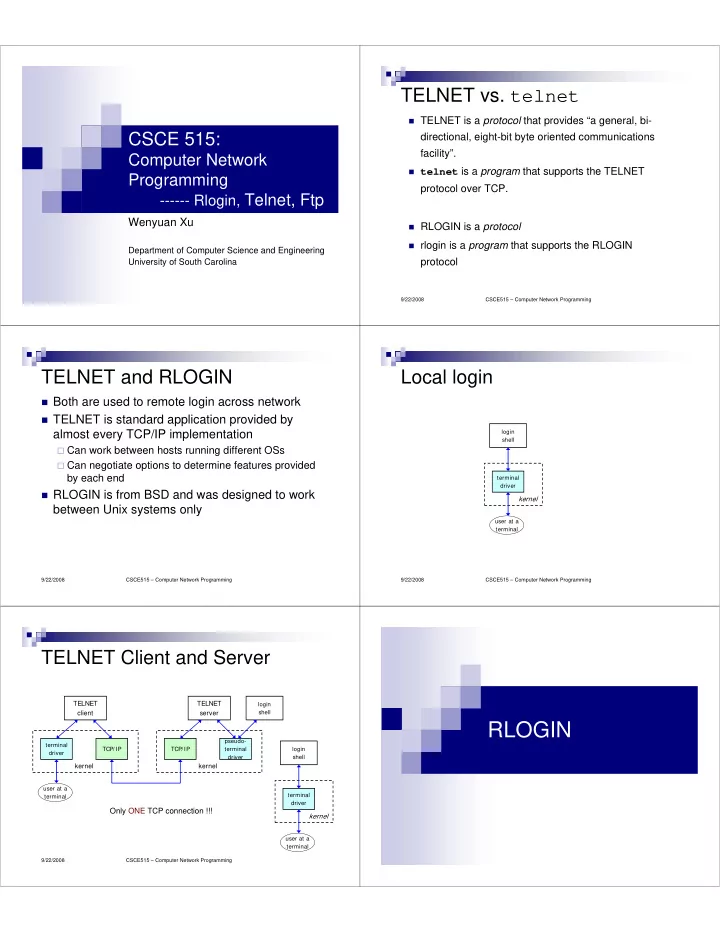
RLOGIN pseudo- terminal TCP/IP TCP/IP terminal login driver - - PDF document

rlogin
SMART_READER_LITE
LIVE PREVIEW

RLOGIN pseudo- terminal TCP/IP TCP/IP terminal login driver - - PDF document

TELNET vs. telnet TELNET is a protocol that provides a general, bi- CSCE 515: directional, eight-bit byte oriented communications facility. Computer Network telnet is a program that supports the TELNET Programming protocol over


slide-1
SLIDE 1

CSCE 515:

Computer Network Programming

  • ----- Rlogin, Telnet, Ftp

Wenyuan Xu

Department of Computer Science and Engineering University of South Carolina

CSCE515 – Computer Network Programming 9/22/2008

TELNET vs. telnet

TELNET is a protocol that provides “a general, bi-

directional, eight-bit byte oriented communications facility”.

telnet is a program that supports the TELNET

protocol over TCP.

RLOGIN is a protocol rlogin is a program that supports the RLOGIN

protocol

CSCE515 – Computer Network Programming 9/22/2008

TELNET and RLOGIN

Both are used to remote login across network TELNET is standard application provided by

almost every TCP/IP implementation

Can work between hosts running different OSs Can negotiate options to determine features provided

by each end

RLOGIN is from BSD and was designed to work

between Unix systems only

CSCE515 – Computer Network Programming 9/22/2008

Local login

terminal driver

kernel

user at a terminal login shell CSCE515 – Computer Network Programming 9/22/2008

TELNET Client and Server

TELNET client

terminal driver TCP/IP

kernel

user at a terminal

TELNET server

TCP/IP pseudo- terminal driver

kernel

login shell terminal driver

kernel

user at a terminal login shell

Only ONE TCP connection !!!

RLOGIN

slide-2
SLIDE 2

CSCE515 – Computer Network Programming 9/22/2008

RLOGIN Protocol – Start up

Specified in RFC 1282 Use a single TCP connection Protocol between client and server after connection is set up Client writes 4 strings to server

a byte of 0 login name of user on client, terminated by a byte of 0 login name of user on server, terminated by a byte of 0 name of user’s terminal type, a slash, terminal speed, terminated by a byte

  • f 0

(\0John\0John\0ibmpc3/9600\0)

Server responds with a byte of 0 Optionally server can ask user for a password Server sends a request to client asking for terminal’s window size

CSCE515 – Computer Network Programming 9/22/2008

Interactive input

Client

keystroke Server

1byte Date

Server

ACK = 1 WIN = xxx

display

1byte Date

echo

ACK = 1 WIN = xxx

CSCE515 – Computer Network Programming 9/22/2008

Flow control

Done by client User type Control-S, Control-Q, asking

SERVER to stop sending data, or start sending data

Control-S stop writing to the network Control-Q start writing to the network

Control by Server

CSCE515 – Computer Network Programming 9/22/2008

Server to Client Commands

Need to mark command bytes because only one TCP connection is

used

Use TCP’s urgent mode to mark command bytes To send a command to client, server enters urgent mode and makes

command byte the last byte of urgent data

Four command bytes 0x02: client flushes output 0x10: client stops performing flow control 0x20: client resumes flow control 0x80: client sends current window size to server immediately and

notifies server if changing window size

Out-of-band signaling

CSCE515 – Computer Network Programming 9/22/2008

TCP Segment Format

15 16 31 20 bytes

destination port number urgent pointer TCP checksum

  • ption (if any)

source port number window size sequence number acknowledgment number

header length reserved

U R G A C K P S H R S T S Y N F I N

data (if any)

CSCE515 – Computer Network Programming 9/22/2008

Client to Server Command

When client receives command 0x80 from

server, client needs to send window size to server

This command needs to be marked

2 bytes of 0xff 2 flag bytes of ASCII char ‘s’ 4 16-bit values: #rows, #chars per row, #pixels in X

direction, #pixels in Y direction

In-band signaling

slide-3
SLIDE 3

CSCE515 – Computer Network Programming 9/22/2008

RLOGIN Client Escape

Talk to client directly instead of sending the input

to server

Start with a tilde ‘~’ Followed by one of four characters

‘.’: terminate client EOF (Ctrl-D): terminate client Job control suspend char (Ctrl-Z): suspend client Job control delayed suspend char (Ctrl-Y): suspend

  • nly client input but keep server output

TELNET

CSCE515 – Computer Network Programming 9/22/2008

TELNET Protocol

Specified in RFC 854 TCP connection data and control over the same connection. Network Virtual Terminal

Designed to work between any host and any

terminal

Negotiated options

CSCE515 – Computer Network Programming 9/22/2008

TELNET Client and Server

TELNET client

terminal driver TCP/IP

kernel

user at a terminal

TELNET server

TCP/IP pseudo- terminal driver

kernel

login shell terminal driver

kernel

user at a terminal login shell

Only ONE TCP connection !!!

CSCE515 – Computer Network Programming 9/22/2008

Network Virtual Terminal

NVT NVT NVT NVT

Server Server Process Process

TCP TCP TCP TCP

CSCE515 – Computer Network Programming 9/22/2008

Network Virtual Terminal

intermediate representation of a generic terminal. provides a standard language for

communication of terminal control functions.

Client maps user’s terminal type to NVT Server maps NVT into its terminal type

Use NVT ASCII, the 7-bit US variant of ASCII

character set, but also allow 8-bit data transmission

slide-4
SLIDE 4

CSCE515 – Computer Network Programming 9/22/2008

Negotiated Options

All NVTs support a minimal set of

capabilities.

Some terminals have more capabilities

than the minimal set.

The 2 endpoints negotiate a set of

mutually acceptable options (character set, echo mode, etc).

CSCE515 – Computer Network Programming 9/22/2008

Negotiated Options

The protocol for requesting optional

features is well defined and includes rules for eliminating possible negotiation “loops”.

The set of options is not part of the

TELNET protocol, so that new terminal features can be incorporated without changing the TELNET protocol.

CSCE515 – Computer Network Programming 9/22/2008

Option examples

Four operation modes

Half-duplex Character at a time Line at a time Linemode

character set (EBCDIC vs. ASCII)

CSCE515 – Computer Network Programming 9/22/2008

Command Structure

In-band signaling for both directions

All TELNET commands and data flow through the

same TCP connection.

Commands start with a special character called

the Interpret as Command (IAC) escape character.

The IAC code is 255 (0xff).

Next byte is command byte

<IAC COMMAND XX >

If a 0xff is sent as data - it must be followed by

another 0xff.

CSCE515 – Computer Network Programming 9/22/2008

Looking for Commands

Each receiver must look at each byte that

arrives and look for IAC.

If IAC is found and the next byte is IAC - a

single byte is presented to the application/terminal (a 0xff).

If IAC is followed by any other code - the

TELNET layer interprets this as a command.

CSCE515 – Computer Network Programming 9/22/2008

Command Codes

IP

243 0xf3

AO

244 0xf4

AYT

245 0xf5

EC

246 0xf6

EL

247 0xf7

  • WILL

WILL 251 251 0xfb 0xfb

  • WON

WON’ ’T T 252 252 0xfc 0xfc

  • DO

DO 253 253 0xfd 0xfd

  • DON

DON’ ’T T 254 254 0xfe 0xfe

  • IAC

IAC 255 0xff 255 0xff

slide-5
SLIDE 5

CSCE515 – Computer Network Programming 9/22/2008

TELNET Option Negotiation

Either side can send request to other side

<IAC COMMANDID OPTIONID >

Four different requests for any given option

WILL: sender wants to enable option

DO: receiver says OK DONT: receiver says NO

DO: sender wants receiver to enable option

WILL: receiver says OK WONT: NO

WONT: sender wants to disable option

DONT: receiver must say OK

DONT: sender wants receiver to disable option

WONT receiver must say OK CSCE515 – Computer Network Programming 9/22/2008

TELNET Options

Option ID Name 1 echo 3 suppress go ahead 5 status 6 timing mark 24 terminal type 31 window size 32 terminal speed 33 remote flow control 34 linemode 36 environment variables

CSCE515 – Computer Network Programming 9/22/2008

TELNET Suboption Negotiation

Used for options that require more information

than just “enable” or “disable”

For example,

client: <IAC, WILL, 24> server: <IAC, DO, 24> server: <IAC, SB, 24, 1, IAC, SE> client: <IAC, SB, 24, 0, ‘I’, ‘B’, ‘M’, ‘P’, ‘C’, IAC, SE>

CSCE515 – Computer Network Programming 9/22/2008

Control Functions

TELNET includes support for a series of

control functions commonly supported by servers.

This provides a uniform mechanism for

communication of (the supported) control functions.

CSCE515 – Computer Network Programming 9/22/2008

Control Functions

Interrupt Process (IP)

suspend/abort process.

Abort Output (AO)

process can complete, but send no more

  • utput to user’s terminal.

Are You There (AYT)

check to see if system is still running.

CSCE515 – Computer Network Programming 9/22/2008

More Control Functions

Erase Character (EC)

delete last character sent typically used to edit keyboard input.

Erase Line (EL)

delete all input in current line.

slide-6
SLIDE 6

CSCE515 – Computer Network Programming 9/22/2008

TELNET Client Escape

Talk to client directly instead of sending the input

to server

Normal client escape char is Ctrl-] Can type commands to change settings or print

information

CSCE515 – Computer Network Programming 9/22/2008

telnet vs. TCP

Not all TCP servers talk TELNET (most don't) You can use the telnet program to play with

these servers, but the fancy commands won't do anything.

type ^], then "help" for a list of fancy TELNET stuff

you can do in telnet.

CSCE515 – Computer Network Programming 9/22/2008

Playing with TELNET

You can use the telnet program to play

with the TELNET protocol.

telnet is a generic TCP client.

Sends whatever you type to the TCP socket. Prints whatever comes back through the TCP

socket.

Useful for testing TCP servers (ASCII based

protocols).

CSCE515 – Computer Network Programming 9/22/2008

Some TCP Servers you can play with

Many Unix systems have these servers

running (by default):

echo

port 7

discard

port 9

daytime

port 13

chargen

port 19

CSCE515 – Computer Network Programming 9/22/2008

Security

Does not encrypt any data sent over the

connection

Including password

No authentication – man in the middle

attack

Daemons have vulnerabilities

CSCE515 – Computer Network Programming 9/22/2008

Secure Shell (SSH)

Operate over TCP/IP connection or other reliable but

insecure transport layers to support secure remote login, secure file transfer and other secure services

Can automatically encrypt, authenticate, and compress

transmitted data

Three major components

Transport Layer Protocol to provide server authentication,

confidentiality, and integrity

User Authentication Protocol to provide authentication of

client-side user to server

Connection Protocol to multiplex encrypted channels to logical

channels

slide-7
SLIDE 7

FTP

CSCE515 – Computer Network Programming 9/22/2008

File Transfer Protocol (FTP)

Internet standard for file transfer Designed to work between different systems but support

limited number of file types and structures

Use two TCP connections Control connection

Client active open to TCP port 21 of server Stay up all the time of communication IP type of service (TOS) should be “minimize delay”

Data connection

Created each time a file is transferred IP TOS should be “maximize throughput” CSCE515 – Computer Network Programming 9/22/2008

FTP Client and Server

user at a terminal server protocol interpreter server data transfer function

server

user protocol interpreter user data transfer function

client

user interface file system file system data connection control connection (FTP commands, FTP replies) CSCE515 – Computer Network Programming 9/22/2008

Control Connection

  • The control connection is the “well known”

service.

  • The control connection uses the TELNET

protocol.

  • Commands and replies are all line
  • riented text (default is ASCII).

CSCE515 – Computer Network Programming 9/22/2008

FTP Commands

Commands are sent in NVT ASCII with a pair of

CR, LF at end of each line

Commands are 3 or 4 bytes of ASCII chars,

some require optional arguments

Access Control Commands USER username specify user PASS password specify password CWD change directory CDUP change directory to parent QUIT logout

CSCE515 – Computer Network Programming 9/22/2008

Transfer Parameter Commands

PORT publish local data port PASV server should listen TYPE type establish data representation MODE establish transfer mode STRU establish file structure

slide-8
SLIDE 8

CSCE515 – Computer Network Programming 9/22/2008

Service Commands

RETR filename retrieve file STOR filename send file STOU send file and save as unique APPE send file and append ABOR abort prev. service command PWD print working directory LIST transfer list of files over data link

CSCE515 – Computer Network Programming 9/22/2008

FTP Replies

  • All replies are sent over control connection.
  • Replies are a single line containing

3 digit status code (sent as 3 numeric chars). text message.

  • The FTP spec. includes support for

multiline text replies.

CSCE515 – Computer Network Programming 9/22/2008

FTP Reply Status Code

First digit of status code indicates type of reply:

‘1’: Positive Preliminary Reply (got it, but wait). ‘2’: Positive Completion Reply (success). ‘3’: Positive Intermediate Reply (waiting for more information). ‘4’: Transient Negative Completion (error - try again). ‘5’: Permanent Negative Reply (error - can’t do).

CSCE515 – Computer Network Programming 9/22/2008

FTP Reply Status Code

  • 2nd digit indicates function groupings.

‘0’: Syntax (problem with command syntax). ‘1’: Information (reply to help or status cmds). ‘2’: Connections (problem with a connection). ‘3’: Authentication (problem with login). ‘4’: Unspecified. ‘5’: File system (related to file system).

  • 3rd digit indicates specific problem within

function group.

  • 331: Username OK, password required

CSCE515 – Computer Network Programming 9/22/2008

FTP Data Representation

Four dimensions determine how file is transferred and

stored

File type: ASCII file, EBCDIC file, binary file, local file Format control: nonprint, telnet format control, Fortran carriage

control

Structure: file structure, record structure, page structure Transmission mode: stream mode, block mode, compressed

mode

Typical implementation restricts to ASCII or binary,

nonprint, file structure, stream mode

CSCE515 – Computer Network Programming 9/22/2008

FTP Connection Management

Three uses for data connection

Sending file from client to server Sending file from server to client Sending a listing of files or directories from server to client

Client chooses an ephemeral port, sends it to server

across control connection, and passive open for data connection

Server receives this port number from control connection,

and active open to that port on client

slide-9
SLIDE 9

CSCE515 – Computer Network Programming 9/22/2008

Anonymous FTP

A server can allow anyone to login and use FTP

to transfer files

To use anonymous FTP, login with “anonymous”

as username and an email address as password

Some anonymous FTP server denies client from

a host that does not have valid hostname

CSCE515 – Computer Network Programming 9/22/2008 CSCE515 – Computer Network Programming

Assignment & Next time

Reading:

TI 26, 27 ** RFC 854 TELENT RFC 959 FTP

Next Lecture:

UDP programming