+ Radius = 695,000 km Radius = 695,000 km Distance = - - PDF document

radius 695 000 km radius 695 000 km distance 149 600 000
SMART_READER_LITE
LIVE PREVIEW

+ Radius = 695,000 km Radius = 695,000 km Distance = - - PDF document

Paul Debevec / SIGGRAPH 2003 The Background The Background Capturing Light Probes in Capturing Light Probes in the Sun the Sun Paul Debevec Paul Debevec USC ICT USC ICT www.debevec.org/IBL2003 www.debevec.org/IBL2003 Guggenheim Museum,


slide-1
SLIDE 1

Paul Debevec / SIGGRAPH 2003 www.debevec.org/IBL2003 Page 1

Capturing Light Probes in the Sun Capturing Light Probes in the Sun

Paul Debevec USC ICT www.debevec.org/IBL2003 Paul Debevec USC ICT www.debevec.org/IBL2003

The Background The Background

Guggenheim Museum, Bilbao

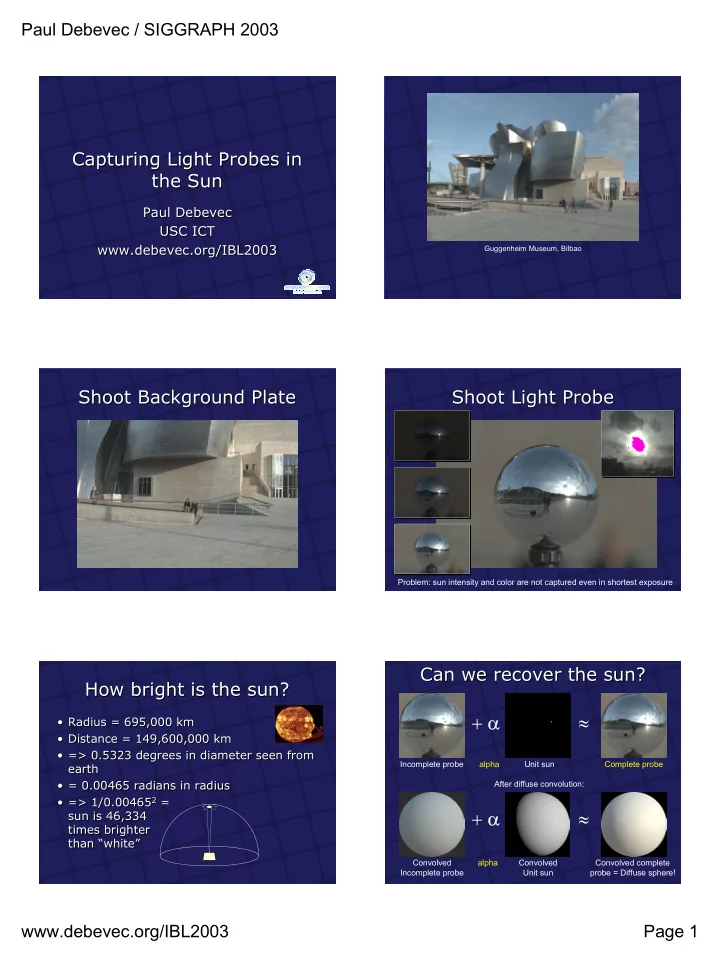
Shoot Background Plate Shoot Background Plate Shoot Light Probe Shoot Light Probe

Problem: sun intensity and color are not captured even in shortest exposure

How bright is the sun? How bright is the sun?

  • Radius = 695,000 km
  • Distance = 149,600,000 km
  • => 0.5323 degrees in diameter seen from

earth

  • = 0.00465 radians in radius
  • => 1/0.004652 =

sun is 46,334 times brighter than “white”

  • Radius = 695,000 km
  • Distance = 149,600,000 km
  • => 0.5323 degrees in diameter seen from

earth

  • = 0.00465 radians in radius
  • => 1/0.004652 =

sun is 46,334 times brighter than “white”

Can we recover the sun? Can we recover the sun?

+ α ≈ + α ≈

After diffuse convolution: Incomplete probe Unit sun Complete probe Convolved Incomplete probe Convolved Unit sun Convolved complete probe = Diffuse sphere! alpha alpha

slide-2
SLIDE 2

Paul Debevec / SIGGRAPH 2003 www.debevec.org/IBL2003 Page 2

Shoot Diffuse Sphere Shoot Diffuse Sphere

Even better: paint the back of the mirror sphere gray and just turn it around Even better: paint the back of the mirror sphere gray and just turn it around

Crop Diffuse and Probe Images Crop Diffuse and Probe Images

Scale Probe Image to account for less- than-100% Reflectance of the Sphere Scale Probe Image to account for less- than-100% Reflectance of the Sphere

Reflected color

(0.632, 0.647, 0.653)

Reflected color

(0.632, 0.647, 0.653)

White reference

(1, 1, 1)

White reference

(1, 1, 1)

Convert Gray Sphere into a White Sphere using Reflectivity of Paint Convert Gray Sphere into a White Sphere using Reflectivity of Paint

Gray Paint

(0.302, 0.333, 0.346)

Gray Paint

(0.302, 0.333, 0.346)

White reference

(1, 1, 1)

White reference

(1, 1, 1)

Calibrate Lens Transmission Ratios Calibrate Lens Transmission Ratios

8mm f/11, 1/60th sec (1.43, 1.54, 1.30) 24mm f/11, 1/60th sec (1.73, 1.88, 1.52) 200mm f/11, 1/60th sec (1.22, 1.34, 1.10 )

Diffuse white light at 160 cd/m^2 or 50 footlamberts For better accuracy, should perform this measurement across entire field of view to

  • btain each lens’s flat field response

Determine Sun Position in Probe Determine Sun Position in Probe

(-1,-1) (1,-1) (1,1) (-1,1)

(u, v) = (0.414, 0.110) (Dx,Dy,Dz) = (0.748, 0.199, 0.633) θ = arctan2(-v, u) φ = 2 arcsin( (u2 + v2)1/2 ) (Dx, Dy, Dz) = ( sin φ cos θ, sin φ sin θ, -cos φ )

u v

slide-3
SLIDE 3

Paul Debevec / SIGGRAPH 2003 www.debevec.org/IBL2003 Page 3

Create a Unit Sun Source Create a Unit Sun Source

# unitsun.rad void light suncolor 3 46334 46334 46334 # Sun intensity chosen to light # white diffuse surface at (1,1,1) suncolor source sun 4 0.748 0.199 0.633 0.5323 # Sun subtended angle = 0.5323 deg. RADIANCE file for unit sun

Create Probe Lighting Environment Create Probe Lighting Environment

# Light Probe Environment probe.rad void colorpict lightprobe 7 red green blue probe.hdr spheremap.cal u v lightprobe glow lightprobeglow 4 1 1 1 0 lightprobeglow source sky 4 0 1 0 360 RADIANCE file for light probe

Solve for Sun Scaling Factor Solve for Sun Scaling Factor

+ α ≈ α ≈

Then solve for

α = (1.166, 0.973, 0.701)

Diffuse Ball

Incomplete probe Unit sun Subtract incomplete probe from both sides to obtain:

Adjust Sun Intensity Adjust Sun Intensity

# sun.rad void light suncolor 3 54006 45083 32464 # obtained sun intensity as: # 46334*(1.165581,0.972998,0.700642) suncolor source sun 4 0.748185858 0.198793344 0.633008 0.5323

Verify composite probe matches diffuse ball Verify composite probe matches diffuse ball

  • Avg. Error (0.5%, 0.3%, 0.2%) RMS Error = (2.2%, 1.8%, 1.3%)

+ − = =

Rendered Diffuse Real Diffuse Rendered Diffuse Lit with Sun Lit with Probe

Background plate Background plate

slide-4
SLIDE 4

Paul Debevec / SIGGRAPH 2003 www.debevec.org/IBL2003 Page 4

Match-move plate & model local scene Match-move plate & model local scene

Done using Façade

http://www.debevec.org/Facade/

Project Background Plate onto Local Scene

Viewed from the original viewpoint, it should look the same

Project Background Plate onto Local Scene

Viewed from the original viewpoint, it should look the same

Project Light Probe onto Environment Project Light Probe onto Environment

Render Diffuse Local Scene to create Irradiance Image Render Diffuse Local Scene to create Irradiance Image

Divide background plate by irradiance to produce local scene texture map Divide background plate by irradiance to produce local scene texture map

  • Reflectance = radiance / irradiance
  • Reflectance = radiance / irradiance

pcomb –e 'ro=0.5*ri(1)/ri(2);go=0.5*gi(1)/gi(2);bo=0.5*bi(1)/bi(2) ' back.hdr local.hdr > localref.hdr pcomb –e 'ro=0.5*ri(1)/ri(2);go=0.5*gi(1)/gi(2);bo=0.5*bi(1)/bi(2) ' back.hdr local.hdr > localref.hdr

Illuminated scene without objects

Should still look the same as the plate, although the ground is now texture-mapped and lit

Illuminated scene without objects

Should still look the same as the plate, although the ground is now texture-mapped and lit

slide-5
SLIDE 5

Paul Debevec / SIGGRAPH 2003 www.debevec.org/IBL2003 Page 5

Final render with objects

Virtual shadows should match the real shadows

Final render with objects

Virtual shadows should match the real shadows

Final render closeup Final render closeup

Thanks! Thanks!

  • Andreas Wenger – CRW converter
  • Chris Tchou – HDRShop features
  • Greg Ward – Radiance renderer
  • Teddy Kim – Probe assistance
  • Maya Martinez – Rendering composition
  • ICT Graphics Lab – Presentation comments

http://www.debevec.org/IBL2003/

  • Andreas Wenger – CRW converter
  • Chris Tchou – HDRShop features
  • Greg Ward – Radiance renderer
  • Teddy Kim – Probe assistance
  • Maya Martinez – Rendering composition
  • ICT Graphics Lab – Presentation comments

http://www.debevec.org/IBL2003/