Problem Statement Physical and Data Link Layer Overview Make two - - PowerPoint PPT Presentation

problem statement physical and data link layer overview
SMART_READER_LITE
LIVE PREVIEW

Problem Statement Physical and Data Link Layer Overview Make two - - PowerPoint PPT Presentation

Problem Statement Physical and Data Link Layer Overview Make two computers talk to


slide-1
SLIDE 1

Physical and Data Link Layer Overview

Kameswari Chebrolu

  • Dept. of Electrical Engineering, IIT Kanpur

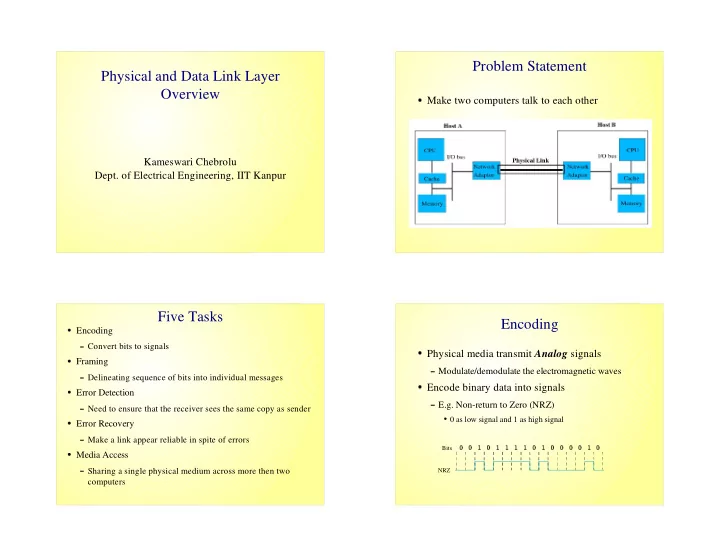
Problem Statement

  • Make two computers talk to each other

Five Tasks

Encoding

Convert bits to signals

Framing

Delineating sequence of bits into individual messages

Error Detection

Need to ensure that the receiver sees the same copy as sender

Error Recovery

Make a link appear reliable in spite of errors

Media Access

Sharing a single physical medium across more then two computers

Encoding

  • Physical media transmit Analog signals

Modulate/demodulate the electromagnetic waves

  • Encode binary data into signals

E.g. Non-return to Zero (NRZ)

0 as low signal and 1 as high signal

Bits NRZ

✆ ✆ ✝ ✆ ✝ ✝ ✝ ✝ ✆ ✝ ✆ ✆ ✆ ✆ ✝ ✆
slide-2
SLIDE 2

Problems with NRZ

  • Consecutive 1s and 0s

Changes the average making it difficult to detect signals (baseline wander)

Clock Recovery

Sender's and receiver clocks have to be precisely synchronized

Receiver derives the clock from the received signal vis signal transition

Lesser number of transitions leads to clock drift

Alternative Encodings

  • Non-return to Zero Inverted (NRZI)

To encode a 1, make a transition

To encode a 0, stay at the current signal

Solves problem of consecutive 1's but not 0's

  • Manchester Encoding

Transmits XOR of the NRZ encoded data and the clock

0 is encoded as low-to-high transition, 1 as high-to-low transition

Only 50% efficient

Example

Bits NRZ Clock Manchester NRZI

✁ ✁ ✁
  • 4B/5B Encoding
  • Every 4 bit of actual data is encoded into a 5 bit

code

  • The 5 bit code words have

No more than one leading 0

No more than two trailing 0s

Solves consecutive zeros problem

  • The 5 bit codes are sent using NRZI
  • Achieves 80% efficiency
slide-3
SLIDE 3

4B/5B Encoding Five Tasks

Encoding

Convert bits to signals

Framing

Delineating sequence of bits into individual messages

Error Detection

Need to ensure that the receiver sees the same copy as sender

Error Recovery

Make a link appear reliable in spite of errors

Media Access

Sharing a single physical medium across more then two computers

Framing

  • Framing breaks bit streams into frames of

smaller sizes

  • Challenge: What sets of bits constitute a frame

Where is the beginning and the end of frame?

  • Framing Protocols

Examples: PPP, HDLC, DDCMP

Theory behind Framing

  • Delineate a frame with a special pattern

HDLC uses an 8 bit pattern: 01111110

  • Problem: Special pattern may appear in payload
  • Solution: Bit Stuffing

Sender inserts a 0 after 5 consecutive 1's

Receiver removes the 0 that follows 5 1's

Header Body 8 16 16 8 CRC Beginning sequence Ending sequence

slide-4
SLIDE 4

Five Tasks

Encoding

Convert bits to signals

Framing

Delineating sequence of bits into individual messages

Error Detection

Need to ensure that the receiver sees the same copy as sender

Error Recovery

Make a link appear reliable in spite of errors

Media Access

Sharing a single physical medium across more then two computers

Error Detection

  • Basic Idea: Add redundant information to a

frame

Add k bits of redundant data to a n bit message

k << n; k = 32; n = 12,000

k derived from original message through some algorithm

  • Examples: CRC, checksum, two-dimensional

parity

Checksum

  • View data in a frame to be transmitted as a

sequence of 16-bit integers.

  • Add the integers using 16 bit one's complement

arithmetic.

  • Take the one's complement of the result – this

result is the checksum

Five Tasks

Encoding

Convert bits to signals

Framing

Delineating sequence of bits into individual messages

Error Detection

Need to ensure that the receiver sees the same copy as sender

Error Recovery

Make a link appear reliable in spite of errors

Media Access

Sharing a single physical medium across more then two computers

slide-5
SLIDE 5

Error Recovery

  • Two forms of error recovery:

Automatic Repeat reQuest (ARQ)

Forward Error Correction (FEC)

  • ARQ relies on two mechanisms

Acknowledgments

Timeout

Stop and Wait ARQ

  • Problem: Can't keep pipe full
  • Example: Consider a 1.5 Mbps link with a 45ms

round trip time; Frame size is 1024 bytes

Utilization is 1024*8/0.045 = 182kbps

Sender Receiver Frame 0 ACK 0 Frame 1 ACK 1 Time

Stop and Wait ARQ Cont...

Sender Receiver Frame ACK Frame ACK Timeout Timeout Time Sender Receiver Frame ACK Timeout (a) (b) Sender Receiver Frame Frame ACK Timeout Timeout Sender Frame ACK Frame ACK Timeout Timeout Receiver

Bandwidth-Delay Product (BDP)

  • View a link as a hollow pipe

Latency corresponds to the length of the pipe

Bandwidth gives diameter of the pipe

BDP gives the volume of the pipe – the number of bits it holds

E.g. a transcontinental link with bandwidth 45Mbps and latency 50ms can hold 2.25 * 106 bits

  • BDP represents #bits the sender can transmit before the

sender gets acknowledgment of the first bit

  • If the sender does not send BDP's worth of data, it is

under utilizing the link

slide-6
SLIDE 6

Sliding Window

  • Allow multiple outstanding (un-Acked) frames
  • Place an upper bound on un-Acked frames,

called window

Sender Receiver Time

Sender Side

  • Assign a sequence number to each frame (SeqNum)
  • Maintain 3 variables:

Send Window Size (SWS): upper bound on the number of unacked frames that sender can transmit

LAR denotes sequence number of Last Acknowledgment Received; Advance LAR when ACK arrives

LFS denotes sequence number of Last Frame Sent

  • Maintain Invariant: LFS-LAR <= SWS

< SWS LAR LFS

Receiver Side

  • Maintains the following three variables

Received Window Size (RWS): upper bound on the number

  • f out of order frames

LAF denotes sequence number of last acceptable frame

LFR denotes sequence number of last frame received

  • Maintain invariant: LAF – LFR <= RWS

RWS LFR LAF <

Receiver Side cont..

  • Frame SeqNum arrives

If SeqNum <= LFR or SeqNum > LAF, discard

If LFR< SeqNum <= LAF, accept

  • Send cumulative Acks
slide-7
SLIDE 7

Summary

  • Five key problems have to be solved for two

computers to talk with each

  • We covered four of these problems

Encoding

Framing

Error Detection

Error Recovery

  • The fifth problem and our topic of next session is

Media Access Protocols