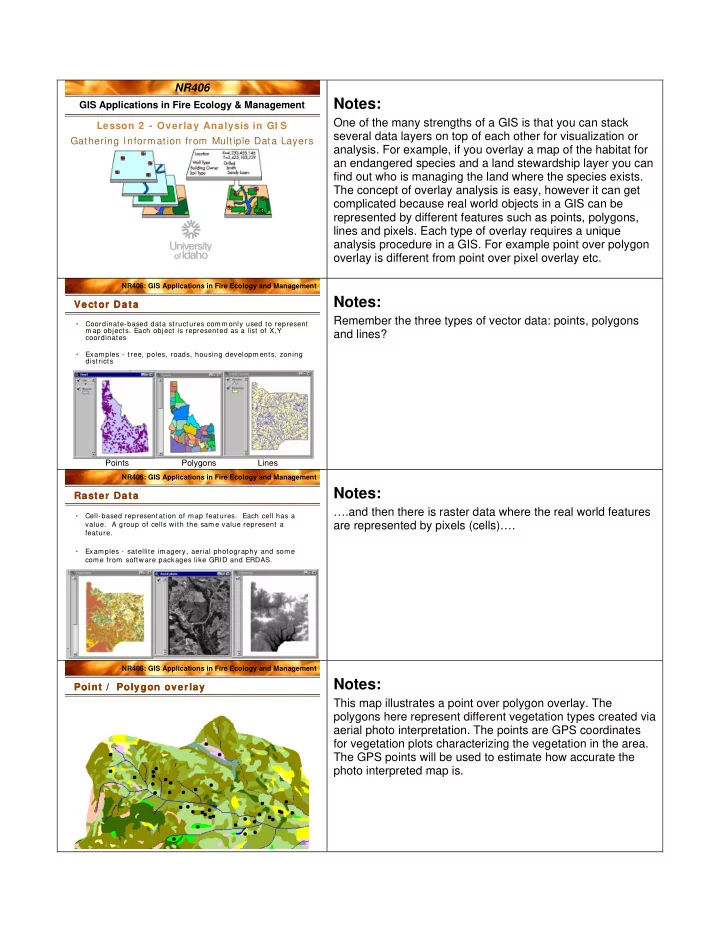
SLIDE 3 NR406: GIS Applications in Fire Ecology and Management
Vector data
Raster data
- GRID clip (masking)
- Zonal statistics (GRID)
- Combine
Region W ide: "Cookie Cutter Approach" Region W ide: "Cookie Cutter Approach"
Notes:
The other overlay approach is the ‘cookie cutter approach’ . This is an example of a polygon to polygon overlay analysis. Going back to the bird nest example, rather than extracting data from the exact bird nest location it might be interesting to analyze the conditions within a 100 meter buffer around the bird nest. The first step in such an analysis would be to create a 100 m buffer around the points (nests). The buffers will be represented in a new polygon layer in GIS. Next you would clip or intersect the habitat and canopy cover layers with the buffer layer and finally summarize the habitat types and canopy cover classes within the buffers. If your habitat and canopy cover layers are represented by raster data you would use the raster tools masking, zonal statistics or combine rather than the vector tools clip and intersect.
NR406: GIS Applications in Fire Ecology and Management
Vector Overlay Table Vector Overlay Table
ArcInfo ArcGIS 9x ArcView 3x Overlay type
GRID: combine Spatial Analyst: Raster Calculator Combine(grid1, grid2) Spatial Analyst: Analysis – Zonal- Tabulate Areas Spatial Analyst: Analysis – Tabulate Areas
Extension: Grid Transformation Tools – Transform Grids - Combine
Grid to Grid
GRID: zonalstats Convert the polygon cover to a grid or the grid to a polygon Spatial Analyst – Zonal Statistics Spatial Analyst: Analysis – Tabulate Areas Spatial Analyst – Zonal Statistics
Poly to Grid
Arc: intersect Arc: union Arc: identity Toolbox – Analysis Tools – Overlay – Union or Intersect Geoprocessing Wizard – Intersect
Poly to Poly
Notes:
The table above guides you as to what tool to use when performing a polygon to polygon overlay (vector overlay) or a poly to grid or grid to grid overlay. We will work with these tools in the lab exercise for this lesson.
NR406: GIS Applications in Fire Ecology and Management
# # # ## # # # # # # # # # # # # # # # # # # # # # # # # # # # # # # # # # # # # # # # # ## # # # # # # # # ## # # # # # # # # # # # # # # # # # # # # # # # # # # # # # # # # # # # # # # # # # # # # # # # # # # # # # # # # # # # # # # # # # # # # # # # # # # # # # # # # # # # # # # # # # # # # # ## # ## # # # # # # # # # # # # # # # # # # # # # # # # # # # ## # # # # # # # # # ## # # # # # # # # # # # # # # # # # # # # # # # # # # # # # # # # # # # # # # # # # # # # # # # # # # # # # # # # # # # # # # # # # # # # # # # # # # # # # # # # # # # # # # # # # # # # # # # # # # # # # # # # # # # # # # # # # # # # # # # # # # # # # # # # # # # # # # # # # # # # # # # # # # # # # # # # # # # # # # # # # # # # # # # # # # # # # # # # # # # # # # # # ## # # #
Ve g e U rb a n Ag ric u ltu re N a tiv e g ra s se s Ex o tic g ra s se s H e rb a ce o u s cle a rc u t W e t la n d s/ w e t m e a d o w s Ot h e r s h ru bs Sa g e b ru sh / ra b b itb ru sh Bro a d le a f f o res ts X eric c o n ife ro u s M e sic c o n ife ro u s W a t e r R ip a ria n Ba rre n L an d Alp in e m e a d o w Sn o w , Ic e, C lo u d s Bro a d le a f /c on if e ro u s m ix ed Bu rn e d , s ta n d in g t im b e r N o D a ta # fire st art lo c a tio n s
200 200 M iles
Fires > 640 acres 1986-1992
S N E W
Fire Start Locations & Vegetation ( GAP) Fire Start Locations & Vegetation ( GAP)
Notes:
This map shows the vegetation cover types of Idaho
- verlayed with the fire start locations for fires larger than 640
acres during the time period 1986-1992. What cover types do you think has the most fire starts (> 640 acres)? When you estimate the relative abundance of fire in different cover type you must consider how much of each cover type there is in the state. If the entire state was in the sagebrush cover type we would expect all fires to start in sagebrush. If half the state was sagebrush and half was forest you would expect half the fires to start in sagebrush and half in forest if the start of fires was a random event. Is it?