
SLIDE 1
Support: service.desk@utas.edu.au|www.utas.edu.au/learning-teaching-online CRICOS Provider Code: 00586B July, 2013 Page 1 of 10
MyLO Student Guide v10.1
ePortfolio – Create a Presentation
This guide demonstrates how you can create a presentation within your ePortfolio in MyLO. Presentations let you compile portfolio items in a web project to showcase your
- achievements. Your presentations may have multiple pages and use different themes and
- layouts. Presentations may also be required by your lecturers as part of assessment items.
- 1. You can access your ePortfolio from the MyLO Home page or a Unit Home page.
Select the ePortfolio tool from the top navbar. This action will take you to your ePortfolio Home page.
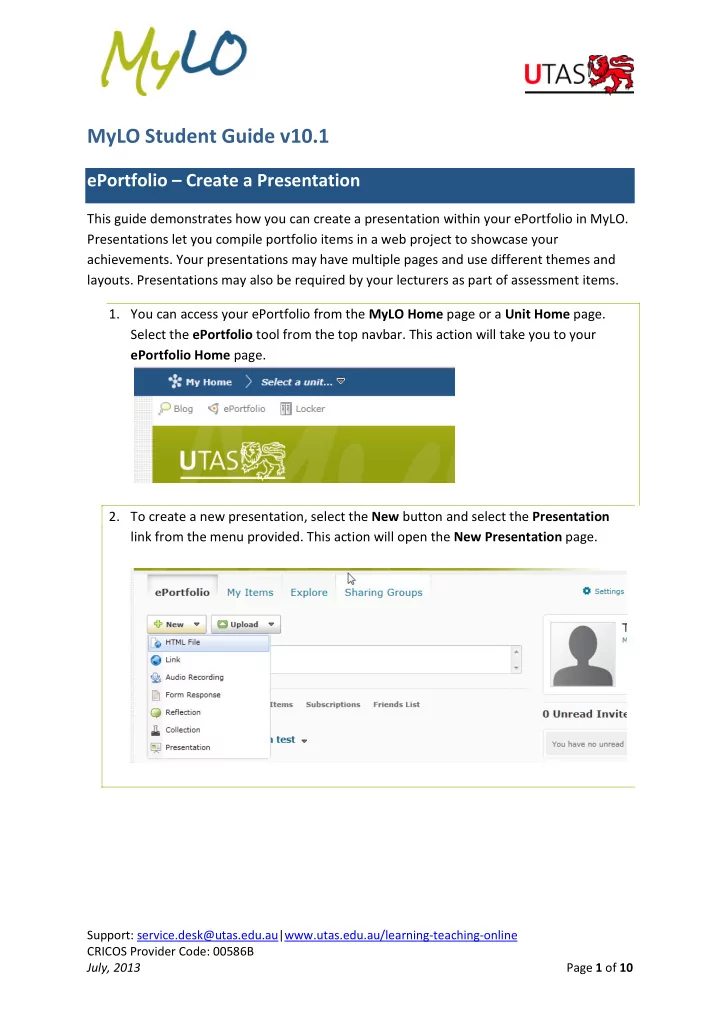
- 2. To create a new presentation, select the New button and select the Presentation