Memory Management Memory Management 5A. Memory Management and - - PDF document

memory management memory management
SMART_READER_LITE
LIVE PREVIEW

Memory Management Memory Management 5A. Memory Management and - - PDF document

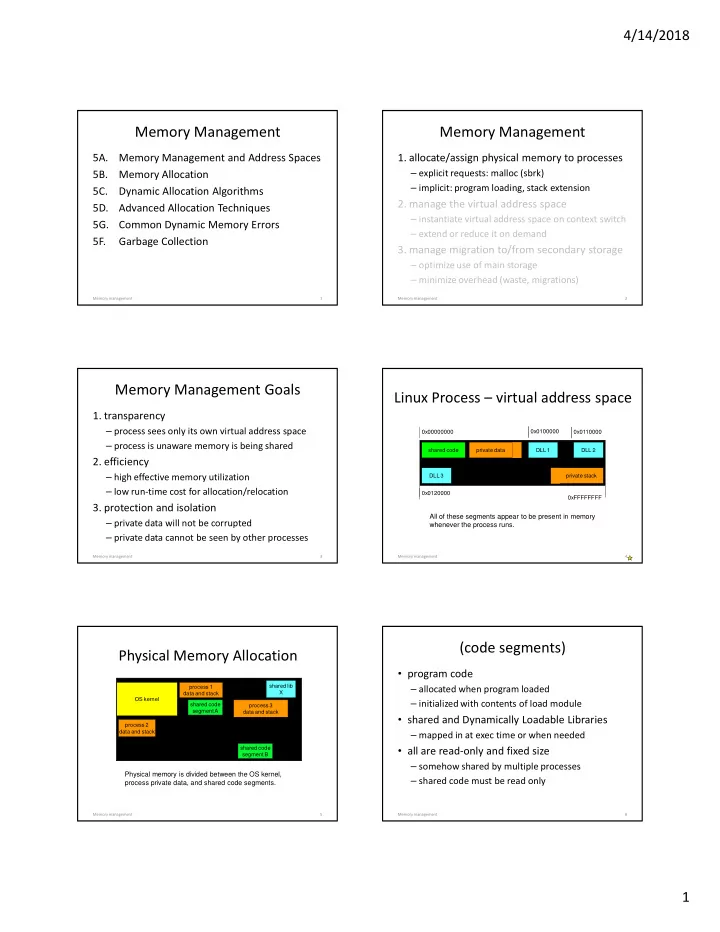
4/14/2018 Memory Management Memory Management 5A. Memory Management and Address Spaces 1. allocate/assign physical memory to processes 5B. Memory Allocation explicit requests: malloc (sbrk) implicit: program loading, stack extension


slide-1
SLIDE 1

4/14/2018 1

Memory Management

5A. Memory Management and Address Spaces 5B. Memory Allocation 5C. Dynamic Allocation Algorithms 5D. Advanced Allocation Techniques 5G. Common Dynamic Memory Errors 5F. Garbage Collection

1 Memory management

Memory Management

  • 1. allocate/assign physical memory to processes

– explicit requests: malloc (sbrk) – implicit: program loading, stack extension

  • 2. manage the virtual address space

– instantiate virtual address space on context switch – extend or reduce it on demand

  • 3. manage migration to/from secondary storage

– optimize use of main storage – minimize overhead (waste, migrations)

Memory management 2

Memory Management Goals

  • 1. transparency

– process sees only its own virtual address space – process is unaware memory is being shared

  • 2. efficiency

– high effective memory utilization – low run-time cost for allocation/relocation

  • 3. protection and isolation

– private data will not be corrupted – private data cannot be seen by other processes

Memory management 3

Linux Process – virtual address space

0x00000000 0xFFFFFFFF shared code private data private stack DLL 1 DLL 2 DLL 3 0x0100000 0x0110000 0x0120000

All of these segments appear to be present in memory whenever the process runs.

4 Memory management

Physical Memory Allocation

OS kernel process 1 data and stack shared code segment A shared lib X

Physical memory is divided between the OS kernel, process private data, and shared code segments.

5 Memory management

process 2 data and stack process 3 data and stack shared code segment B

(code segments)

  • program code

– allocated when program loaded – initialized with contents of load module

  • shared and Dynamically Loadable Libraries

– mapped in at exec time or when needed

  • all are read-only and fixed size

– somehow shared by multiple processes – shared code must be read only

Memory management 6

slide-2
SLIDE 2

4/14/2018 2

(implementing: code segments)

  • program loader

– ask for memory (size and virtual location) – copy code from load module into memory

  • run-time loader

– request DLL be mapped (location and size) – edit PLT pointers from program to DLL

  • memory manager

– allocates memory, maps into process

Memory management 7

(data/stack segments)

  • they are process-private, read/write
  • initialized data

– allocated when program loaded – initialized from load module

  • data segment expansion/contraction

– requested via system calls (e.g. sbrk) – only added/truncated part is affected

  • process stack

– allocated and grown automatically on demand

Memory management 8

(implementing: data/stack)

  • program loader

– ask for memory (location and size) – copy data from load module into memory – zero the uninitialized data

  • memory manager

– invoked for allocations and stack extensions – allocates and deallocates memory – adjusts process address space accordingly

Memory management 9

Fixed Partition Memory Allocation

  • pre-allocate partitions for n processes

–reserving space for largest possible process

  • very easy to implement

–common in old batch processing systems

  • well suited to well-known job mix

–must reconfigure system for larger processes

  • likely to use memory inefficiently

–large internal fragmentation losses –swapping results in convoys on partitions

10 Memory management

Fragmentation

  • The curse of spatially partitioned resources

– wasted or unusable free space

  • internal fragmentation – not needed by its owner
  • external fragmentation – uselessly small pieces

– all such resources, not merely memory

  • inheritance of farm land
  • calendar appointment packing
  • Choose your poison

– static allocation … constant internal waste – dynamic allocation … progressive external loss

Internal Fragmentation

partn #1 8MB partn #2 4MB partn #3 4MB process A (6 MB) process B (3 MB) process C (2 MB) waste 2MB waste 2MB waste 1MB Total waste = 2MB + 1MB + 2MB = 5/16MB = 31%

12 Memory management

slide-3
SLIDE 3

4/14/2018 3

(Internal Fragmentation)

  • wasted space in fixed sized blocks
  • caused by a mis-match between

– the chosen sizes of a fixed-sized blocks – the actual sizes that programs request

  • average waste: 50% of each block
  • overall waste reduced by multiple sizes

– suppose blocks come in sizes S1 and S2 – average waste = ((S1/2) + (S2 - S1)/2)/2

13 Memory management

Variable Partition Allocation

  • start with one large "heap" of memory
  • when a process requests more memory

– find a large enough chunk of memory – carve off a piece of the requested size – put the remainder back on the free list

  • when a process frees memory

– put it back on the free list

  • eliminates internal fragmentation losses

14 Memory management

External Fragmentation

PA PB PC PA PC PD PE PC PD PE PF

(External/Global Fragmentation)

  • each allocation creates left-over fragments

– over time these become smaller and smaller

  • tiny left-over fragments are useless

– they are too small to satisfy any request – but their combined size may be significant

  • there are three obvious approaches:

– try to avoid creating tiny fragments – try to recombine adjacent fragments – re-pack the allocated space more densely

Fixed vs Variable Partition

  • Fixed partition allocation

– allocation and free lists are trivial – internal fragmentation is inevitable

  • average 50% (unless we have multiple sizes)
  • Variable partition allocation

– allocation is complex and expensive

  • long searches of complex free lists

– eliminates internal fragmentation – external fragmentation is inevitable

  • can be managed by (complex) coalescing

Memory management 17

Stack vs Heap Allocation

  • stack allocation

– compiler manages space (locals, call info) – data is valid until stack frame is popped – OS automatically extends/shrinks stack segment

  • heap allocation

– explicitly allocated by application (malloc/new) – data is valid until free/delete (or G.C.) – heap space managed by user-mode library – data segment size adjusted by system call

Memory management 18

slide-4
SLIDE 4

4/14/2018 4

sbrk(2) vs. malloc(3)

  • sbrk(2) … managing size of data segment

– each address space has a private data segment – process can request that it be grown/shrunk – sbrk(2) specifies desired ending address – this is a coarse and expensive operation

  • malloc(3) … dynamic heap allocation

– sbrk(2) is called to extend/shrink the heap – malloc(3) is called to carve off small pieces – mfree(3) is called to return them to the heap

Memory management 19

managing process private data

  • 1. loader allocates space for, and copies initialized data from load module.
  • 2. loader allocates space for, and zeroes uninitialized data from load module.
  • 3. after it starts, program uses sbrk to extend the process data segment

and then puts the newly created chunk on the free list

  • 4. Free space “heap” is eventually consumed

program uses sbrk to further extend the process data segment and then puts the newly created chunk on the free list

initialized data 000000000000 000000000000

20 Memory management

Variable Partition Free List

head

F R E E L E N N E X T U S E D L E N N E X T F R E E L E N N E X T U S E D L E N N E X T F R E E L E N N E X T

List might contain all memory fragments …or only fragments that are free.

21 Memory management

(Free lists: keeping track of it all)

  • fixed sized blocks are easy to track

– a bit map indicating which blocks are free

  • variable chunks require more information

– a linked list of descriptors, one per chunk – each lists size of chunk, whether it is free – each has pointer to next chunk on list – descriptors often at front of each chunk

  • allocated memory may have descriptors too

B1

22 Memory management

Free Chunk Carving

U S E D L E N N E X T U S E D N E X T F R E E L E N N E X T

  • 1. find large enough free chunk
  • 2. reduce len to requested size
  • 3. new header for residual chunk
  • 4. insert new chunk into list
  • 5. mark carved piece as in use

L E N N E X T F R E E L E N U S E D

23 Memory management

Avoid Creating Small Fragments

  • Choose carefully which piece to carve
  • “There Ain’t No Such Thing As A Free Lunch”

– careful choices mean longer searches – optimization means more complex data structures – cost of reduced fragmentation is more cycles

  • A few obvious choices for “smart” choices …

– Best fit – Worst fit – First fit – Next fit

slide-5
SLIDE 5

4/14/2018 5

Which chunk: best fit

  • search for the "best fit" chunk

– smallest size greater/equal to requested size

  • advantages:

– might find a perfect fit

  • disadvantages:

– have to search entire list every time – quickly creates very small fragments

25 Memory management

Which chunk: worst fit

  • search for the "worst fit" chunk

– largest size greater/equal to requested size

  • advantages:

– tends to create very large fragments … for a while at least

  • disadvantages:

– still have to search entire list every time

26 Memory management

Which chunk: first fit

  • take first chunk that is big enough
  • advantages:

– very short searches – creates random sized fragments

  • disadvantages:

– the first chunks quickly fragment – searches become longer – ultimately it fragments as badly as best fit

27 Memory management

Which Chunk: next Fit

head

F R E E L E N N E X T U S E D L E N N E X T F R E E L E N N E X T U S E D L E N N E X T F R E E L E N N E X T

After each search, set guess pointer to chunk after the one we chose.

guess pointer

That is the point at which we will begin

  • ur next

search.

28 Memory management

(next-fit ... guess pointers)

  • the best of both worlds

– short searches (maybe shorter than first fit) – spreads out fragmentation (like worst fit)

  • guess pointers are a general technique

– think of them as a lazy (non-coherent) cache – if they are right, they save a lot of time – if they are wrong, the algorithm still works – they can be used in a wide range of problems

29 Memory management

Coalescing – de-fragmentation

  • all dynamic algorithms have ext fragmentation

– some get it faster, some spread it out more evenly

  • we need a way to reassemble fragments

– check neighbors when ever a chunk is freed – recombine w/free neighbors whenever possible – free list can be designed to make this easier

  • e.g. address-sorted doubly linked list of all chunks
  • e.g. “Buddy” allocation w/implicit neighbors
  • counters forces of external fragmentation

30 Memory management

slide-6
SLIDE 6

4/14/2018 6

Free Chunk Coalescing

head

F R E E L E N N E X T U S E D L E N N E X T F R E E L E N N E X T U S E D L E N N E X T F R E E L E N N E X T

Previous chunk is free, so coalesce backwards. Next chunk is also free, so coalesce forwards.

F R E E

FREE

31 Memory management

Coalescing vs. Fragmentation

  • opposing processes operate in parallel

– which of the two processes will dominate?

  • what fraction of space is typically allocated?

– coalescing works better with more free space

  • how fast is allocated memory turned over?

– chunks held for long time cannot be coalesced

  • how variable are requested chunk sizes?

– high variability increases fragmentation rate

  • how long will the program execute

– fragmentation, like rust, gets worse with time

32 Memory management

Memory Allocation Requests

frequency

4K 256 64 1K

Internal fragmentation results from mismatches between chunk sizes and request sizes (which we have assumed to be randomly distributed) But if we look at what actually happens, it turns out that memory allocation requests aren’t random at all.

33 Memory management

(memory allocation requests)

  • memory requests are not well distributed

– some sizes are used much more than others

  • many key services use fixed-size buffers

– file systems (for disk I/O) – network protocols (for packet assembly) – standard request descriptors

  • these account for much transient use

– they are continuously allocated and freed

34 Memory management

Special Buffer Pools

  • if there are popular sizes

– reserve special pools of particular size buffers – allocate/free matching requests from those pools

  • benefit: improved efficiency

– much simpler than variable partition allocation – reduces (or eliminates) external fragmentation

  • but ... we must know how much to reserve

– too little: buffer pool will become a bottleneck – too much: we will have a lot of idle space

35 Memory management

Balancing Space for Buffer Pools

  • many different special purpose pools

– demand for each changes continuously – memory needs to migrate between them

  • sounds like dynamic a equilibrium problem

– voluntarily managed free space margins

  • maximum allowable free space per service
  • graceful handling of changing loads

– claw-back call-back from OS to services

  • OS requests services to free all available memory
  • prompt handling of emergencies

Memory management 36

slide-7
SLIDE 7

4/14/2018 7

Buffer Pools – Slab Allocation

  • requests are not merely for common sizes

– they are often for the same data structure – or even assemblies of data structures

  • initializing and demolition are expensive

– many fields and much structure are constant

  • stop destroying and reinitializing

– recycle data structures (or assemblies) – only reinitialize the fields that must be changed – only disassemble to give up the space – reduce (or eliminate) carving and coalescing

Memory management 37

Common Dynamic Memory Errors

  • Memory Leaks

– neglect to free memory after done with it – often happens in (not thought out) error cases

  • Buffer over-run

– writing past beginning or end of allocated chunk – usually result of not checking parameters/limits

  • Continuing to use it after freeing it

– may be result of a race condition – may be result of returning pointers to locals – may simply be “poor house-keeping”

Memory management 38

Diagnostic Free List

  • standard chunk header

– free bit, chunk length, next chunk pointer

  • allocation audit info

– tracing down the source of memory leaks

  • guard zones

– detect application buffer over-runs

  • zero memory when it is freed

– detect continued use after chunk is freed

F R E E B I T L E N G T H N E X T P T R A L L O C R T N A L L O C T I M E G U A R D Z O N E G U A R D Z O N E

free space

E1 E2 E3

39 Memory management

(Diagnostic Free lists can help)

  • all chunks in list (whether allocated or free)

– enables us to find state of ALL memory chunks

  • record of who last allocated each chunk

– what routine called malloc, when – enables to identify type of data structure

  • guard zones at beginning and end of chunks

– limited protection against buffer under/overrun – enables us to detect data under/overrun

40 Memory management

Memory Leaks

  • a very common problem

– programs often forget to free heap memory

  • this is why the automatic stack model is so attractive

– losses can be significant in long running processes

  • process grows, consuming ever-more resources
  • degrading system and application performance
  • the operating system cannot help

– the heap is managed entirely by user-mode code – finding and fixing the leaks is too difficult for most – some advocate regular “prophylactic restarts”

Garbage Collection: “A New Hope”

  • garbage collection is alternative to freeing

– applications allocate objects, never free them

  • user-mode memory manager monitors space

– when it gets low, initiate garbage collection

  • Garbage Collection:

– search data space finding every object pointer – note address/size of all accessible objects – compute the compliment (what is inaccessible) – add all inaccessible memory to the free list

42 Memory management

slide-8
SLIDE 8

4/14/2018 8

Garbage Collection: TANSTAAFL

  • Garbage Collection is expensive

– scan all possible object references – compute an active reference count for each – may require stopping application for a long time

  • Progressive Background Garbage Collection

– runs continuously, in parallel with application – continuous overhead and competing data access

  • The more you need it, the more it costs

– more frequent garbage collection scans – yielding less free memory per scan

Memory management 43

Finding all accessible data

  • object oriented languages often enable this

– all object references are tagged – all object descriptors include size information

  • it is often possible for system resources

– where all resources and references are known (e.g. we know who has which files open)

  • resources can be designed with GC in mind

– but, in the general case, it may be impossible

44 Memory management

General Case GC: What’s so hard?

  • Compiler can know static/automatic pointers
  • How do we identify pointers in the heap?

– search data segment for address-like values? – a number or string could look like an address

  • How do we know if pointers are still live?

– a value doesn’t mean the code is still using it

  • What kind of structure does it point to?

– we need to know how much memory to free

  • Only possible if all data/pointers are tagged

– which is, in general, not the case

GC vs. Reference Counting

  • What if there are multiple pointers to object?

– when can we safely delete it

  • Associate a reference count w/each object

– increment count on each reference creation – decrement count on each reference deletion – delete object when reference count hits zero

  • This is not the same as Garbage Collection

– it requires explicit close/release operations – doesn’t involve searching for unreferenced objs – correct count maintenance may not be free

assignments

  • reading for the next lecture (moderately long)

– Arpaci ch 15-16 … Relocation, Segmentation – Arpaci ch 18-19 … Paging and TLBs – Arpaci ch 21-22 … Swapping mechanisms/policies – Working Sets and replacement algorithms

  • Project

– project 1B … extra process complicates debugging

Memory management 47

Supplementary Slides

slide-9
SLIDE 9

4/14/2018 9

Physical and Virtual Addresses

  • A cell of RAM has a particular physical address
  • Years ago, that address was used by processes

to name RAM locations

  • Instead, we can have processes use virtual

addresses

– Which may not be the same as physical addresses

  • More flexibility in memory management, but

requires virtual to physical translation

The Memory Management Problem

  • Most processes can’t perfectly predict how much

memory they will use

  • The processes expect to find their existing data when

they need it where they left it

  • The entire amount of data required by all processes

may exceed amount of available physical memory

  • Switching between processes must be fast

– Can’t afford much delay for copying data

  • The cost of memory management itself must not be

too high

Fixed Partition (bitmap) Free List

partn #1 (in use) partn #2 (in use) partn #3 (free) partn #4 (in use) partn #5 (free) partn #6 (free)

free partition bit map: one bit per partition

1 1 1

actual memory partitions bit maps make very compact free lists

51 Memory management

Other Dynamic Memory Advice

  • uninitialized pointers, forget to allocate

– some OS leave page 0 un-mapped

  • returning pointers to local variables

– “gcc –ansi –pedantic –wall” will catch these

  • continued use, multiple frees

– null pointers after freeing the memory – avoid keeping multiple pointers to an object

  • buffer over-runs

– use newer APIs with length parameters

Memory management 52