Memory Hierarchy Introduction Problem: Suppose your processor - - PowerPoint PPT Presentation

memory hierarchy introduction
SMART_READER_LITE
LIVE PREVIEW

Memory Hierarchy Introduction Problem: Suppose your processor - - PowerPoint PPT Presentation

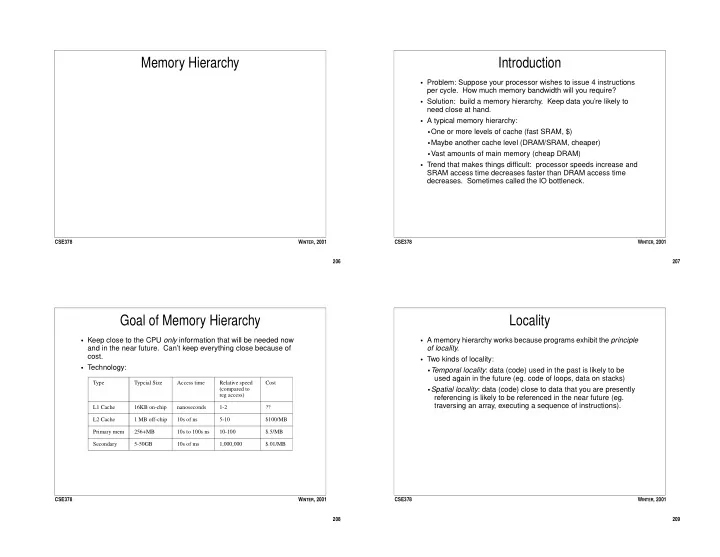
Memory Hierarchy Introduction Problem: Suppose your processor wishes to issue 4 instructions per cycle. How much memory bandwidth will you require? Solution: build a memory hierarchy. Keep data youre likely to need close at hand.


slide-1
SLIDE 1

206 CSE378 WINTER, 2001

Memory Hierarchy

207 CSE378 WINTER, 2001

Introduction

  • Problem: Suppose your processor wishes to issue 4 instructions

per cycle. How much memory bandwidth will you require?

  • Solution: build a memory hierarchy. Keep data you’re likely to

need close at hand.

  • A typical memory hierarchy:
  • One or more levels of cache (fast SRAM, $)
  • Maybe another cache level (DRAM/SRAM, cheaper)
  • Vast amounts of main memory (cheap DRAM)
  • Trend that makes things difficult: processor speeds increase and

SRAM access time decreases faster than DRAM access time

  • decreases. Sometimes called the IO bottleneck.

208 CSE378 WINTER, 2001

Goal of Memory Hierarchy

  • Keep close to the CPU only information that will be needed now

and in the near future. Can’t keep everything close because of cost.

  • Technology:

Type Typcial Size Access time Relative speed (compared to reg access) Cost L1 Cache 16KB on-chip nanoseconds 1-2 ?? L2 Cache 1 MB off-chip 10s of ns 5-10 $100/MB Primary mem 256+MB 10s to 100s ns 10-100 $.5/MB Secondary 5-50GB 10s of ms 1,000,000 $.01/MB

209 CSE378 WINTER, 2001

Locality

  • A memory hierarchy works because programs exhibit the principle
  • f locality.
  • Two kinds of locality:
  • Temporal locality: data (code) used in the past is likely to be

used again in the future (eg. code of loops, data on stacks)

  • Spatial locality: data (code) close to data that you are presently

referencing is likely to be referenced in the near future (eg. traversing an array, executing a sequence of instructions).

slide-2
SLIDE 2

210 CSE378 WINTER, 2001

Caches

  • Registers are not sufficiently large to keep enough locality close to

the ALU.

  • Main memory is too far away -- it takes many cycles to access it,

completely destroying the pipeline performance.

  • Hence, we need fast memory between main memory and the

registers -- a cache.

  • Keep in the cache what is most likely to be referenced in the near

future.

  • When fetching an instruction or performing a load, first check to

see if it’s in the cache.

  • When performing a store, first write it in the cache before going to

main memory.

  • Every current micro has at least 2 levels of cache (one on chip,
  • ne off chip)

211 CSE378 WINTER, 2001

Levels in the Memory Hierarchy

Disk Registers On Chip Cache Off Chip Cache Main memory CPU Fast, very small (100s of bytes) 8-128 KB (split I and D caches) 32K - several MB Large (100s of MB) “Unlimited” capacity... 212 CSE378 WINTER, 2001

Cache Access

  • Think of the cache as a table associating memory addresses and

data values.

  • When the CPU generates an address, it first checks to see if the

corresponding memory location is mapped in the cache. If so, we have a cache hit, if not, we have a cache miss. 122

  • 4

14 Memory Physical Address 14 Cache

How do we know where to look? If we had a miss, we look in main mem.

2 25 8 54

Tag Data

99 ...

1 2 n

7 101

213 CSE378 WINTER, 2001

  • Mem. Hierarchy Characteristics
  • A block (or line) is the fundamental unit of data that we transfer

betwen two levels of the hierarchy.

  • Where can a block be placed?
  • Depends on the organization.
  • How do we find a block?
  • Each cache entry carries its own “name” (or tag).
  • Which block should be replaced on a miss?
  • One entry will have to be kicked out to make room for the new
  • ne: which one depends on replacement policy.
  • What happens on a write?
  • Depends on write policy.
slide-3
SLIDE 3

214 CSE378 WINTER, 2001

A Direct Mapped Cache

1 2 3 4 5 6 7 1 2 3 4 5 6 7 8 ... ... 1022 1023

Memory Cache index = address % cacheSize 215 CSE378 WINTER, 2001

Indexing in a Direct Mapped Cache

Tag Data Tag Data Tag Data Tag Data Tag Data Tag Data Tag Data Tag Data Address Tag Index d

If the tag at the indexed location matches the tag

  • f the address, we have

a hit. d = log2(# of bytes per entry) i = log2(number of entries in the cache) If cacheSize is a power of 2, then: index = addr[i+d-1 : d] tag = addr[31 : i+d] Block or Line

216 CSE378 WINTER, 2001

Example Cache (1)

  • DEC Station 3100 Cache. Direct mapped, 16K blocks of 1 word

(4 bytes) each. Total capacity is 16K x 4 = 64 KBytes.

Tag Data Tag Data Tag Data Tag Data Tag Data 16 bits 14 bits 2 b 31 16 15 2 1 0 ... ...

Valid Bit = And Hit Data

1 16K-1 217 CSE378 WINTER, 2001

Example Cache (2)

  • Direct mapped. 4K blocks with 16 bytes (4 words) each. Total

capacity = 4K x 16 = 64Kbytes.

  • Takes advantage of spatial locality !!

16 bits 12 bits 31 16 15 4

Valid Bit

Tag Tag Tag Tag 128 bits MUX Data Hit And =

slide-4
SLIDE 4

218 CSE378 WINTER, 2001

Cache Performance

  • Basic metric is hit rate h.
  • Miss rate = 1 - h.
  • Now we can count how many cycles are spent stalled due to

cache misses:

  • We can now add this factor to our basic equation:

hit rate number of memory references that hit in cache total number of memory references

  • =

memory stall cycles m memory accesses program

  • miss penalty

⋅ ⋅ = CPU Time CPU clock cycles memory stall cycles + ( ) cycle time ⋅ =

219 CSE378 WINTER, 2001

Performance 2

  • Memory access per instruction depends on mix of instructions in

the program (obviously), but is always > 1. Why?

  • Example: gcc has 33% load/store instructions, so it has 1.33

accesses per instruction, on average.

  • Let’s say our cache miss rate is 10%, and our miss penalty is 20

cycles, and our CPI = 4 (not counting stall cycles)

  • How many memory stall cycles do we spend? (How many cycles

per instruction is probably more insteresting.)

  • The danger of neglecting the memory hierarchy:
  • What happens if we build a processor with a lower CPI (cutting it

in half), but neglect improving the cache performance (ie. reducing miss rate and/or reducing miss penalty)?

220 CSE378 WINTER, 2001

Taxonomy of Misses

  • The three Cs:
  • Compulsory (or cold) misses: there will be a miss the first time

you touch a block of main memory

  • Capacity misses: the cache is not big enough to hold all the

blocks you’ve referenced

  • Conflict misses: two blocks are mapping to the same location (or

set) and there is not enough room to have them in the same set at the same time.

221 CSE378 WINTER, 2001

Parameters of Cache Design

  • Once you are given a budget in terms of # of transistors, there are

many parameters that will influence the way you design your cache.

  • The goals are to have as great an h as possible without paying too

much for Tcache.

  • Size: Bigger caches = higher hit rates but higher Tcache.

Reduces capacity misses.

  • Block size. Larger blocks take advantage of spatial locality.

Larger blocks = increase Tmem on misses and generally higher hit rate.

  • Associativity: Smaller associativity = lower Tcache but lower hit

rates.

  • Write policy. Several alternatives, see later.
  • Replacement policy. Several alternatives, see later.
slide-5
SLIDE 5

222 CSE378 WINTER, 2001

Block Size

  • The block (line) size is the number of data bytes stored in one

block of the cache.

  • On a cache miss, the whole block is brought into the cache.
  • For a given cache capacity, large block sizes have advantages:
  • Decrease miss rate IF the program exhibits good spatial locality.
  • Increases transfer efficiency between cache and main memory.
  • Need fewer tags ( = fewer transistors)
  • ... and drawbacks:
  • Increase latency of memory transer.
  • Might bring unused data IF the program exhibits poor spatial

locality.

  • Might increase the number of capacity misses.

223 CSE378 WINTER, 2001

Miss Rate vs. Block Size

  • Note that miss rate increases with very large blocks.

miss rate % Block Size (bytes) 8KB 16KB 64KB 8 16 128 256 8 12 4

224 CSE378 WINTER, 2001

Associativity 1

  • The mapping of memory locations to cache locations ranges for

fully general to very restrictive.

  • Fully associative:
  • A memory location can be mapped anywhere in the cache.
  • Doing a lookup means inspecting all address fields in parallel

(very expensive).

  • Set associative:
  • A memory location can map to a set of cache locations.
  • Direct mapped:
  • A memory location can map to just one cache location.
  • Lookup is very fast.
  • Note that direct mapped is just set associative with a set size of 1
  • Note that fully associative is just set associative with a set size =

the number of blocks

225 CSE378 WINTER, 2001

Associativity 2

  • Advantages:
  • Reduce conflict misses
  • Drawbacks:
  • Need more comparators
  • Access time increases as set-associativity increases (more logic

in mux)

  • Replacement algorithm is needed and could get more complex

as associativity is larger

  • Rule of thumb:
  • A direct mapped cache of size N has about the same miss rate

as a 2-way set associative cache of size N/2

slide-6
SLIDE 6

226 CSE378 WINTER, 2001

Associativity in pictures

4-way associative 2-way associative 1-way associative (direct mapped)

227 CSE378 WINTER, 2001

Miss Rate vs. Associativity

  • Biggest gain when passing from direct-mapped to two-way.
  • Gains diminish as caches become larger.

miss rate 8KB 16KB 64KB Degree of Associativity 1 2 4 8 6 8 4 2

228 CSE378 WINTER, 2001

Replacement Policy

  • On a read miss, we bring data into the cache.
  • What if there is no room?
  • We need to replace an item in the cache.
  • For a direct-mapped cache, we have no choice. Replace the item

that maps to the same place as the one brought in.

  • For set-associative caches, we have several possible policies.

However the block replaced must belong to the same set as the block being brought in:

  • Random
  • FIFO (replace the oldest one)
  • LRU (replace the least recently used)
  • For caches, replacement policy has little influence on

performance.

229 CSE378 WINTER, 2001

Write Policy: Write Hits and Misses

  • When we try to write to a location, we either find the location

mapped in the cache (write hit) or we don’t (write miss)

  • On a write hit, we’ll update the value in the cache (obviously), but

what about main memory?

  • We have two basic choices:
  • Write through -- update memory right away.
  • Write back -- update memory only when the block is replaced.
slide-7
SLIDE 7

230 CSE378 WINTER, 2001

Write Through

  • Advantages:
  • Memory is always current (coherent); easier for I/O (see below)
  • Read misses don’t result in writes to the lower level
  • Easy to implement
  • Disadvantages:
  • Writes occur at the speed of the main memory (not the cache!)
  • Requires more memory bandwidth since every write has to go to

memory.

231 CSE378 WINTER, 2001

Write Back

  • With write back, on a write hit, we update only the cache and we
  • nly write to memory when a block is replaced.
  • This requires a dirty bit, per block to indicate if the block has been

written to (otherwise we’d be performing many unecessary writes)

  • On replacement, if the dirty bit is set, we write back the block,
  • therwise we don’t (the block is called clean). We reset the dirty

bit on the incoming block, setting it on the first write.

  • Advantages:
  • Writes occur at the speed of cache memory.
  • Less memory bandwidth
  • Multiple writes w/i a block require only one write to main mem
  • Disadvantages:
  • Coherency problems
  • Harder to implement

232 CSE378 WINTER, 2001

What to do on a Write Miss?

  • Again, we have choices:
  • Write-around -- write only in memory (aka no-fetch)
  • Write-allocate -- bring data into the cache and then write it
  • Note that these policies are independent of write through or write

back.

  • On write-allocate write-back, we we need to write back the

replaced block if it is dirty.

  • On write-around write-back, we still need to write-back the dirty

blocks on read misses.

233 CSE378 WINTER, 2001

Optimization: Sub-block Placement

  • For blocks with multiple words, have one dirty bit and one valid bit

per word:

  • Reduces tag storage.
  • Read only individual words if necessary, not whole blocks.
  • We only need to write back the words that are dirty.
  • This becomes increasingly important as line size increases.

Tag Word1 Word2 Word3 Word n valid and dirty bits

slide-8
SLIDE 8

234 CSE378 WINTER, 2001

Optimization: Write Buffers

  • On write through, the processor has to wait until the memory has

stored the date (ie. the cache works at memory speeds)

  • To speed up the process we can have write buffers between the

cache and main memory.

  • A write buffer is a small buffer (1-10 words) where each entry

contains a pair of <data, address>.

  • The store to memory can be done while the processor continues

its work (of course the processor will stall if the write buffer is full and there is another store).

  • Similarly, dirty blocks in a write-back strategy can be stored in a

buffer while the block replacing them is being fetched.

  • Stalls will still occur when writes occur in bursts.

235 CSE378 WINTER, 2001

Instruction, Data, and Unified Caches

  • Early caches were unified (the same cache used for instructions

and data).

  • RISCs and pipeline implementations require that an instruction be

fetched every cycle. It is also possible that we might want to load

  • r store data on that cycle.
  • Modern implementations split the on-chip cache into I-caches and

D-caches.

  • Large off-chip caches are unified.
  • I caches should also be simpler because they are read-only

(usually).

236 CSE378 WINTER, 2001

Coherency Problem: I/O

  • As we’ll see, I/O transfers occur directly to/from memory to disk.
  • We’ll use this terminology:
  • read: a transfer from disk to memory
  • write: a transfer from memory to disk
  • Reads:
  • Write-through and write-back: data transferred during the read

must invalidate corresponding entries in the cache.

  • Writes:
  • Write-back: the cached data may not be coherent with the data

in memory. This means we have to flush parts of the cache.

  • This problem doesn’t exist with write-through!

237 CSE378 WINTER, 2001

Current Caches

  • Don’t quote me on these numbers...
  • Alpha 21164 has 96KB L2 cache on chip.

Micro On-Chip (I/D) Line Size (bytes) Assoc. (I/D) Write Policy Clock MHz Alpha 21164 8/8 32 1/1 WT 300 Alpha 21264 64/64 32 2/2 ? 700 Power PC G4 32/32 64 8/8 WB 500 MIPS R4400 16/16 32 1/1 WB 150 MIPS R10000 32/32 64 2/2 WB? 200 AMD Athlon 64/64 32 2/2 WB 1000+