SLIDE 1 Main Effects vs. Simple Effects
Scott Fraundorf MLM Reading Group April 7th, 2011
1 2 3 4 5 6 7 8 9 10 1 2 3 4 5 6 7 8 9 10
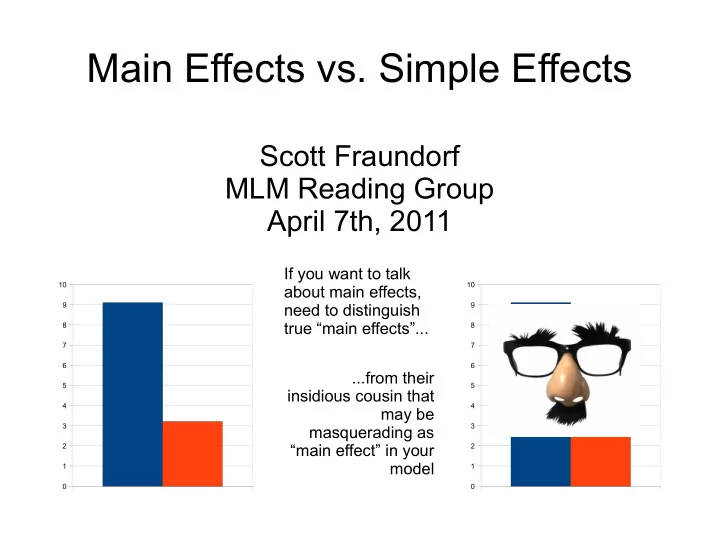
If you want to talk about main effects, need to distinguish true “main effects”... ...from their insidious cousin that may be masquerading as “main effect” in your model
SLIDE 2 Outline
The Problem Recap of Coding Parameter Testing Simple Effects & Main Effects More Detailed Explanation How to Do Contrast Coding Continuous Predictors
SLIDE 3 Contrast Unmentioned
0.1 0.2 0.3 0.4 0.5 0.6 0.7 0.8 0.9 1
Presentational Contrastive
Prototypical psychology study: 2 x 2 design
SLIDE 4 Example Study
Study easy and difficult word pairs
– VIKING—HELMET (related and thus easy) – VIKING—COLLEGE (unrelated and thus hard)
Do cued recall task:
– VIKING---?????
During test phase, told if an opponent
supposedly got the item correct or incorrect
SLIDE 5 Easy Items Hard Items
0.1 0.2 0.3 0.4 0.5 0.6 0.7 0.8 0.9 1
Opponent Correct Opponent Incorrect
Accuracy
INTERACTION!
Easy items are remembered better if the opponent supposedly got them right. Hard items are remembered better if the opponent got them wrong. (i.e., performance best in the MISMATCH conditions) Effect of feedback depends on item type (INTERACTION).
SLIDE 6 Easy Items Hard Items
0.1 0.2 0.3 0.4 0.5 0.6 0.7 0.8 0.9 1
Opponent Correct Opponent Incorrect
Accuracy
INTERACTION!
MAIN EFFECT Overall, the related (easy) items are also remembered better than the unrelated (hard) items
SLIDE 7 Easy Items Hard Items
0.1 0.2 0.3 0.4 0.5 0.6 0.7 0.8 0.9 1
Opponent Correct Opponent Incorrect
Accuracy
INTERACTION!
MAIN EFFECT MAIN EFFECT (OR LACK THEREOF) No consistent effect of
SLIDE 8 The Problem
MLM WORLD ANOVA WORLD
- Get test of interaction
- And of 2 main effects
- Not in Kansas anymore!
- What to do?
SLIDE 9 The Problem
Modeling our outcome variable in a regression
equation
Need to code categorical
variables into numerical ones
Consequences for how you
interpret hypothesis tests
β2X2 + β12X1X2 + ... Y=β0 β0+ β1X1 +
R's secret decoder wheel
SLIDE 10 Outline
The Problem Recap of Coding Parameter Testing Simple Effects & Main Effects More Detailed Explanation How to Do Contrast Coding Continuous Predictors
SLIDE 11
OPPONENT FEEDBACK
Correct : 0 Incorrect : 1
DUMMY CODING a/k/a TREATMENT CODING (R's default)
ITEM TYPE
Related : 0 Unrelated : 1
One level is 1 Other level is 0
SLIDE 12
OPPONENT (A)
Didn't See : 0 Correct : 1 Incorrect : 0
OPPONENT (B)
Didn't See : 0 Correct : 0 Incorrect : 1
DUMMY CODING a/k/a TREATMENT CODING (R's default)
Predictor with >2 levels: get more dummy-coded variables ITEM TYPE
Related : 0 Unrelated : 1
SLIDE 13 DUMMY CODING CONTRAST CODING
ITEM TYPE
Related : -0.5 Unrelated : 0.5
OPPONENT FEEDBACK
Correct : -0.5 Incorrect : 0.5
One level is positive Other level is negative
One level is 1 Other level is 0 OPPONENT FEEDBACK
Correct : 0 Incorrect : 1
ITEM TYPE
Related : 0 Unrelated : 1
SLIDE 14 Outline
The Problem Recap of Coding Parameter Testing Simple Effects & Main Effects More Detailed Explanation How to Do Contrast Coding Continuous Predictors
SLIDE 15
Testing a Parameter
β2X2 + ... Y=β0 β0+ β1X1 +
Feedback 0 = Correct 1 = Incorrect Item Type 0 = Related 1 = Unrelated
How to tell if the opponent's feedback is related to memory? (e.g. possible main effect: you just try harder when someone else got the item wrong)
SLIDE 16
Testing a Parameter
β2X2 + ... Y=β0 β0+ β10 +
Feedback 0 = Correct 1 = Incorrect Item Type 0 = Related 1 = Unrelated
Compare when feedback = 0...
SLIDE 17
Testing a Parameter
β2X2 + ... Y=β0 β0+ β11 +
Feedback 0 = Correct 1 = Incorrect Item Type 0 = Related 1 = Unrelated
… to when feedback = 1
SLIDE 18
Testing a Parameter
β2X2 + ... Y=β0 β0+ β1X1 +
Feedback 0 = Correct 1 = Incorrect Item Type 0 = Related 1 = Unrelated
β1: “The effect of changing feedback, while holding item type constant” But, we know there's an interaction … so it will matter what value we hold item type constant at!
SLIDE 19
Testing a Parameter
β2X2 + ... Y=β0 β0+ β1X1 +
Probe
With dummy coding, item type = 0 represents the RELATED condition. Testing effect of feedback in just the RELATED condition.
Feedback 0 = Correct 1 = Incorrect
Hold other variable at:
SLIDE 20 Easy Items Hard Items
0.1 0.2 0.3 0.4 0.5 0.6 0.7 0.8 0.9 1
Opponent Correct Opponent Incorrect
Accuracy
INTERACTION!
With dummy coding, item type = 0 represents the RELATED condition. Testing effect of feedback in just the RELATED condition. Hold other variable at: But, this test only reflects HALF of the graph! Here, we see Opponent Incorrect > Opponent Correct
SLIDE 21 Easy Items Hard Items
0.1 0.2 0.3 0.4 0.5 0.6 0.7 0.8 0.9 1
Opponent Correct Opponent Incorrect
Accuracy
INTERACTION!
Feedback effect is different in the other half. Misleading! But, this test only reflects HALF of the graph!
SLIDE 22 Outline
The Problem Recap of Coding Parameter Testing Simple Effects & Main Effects More Detailed Explanation How to Do Contrast Coding Continuous Predictors
SLIDE 23
FEEDBACK
Correct : 0 Incorrect : 1
ITEM TYPE
Related : 0 Unrelated : 1
DUMMY CODING
What is effect of the Feedback variable? R holds Item Type at 0. Only reflects Related condition. Problem: Effect of Feedback depends on the Item Type. (i.e., there's an INTERACTION)
Simple Effect
SLIDE 24 FEEDBACK
Correct : -0.5 Incorrect : 0.5
ITEM TYPE
Related : -0.5 Unrelated : 0.5 CONTRAST CODING
What is effect of the Feedback variable? R holds Item Type at 0. Averaged between 2 conditions. Test now uses information from both Item Types in testing
effect here.)
Main Effect
SLIDE 25 Dummy Coding -> Simple Effects
Consider only one level of predictor X2 in testing
predictor X1
Contrast Coding -> Main Effects
Consider all levels of predictor X2 in testing
predictor X1
Both are legitimate statistical tests, but they
test different things
– Simple effects may be appropriate if you WANT to only test at one level of predictor X2 – e.g. that level is the baseline (“opponent didn't see” condition?) – Just make sure that your tests are testing what you say they are!
SLIDE 26 Easy Items Hard Items
0.1 0.2 0.3 0.4 0.5 0.6 0.7 0.8 0.9 1
Opponent Correct Opponent Incorrect
Accuracy
INTERACTION!
Some Other Notes...
not affect the test of the interaction
the simple/main effect terms
- Also doesn't change
- verall fit of the model
SLIDE 27 Easy Items Hard Items
0.1 0.2 0.3 0.4 0.5 0.6 0.7 0.8 0.9 1
Opponent Correct Opponent Incorrect
Accuracy
INTERACTION!
Some Other Notes...
- If NO interaction, simple
effects and main effects are the same
effect
interaction isn't reliable at α = .05, there can be a numerical interaction
difference between simple effects & main effects
SLIDE 28 Outline
The Problem Recap of Coding Parameter Testing Simple Effects & Main Effects More Detailed Explanation How to Do Contrast Coding Continuous Predictors
SLIDE 29 Dummy Coding
Y = β0 + β1X1 + β2X2 + β12X1X2 (+ random effects, error) X1 = 0 if related, 1 if unrelated X2 = 0 if opponent right, 1 if opponent wrong Results:
– Related, Right: β0 + β1X1 + β2X2 + β12X1X2 – = β0 + β1(0) + β2(0) + β12(0)(0) (substituting in 0s for X1 and X2)
SLIDE 30 Dummy Coding
Y = β0 + β1X1 + β2X2 + β12X1X2 (+ random effects, error) X1 = 0 if related, 1 if unrelated X2 = 0 if opponent right, 1 if opponent wrong Results:
– Related, Right: β0 + β1X1 + β2X2 + β12X1X2 – = β0 + β1(0) + β2(0) + β12(0)(0) – Most of this is 0 and drops out
SLIDE 31 Dummy Coding
Y = β0 + β1X1 + β2X2 + β12X1X2 (+ random effects, error) X1 = 0 if related, 1 if unrelated X2 = 0 if opponent right, 1 if opnonent wrong Results:
– Related, Right: β0 – Unrelated, Right: β0 + β1 – Related, Wrong: β0 + β2 – Unrelated, Wrong: β0 + β1 + β2 + β12
If we create the equation for all 4 conditions...
SLIDE 32 Dummy Coding
Y = β0 + β1X1 + β2X2 + β12X1X2 (+ random effects, error) X1 = 0 if related, 1 if unrelated X2 = 0 if opponent right, 1 if opnonent wrong Results:
– Related, Right: β0 – Unrelated, Right: β0 + β1 – Related, Wrong: β0 + β2 – Unrelated, Wrong: β0 + β1 + β2 + β12
We see that, here, β1 = Difference between Related, Right and Unrelated, Right
SLIDE 33 Contrast Coding
Y = β0 + β1X1 + β2X2 + β12X1X2 (+ random effects, error) X1 = -0.5 if related, 0.5 if unrelated X2 = -0.5 if opponent right, 0.5 if opponent wrong Results:
– Related, Right: β0 - 0.5β1 - 0.5β2 + β12(-0.5)(-0.5) – Unrelated, Right: β0 + 0.5β1 - 0.5β2 + β12(0.5)(-0.5) – Related, Wrong: β0 - 0.5β1 + 0.5β2 + β12(-0.5)(0.5) – Unrelated, Wrong: β0 + 0.5β1 + 0.5β2 + β12(0.5)(0.5)
SLIDE 34 Contrast Coding
Y = β0 + β1X1 + β2X2 + β12X1X2 (+ random effects, error) X1 = -0.5 if related, 0.5 if unrelated X2 = -0.5 if opponent right, 0.5 if opponent wrong Results:
– Related, Right: β0 - 0.5β1 - 0.5β2 + β12(-0.5)(-0.5) – Related, Wrong: β0 - 0.5β1 + 0.5β2 + β12(-0.5)(0.5) – Unrelated, Right: β0 + 0.5β1 - 0.5β2 + β12 (0.5)(-0.5) – Unrelated, Wrong: β0 + 0.5β1 + 0.5β2 + β12(0.5)(0.5)
I switched the
rows to make the next step easier to see
SLIDE 35 Contrast Coding
Y = β0 + β1X1 + β2X2 + β12X1X2 (+ random effects, error) X1 = -0.5 if related, 0.5 if unrelated X2 = -0.5 if opponent right, 0.5 if opponent wrong Results:
– Related, Right: β0 - 0.5β1 - 0.5β2 + β12(-0.5)(-0.5) – Related, Wrong: β0 - 0.5β1 + 0.5β2 + β12(-0.5)(0.5) – Unrelated, Right: β0 + 0.5β1 - 0.5β2 + β12 (0.5)(-0.5) – Unrelated, Wrong: β0 + 0.5β1 + 0.5β2 + β12(0.5)(0.5)
β1 = Difference between 2 related conditions and 2 unrelated conditions
Same between 2 related and 2 unrelated conditions:
SLIDE 36 Outline
The Problem Recap of Coding Parameter Testing Simple Effects & Main Effects More Detailed Explanation How to Do Contrast Coding Continuous Predictors
SLIDE 37 How to Do Contrast Coding
SEE your current coding:
contrasts(Dataframe$Variable)
CHANGE your coding:
contrasts(Dataframe$Variable) = c(-0.5,0.5)
With more than 2 levels, set multiple contrasts:
contrasts(Dataframe$Variable) = cbind(c(-0.33,-0.33,0.66), c(-0.5,0.5,0))
SLIDE 38 How to Do Contrast Coding
To get back to dummy coding... Could set the coding manually
contrasts(Dataframe$Variable)= c(0,1)
SHORTCUT!
contrasts(Dataframe$Variable) = contr.treatment
SLIDE 39 Outline
The Problem Recap of Coding Parameter Testing Simple Effects & Main Effects More Detailed Explanation How to Do Contrast Coding Continuous Predictors
SLIDE 40 Continuous Predictors
- So far, we've looked at categorical predictors
- What about continuous predictors?
– e.g. do online processing resources predict use
- f pitch accenting information in discourse
comprehension? 4
5
6
COMPLEX SPAN SCORE
SLIDE 41 Continuous Predictors
- Again, by default, pitch accent is evaluated
when span score = 0
- So main effect of pitch accent represents what
pitch accent does when you have no working memory
- May be uninformative (as in this case)
- Nobody has span score of 0
β2X2 + ... Y=β0 β0+ β1X1 +
SLIDE 42 Continuous Predictors
- Alternative: CENTER the continuous predictor
- So 0 is now the mean span score
- Now, main effect of pitch accent represents
what pitch accent does for you if you have average span score
- “Jane Average”'s pitch accenting effect
- More informative!
Subject 23's span score: 4.43 Mean: 5.0 Subject 23's span score: -0.57 Mean: 0.0
CENTERING
SLIDE 43 Centering a Variable in R
Replace the original variable w/ mean-centered
version Dataframe$Variable = Dataframe$Variable – mean(Dataframe$Variable)
Keep the original variable and create a new
mean-centered one called Variable.c: Dataframe$Variable.c = Dataframe$Variable – mean(Dataframe$Variable)
SLIDE 44 Default
Main effect of predictor X1 is when predictor X2 is at
Mean Centering
Main effect of predictor X1 is when predictor X2 is at
its mean
Again...
– Both are legitimate statistical tests, but they test different things – No difference between these 2 when there's no interaction – Doesn't change the test of the interaction itself