Machines communicating 12: Communications Distributed Network - - PDF document

machines communicating 12 communications
SMART_READER_LITE
LIVE PREVIEW

Machines communicating 12: Communications Distributed Network - - PDF document

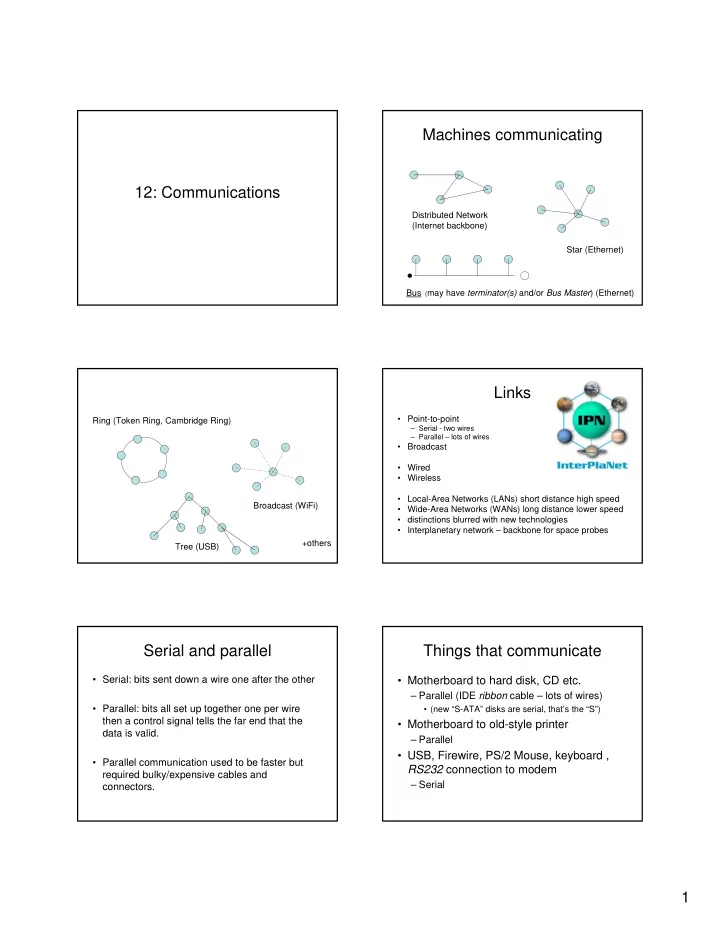
Machines communicating 12: Communications Distributed Network (Internet backbone) Star (Ethernet) Bus ( may have terminator(s) and/or Bus Master ) (Ethernet) Links Point-to-point Ring (Token Ring, Cambridge Ring) Serial - two wires


slide-1
SLIDE 1

1

12: Communications Machines communicating

Distributed Network (Internet backbone) Star (Ethernet) Bus (may have terminator(s) and/or Bus Master) (Ethernet) Ring (Token Ring, Cambridge Ring) Broadcast (WiFi) Tree (USB) +others

Links

  • Point-to-point

– Serial - two wires – Parallel – lots of wires

  • Broadcast
  • Wired
  • Wireless
  • Local-Area Networks (LANs) short distance high speed
  • Wide-Area Networks (WANs) long distance lower speed
  • distinctions blurred with new technologies
  • Interplanetary network – backbone for space probes

Serial and parallel

  • Serial: bits sent down a wire one after the other
  • Parallel: bits all set up together one per wire

then a control signal tells the far end that the data is valid.

  • Parallel communication used to be faster but

required bulky/expensive cables and connectors.

Things that communicate

  • Motherboard to hard disk, CD etc.

– Parallel (IDE ribbon cable – lots of wires)

  • (new “S-ATA” disks are serial, that’s the “S”)
  • Motherboard to old-style printer

– Parallel

  • USB, Firewire, PS/2 Mouse, keyboard ,

RS232 connection to modem

– Serial

slide-2
SLIDE 2

2

Protocol

  • “The rules & formalities of any procedure”
  • If I want to communicate with you we have

to agree how to do it

  • Who speaks first? How do I signal I’ve

finished and you can start? What language do we speak? How do I indicate I’ve not heard or understood?

  • Bidding in Bridge; dance

What goes down the wire?

  • Telephone (speech)

– An analogue signal – a varying voltage that represents your voice. – Degrades over long or poor lines – Can’t reconstruct original signal exactly

  • Computer data

– Digital information (0 and 1)

Modulation / Demodulation

  • Just ‘sending bits’ down the wire i.e. trying

to send a square wave down the wire doesn’t really work – it degrades and is

  • inefficient. Instead you modulate a carrier

then de-modulate it at the far end

  • box that does this = Modem

From: Introduction to Computer Communication Dr. D. Koren / University of Tel Aviv

+ =

So now you can send bits

  • Actually your data will have structure

– Need to send data and control information – Bytes (groups of 8 bits) usually sent as .. – Packets – groups of a few bytes up to maybe 2000 with control information at the beginning and end. – Why?

  • Error recovery
  • Flow control
  • Need framing convention – packet boundaries

Framing

It is rather important to know where your data starts and ends … “yadayadaMaryhadalittlelambitsfleecewaswhiteassnowzzz” Or: Caesar entered, On his head a helmet On each foot a sandal. In his hand he held his trusty sword, to boot. [“to boot” = “as well”]

slide-3
SLIDE 3

3

Framing ..

Caesar entered on his head a helmet on each foot a sandal in his hand he held his trusty sword to boot Protocol gives rules for recognising start and end of data

Errors happen

  • You have to detect them and recover from them
  • Simplest error detection mechanism – parity bit

chosen so even number of bits are ‘1’

– Not foolproof (2 errors?)

  • Can’t recover data with a single redundant bit

but if you have a protocol you can ask for it to be retransmitted.

  • Works but inefficient

Error Detection & Recovery

  • Data is sent in packets. The last bytes in the

packet are a Cyclic Redundancy Check (CRC) – a complex sum of all bytes in the packet. The sum is recomputed as the packet is received and if the computed sum doesn’t match the CRC an error has occurred.

  • The protocol then gives a rule on how to request

a retransmission.

  • Can include enough redundancy in the packet to

recover the data (CD-ROM, deep space comms)

Flow control

  • What if the sending machine is faster than

the receiver?

  • Receiver may lose data (inefficient)

– Better to say “wait a bit!” when it gets congested then “OK, off you go” when it clears

  • This is flow control

Packet length

  • Trade-off:
  • Short: know quickly if something is wrong

and recover quickly but high overheads

  • Long: more efficient but slower reaction
  • Throughput versus response.
  • File transfer requires high throughput
  • Interaction requires fast response

Data Compression

  • Sending long sequences of the same

information is inefficient

  • Send an example of the data plus a count
  • = Simple compression
  • Complex compression algorithms

– Video, streaming video, VoIP audio – Compression-Decompression = codec

slide-4
SLIDE 4

4

Getting packets across a network

  • Now you know how to send data down a

point-to-point link

  • What about getting across a network?

Addressing

  • You need to know where the packet is to

go.

  • Addressing is part of Internet Protocol (IP).
  • www.inf.ed.ac.uk – name
  • 129.215.128.35 – address
  • Hierarchy of name servers is responsible

for tables of names vs. addresses

  • Routers are responsible for getting

packets to destination

Circuit and packet switching

  • Traditional wired telephone network is a “circuit

switched” network. You request a circuit to the far end then it is yours for the duration of the

  • call. [actually it isn’t any more but you don’t see

that]

  • Computer networks are “packet switched” – your

data is sent as packets and shares connections with other packets like cars on the road.

  • Wired and bus networks are “broadcast” – your

packet has the network to itself when you send it but someone else might send at the same time

Datagrams

  • A datagram is a self-contained packet of

data like a letter – it is addressed with a to: and from: address and is sent into the network to be sent to the far end. It will be routed by the best available route at that instant, may not get to the far end at all and if it does it may overtake packets which have been routed differently.

TCP and IP

  • “IP is responsible” for getting datagrams to

the destination “best effort”

  • Need something more for file transfer etc.
  • TCP is responsible for turning this into a

reliable data stream – keeping track of missing and out-of-sequence packets, requesting retransmission etc.

Layered protocols

  • TCP – maintains reliable data stream by sending

(unreliable) datagrams

  • IP – responsible for getting datagrams to

destination if possible

  • Error recovery and flow control ensure reliable

transmission down a single wire

  • Framing conventions determine how we

assemble bits into bytes and packets

  • Modulation techniques let us send data over

wires, wireless and fibre