Learning to learn Aim To be able to design activities where people - - PDF document

learning to learn
SMART_READER_LITE
LIVE PREVIEW

Learning to learn Aim To be able to design activities where people - - PDF document

INF 3280 22 Feb 2017 Learning to learn Aim To be able to design activities where people can become better learners of IT Input for Assignment 3 Core literature: Textbook chapter 5 Additional literature Grigoreanu


slide-1
SLIDE 1

Jens Kaasbøll INF 3280 – 22 Feb 2017 c

Learning to learn

  • Aim

– To be able to design activities where people can become better learners of IT – Input for Assignment 3

  • Core literature:

– Textbook chapter 5

  • Additional literature

– Grigoreanu et.al.(2012). End-user debugging strategies: A sensemaking perspective – Novick, Elizalde & Bean (2007) Toward a more accurate view of when and how people seek help with computer applications.

Write down 1-3 ways in which you solve IT use problems.

1

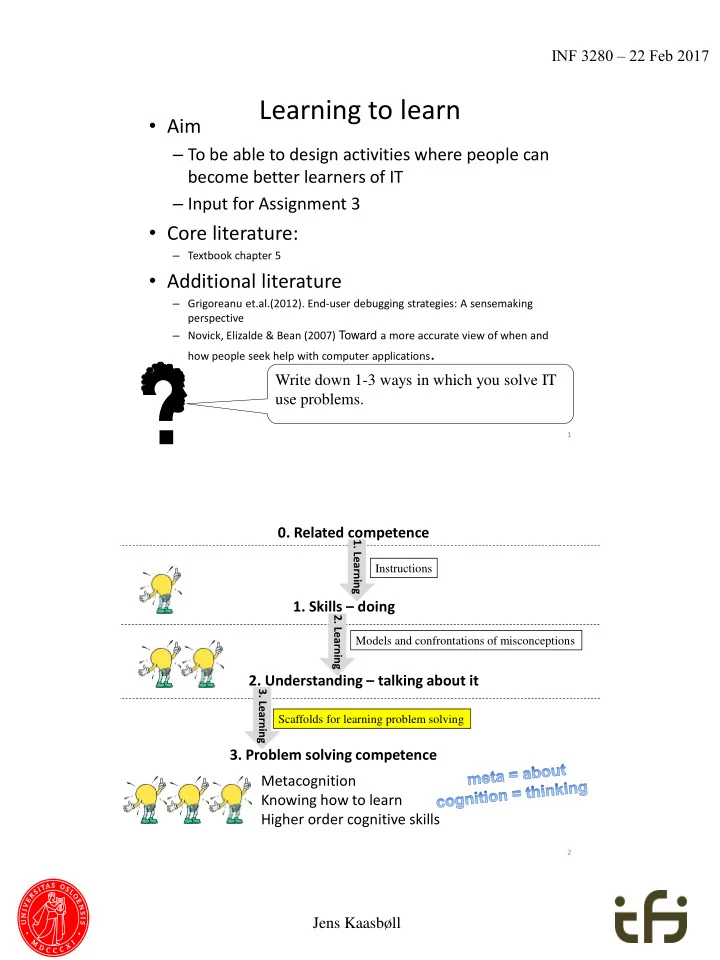
  • 1. Skills – doing
  • 2. Understanding – talking about it
  • 3. Problem solving competence

Models and confrontations of misconceptions Scaffolds for learning problem solving

  • 1. Learning

Instructions

  • 0. Related competence
  • 2. Learning
  • 3. Learning

Metacognition Knowing how to learn Higher order cognitive skills

2

slide-2
SLIDE 2

Jens Kaasbøll INF 3280 – 22 Feb 2017

Module for Problem solving

  • 1. Introduction
  • a. Usefulness of problem solving method
  • b. Presentation of problem solving method
  • 2. Practical hands-on exercises
  • a. Exercise requiring problem solving
  • 3. Summary
  • a. Discuss problem solving approach

3

Categories of problem solving methods

  • 1. Research cycle
  • 2. Stages of the research cycle
  • 3. Strategies for iteration
  • 4. Innovative research cycles

4

slide-3
SLIDE 3

Jens Kaasbøll INF 3280 – 22 Feb 2017

  • 4. Make

sense

  • f output.
  • 3. Enter input.
  • 1. Generate hypothesis and plan input.
  • 5. Compare output with hypothesis
  • 2. Navigate

Research cycle

Exploration skill. IT skill and understanding Repeating the cycle for

  • Fun,
  • Curiosity,
  • Learning, …
  • 1. Research cycle
  • 4. Make

sense

  • f output.
  • 3. Enter input.
  • 1. Generate hypothesis and plan input.
  • 5. Compare output with hypothesis.
  • 2. Navigate.

Troubleshooting Experimentation

  • 4. Make

sense

  • f output.
  • 3. Enter input.
  • 1. Generate hypothesis and plan input.
  • 5. Compare output with hypothesis.
  • 2. Navigate.

Two types of problem solving

  • Triggered from understanding
  • It can do this, can it do that?
  • Triggered from unexpected result
  • How can I fix it?
  • 1. Research cycle

6

slide-4
SLIDE 4

Jens Kaasbøll INF 3280 – 22 Feb 2017

1. Erroneous Output

  • 5. Output of

new formula

  • 4. Enter changed formula
  • 6. Compare output with expected
  • 3. Where to change

Debug spreadsheets

Grigoreanu et.al.(2012)

1. Erroneous Output

  • 5. Output of

new formula

  • 4. Enter changed formula
  • 6. Compare output with expected
  • 3. Where to change
  • 2. Understanding
  • 1. Skill

Troubleshooting skill. Corrected the errors. No new competence. Errors remain.

  • 2. Detecting suspicious formulas
  • 2. Guessing what can be wrong
  • 1. Research cycle
  • 3a. Imitate and

Repeat research cycle

  • 3a. Research cycle skill.

IT skill and understanding

  • 3b. Understanding generation
  • f IT use understanding
  • 3b. Compare scaffold

and execution of research cycle

  • 4. Make

sense

  • f output.
  • 3. Enter input.
  • 1. Generate hypothesis and plan input.
  • 5. Compare output with hypothesis.
  • 2. Navigate.

Pair working

  • 2. Understanding

Learning the research cycle

  • 1. Research cycle
slide-5
SLIDE 5

Jens Kaasbøll INF 3280 – 22 Feb 2017

Guiding precise observation

This worked ed last t time, e, why did the compute puter r do someth mething g else now? No worr rries es. . Start t over er again. . Go slowly y and

  • bserv

erve e preci cisel ely y what t you are e typing. g. You know, , I often en misty type pe mysel elf. . That t is norma mally y the reason why surpr prising g things gs happen pen on the screen een. Trainer refering to own mistakes  Learner understands that he is not stupid

  • 2. Stages of the research cycle

9

  • 3d. Compare scaffold and
  • bservations
  • 3c. Repeat
  • observe buttons pressed
  • take notes
  • make screen shots
  • 3d. Understanding precise
  • bservation
  • 3c. Skill for precise
  • bservation.

Functional IT understanding.

Without knowing what happened  Cannot know which input change that caused output changes.

  • 2. Understanding
  • 4. Make sense
  • f output.
  • 3. Enter input.

Learning precise observation

Without knowing the input  Cannot know why the output appeared.

  • 2. Stages of the research cycle
slide-6
SLIDE 6

Jens Kaasbøll INF 3280 – 22 Feb 2017

Interpreting search results

From software producer Another pdf reader A file Non-commercial Date An introductory tutorial to the software

  • 2. Stages of the research cycle

11

Efficiency in problem solving

  • Ineff

fficien cient – Trial-and-error – Consulting documentation

  • More efficien

ficient – Switching between trial-and-error and documentation

Andrade, et al., 2009

Reviewing training material is twice as successful as searching for help

Novick et al 2009

Same material in training and documentation

12

slide-7
SLIDE 7

Jens Kaasbøll INF 3280 – 22 Feb 2017

Proble lem m solvin ing strate ategie ies

Direct observation (bold lines) Interviews (thin lines) Self-reports through diaries (dotted lines) Novick, Elizalde, & Bean, 2007

13

  • 3h. Compare issue and help

received to judge the choice

  • f person asked for help
  • 3g. Imitate and Repeat
  • Ask colleagues for help
  • Ask IT support for help
  • 3h. Understanding

help seeking

  • 3g. Help seeking skill.

IT skill and understanding

IT support Colleagues, including superusers

  • 4. Make sense
  • f output.
  • 2. Understanding

Learning help seeking

  • 2. Stages of the research cycle
slide-8
SLIDE 8

Jens Kaasbøll INF 3280 – 22 Feb 2017

  • 3i. Imitate and Repeat

planning changes

  • 3i. Skill of

planning changes

Pair working

  • 3j. Understanding

experimental control

Identical input  identical output. Two changes in input  Not always possible to know which input change that caused output changes.

  • 3j. Compare scaffold

and plans for changes

  • 2. Understanding
  • 1. Plan input.

.

Learning experimental control

  • 2. Stages of the research cycle

Guideline for Experimental control

  • 1. Make one change at a time:

a. Ill-structured chart  change Series, Category, Filter.

  • b. Values of Categories and Filters  change Organisation units or Periods.

c. Values which the graph displays  change Indicators, Data elements or Reporting rates.

  • d. Title, trend lines, target lines, axis etc.  change Options
  • 2. Click Update
  • 3. Repeat

The general way of improving charts

  • 2. Stages of the research cycle

16

slide-9
SLIDE 9

Jens Kaasbøll INF 3280 – 22 Feb 2017

Guiding to improve self-efficacy

  • Strength of one's belief in one's own ability to complete tasks and reach goals

I never er get this right. . I give e up Let’s try. I find the edit button there. … No. Too small number er. . We need to divide e by 100 000 and not 100. Edit t again. . There it says ys percen centa tage.

  • ge. What

t are the

  • ther

er opti tions

  • ns? Per100k,

, does es that mean 100000? … Save … Calculate … Yessss.

Watching a peer struggle and succeed is the best way of strengthening self efficacy

  • 2. Stages of the research cycle

17

  • 3l. Compare yourself

with colleagues.

  • 3k. Observe colleagues

solving problems. Take part in groups solving problems.

  • 3l. Understanding own efficacy
  • 3k. Higher self efficacy.

IT skill and understanding

Colleagues

  • 3. Enter input.
  • 1. Self-efficacy

A group which succeeds in problem solving

Learning self efficacy

  • 2. Understanding own self-efficacy
  • 2. Stages of the research cycle
slide-10
SLIDE 10

Jens Kaasbøll INF 3280 – 22 Feb 2017

Guiding for generating hypotheses

Now I have e open ened ed each ch picture ure in the edito tor, , adjus uste ted its size e to the standard rd and saved ed it again. . There e must t be an easier er way Norma mally, y, when you repea eat t the same me over er and over er again, , there e is some me functi tion

  • n in

the compu mpute ter r which can do it. We just t need to find it.

  • 2. Stages of the research cycle
  • 3r. Imitate and Repeat

generating hypotheses

  • 3r. Skill of generating

hypotheses. Understanding usefulness of IT in own tasks

Repeating the same sequence of

  • perations  Software may exist with

which repetitions can be avoided.

  • 3s. Understanding generation
  • f hypotheses
  • 3s. Compare scaffold

and generation of hypotheses

  • 2. Understanding

1. Generate hypotheses.

Learning generation of hypotheses

Additional effort during planning is paid back through more efficient operation.

  • 2. Stages of the research cycle
slide-11
SLIDE 11

Jens Kaasbøll INF 3280 – 22 Feb 2017

  • 3v. Compare scaffold wih

the sequence of research cycles

  • 3u. Imitate and repeat

backtracking

  • 3v. Understanding backtracking
  • 3u. Backtracking skill.

IT understanding

Pair working

21

  • 2. Understanding

Start with erroneous output. Proceed backwards in the process which created the output and test all steps.

  • 1. Plan input.
  • 4. Make sense
  • f output.
  • 3. Enter input.
  • 2. Navigate.
  • 3. Strategies for iteration

Backtracking

User’s computer WiFi Internet service provider Remote hosts Browser Network software Network hardware

Elimination

  • 3. Strategies for iteration
slide-12
SLIDE 12

Jens Kaasbøll INF 3280 – 22 Feb 2017

  • 3aa. Skill for changing routines.

Skill and understanding of new routine

Learning new work routine

Repeated, consistent feedback

  • 3z. Compare

scaffolds with experienced effects

  • 2. Understanding
  • 3y. Repeat
  • Carry out new

routine

  • Discuss purpose
  • f new routine

Discuss purpose of new routine

  • 3z. Understanding changing

routines

  • 3. Strategies for iteration

Guiding giving feedback

  • Consistent, repeated feedback

make people change behaviour

Françoi çois, , you you have e to tell the customer tomers that we we no no longer er respo pond to e-mails to to individua ual staff members ers. . They have e to use the web-po porta rtal, , such that we we can track ck all reques ests ts.

  • 3. Strategies for iteration

24

slide-13
SLIDE 13

Jens Kaasbøll INF 3280 – 22 Feb 2017

  • 3t. Imitate and Repeat
  • Search for
  • Download
  • Install software.
  • Remove if needed.
  • 3t. Skill of installing software.

IT understanding

Software is data. Software can be downloaded. Software can be installed.

  • 3u. Understanding installing software
  • 3u. Compare scaffold

and installation of software Software can be malicious  Search for reviews. Remove if needed.

  • 2. Understanding, skill for (3e) search for help and (3g) help seeking

Learning installing software

  • 4. Innovative research cycles

Workaround

That t web-shop

  • p requires

es me to fill a field called ed State, te, but Benin is not divided ed into state tes. . Since e this addres ress data ta is probably y going g to be glued to the package, I’d better not mislea ead the post t office.

  • e. Just

t let me repea eat t the city name e Coto tonou.

  • u.
  • 4. Innovative research cycles
slide-14
SLIDE 14

Jens Kaasbøll INF 3280 – 22 Feb 2017

  • 3ad. Understanding workaround
  • 3ac. Skills for workaround.

Skill and understanding of the particular solution

  • 3ad. Compare scaffolds

with experienced effects

  • 1. Observe that IT operation

does not fit business goal

  • 2. Determine wanted output
  • 3. Compare wanted output with

result of other IT operations Pair working 3 ac.Repeat research cycle until output meets business needs

  • 2. Understanding and 3a, 3e and 3g.

Learning workaround

  • 4. Innovative research cycles
  • 4. Train users so that they can solve problems and learn on their own.

28