Last Class: OS and Computer Architecture System bus Network card - - PDF document

last class os and computer architecture
SMART_READER_LITE
LIVE PREVIEW

Last Class: OS and Computer Architecture System bus Network card - - PDF document

Last Class: OS and Computer Architecture System bus Network card CPU, memory, I/O devices, network card, system bus Computer Science Computer Science CS377: Operating Systems Lecture 3, page 1 Last Class: OS and Computer Architecture


slide-1
SLIDE 1

Computer Science

Lecture 3, page

Computer Science

CS377: Operating Systems

Last Class: OS and Computer Architecture

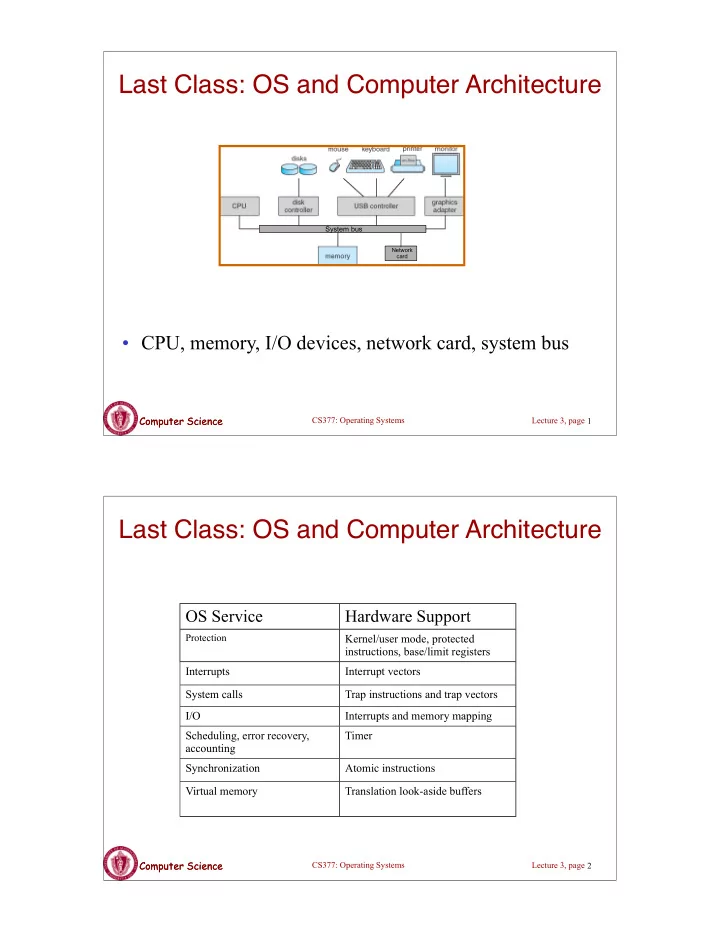
  • CPU, memory, I/O devices, network card, system bus

Network card

System bus

1

Computer Science

Lecture 3, page

Computer Science

CS377: Operating Systems

Last Class: OS and Computer Architecture

OS Service Hardware Support

Protection

Kernel/user mode, protected instructions, base/limit registers Interrupts Interrupt vectors System calls Trap instructions and trap vectors I/O Interrupts and memory mapping Scheduling, error recovery, accounting Timer Synchronization Atomic instructions Virtual memory Translation look-aside buffers

2

slide-2
SLIDE 2

Computer Science

Lecture 3, page

Computer Science

CS377: Operating Systems

Today: OS Structures & Services

  • More on System Calls
  • Introduce the organization and components in an OS.
  • Four example OS organizations

– Monolithic kernel – Layered architecture – Microkernel – Modular

3

Computer Science

Lecture 3, page

Computer Science

Class Exercise

  • iOS 7 and iPhone 5S

– “iPhone 5S first 64-bit smartphone, iOS 7 first 64-bit OS”

  • iPhone 5S has M7 co-processor in addition to main A7

processor

– Offloads work (primarily sensor data processing) from main CPU to co-processor

  • Critique these design decisions. Benefits?

4

slide-3
SLIDE 3

Computer Science

Lecture 3, page

Computer Science

CS377: Operating Systems

System Calls

  • Programming interface to the services provided by the OS
  • Typically written in a high-level language (C or C++)
  • Mostly accessed by programs via a high-level Application

Program Interface (API) rather than direct system call use

  • Three most common APIs are Win32 API for Windows, POSIX

API for POSIX-based systems (including virtually all versions of UNIX, Linux, and Mac OS X), and Java API for the Java virtual machine (JVM)

  • Why use APIs rather than system calls?

5

Computer Science

Lecture 3, page

Computer Science

CS377: Operating Systems

Standard C Library Example

  • C program invoking printf() library call, which

calls write() system call

6 k

slide-4
SLIDE 4

Computer Science

Lecture 3, page

Computer Science

CS377: Operating Systems

Example of Standard API

  • Consider the ReadFile() function in the
  • Win32 API—a function for reading from a file
  • A description of the parameters passed to ReadFile()

– HANDLE file—the file to be read – LPVOID buffer—a buffer where the data will be read into and written from – DWORD bytesToRead—the number of bytes to be read into the buffer – LPDWORD bytesRead—the number of bytes read during the last read – LPOVERLAPPED ovl—indicates if overlapped I/O is being used

7

Computer Science

Lecture 3, page

Computer Science

CS377: Operating Systems

System Call Implementation

  • Typically, a number associated with each system call

– System-call interface maintains a table indexed according to these numbers

  • The system call interface invokes intended system call in OS

kernel and returns status of the system call and any return values

  • The caller need know nothing about how the system call is

implemented

– Just needs to obey API and understand what OS will do as a result call – Most details of OS interface hidden from programmer by API

  • Managed by run-time support library (set of functions built into libraries

included with compiler)

8

slide-5
SLIDE 5

Computer Science

Lecture 3, page

Computer Science

CS377: Operating Systems

API – System Call – OS Relationship

9

Computer Science

Lecture 3, page

Computer Science

CS377: Operating Systems

System Call Parameter Passing

  • Often, more information is required than simply identity of

desired system call

– Exact type and amount of information vary according to OS and call

  • Three general methods used to pass parameters to the OS

– Simplest: pass the parameters in registers

  • In some cases, may be more parameters than registers

– Parameters stored in a block, or table, in memory, and address of block passed as a parameter in a register

  • This approach taken by Linux and Solaris

– Parameters placed, or pushed, onto the stack by the program and popped off the stack by the operating system – Block and stack methods do not limit the number or length of parameters being passed

10

slide-6
SLIDE 6

Computer Science

Lecture 3, page

Computer Science

CS377: Operating Systems

Examples of Windows and Unix System Calls

11

Computer Science

Lecture 3, page

Computer Science

CS377: Operating Systems

One Basic OS Structure

  • The kernel is the protected part of the OS that runs in

kernel mode, protecting the critical OS data structures and device registers from user programs.

  • Debate about what functionality goes into the kernel

(above figure: UNIX) - “monolithic kernels”

12

slide-7
SLIDE 7

Computer Science

Lecture 3, page

Computer Science

Mac OS X Architecture

13

Computer Science

Lecture 3, page

Computer Science

Windows 8 Architecture

14

slide-8
SLIDE 8

Computer Science

Lecture 3, page

Computer Science

CS377: Operating Systems

Layered OS design

Layer N: uses layer N-1 and provides new functionality to N+1

  • Advantages: modularity, simplicity, portability, ease of

design/debugging

  • Disadvantage - communication overhead between layers,

extra copying, book-keeping, layer design

User programs

Device drivers

Virtual memory

I/O channel

Cpu scheduler Hardware 15

Computer Science

Lecture 3, page

Computer Science

CS377: Operating Systems

Microkernel

  • Small kernel that provides communication (message

passing) and other basic functionality

  • ther OS functionality implemented as user-space processes

16

slide-9
SLIDE 9

Computer Science

Lecture 3, page

Computer Science

CS377: Operating Systems

Microkernel Features

  • Goal: to minimize what goes in the kernel (mechanism, no

policy), implementing as much of the OS in User-Level processes as possible.

  • Advantages

– better reliability, easier extension and customization – mediocre performance (unfortunately)

  • First Microkernel was Hydra (CMU '70). Current systems include

Chorus (France) and Mach (CMU).

17

Computer Science

Lecture 3, page

Computer Science

CS377: Operating Systems

Mac OS X - hybrid approach

  • Layered system: Mach microkernel (mem, RPC, IPC) + BSD

(threads, CLI, networking, filesystem) + user-level services (GUI)

18

slide-10
SLIDE 10

Computer Science

Lecture 3, page

Computer Science

CS377: Operating Systems

Modules

  • Most modern operating systems implement kernel

modules

– Uses object-oriented approach – Each core component is separate – Each talks to the others over known interfaces – Each is loadable as needed within the kernel

  • Overall, similar to layers but more flexible

19

Computer Science

Lecture 3, page

Computer Science

CS377: Operating Systems

Solaris Modular Approach

20

slide-11
SLIDE 11

Computer Science

Lecture 3, page

Computer Science

CS377: Operating Systems

Summary

  • Big Design Issue: How do we make the OS efficient, reliable, and

extensible?

  • General OS Philosophy: The design and implementation of an

OS involves a constant tradeoff between simplicity and

  • performance. As a general rule, strive for simplicity except when

you have a strong reason to believe that you need to make a particular component complicated to achieve acceptable performance (strong reason = simulation or evaluation study)

21

Computer Science

Lecture 3, page

Computer Science

CS377: Operating Systems 22