Killer Bunny Rabbit Detector An Application of Object Detection James - - PowerPoint PPT Presentation

killer bunny rabbit detector
SMART_READER_LITE
LIVE PREVIEW

Killer Bunny Rabbit Detector An Application of Object Detection James - - PowerPoint PPT Presentation

Killer Bunny Rabbit Detector An Application of Object Detection James Maher Image from: http://thereelcult.com/wp content/uploads/2012/04/Monty Python rabbit_400.jpg Outline Introduction Previous Work Methodology Results


slide-1
SLIDE 1

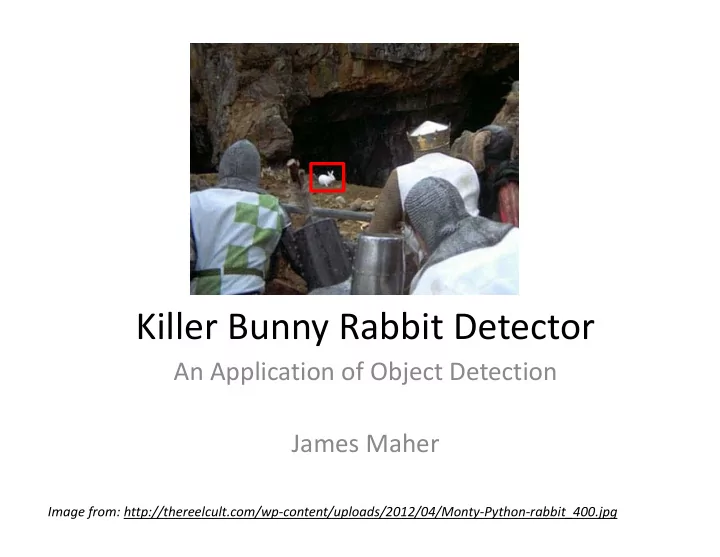
Killer Bunny Rabbit Detector

An Application of Object Detection James Maher

Image from: http://thereelcult.com/wp‐content/uploads/2012/04/Monty‐Python‐rabbit_400.jpg
slide-2
SLIDE 2

Outline

  • Introduction
  • Previous Work
  • Methodology
  • Results
  • Discussion and Conclusion
slide-3
SLIDE 3

Introduction

  • My Rabbit Problem
  • PyCon 2012 Talk

– Militarizing Your Backyard with Python…, by: Kurt Grandis [1].

  • Project Goal

– Apply a more sophisticated Computer Vision algorithm to detect objects

Images from [1].

slide-4
SLIDE 4

Previous Work

  • Background Segmentation

– Issues

  • Ghosts [2]
  • Multi‐step process is

computationally intensive

  • Feature Extraction

– SIFT [3] – Histogram of Oriented Gradients (HOGs) [4]

Images from [2,5]. Image from [3].

slide-5
SLIDE 5

Methodology

  • Followed P. Felzenszwalb,

et al.’s, Discriminatively Trained Deformable Parts Model [6],[7].

  • Deformable parts are

parts that can change shape and position, but

  • nly within a limited

range.

Image from [8]. An early attempt at object detection through deformable parts.

slide-6
SLIDE 6

Methodology

  • Histograms of Oriented

Gradients (HOGs) are used for feature extraction

  • The magnitude and direction of

the gradients are calculated for each pixel and combined into

  • ne histogram per cell.

– A cell is defined as 8x8 pixels

  • Gradient Magnitude

Gradient Direction

  • 1

1

  • 1

1 Gradient Masks

slide-7
SLIDE 7

Methodology

  • Each pixel’s gradient direction

and orientation votes into a histogram for the cell

– 9 orientation bins and 4 magnitude bins were used

  • These histograms are

normalized by blocks of 2x2 cells

– Each cell is normalized by it’s 8 neighbors

Image from [6].

slide-8
SLIDE 8

Methodology

  • A feature pyramid of HOGs was used to match

the root filter and the deformable parts

  • For implementation, deformable parts used

twice the resolution of the root filter

Image from [7].

slide-9
SLIDE 9

Methodology

  • Two factors determined the score for potential

matches:

  • 1. How well the image’s HOG features matched the

trained model

  • 2. How much the parts were deformed from the

trained model

  • This results in:
  • max

∈ ∙ Φx, z ∙ , ∙

  • ,

  • ,
slide-10
SLIDE 10

Methodology

  • A visual representation of the filters and

penalty terms for a trained model:

Image from [6].

slide-11
SLIDE 11

Methodology

  • A Latent Support Vector Machine (LSVM) is

used to train the term in:

  • The latent variables are in the z term
  • max

∈ ∙ Φx, z

slide-12
SLIDE 12

Methodology

  • OpenCV contains a library for LatentSVMs

– Must provide a trained model. The only trained models available are for objects in the PASCAL competition.

  • MATLAB source code is available at:

http://people.cs.uchicago.edu/~rbg/latent/

  • Code only compiles on Mac and Linux
  • Modifications for training a new model are non‐

trivial, but details are included in my paper

slide-13
SLIDE 13

Methodology

  • Used 126 training images, from videos of

rabbits near my house

  • Wrote MATLAB scripts to extract training

images and create files training the model

  • Held back 14 testing photos from rabbits near

Golden and 10 photos from the original movies that were not used in training the model.

slide-14
SLIDE 14

Results

slide-15
SLIDE 15

Results

  • None of the testing images from Golden were

detected

  • Detection/Non‐Detection in the training videos

was dependent on how close the camera was to the rabbit

– 50% of the video clips were detected

  • No false positives. Bounding box surrounded the

rabbit each time

  • Increasing the number/variety of training

examples increases detection

slide-16
SLIDE 16

Discussion and Conclusion

  • Good

– Images similar to training images were detected – No false positives

  • Bad

– Algorithm is not fast enough to be used with real‐ time, 30fps video – Must be close to the target

  • Notes:

– Closer images worked better than distant images

slide-17
SLIDE 17

References

[1] K. Grandis, Militarizing Your Backyard with Python: Computer Vision and the Squirrel Hordes. PyCon USA 2012. [2] R. Cucchiara, C. Grana, M. Piccardi, and A. Prati, “Detecting moving objects, ghosts, and shadows in video streams,” Pattern Anal. Mach. Intell. IEEE Trans., vol. 25, no. 10, pp. 1337–1342, 2003. [3] D. G. Lowe, “Distinctive image features from scale‐invariant keypoints,” Int. J.

  • Comput. Vis., vol. 60, no. 2, pp. 91–110, 2004.

[4] N. Dalal and B. Triggs, “Histograms of Oriented Gradients for Human Detection,” presented at the International Conference on Computer Vision & Pattern Recognition, 2005, vol. 1, pp. 886–893. [5] W. Hoff, “Motion‐Based Segmentation,” presented at the EGGN 512: Computer Vision, 2013. [6] P. Felzenszwalb, D. McAllester, and D. Ramanan, “A Discriminatively Trained, Multiscale, Deformable Part Model,” in Computer Vision and Pattern Recognition,

  • 2008. CVPR 2008. IEEE Conference on, 2008, pp. 1–8.

[7] P. Felzenszwalb, R. Girshick, D. McAllester, and D. Ramanan, “Object Detection with Discriminatively Trained Part Based Models,” in IEEE Transactions on Pattern Analysis and Machine Intelligence, 2010, vol. 32.

slide-18
SLIDE 18

References

[8] M. A. Fischler and R. A. Elschlager, “The representation and matching of pictorial structures,” Comput. Ieee Trans., vol. 100, no. 1, pp. 67–92, 1973.