Java classes object-oriented programming (OOP) : Writing programs - - PDF document

java classes
SMART_READER_LITE
LIVE PREVIEW

Java classes object-oriented programming (OOP) : Writing programs - - PDF document

Objects and classes object : An entity that combines state and behavior. Java classes object-oriented programming (OOP) : Writing programs that perform most of their behavior as interactions between objects. class : 1. A


slide-1
SLIDE 1

Java classes

Savitch, ch 5

2

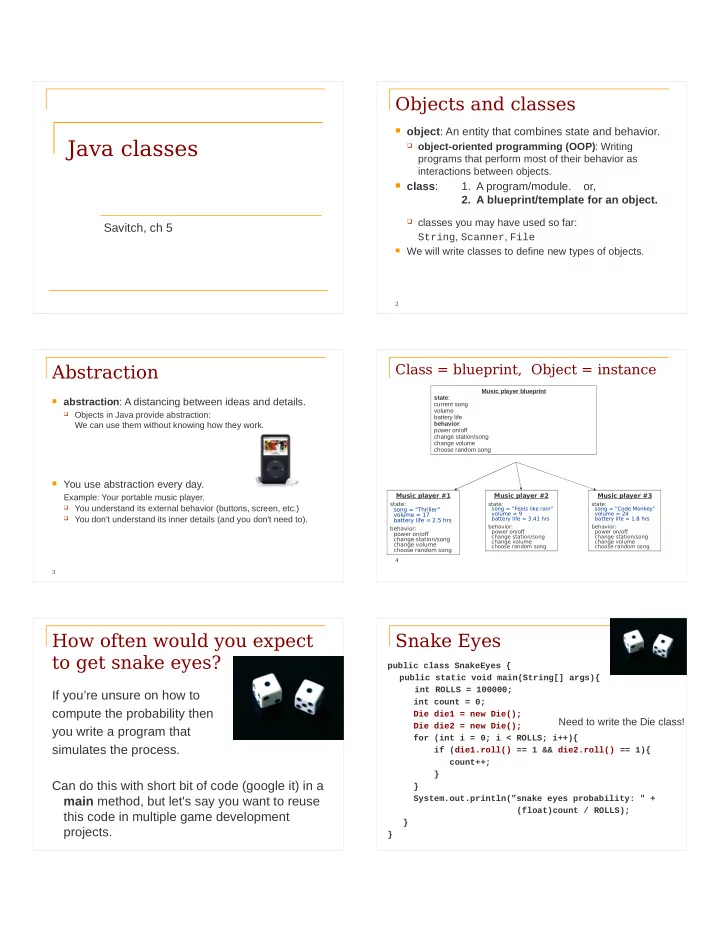
Objects and classes

 object: An entity that combines state and behavior.

 object-oriented programming (OOP): Writing

programs that perform most of their behavior as interactions between objects.

 class:

  • 1. A program/module. or,
  • 2. A blueprint/template for an object.

 classes you may have used so far:

String, Scanner, File

 We will write classes to define new types of objects.

3

Abstraction

 abstraction: A distancing between ideas and details.

 Objects in Java provide abstraction:

We can use them without knowing how they work.

 You use abstraction every day.

Example: Your portable music player.

 You understand its external behavior (buttons, screen, etc.)  You don't understand its inner details (and you don't need to). 4

Class = blueprint, Object = instance

Music player blueprint state: current song volume battery life behavior: power on/off change station/song change volume choose random song Music player #1 state: song = "Thriller" volume = 17 battery life = 2.5 hrs behavior: power on/of change station/song change volume choose random song Music player #2

state: song = ”Feels like rain" volume = 9 battery life = 3.41 hrs behavior: power on/of change station/song change volume choose random song

Music player #3

state: song = "Code Monkey" volume = 24 battery life = 1.8 hrs behavior: power on/of change station/song change volume choose random song

How often would you expect to get snake eyes?

If you’re unsure on how to compute the probability then you write a program that simulates the process. Can do this with short bit of code (google it) in a main method, but let's say you want to reuse this code in multiple game development projects.

Snake Eyes

public class SnakeEyes { public static void main(String[] args){ int ROLLS = 100000; int count = 0; Die die1 = new Die(); Die die2 = new Die(); for (int i = 0; i < ROLLS; i++){ if (die1.roll() == 1 && die2.roll() == 1){ count++; } } System.out.println(”snake eyes probability: " + (float)count / ROLLS); } }

Need to write the Die class!

slide-2
SLIDE 2

7

Die object

 State (data) of a Die object:  Behavior (methods) of a Die object: Method name Description roll() roll the die (and return the value rolled) getFaceValue() retrieve the value of the last roll Instance variable Description numFaces the number of faces for a die faceValue the current value produced by rolling the die

8

The Die class

 The class (blueprint) knows how to create objects.

Die class state: int numFaces int faceValue behavior: roll() getFaceValue() Die object #1 state: numFaces = 6 faceValue = 2 behavior: roll() getFaceValue() Die object #2 state: numFaces = 6 faceValue = 5 behavior: roll() getFaceValue() Die object #3 state: numFaces = 10 faceValue = 8 behavior: roll() getFaceValue()

Die die1 = new Die();

9

Object state: instance variables

10

Die class

 The following code creates a new class named Die.

public class Die { public int numFaces; public int faceValue; }

 Save this code into a file named Die.java.

 Each Die object contains two pieces of data:

 an int named numFaces,  an int named faceValue

 No behavior (yet).

declared outside of any method

11

Instance variables

 instance variable: A variable inside an object that holds

part of its state.

 Each object has its own copy.  Declaring an instance variable:

<type> <name> ; public class Die { public int numFaces; public int faceValue; }

Instance variables

Each Die object maintains its own numFaces and faceValue variable, and thus its own state

Die die1 = new Die(); Die die2 = new Die(); die1 5 numFaces faceValue die2 6 numFaces faceValue 2 3

slide-3
SLIDE 3

13

Accessing instance variables

 Code in other classes can access your object's

instance variables.

 Accessing an instance variable: dot operator

<variable name>.<instance variable>

 Modifying an instance variable:

<variable name>.<instance variable> = <value> ;

 Examples: System.out.println(”you rolled " + die.faceValue); die.faceValue = 20;

14

Client code

 Die.java can be made executable by giving it a main …

We will almost always do this…. WHY?

To test the class Die before it is used by other classes

 or can be used by other programs stored in separate .java files.

 client code: Code that uses a class

Roll.java (client code) main(String[] args) { Die die1 = new Die(); die1.numFaces = 6; die1.faceValue = 5; Die die2 = new Die(); die2.numFaces = 10; die2.faceValue = 3; ... } Die.java public class Die { public int numFaces; public int faceValue; }

15

Object behavior: methods

16

Instance methods

 Classes combine state and behavior.  instance variables: define state  instance methods: define behavior for each

  • bject of a class---the way objects communicate

with each other and with users.

 instance method declaration, general syntax:

public <type> <name> ( <parameter(s)> ) { <statement(s)> ; }

Rolling the dice: instance methods

public class Die { public int numFaces; public int faceValue; public int roll (){ faceValue = (int)(Math.random() * numFaces) + 1; return faceValue; } }

Die die1 = new Die(); die1.numFaces = 6; int value1 = die1.roll(); Die die2 = new Die(); die2.numFaces = 10; int value2 = die2.roll(); Think of each Die object as having its own copy of the roll method, which operates

  • n that object's state

18

Object initialization: constructors

slide-4
SLIDE 4

19

Initializing objects

 When we create a new object, we can assign

values to all, or some of, its instance variables:

Die die1 = new Die(6);

How do we make that happen?

Die constructor

public class Die { public int numFaces; public int faceValue; public Die (int faces) { numFaces = faces; faceValue = 1; } public int roll (){ faceValue = (int)(Math.random()*numFaces) + 1; return faceValue; } }

Die die1 = new Die(6);

21

Constructors

 constructor: creates and initializes a new object

public <type> ( <parameter(s)> ) { <statement(s)> ; }

 For a constructor the <type> is the name of the class  A constructor runs when the client uses the new keyword.  A constructor implicitly returns the newly created and initialized

  • bject.

 If a class has no constructor, Java gives it a default constructor

with no parameters that sets all the object's fields to 0 or null.

we did this in Recap.java

Multiple constructors are possible

public class Die { int numFaces; int faceValue; public Die () { numFaces = 6; faceValue = 1; } public Die (int faces) { numFaces = faces; faceValue = 1; } }

Die die1 = new Die(5); Die die2 = new Die();

The Student class

 Let’s write a class called Student with the

following state and behavior:

Student state: String name String id int[] grades behavior: Constructor – takes id and name numGrades – returns the number of grades addGrade – adds a grade getAverage – computes the average grade

24

Encapsulation

slide-5
SLIDE 5

25

Encapsulation

 encapsulation:

Hiding implementation details of an object from clients.

 Encapsulation provides abstraction;

we can use objects without knowing how they work.

The object has:

 an external view (its behavior)  an internal view (the state and methods that

accomplish the behavior)

26

Implementing encapsulation

 Instance variables can be declared private to indicate

that no code outside their own class can access or change them.

 Declaring a private instance variable:

private <type> <name> ;

 Examples:

private int faceValue; private String name;

 Once instance variables are private, client code cannot

access them:

Roll.java:11: faceValue has private access in Die System.out.println(”faceValue is " + die.faceValue); ^

Instance variables, encapsulation and access

 In our previous implementation of the Die class we used

the public access modifier:

public class Die { public int numFaces; public int faceValue; }

 We can encapsulate the instance variables using private:

public class Die { private int numFaces; private int faceValue; } But how does a client class now get to these?

28

Accessors and mutators

 We provide accessor methods to examine their values:

public int getFaceValue() { return faceValue; }

 This gives clients read-only access to the object's fields.  Client code will look like this:

System.out.println(”faceValue is " + die.getFaceValue());

 If required, we can also provide mutator methods:

public void setFaceValue(int value) { faceValue = value; }

Often not needed. Do we need a mutator method in this case?

29

Benefjts of encapsulation

 Protects an object from unwanted access by clients.  Example: If we write a program to manage users' bank

accounts, we don't want a malicious client program to be able to arbitrarily change a BankAccount object's balance.

 Allows you to change the class implementation later.  As a general rule, all instance data should be modified only

by the object, i.e. instance variables should be declared private

Access Protection: Summary

Access protection has three main benefits:

 It allows you to enforce constraints on an object's state.  It provides a simpler client interface. Client programmers

don't need to know everything that’s in the class, only the public parts.

 It separates interface from implementation, allowing

them to vary independently.

slide-6
SLIDE 6

General guidelines

As a rule of thumb:

 Classes are public.  Instance variables are private.  Constructors are public.  Getter and setter/mutator methods are public  Other methods must be decided on a case-by-

case basis.

Printing Objects

 We would like to be able to print a Java object like this:

Student student = new Student(…); System.out.println(“student: " + student);

 Would like this to provide output that is more useful than

what Java provides by default.

 Need to provide a toString() method

The toString() method

 tells Java how to convert an object into a String  called when an object is printed or concatenated to a String

Point p = new Point(7, 2); System.out.println(”p: " + p);

 Same as:

System.out.println("p: " + p.toString());

 Every class has a toString(), even if it isn't in your code.

 The default is the class's name and a hex (base-16) hash-code:

Point@9e8c34

toString() implementation

public String toString() { //code that returns a suitable String; }

 Example: toString() method for our Student class:

public String toString(){ return ”name: " + name+ "\n" + ”id: " + id + "\n" + ”average: " + getAverage(); }

Variable shadowing

 A method parameter can have the same name as one of

the instance variables:

public class Point { private int x; private int y; … // this is legal public void setLocation(int x, int y) { // when using x and y you get the parameters }

 Instance variables x and y are shadowed by

parameters with the same names.

Avoiding variable shadowing

public class Point { private int x; private int y; ... public void setLocation(int x_value, int y_value) { x = x_value; y = y_value; } }

slide-7
SLIDE 7

Avoiding shadowing using this

public class Point { private int x; private int y; ... public void setLocation(int x, int y) { this.x = x; this.y = y; } }

 Inside the setLocation method,

 When this.x is seen, the instance variable x is used.  When x is seen, the parameter x is used.

Multiple constructors

 It is legal to have more than one constructor in a class.

 The constructors must accept different parameters.

public class Point { private int x; private int y; public Point() { x = 0; y = 0; } public Point(int x, int y) { this.x = x; this.y = y; }

Constructors and this

 One constructor can call another using this:

public class Point { private int x; private int y; public Point() { this(0, 0); //calls the (x, y) constructor } public Point(int x, int y) { this.x = x; this.y = y; } ... }

Summary of this

 this : A reference to the current instance of a given class  using this:

 To refer to an instance variable:

this.variable

 To call a method:

this.method(parameters);

 To call a constructor from another constructor:

this(parameters);

Example of using this

public class MyThisTest { private int a; public MyThisTest() { this(42); } public MyThisTest(int a) { this.a = a; } public void someSomething() { int a = 1; System.out.println(a); System.out.println(this.a); System.out.println(this); } public String toString() { return "MyThisTest a=" + a; // refers to the instance variable a } }

42

The implicit parameter

 During the call die.roll(); ,

the object referred to by die is the implicit parameter to the method.

 The method int roll() is really int roll(Die this)  The call die.roll() is translated to roll(die)

slide-8
SLIDE 8

Method overloading

 Can you write different methods that have the same

name?

 Yes!

System.out.println(“I can handle strings”); System.out.println(2 + 2); System.out.println(3.14); System.out.println(object); Math.max(10, 15); // returns integer Math.max(10.0, 15.0); // returns double

Useful when you need to perform the same operation on different kinds of data.

Method overloading

public int sum(int num1, int num2){ return num1 + num2; } public int sum(int num1, int num2, int num3){ return num1 + num2 + num3; }

 A method’s name + number, type, and order of its

parameters: method signature

 The compiler uses a method’s signature to bind a method

invocation to the appropriate definition

The return value is not part of the signature

 You cannot overload on the basis of the return

type (because it can be ignored) Example of invalid overloading:

public int convert(int value) { return 2 * value; } public double convert(int value) { return 2.54 * value; }

Example

 Consider the class Pet

class Pet { private String name; private int age; private double weight; … }

Example (cont)

public Pet() public Pet(String name, int age, double weight) public Pet(int age) public Pet(double weight) Suppose you have a horse that weights 750 pounds then you use: Pet myHorse = new Pet(750.0); but what happens if you do: Pet myHorse = new Pet(750);

Primitive Equality

 Suppose we have two integers i and j  How does the statement i==j behave?  i==j if i and j contain the same value

slide-9
SLIDE 9

Object Equality

 Suppose we have two pet instances pet1

and pet2

 How does the statement pet1==pet2

behave?

Object Equality

 Consider the following lines of code:

String s1 = new String(“Java”); String s2 = new String(“Java”);

Is s1==s2 True? a) Yes b) No

Object Equality

 Consider the following lines of code:

String s1 = new String(“Java”); String s2 = new String(“Java”);

Is s1.equals(s2) True? a) Yes b) No

Object Equality

 Suppose we have two pet instances pet1

and pet2

 How does the statement pet1==pet2

behave?

 pet1==pet2 is true if both refer to the same

  • bject

 The == operator checks if the addresses of

the two objects are equal

 May not be what we want!

Object Equality - extended

 If you want a different notion of equality define

your own .equals() method.

 Do pet1.equals(pet2) instead of

pet1==pet2

 The default definition of .equals() is the

value of ==

but for Strings the contents are compared

.equals for the Pet class

public boolean equals (Object other) { if (this == other) return true; if (!(other instanceof Pet)) { return false; } Pet otherPet = (Pet) other; return ((this.age == otherPet.age) &&(Math.abs(this.weight – otherPet.weight) < 1e-8) &&(this.name.equals(otherPet.name))); } This is not explained correctly in the book (section 5.3)!!

slide-10
SLIDE 10

Naming things

 Computer programs are written to be read by

humans and only incidentally by computers.

 Use names that convey meaning  Loop indices are often a single character (i, j,

k), but others should be more informative.

 Importance of a name depends on its scope:

Names with a “short life” need not be as informative as those with a “long life”

 Read code and see how others do it