Introduction to Static Analysis 17654: Analysis of Software - - PDF document

introduction to static analysis
SMART_READER_LITE
LIVE PREVIEW

Introduction to Static Analysis 17654: Analysis of Software - - PDF document

Introduction to Static Analysis 17654: Analysis of Software Artifacts Jonathan Aldrich


slide-1
SLIDE 1

1

Introduction to Static Analysis

17654: Analysis of Software Artifacts Jonathan Aldrich

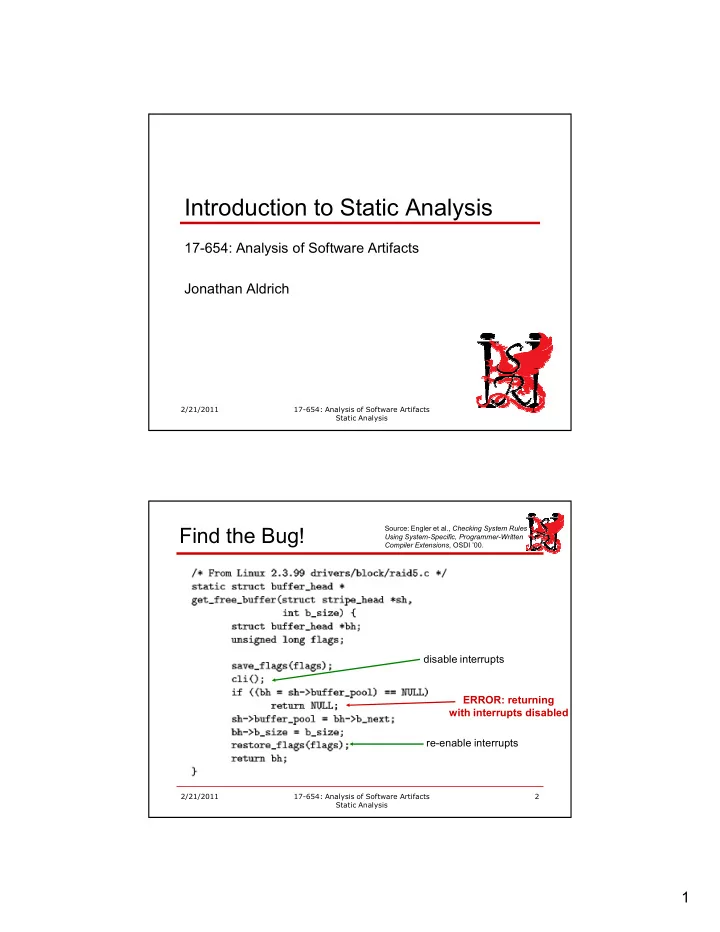
  • Find the Bug!

disable interrupts reenable interrupts

  • Source: Engler et al.,
  • , OSDI ’00.
slide-2
SLIDE 2

2

  • Metal Interrupt Analysis

is_enabled is_disabled disable enable enable => err(double enable) disable => err(double disable) end path => err(end path with/intr disabled)

Source: Engler et al.,

  • , OSDI ’00.
  • Applying the Analysis

initial state is_enabled transition to is_disabled transition to is_enabled final state is_enabled is OK final state is_disabled: ERROR!

Source: Engler et al.,

  • , OSDI ’00.
slide-3
SLIDE 3

3

  • Outline
  • Why static analysis?
  • The limits of testing and inspection
  • What is static analysis?
  • How does static analysis work?
  • AST Analysis
  • Dataflow Analysis
slide-4
SLIDE 4

4

  • Process, Cost, and Quality
  • !

"#"" ""$"%" $&$ ' !%#!" $$"(" "$"$$ (%

! %)

  • Slide: William Scherlis

" *"")+

  • Root Causes of Errors
  • Requirements problems
  • Don’t fit user needs
  • Design flaws
  • Lacks required qualities
  • Implementation errors
  • Assign
  • Checking
  • Algorithm
  • Timing
  • Interface
  • Relationship

Taxonomy: [Chillarege et al., Orthogonal Defect Classification]

  • Does design achieve goals?

Is design implemented right? Is data initialized? Is dereference/indexing valid? Are threads synchronized? Are interface semantics followed? Are invariants maintained? Hard Hard

  • Security
slide-5
SLIDE 5

5

  • Existing Approaches
  • Testing:
  • Verifies features work
  • Finds algorithmic

problems

  • Inspection:
  • Missing requirements
  • Design problems
  • Style issues
  • Application logic
  • Limitations
  • Nonlocal interactions
  • Uncommon paths
  • Nondeterminism
  • Static analysis: !
  • Verifies nonlocal

consistency

  • Checks all paths
  • Considers all non

deterministic choices

  • Static Analysis Finds “Mechanical” Errors
  • Defects that result from inconsistently following simple,

mechanical design rules

  • Security vulnerabilities
  • Buffer overruns, unvalidated inputK
  • Memory errors
  • Null dereference, uninitialized dataK
  • Resource leaks
  • Memory, OS resourcesK
  • Violations of API or framework rules
  • e.g. Windows device drivers; real time libraries; GUI frameworks
  • Exceptions
  • Arithmetic/library/userdefined
  • Encapsulation violations
  • Accessing internal data, calling private functionsK
  • Race conditions
  • Two threads access the same data without synchronization
slide-6
SLIDE 6

6

  • Empirical Results on Static Analysis
  • Nortel study [Zheng et al. 2006]
  • 3 C/C++ projects
  • 3 million LOC total
  • Early generation static analysis tools
  • Conclusions
  • Cost per fault of static analysis 6172% compared

to inspections

  • Effectively finds assignment, checking faults
  • Can be used to find potential security

vulnerabilities

  • Empirical Results on Static Analysis
  • InfoSys study [Chaturvedi 2005]
  • 5 projects
  • Average 700 function points

each

  • Compare inspection with and

without static analysis

  • Conclusions
  • Fewer defects
  • Higher productivity

Adapted from [Chaturvedi 2005]

slide-7
SLIDE 7

7

  • Quality Assurance at Microsoft (Part 1)
  • Original process: manual code inspection
  • Effective when system and team are small
  • Too many paths to consider as system grew
  • Early 1990s: add massive system and unit testing
  • Tests took weeks to run
  • Diversity of platforms and configurations
  • Sheer volume of tests
  • Inefficient detection of common patterns, security holes
  • Nonlocal, intermittent, uncommon path bugs
  • Was treading water in Windows Vista development
  • Early 2000s: add static analysis
  • More on this later
  • Outline
  • Why static analysis?
  • What is static analysis?
  • Abstract state space exploration
  • How does static analysis work?
  • What do practical tools look like?
  • How does it fit into an organization?
slide-8
SLIDE 8

8

  • Static Analysis Definition
  • Static program analysis is the systematic

examination of an abstraction of a program’s state space

  • Metal interrupt analysis
  • Abstraction
  • 2 states: enabled and disabled
  • All program information—variable values, heap contents—is

abstracted by these two states, plus the program counter

  • Systematic
  • Examines all paths through a function
  • What about loops? More laterK
  • Each path explored for each reachable state
  • Assume interrupts initially enabled (Linux practice)
  • Since the two states abstract all program information, the

exploration is exhaustive

  • Outline
  • Why static analysis?
  • What is static analysis?
  • How does static analysis work?
  • Termination
  • AST Analysis
  • Dataflow Analysis
slide-9
SLIDE 9

9

  • How can Analysis Search All Paths?
  • How many paths are in a program?
  • Exponential # paths with if statements
  • Infinite # paths with loops
  • How could we possibly cover them all?
  • Secret weapon: Abstraction
  • Finite number of (abstract) states
  • If you come to a statement and you’ve already

explored a state for that statement, stop.

  • The analysis depends only on the code and the current

state

  • Continuing the analysis from this program point and state

would yield the same results you got before

  • If the number of states isn’t finite, too bad
  • Your analysis may not terminate
  • Example
  • 1. void foo(int x) {

2. if (x == 0) 3. bar(); cli(); 4. else 5. baz(); cli(); 6. while (x > 0) { 7. sti(); 8. do_work(); 9. cli(); 10. } 11. sti(); 12.}

Path 1 (before stmt): true/no loop 2: is_enabled 3: is_enabled 6: is_disabled 11: is_disabled 12: is_enabled

slide-10
SLIDE 10

10

  • Example
  • 1. void foo(int x) {

2. if (x == 0) 3. bar(); cli(); 4. else 5. baz(); cli(); 6. while (x > 0) { 7. sti(); 8. do_work(); 9. cli(); 10. } 11. sti(); 12.}

Path 2 (before stmt): true/1 loop 2: is_enabled 3: is_enabled 6: is_disabled 7: is_disabled 8: is_enabled 9: is_enabled 11: is_disabled

  • Example
  • 1. void foo(int x) {

2. if (x == 0) 3. bar(); cli(); 4. else 5. baz(); cli(); 6. while (x > 0) { 7. sti(); 8. do_work(); 9. cli(); 10. } 11. sti(); 12.}

Path 3 (before stmt): true/2+ loops 2: is_enabled 3: is_enabled 6: is_disabled 7: is_disabled 8: is_enabled 9: is_enabled 6: is_disabled

slide-11
SLIDE 11

11

  • Example
  • 1. void foo(int x) {

2. if (x == 0) 3. bar(); cli(); 4. else 5. baz(); cli(); 6. while (x > 0) { 7. sti(); 8. do_work(); 9. cli(); 10. } 11. sti(); 12.}

Path 4 (before stmt): false 2: is_enabled 5: is_enabled 6: is_disabled

  • Outline
  • Why static analysis?
  • What is static analysis?
  • How does static analysis work?
  • AST Analysis
  • Abstract Syntax Tree Representation
  • Simple Bug Finders: FindBugs
  • Dataflow Analysis
slide-12
SLIDE 12

12

Representing Programs

  • To analyze software automatically, we

must be able to represent it precisely

  • Some representations
  • Source code
  • Abstract syntax trees
  • Control flow graph
  • Bytecode
  • Assembly code
  • Binary code
  • Abstract Syntax Trees
  • A tree representation of source code
  • Based on the language grammar
  • One type of node for each production
slide-13
SLIDE 13

13

Parsing: Source to AST

  • Parsing process (top down)
  • 1. Determine the toplevel production to use
  • 2. Create an AST element for that production
  • 3. Determine what text corresponds to each

child of the AST element

  • 4. Recursively parse each child
  • Algorithms have been studied in detail
  • For this course you only need the intuition
  • Details covered in compiler courses
  • Parsing Example

y := x; z := 1; while y>1 do z := z * y; y := y – 1

  • Toplevel production?
  • What are the parts?
slide-14
SLIDE 14

14

Parsing Example

y := x; z := 1; while y>1 do z := z * y; y := y – 1

  • Toplevel production?
  • What are the parts?

;

  • Parsing Example

y := x; z := 1; while y>1 do z := z * y; y := y – 1

  • Toplevel production?
  • What are the parts?
  • y := x
  • z := 1; while K

; y := x z := 1; whileK

slide-15
SLIDE 15

15

Parsing Example

y := x; z := 1; while y>1 do z := z * y; y := y – 1

  • Toplevel production?
  • What are the parts?
  • y := x
  • z := 1; while K

; := z := 1; whileK y x

  • Parsing Example

y := x; z := 1; while y>1 do z := z * y; y := y – 1

  • Toplevel production?
  • What are the parts?
  • y := x
  • z := 1; while K

; := ; y x z := 1 whileK

slide-16
SLIDE 16

16

Parsing Example

y := x; z := 1; while y>1 do z := z * y; y := y – 1

  • Toplevel production?
  • What are the parts?
  • y := x
  • z := 1; while K

; := ; y x := whileK z 1

  • Parsing Example

y := x; z := 1; while y>1 do z := z * y; y := y – 1

  • Toplevel production?
  • What are the parts?
  • y := x
  • z := 1; while K

; := ; y x := while z 1 y>1 z :=...

slide-17
SLIDE 17

17

Parsing Example

y := x; z := 1; while y>1 do z := z * y; y := y – 1

  • Toplevel production?
  • What are the parts?
  • y := x
  • z := 1; while K

; := ; y x := while z 1 > z :=... y 1

  • Parsing Example

y := x; z := 1; while y>1 do z := z * y; y := y – 1

  • Toplevel production?
  • What are the parts?
  • y := x
  • z := 1; while K

; := ; y x := while z 1 > ; y 1 z:=z*y y:=y1

slide-18
SLIDE 18

18

Parsing Example

y := x; z := 1; while y>1 do z := z * y; y := y – 1

  • Toplevel production?
  • What are the parts?
  • y := x
  • z := 1; while K

; := ; y x := while z 1 > ; y 1 := y:=y1 z z*y

  • Parsing Example

y := x; z := 1; while y>1 do z := z * y; y := y – 1

  • Toplevel production?
  • What are the parts?
  • y := x
  • z := 1; while K

; := ; y x := while z 1 > ; y 1 := y:=y1 z * z y

slide-19
SLIDE 19

19

Parsing Example

y := x; z := 1; while y>1 do z := z * y; y := y – 1

  • Toplevel production?
  • What are the parts?
  • y := x
  • z := 1; while K

; := ; y x := while z 1 > ; y 1 := := z * y y1 z y

  • Parsing Example

y := x; z := 1; while y>1 do z := z * y; y := y – 1

  • Toplevel production?
  • What are the parts?
  • y := x
  • z := 1; while K

; := ; y x := while z 1 > ; y 1 := := z * y z y y 1

slide-20
SLIDE 20

20

Quick Quiz

Draw a parse tree for the function below. You can assume that the “for” statement is at the top of the parse tree. void copy_bytes(char dest[], char source[], int n) { for (int i = 0; i < n; ++i) dest[i] = source[i]; }

  • Matching AST against Bug Patterns
  • AST Walker Analysis
  • Walk the AST, looking for nodes of a particular type
  • Check the immediate neighborhood of the node for a bug pattern
  • Warn if the node matches the pattern
  • Semantic grep
  • Like grep, looking for simple patterns
  • Unlike grep, consider not just names, but semantic structure of

AST

  • Makes the analysis more precise
  • Common architecture based on Visitors
  • class Visitor has a visitX method for each type of AST node X
  • Default Visitor code just descends the AST, visiting each node
  • To find a bug in AST element of type X, override visitX
slide-21
SLIDE 21

21

Behavioral Patterns: Visitor

  • Applicability
  • Structure with many classes
  • Want to perform operations

that depend on classes

  • Set of classes is stable
  • Want to define new
  • perations
  • Consequences
  • Easy to add new operations
  • Groups related behavior in

Visitor

  • Adding new elements is

hard

  • Visitor can store state
  • Elements must expose

interface

  • Example: Shifting by more than 31 bits

class BadShiftAnalysis extends Visitor visitShiftExpression(ShiftExpression e) { if (type of e’s left operand is int) if (e’s right operand is a constant) if (value of constant < 0 or > 31) warn(“Shifting by less than 0 or more than 31 is meaningless”) super.visitShiftExpression(e); }

slide-22
SLIDE 22

22

Example: String concatenation in a loop

class StringConcatLoopAnalysis extends Visitor private int loopLevel = 0; visitStringConcat(StringConcat e) { if (loopLevel > 0) warn(“Performance issue: String concatenation in loop (use StringBuffer instead)”) super.visitStringConcat(e); ""#$%& } visitWhile(While e) { loopLevel++; super.visitWhile(e); ""#$%& loopLevel; } ""

  • Example Tool: FindBugs
  • Origin: research project at U. Maryland
  • Now freely available as open source
  • Standalone tool, plugins for Eclipse, etc.
  • Checks over 250 “bug patterns”
  • Over 100 correctness bugs
  • Many style issues as well
  • Includes the two examples just shown
  • Focus on simple, local checks
  • Similar to the patterns we’ve seen
  • But checks bytecode, not AST
  • Harder to write, but more efficient and doesn’t require source
  • http://findbugs.sourceforge.net/
slide-23
SLIDE 23

23

Example FindBugs Bug Patterns

  • Correct equals()
  • Use of ==
  • Closing streams
  • Illegal casts
  • Null pointer dereference
  • Infinite loops
  • Encapsulation problems
  • Inconsistent synchronization
  • Inefficient String use
  • Dead store to variable
  • FindBugs Experiences
  • Useful for learning idioms of Java
  • Rules about libraries and interfaces
  • e.g. equals()
  • Customization is important
  • Many warnings may be irrelevant, others may be

important – depends on domain

  • e.g. embedded system vs. web application
  • Useful for pointing out things to examine
  • Not all are real defects
  • Turn off false positive warnings for future analyses
  • n codebase
slide-24
SLIDE 24

24

  • Outline
  • Why static analysis?
  • What is static analysis?
  • How does static analysis work?
  • AST Analysis
  • Dataflow Analysis
  • Control Flow Graph Representation
  • Simple Flow Analysis: Zero/Null Values

Motivation: Dataflow Analysis

  • Catch interesting errors
  • Nonlocal: x is null, x is written to y, y is

dereferenced

  • Optimize code
  • Reduce run time, memory usageK
  • Soundness required
  • Safetycritical domain
  • Assure lack of certain errors
  • Cannot optimize unless it is proven safe
  • Correctness comes before performance
  • Automation required
  • Dramatically decreases cost
  • Makes cost/benefit worthwhile for far more

purposes

slide-25
SLIDE 25

25

Dataflow analysis

  • Tracks value flow through program
  • Can distinguish order of operations
  • Did you read the file after you closed it?
  • Does this null value flow to that dereference?
  • Differs from AST walker
  • Walker simply collects information or checks patterns
  • Tracking flow allows more interesting properties
  • Abstracts values
  • Chooses abstraction particular to property
  • Is a variable null?
  • Is a file open or closed?
  • Could a variable be 0?
  • Where did this value come from?
  • More '&than Hoare logic
  • Hoare logic allows any property to be expressed
  • Specialization allows automation and soundness
  • Zero Analysis
  • Could variable x be 0?
  • Useful to know if you have an expression y/x
  • In C, useful for null pointer analysis
  • Program semantics
  • η maps every variable to an integer
  • Semantic abstraction
  • σ maps every variable to non zero (NZ), zero(Z),
  • r maybe zero (MZ)
  • Abstraction function for integers αZI :
  • αZI(0) = Z
  • αZI() = NZ

for all ≠ 0

  • We may not know if a value is zero or not
  • Analysis is always an approximation
  • Need MZ option, too
slide-26
SLIDE 26

26

Zero Analysis Example

x := 10; y := x; z := 0; while y > 1 do x := x / y; y := y1; z := 5; σ =[]

  • Zero Analysis Example

x := 10; y := x; z := 0; while y > 1 do x := x / y; y := y1; z := 5; σ =[] σ =[x↦αZI(10)]

slide-27
SLIDE 27

27

Zero Analysis Example

x := 10; y := x; z := 0; while y > 1 do x := x / y; y := y1; z := 5; σ =[] σ =[x↦NZ]

  • Zero Analysis Example

x := 10; y := x; z := 0; while y > 1 do x := x / y; y := y1; z := 5; σ =[] σ =[x↦NZ] σ =[x↦NZ,y↦σ(x)]

slide-28
SLIDE 28

28

Zero Analysis Example

x := 10; y := x; z := 0; while y > 1 do x := x / y; y := y1; z := 5; σ =[] σ =[x↦NZ] σ =[x↦NZ,y↦NZ]

  • Zero Analysis Example

x := 10; y := x; z := 0; while y > 1 do x := x / y; y := y1; z := 5; σ =[] σ =[x↦NZ] σ =[x↦NZ,y↦NZ] σ =[x↦NZ,y↦NZ,z↦αZI(0)]

slide-29
SLIDE 29

29

Zero Analysis Example

x := 10; y := x; z := 0; while y > 1 do x := x / y; y := y1; z := 5; σ =[] σ =[x↦NZ] σ =[x↦NZ,y↦NZ] σ =[x↦NZ,y↦NZ,z↦Z]

  • Zero Analysis Example

x := 10; y := x; z := 0; while y > 1 do x := x / y; y := y1; z := 5; σ =[] σ =[x↦NZ] σ =[x↦NZ,y↦NZ] σ =[x↦NZ,y↦NZ,z↦Z] σ =[x↦NZ,y↦NZ,z↦Z]

slide-30
SLIDE 30

30

Zero Analysis Example

x := 10; y := x; z := 0; while y > 1 do x := x / y; y := y1; z := 5; σ =[] σ =[x↦NZ] σ =[x↦NZ,y↦NZ] σ =[x↦NZ,y↦NZ,z↦Z] σ =[x↦NZ,y↦NZ,z↦Z] σ =[x↦NZ,y↦NZ,z↦Z]

  • Zero Analysis Example

x := 10; y := x; z := 0; while y > 1 do x := x / y; y := y1; z := 5; σ =[] σ =[x↦NZ] σ =[x↦NZ,y↦NZ] σ =[x↦NZ,y↦NZ,z↦Z] σ =[x↦NZ,y↦NZ,z↦Z] σ =[x↦NZ,y↦NZ,z↦Z] σ =[x↦NZ,y↦MZ,z↦Z]

slide-31
SLIDE 31

31

Zero Analysis Example

x := 10; y := x; z := 0; while y > 1 do x := x / y; y := y1; z := 5; σ =[] σ =[x↦NZ] σ =[x↦NZ,y↦NZ] σ =[x↦NZ,y↦NZ,z↦Z] σ =[x↦NZ,y↦NZ,z↦Z] σ =[x↦NZ,y↦NZ,z↦Z] σ =[x↦NZ,y↦MZ,z↦Z] σ =[x↦NZ,y↦MZ,z↦NZ]

  • Zero Analysis Example

x := 10; y := x; z := 0; while y > 1 do x := x / y; y := y1; z := 5; σ =[] σ =[x↦NZ] σ =[x↦NZ,y↦NZ] σ =[x↦NZ,y↦NZ,z↦Z] σ =[x↦NZ,y↦MZ,z↦MZ] σ =[x↦NZ,y↦NZ,z↦Z] σ =[x↦NZ,y↦MZ,z↦Z] σ =[x↦NZ,y↦MZ,z↦NZ]

slide-32
SLIDE 32

32

Zero Analysis Example

x := 10; y := x; z := 0; while y > 1 do x := x / y; y := y1; z := 5; σ =[] σ =[x↦NZ] σ =[x↦NZ,y↦NZ] σ =[x↦NZ,y↦NZ,z↦Z] σ =[x↦NZ,y↦MZ,z↦MZ] σ =[x↦NZ,y↦MZ,z↦MZ] σ =[x↦NZ,y↦MZ,z↦Z] σ =[x↦NZ,y↦MZ,z↦NZ]

  • Zero Analysis Example

x := 10; y := x; z := 0; while y > 1 do x := x / y; y := y1; z := 5; σ =[] σ =[x↦NZ] σ =[x↦NZ,y↦NZ] σ =[x↦NZ,y↦NZ,z↦Z] σ =[x↦NZ,y↦MZ,z↦MZ] σ =[x↦NZ,y↦MZ,z↦MZ] σ =[x↦NZ,y↦MZ,z↦MZ] σ =[x↦NZ,y↦MZ,z↦NZ]

slide-33
SLIDE 33

33

Zero Analysis Example

x := 10; y := x; z := 0; while y > 1 do x := x / y; y := y1; z := 5; σ =[] σ =[x↦NZ] σ =[x↦NZ,y↦NZ] σ =[x↦NZ,y↦NZ,z↦Z] σ =[x↦NZ,y↦MZ,z↦MZ] σ =[x↦NZ,y↦MZ,z↦MZ] σ =[x↦NZ,y↦MZ,z↦MZ] σ =[x↦NZ,y↦MZ,z↦NZ] Nothing more happens!

  • Zero Analysis Termination
  • The analysis values will not change, no matter how

many times we execute the loop

  • Proof: our analysis is deterministic
  • We run through the loop with the current analysis values,

none of them change

  • Therefore, no matter how many times we run the loop, the

results will remain the same

  • Therefore, we have computed the dataflow analysis results

for any number of loop iterations

slide-34
SLIDE 34

34

Zero Analysis Termination

  • The analysis values will not change, no matter how

many times we execute the loop

  • Proof: our analysis is deterministic
  • We run through the loop with the current analysis values,

none of them change

  • Therefore, no matter how many times we run the loop, the

results will remain the same

  • Therefore, we have computed the dataflow analysis results

for any number of loop iterations

  • Why does this work
  • If we simulate the loop, the data values could (in principle)

keep changing indefinitely

  • There are an infinite number of data values possible
  • Not true for 32bit integers, but might as well be true
  • Counting to 232 is slow, even on today’s processors
  • Dataflow analysis only tracks 2 possibilities!
  • So once we’ve explored them all, nothing more will change
  • This is the secret of abstraction
  • We will make this argument more precise later
  • Using Zero Analysis
  • Visit each division in the program
  • Get the results of zero analysis for the divisor
  • If the results are definitely zero, report an error
  • If the results are possibly zero, report a warning
slide-35
SLIDE 35

35

Quick Quiz

Program Statement Analysis Info after that statement ()*+,

  • )x := 0

.)y := 1 /)if (z == 0) 0) x := x + y 1)else y := y – 1 2)w := y

  • Fill in the table to show how what information zero

analysis will compute for the function given.

  • Outline
  • Why static analysis?
  • What is static analysis?
  • How does static analysis work?
  • AST Analysis
  • Dataflow Analysis
  • Further Examples and Discussion
slide-36
SLIDE 36

36

  • Static Analysis Definition
  • Static program analysis is the systematic examination
  • f an abstraction of a program’s state space
  • Simple model checking for data races
  • defined:

[From Savage et al., )$333

4&&]

  • Two threads access the same variable
  • At least one access is a write
  • No explicit mechanism prevents the accesses from being

simultaneous

  • Abstraction
  • Program counter of each thread, state of each lock
  • Abstract away heap and program variables
  • Systematic
  • Examine all possible interleavings of all threads
  • Flag error if no synchronization between accesses
  • Exploration is exhaustive, since abstract state abstracts all concrete

program state

  • Model Checking for Data Races

thread1() { read x; } thread2() { lock(); write x; unlock(); } Interleaving 1: OK

Thread 1 Thread 2 read x lock write x unlock

slide-37
SLIDE 37

37

  • Model Checking for Data Races

thread1() { read x; } thread2() { lock(); write x; unlock(); } Interleaving 1: OK Interleaving 2: OK

Thread 1 Thread 2 read x lock write x unlock

  • Model Checking for Data Races

thread1() { read x; } thread2() { lock(); write x; unlock(); } Interleaving 1: OK Interleaving 2: OK Interleaving 3: Race

Thread 1 Thread 2 read x lock write x unlock

slide-38
SLIDE 38

38

  • Model Checking for Data Races

thread1() { read x; } thread2() { lock(); write x; unlock(); } Interleaving 1: OK Interleaving 2: OK Interleaving 3: Race Interleaving 4: Race

Thread 1 Thread 2 read x lock write x unlock

  • Compare Analysis to Testing, Inspection
  • Why might it be hard to test/inspect for:
  • Null pointer errors?
  • Forgetting to reenable interrupts?
  • Race conditions?
slide-39
SLIDE 39

39

  • Compare Analysis to Testing, Inspection
  • Null Pointers, Interrupts
  • Testing
  • Errors typically on uncommon paths or uncommon input
  • Difficult to exercise these paths
  • Inspection
  • Nonlocal and thus easy to miss
  • Object allocation vs. dereference
  • Disable interrupts vs. return statement
  • Finding Data Races
  • Testing
  • Cannot force all interleavings
  • Inspection
  • Too many interleavings to consider
  • Check rules like “lock protects x” instead
  • But checking is nonlocal and thus easy to miss a case
  • Sound Analyses
  • A sound analysis never misses an error

[of the relevant error category]

  • No #5&6
  • Requires exhaustive exploration of state space
  • Inductive argument for soundness
  • Start program with abstract state for all possible initial

concrete states

  • At each step, ensure new abstract state covers all concrete

states that could result from executing statement on any concrete state from previous abstract state

  • Once no new abstract states are reachable, by induction all

concrete program executions have been considered

slide-40
SLIDE 40

40

  • Soundness and Precision

Program state covered in actual execution Program state covered by abstract execution with analysis

unsound (false negative) imprecise (false positive)

  • Soundness and Precision

Program state covered in actual execution Program state covered by abstract execution with analysis

unsound (false negative) imprecise (false positive)

slide-41
SLIDE 41

41

  • Abstraction and Soundness
  • Consider “Sound Testing”

[testing that finds every bug]

  • Requires executing program on every input
  • (and on all interleavings of threads)
  • Infinite number of inputs for realistic programs
  • Therefore impossible in practice
  • Abstraction
  • Infinite state space finite set of states
  • Can achieve soundness by exhaustive exploration
  • Zero Analysis Precision

1. void foo(unsigned n) { 2. int x = 1; 3. x = x+2; 4. int y = 10/x; 5. } What will be the result of static analysis? Path 1 (after stmt): 1: ∅ 2: x↦NZ 3: x↦MZ

  • What went wrong?
  • Before statement 3 we only know

x is nonzero

  • We need to know that x is 1
slide-42
SLIDE 42

42

  • Regaining Zero Analysis Precision
  • Keep track of exact value of variables
  • Infinite states
  • r 232, close enough
  • Add a 1 state
  • Not general enough
  • Track formula for every variable
  • Undecidable for arbitrary formulas
  • Track restricted formulas
  • Decent solution in practice
  • Presburger arithmetic
  • Analysis as an Approximation
  • Analysis must approximate in practice
  • May report errors where there are really none
  • False positives
  • May not report errors that really exist
  • False negatives
  • All analysis tools have either false negatives or false

positives

  • Approximation strategy
  • Find a pattern P for correct code
  • which is feasible to check (analysis terminates quickly),
  • covers most correct code in practice (low false positives),
  • which implies no errors (no false negatives)
  • Analysis can be pretty good in practice
  • Many tools have low false positive/negative rates
  • A sound tool has no false negatives
  • Never misses an error in a category that it checks
slide-43
SLIDE 43

43

  • AttributeSpecific Analysis
  • Analysis is specific to
  • A quality attribute
  • Race condition
  • Buffer overflow, divide by zero
  • Use after free
  • A strategy for verifying that attribute
  • Protect each shared piece of data with a lock
  • Presburger arithmetic decision procedure for array

indexes, zero analysis

  • Only one variable points to each memory location
  • Analysis is inappropriate for some attributes
  • Approach to assurance is adhoc and follows no

clear pattern

  • No known decision procedure for checking an

assurance pattern that is followed

  • !
  • Soundness Tradeoffs
  • Sound Analysis
  • Assurance that no

bugs are left

  • Of the target error

class

  • Can focus other

QA resources on

  • ther errors
  • May have more

false positives

  • Unsound Analysis
  • No assurance that

bugs are gone

  • Must still apply
  • ther QA

techniques

  • May have fewer

false positives

slide-44
SLIDE 44

44

  • Which to Choose?
  • Cost/Benefit tradeoff
  • Benefit: How valuable is the bug?
  • How much does it cost if not found?
  • How expensive to find using testing/inspection?
  • Cost: How much did the analysis cost?
  • Effort spent running analysis, interpreting results –

includes false positives

  • Effort spent finding remaining bugs (for unsound analysis)
  • Rule of thumb
  • For critical bugs that testing/inspection can’t find, a

sound analysis is worth it

  • As long as false positive rate is acceptable
  • For other bugs, maximize engineer productivity
  • Questions?
slide-45
SLIDE 45

45

Additional Slides/Examples

  • Static Analysis Definition
  • Static program analysis is the systematic

examination of an abstraction of a program’s state space

  • Simple array bounds analysis
  • Abstraction
  • Given array , track whether each integer variable and

expression is <,=, or > than 56

  • Abstract away precise values of variables and expressions
  • Abstract away the heap
  • Systematic
  • Examines all paths through a function
  • Each path explored for each reachable state
  • Exploration is exhaustive, since abstract state abstracts all

concrete program state

slide-46
SLIDE 46

46

  • Array Bounds Example

1. void foo(unsigned n) { 2. char str = new char[n+1]; 3. int idx = 0; 4. if (n > 5) 5. idx = n 6. else 7. idx = n+1 8. str[idx] = ‘c’; 9. } Path 1 (before stmt): then branch 2: ∅ 3: n↦< 4: n↦<, idx↦< 5: n↦<, idx↦< 8: n↦<, idx↦< 9: n↦<, idx↦<

  • Array Bounds Example

1. void foo(unsigned n) { 2. char str = new char[n+1]; 3. int idx = 0; 4. if (n > 5) 5. idx = n 6. else 7. idx = n+1 8. str[idx] = ‘c’; 9. } Path 1 (before stmt): else branch 2: ∅ 3: n↦< 4: n↦<, idx↦< 7: n↦<, idx↦<,= 8: n↦<, idx↦<,= 9: n↦<, idx↦<,= ""#