Interaction Devices Mobile Keyboard Animation, Speech and - - PowerPoint PPT Presentation

interaction devices
SMART_READER_LITE
LIVE PREVIEW

Interaction Devices Mobile Keyboard Animation, Speech and - - PowerPoint PPT Presentation

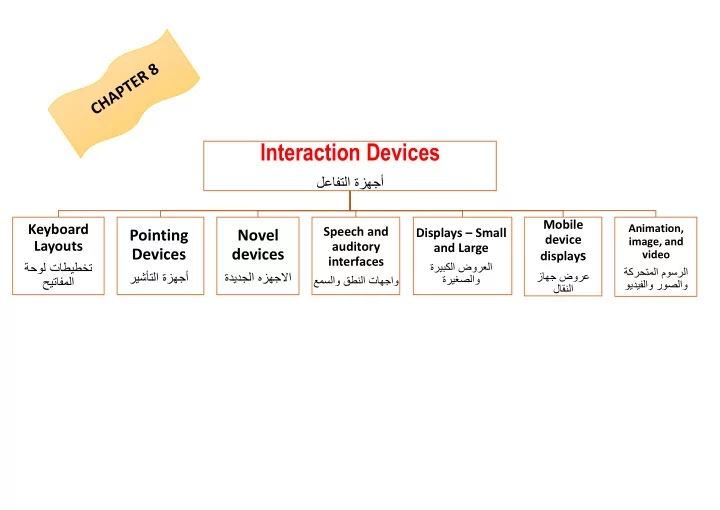
Interaction Devices Mobile Keyboard Animation, Speech and Displays Small Pointing Novel device image, and Layouts auditory and Large Devices devices display s video interfaces


slide-1
SLIDE 1

Interaction Devices

لعافتلا ةزهجأ

Animation, image, and video ةكرحتملا موسرلا ويديفلاو روصلاو

Mobile device displays

زاهج ضورع لاقنلا

Displays – Small and Large

ةريبكلا ضورعلا ةريغصلاو

Speech and auditory interfaces

عمسلاو قطنلا تاهجاو

Novel devices

ةديدجلا هزهجلبا

Pointing Devices

ريشأتلا ةزهجأ

Keyboard Layouts

ةحول تاطيطخت حيتافملا

slide-2
SLIDE 2

Keyboard Layouts

حيتافملا ةحول تاطيطخت

Keyboard Layouts

QWERTY layout Dvorak layout ABCDE style

Additional keyboard issues

Keys

Keys Function keys Cursor movement keys Keyboard and keypads for small devices

slide-3
SLIDE 3

Pointing Devices

ريشأتلا ةزهجأ

Pointing devices are applicable in six types of interaction tasks:

Select Position Orient Path Quantify Text

Direct control devices Indirect control devices

Non-standard devices and strategies

Criteria for success

Direct-control pointing devices

lightpen / Touchscreen Tablet PCs and Mobile Devices

Indirect pointing devices

mouse / trackball / joystick graphics tablet / touchpad

Comparison of pointing devices

Human-factors variables Other variables Some results Fitts' Law

slide-4
SLIDE 4

Novel devices

ةديدجلا هزهجلبا

Foot controls Eye-tracking Multiple-degrees-of-freedom devices DataGlove Haptic feedback Bimanual input Ubiquitous computing and tangible user interfaces Handheld devices Smart pens Table top touch screens

Game controllers

slide-5
SLIDE 5

Speech and auditory interfaces

عمسلاو قطنلا تاهجاو

Speech recognition still does not match the fantasy of science fiction Opportunitie Technologies Obstacles to speech recognition Obstacles to speech output Discrete word recognition Continuous-speech recognition Speech store and forward Voice information systems Speech generation

Audio tones, audiolization, and music

slide-6
SLIDE 6

Displays Small and Large

اةريغصلاو ةريبكلا ضورعل

Usage characteristics distinguish displays

Portability -Privacy - Saliency - Ubiquity - Simultaneity

The display has many important features ( 8 )

Display technology

Monochrome displays are adequate, and are attractive because of their lower cost RGB shadow-mask displays small dots of red, green, and blue phosphors packed closely Raster-scan cathode-ray tube (CRT)

electron beam sweeping out lines of dots to form letters - refresh rates 30 to 70 per second

Liquid-crystal displays (LCDs)

voltage changes influence the polarization of tiny capsules of liquid crystals - flicker-free size of the capsules limits the resolution Plasma panel rows of horizontal wires are slightly separated from vertical wires by small glass-enclosed capsules of neon-based gases

Light-emitting diodes (LEDs)

certain diodes emit light when a voltage is applied arrays of these small diodes can be assembled to display characters

Electronic ink

Paper like resolution - Tiny capsules with negatively and positively charged particles

Braille displays

Pins provide output for the blind Large displays Informational wall displays - Interactive wall displays - Multiple desktop displays Heads-up and helmet mounted displays A heads-up display can, for instance, project information on a partially silvered widescreen of an airplane or car A helmet/head mounted display (HMD) moves the image with the user - 3D images

slide-7
SLIDE 7

Mobile device displays

لاقنلا زاهج ضورع

Currently mobile devices used for brief tasks, except for game playing Optimize for repetitive tasks Custom designs to take advantage of every pixel DataLens allows compact overviews Web browsing difficult Okay for linear reading, but making comparisons can be difficult

Animation, image, and video

ويديفلاو روصلاو ةكرحتملا موسرلا

Accelerated graphics hardware

More information shared and downloaded on the web Scanning of images and OCR Digital video CD-ROMs and DVDs Compression and decompression through MPEG Computer-based video conferencing