First Design: Weather Station Observer Design Pattern Event-Driven - - PowerPoint PPT Presentation

first design weather station observer design pattern
SMART_READER_LITE
LIVE PREVIEW

First Design: Weather Station Observer Design Pattern Event-Driven - - PowerPoint PPT Presentation

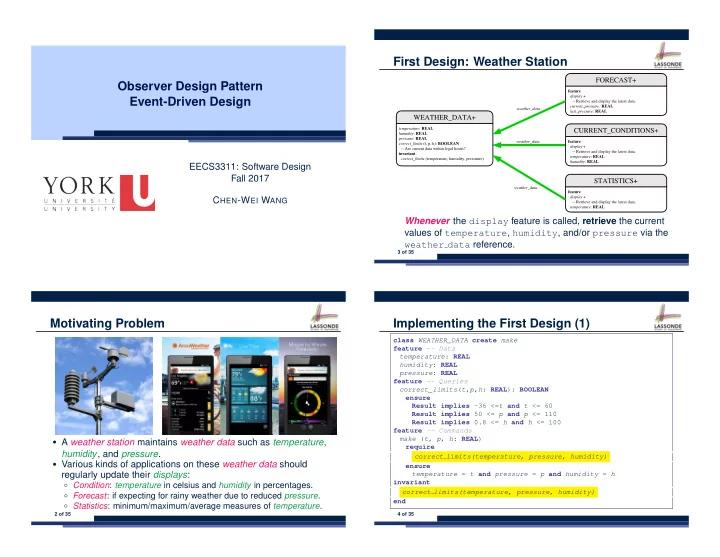
First Design: Weather Station Observer Design Pattern Event-Driven Design EECS3311: Software Design Fall 2017 C HEN -W EI W ANG Whenever the display feature is called, retrieve the current values of temperature , humidity , and/or pressure via


slide-1
SLIDE 1

Observer Design Pattern Event-Driven Design

EECS3311: Software Design Fall 2017 CHEN-WEI WANG

Motivating Problem

  • A weather station maintains weather data such as temperature,

humidity, and pressure.

  • Various kinds of applications on these weather data should

regularly update their displays:

○ Condition: temperature in celsius and humidity in percentages. ○ Forecast: if expecting for rainy weather due to reduced pressure. ○ Statistics: minimum/maximum/average measures of temperature.

2 of 35

First Design: Weather Station

Whenever the display feature is called, retrieve the current values of temperature, humidity, and/or pressure via the weather data reference.

3 of 35

Implementing the First Design (1)

class WEATHER_DATA create make feature -- Data temperature: REAL humidity: REAL pressure: REAL feature -- Queries correct_limits(t,p,h: REAL): BOOLEAN ensure Result implies -36 <=t and t <= 60 Result implies 50 <= p and p <= 110 Result implies 0.8 <= h and h <= 100 feature -- Commands make (t, p, h: REAL) require correct limits(temperature, pressure, humidity) ensure temperature = t and pressure = p and humidity = h invariant correct limits(temperature, pressure, humidity) end

4 of 35

slide-2
SLIDE 2

Implementing the First Design (2.1)

class CURRENT_CONDITIONS create make feature -- Attributes temperature: REAL humidity: REAL weather_data: WEATHER_DATA feature -- Commands make(wd: WEATHER_DATA) ensure weather data = wd update do temperature := weather_data.temperature humidity := weather_data.humidity end display do update io.put_string("Current Conditions: ") io.put_real (temperature) ; io.put_string (" degrees C and ") io.put_real (humidity) ; io.put_string (" percent humidity%N") end end

5 of 35

Implementing the First Design (2.2)

class FORECAST create make feature -- Attributes current_pressure: REAL last_pressure: REAL weather_data: WEATHER_DATA feature -- Commands make(wd: WEATHER_DATA) ensure weather data = a weather data update do last_pressure := current_pressure current_pressure := weather_data.pressure end display do update if current_pressure > last_pressure then print("Improving weather on the way!%N") elseif current_pressure = last_pressure then print("More of the same%N") else print("Watch out for cooler, rainy weather%N") end end end

6 of 35

Implementing the First Design (2.3)

class STATISTICS create make feature -- Attributes weather_data: WEATHER_DATA current_temp: REAL max, min, sum_so_far: REAL num_readings: INTEGER feature -- Commands make(wd: WEATHER_DATA) ensure weather data = a weather data update do current_temp := weather_data.temperature

  • - Update min, max if necessary.

end display do update print("Avg/Max/Min temperature = ") print(sum_so_far / num_readings + "/" + max + "/" min + "%N") end end

7 of 35

Implementing the First Design (3)

1 class WEATHER_STATION create make 2 feature -- Attributes 3 cc: CURRENT_CONDITIONS ; fd: FORECAST ; sd: STATISTICS 4 wd: WEATHER_DATA 5 feature -- Commands 6 make 7 do create wd.make (9, 75, 25) 8 create cc.make (wd) ; create fd.make (wd) ; create sd.make(wd) 9 10 wd.set_measurements (15, 60, 30.4) 11 cc.display ; fd.display ; sd.display 12 13 cc.display ; fd.display ; sd.display 14 15 wd.set_measurements (11, 90, 20) 16 cc.display ; fd.display ; sd.display 17 end 18 end

L14: Updates occur on cc, fd, sd even with the same data.

8 of 35

slide-3
SLIDE 3

First Design: Good Design?

  • Each application (CURRENT CONDITION, FORECAST,

STATISTICS) cannot know when the weather data change. ⇒ All applications have to periodically initiate updates in order to keep the display results up to date. ∵ Each inquiry of current weather data values is a remote call. ∴ Waste of computing resources (e.g., network bandwidth) when there are actually no changes on the weather data.

  • To avoid such overhead, it is better to let:

○ Each application subscribe the weather data. ○ The weather station publish/notify new changes. ⇒ Updates on the application side occur only when necessary .

9 of 35

Observer Pattern: Architecture

  • Observer (publish-subscribe) pattern: one-to-many relation.

○ Observers (subscribers) are attached to a subject (publisher). ○ The subject notify its attached observers about changes.

  • Some interchangeable vocabulary:

○ subscribe ≈ attach ≈ register ○ unsubscribe ≈ detach ≈ unregister ○ publish ≈ notify ○ handle ≈ update

10 of 35

Observer Pattern: Weather Station

11 of 35

Implementing the Observer Pattern (1.1)

deferred class OBSERVER feature -- To be effected by a descendant up_to_date_with_subject: BOOLEAN

  • - Is this observer up to date with its subject?

deferred end update

  • - Update the observer’s view of ‘s’

deferred ensure up_to_date_with_subject: up_to_date_with_subject end end

Each effective descendant class of OBSERVDER should:

○ Define what weather data are required to be up-to-date. ○ Define how to update the required weather data.

12 of 35

slide-4
SLIDE 4

Implementing the Observer Pattern (1.2)

class CURRENT_CONDITIONS inherit OBSERVER feature -- Commands make(a_weather_data: WEATHER_DATA) do weather_data := a_weather_data weather data.attach (Current) ensure weather_data = a_weather_data weather data.observers.has (Current) end feature -- Queries up_to_date_with_subject: BOOLEAN ensure then Result = temperature = weather_data.temperature and humidity = weather_data.humidity update do -- Same as 1st design; Called only on demand end display do -- No need to update; Display contents same as in 1st design end end

13 of 35

Implementing the Observer Pattern (1.3)

class FORECAST inherit OBSERVER feature -- Commands make(a_weather_data: WEATHER_DATA) do weather_data := a_weather_data weather data.attach (Current) ensure weather_data = a_weather_data weather data.observers.has (Current) end feature -- Queries up_to_date_with_subject: BOOLEAN ensure then Result = current_pressure = weather_data.pressure update do -- Same as 1st design; Called only on demand end display do -- No need to update; Display contents same as in 1st design end end

14 of 35

Implementing the Observer Pattern (1.4)

class STATISTICS inherit OBSERVER feature -- Commands make(a_weather_data: WEATHER_DATA) do weather_data := a_weather_data weather data.attach (Current) ensure weather_data = a_weather_data weather data.observers.has (Current) end feature -- Queries up_to_date_with_subject: BOOLEAN ensure then Result = current_temperature = weather_data.temperature update do -- Same as 1st design; Called only on demand end display do -- No need to update; Display contents same as in 1st design end end

15 of 35

Implementing the Observer Pattern (2.1)

class SUBJECT create make feature -- Attributes

  • bservers : LIST[OBSERVER]

feature -- Commands make do create {LINKED_LIST[OBSERVER]} observers.make ensure no observers:

  • bservers.count = 0 end

feature -- Invoked by an OBSERVER attach (o: OBSERVER) -- Add ‘o’ to the observers require not yet attached: not observers.has (o) ensure is attached: observers.has (o) end detach (o: OBSERVER) -- Add ‘o’ to the observers require currently attached: observers.has (o) ensure is attached: not observers.has (o) end feature -- invoked by a SUBJECT notify -- Notify each attached observer about the update. do across observers as cursor loop cursor.item.update end ensure all views updated: across observers as o all o.item.up_to_date_with_subject end end end

16 of 35

slide-5
SLIDE 5

Implementing the Observer Pattern (2.2)

class WEATHER_DATA inherit SUBJECT rename make as make subject end create make feature -- data available to observers temperature: REAL humidity: REAL pressure: REAL correct_limits(t,p,h: REAL): BOOLEAN feature -- Initialization make (t, p, h: REAL) do make subject -- initialize empty observers set_measurements (t, p, h) end feature -- Called by weather station set_measurements(t, p, h: REAL) require correct_limits(t,p,h) invariant correct limits(temperature, pressure, humidity) end

17 of 35

Implementing the Observer Pattern (3)

1 class WEATHER_STATION create make 2 feature -- Attributes 3 cc: CURRENT_CONDITIONS ; fd: FORECAST ; sd: STATISTICS 4 wd: WEATHER_DATA 5 feature -- Commands 6 make 7 do create wd.make (9, 75, 25) 8 create cc.make (wd) ; create fd.make (wd) ; create sd.make(wd) 9 10 wd.set_measurements (15, 60, 30.4) 11 wd.notify 12 13 cc.display ; fd.display ; sd.display 14 15 wd.set_measurements (11, 90, 20) 16 wd.notify 17 end 18 end

L13: cc, fd, sd make use of “cached” data values.

18 of 35

Observer Pattern: Limitation? (1)

  • The observer design pattern is a reasonable solution to building

a one-to-many relationship: one subject (publisher) and multiple observers (subscribers).

  • But what if a many-to-many relationship is required for the

application under development?

○ Multiple weather data are maintained by weather stations. ○ Each application observes all these weather data. ○ But, each application still stores the latest measure only. e.g., the statistics app stores one copy of temperature ○ Whenever some weather station updates the temperature of its associated weather data, all relevant subscribed applications (i.e., current conditions, statistics) should update their temperatures.

  • How can the observer pattern solve this general problem?

○ Each weather data maintains a list of subscribed applications. ○ Each application is subscribed to multiple weather data.

19 of 35

Observer Pattern: Limitation? (2)

What happens at runtime when building a many-to-many relationship using the observer pattern?

wd1 wd1: WEATHER_DATA wd2 wd2: WEATHER_DATA wdm wdm: WEATHER_DATA wdm−1 wdm−1: WEATHER_DATA application1 application1 application2 application2 applicationn applicationn

… …

Graph complexity, with m subjects and n observers? [ O( m ⋅ n ) ]

20 of 35

slide-6
SLIDE 6

Event-Driven Design (1)

Here is what happens at runtime when building a many-to-many relationship using the event-driven design.

wd1 wd1: WEATHER_DATA wd2 wd2: WEATHER_DATA wdn wdn: WEATHER_DATA wdn−1 wdn−1: WEATHER_DATA application1 application1 application2 application2 applicationn applicationn

… …

change_on_temperature: EVENT publish applicationn−1 applicationn−1 subscribe

Graph complexity, with m subjects and n observers? [O( m + n )] Additional cost by adding a new subject? [O(1)] Additional cost by adding a new observer? [O(1)] Additional cost by adding a new event type? [O(m + n)]

21 of 35

Event-Driven Design (2)

In an event-driven design :

  • Each variable being observed (e.g., temperature,

humidity, pressure) is called a monitored variable. e.g., A nuclear power plant (i.e., the subject) has its temperature and pressure being monitored by a shutdown system (i.e., an observer): as soon as values of these monitored variables exceed the normal threshold, the SDS will be notified and react by shutting down the plant.

  • Each monitored variable is declared as an event :

○ An observer is attached/subscribed to the relevant events.

  • CURRENT CONDITION attached to events for temperature, humidity.
  • FORECAST only subscribed to the event for pressure.
  • STATISTICS only subscribed to the event for temperature.

○ A subject notifies/publishes changes to the relevant events.

22 of 35

Event-Driven Design: Implementation

  • Requirements for implementing an event-driven design are:
  • 1. When an observer object is subscribed to an event, it attaches:

1.1 The reference/pointer to an update operation Such reference/pointer is used for delayed executions. 1.2 Itself (i.e., the context object for invoking the update operation)

  • 2. For the subject object to publish an update to the event, it:

2.1 Iterates through all its observers (or listeners) 2.2 Uses the operation reference/pointer (attached earlier) to update the corresponding observer.

  • Both requirements can be satisfied by Eiffel and Java.
  • We will compare how an event-driven design for the weather

station problems is implemented in Eiffel and Java. ⇒ It’s much more convenient to do such design in Eiffel.

23 of 35

Event-Driven Design in Java (1)

1 public class Event { 2 Hashtable<Object, MethodHandle> listenersActions; 3 Event() { listenersActions = new Hashtable<>(); } 4 void subscribe(Object listener, MethodHandle action) { 5 listenersActions.put( listener , action ); 6 } 7 void publish(Object arg) { 8 for (Object listener : listenersActions.keySet()) { 9 MethodHandle action = listenersActions.get(listener); 10 try { 11 action .invokeWithArguments( listener , arg); 12 } catch (Throwable e) { } 13 } 14 } 15 }

  • L5: Both the delayed action reference and its context object (or call

target) listener are stored into the table.

  • L11: An invocation is made from retrieved listener and action.

24 of 35

slide-7
SLIDE 7

Event-Driven Design in Java (2)

1 public class WeatherData { 2 private double temperature; 3 private double pressure; 4 private double humidity; 5 public WeatherData(double t, double p, double h) { 6 setMeasurements(t, h, p); 7 } 8 public static Event changeOnTemperature = new Event(); 9 public static Event changeOnHumidity = new Event(); 10 public static Event changeOnPressure = new Event(); 11 public void setMeasurements(double t, double h, double p) { 12 temperature = t; 13 humidity = h; 14 pressure = p; 15 changeOnTemperature .publish(temperature); 16 changeOnHumidity .publish(humidity); 17 changeOnPressure .publish(pressure); 18 } 19 }

25 of 35

Event-Driven Design in Java (3)

1 public class CurrentConditions { 2 private double temperature; private double humidity; 3 public void updateTemperature(double t) { temperature = t; } 4 public void updateHumidity(double h) { humidity = h; } 5 public CurrentConditions() { 6 MethodHandles.Lookup lookup = MethodHandles.lookup(); 7 try { 8 MethodHandle ut = lookup.findVirtual( 9 this.getClass(), "updateTemperature", 10 MethodType.methodType(void.class, double.class)); 11 WeatherData.changeOnTemperature.subscribe(this, ut); 12 MethodHandle uh = lookup.findVirtual( 13 this.getClass(), "updateHumidity", 14 MethodType.methodType(void.class, double.class)); 15 WeatherData.changeOnHumidity.subscribe(this, uh); 16 } catch (Exception e) { e.printStackTrace(); } 17 } 18 public void display() { 19 System.out.println("Temperature: " + temperature); 20 System.out.println("Humidity: " + humidity); } }

26 of 35

Event-Driven Design in Java (4)

1 public class WeatherStation { 2 public static void main(String[] args) { 3 WeatherData wd = new WeatherData(9, 75, 25); 4 CurrentConditions cc = new CurrentConditions(); 5 System.out.println("======="); 6 wd.setMeasurements(15, 60, 30.4); 7 cc.display(); 8 System.out.println("======="); 9 wd.setMeasurements(11, 90, 20); 10 cc.display(); 11 } }

L4 invokes WeatherData.changeOnTemperature.subscribe( cc, ‘‘updateTemperature handle’’) L6 invokes WeatherData.changeOnTemperature.publish(15) which in turn invokes ‘‘updateTemperature handle’’.invokeWithArguments(cc, 15)

27 of 35

Event-Driven Design in Eiffel (1)

1 class EVENT [ARGUMENTS

  • > TUPLE ]

2 create make 3 feature -- Initialization 4 actions: LINKED_LIST[PROCEDURE[ARGUMENTS]] 5 make do create actions.make end 6 feature 7 subscribe (an_action: PROCEDURE[ARGUMENTS]) 8 require action_not_already_subscribed: not actions.has(an_action) 9 do actions.extend (an_action) 10 ensure action_subscribed: action.has(an_action) end 11 publish (args: G) 12 do from actions.start until actions.after 13 loop actions.item.call (args) ; actions.forth end 14 end 15 end

  • L1 constrains the generic parameter ARGUMENTS: any class that instantiates

ARGUMENTS must be a descendant of TUPLE.

  • L4: The type PROCEDURE encapsulates both the context object and the

reference/pointer to some update operation.

28 of 35

slide-8
SLIDE 8

Event-Driven Design in Eiffel (2)

1 class WEATHER_DATA 2 create make 3 feature -- Measurements 4 temperature: REAL ; humidity: REAL ; pressure: REAL 5 correct_limits(t,p,h: REAL): BOOLEAN do . . . end 6 make (t, p, h: REAL) do . . . end 7 feature -- Event for data changes 8 change on temperature : EVENT[TUPLE[REAL]]once create Result end 9 change on humidity : EVENT[TUPLE[REAL]]once create Result end 10 change on pressure : EVENT[TUPLE[REAL]]once create Result end 11 feature -- Command 12 set_measurements(t, p, h: REAL) 13 require correct_limits(t,p,h) 14 do temperature := t ; pressure := p ; humidity := h 15 change on temperature .publish ([t]) 16 change on humidity .publish ([p]) 17 change on pressure .publish ([h]) 18 end 19 invariant correct_limits(temperature, pressure, humidity) end

29 of 35

Event-Driven Design in Eiffel (3)

1 class CURRENT_CONDITIONS 2 create make 3 feature -- Initialization 4 make(wd: WEATHER_DATA) 5 do 6 wd.change on temperature.subscribe (agent update_temperature) 7 wd.change on temperature.subscribe (agent update_humidity) 8 end 9 feature 10 temperature: REAL 11 humidity: REAL 12 update_temperature (t: REAL) do temperature := t end 13 update_humidity (h: REAL) do humidity := h end 14 display do . . . end 15 end

  • agent cmd retrieves the pointer to cmd and its context object.
  • L6 ≈ ... (agent Current.update temperature)
  • Contrast L6 with L8–11 in Java class CurrentConditions.

30 of 35

Event-Driven Design in Eiffel (4)

1 class WEATHER_STATION create make 2 feature 3 cc: CURRENT_CONDITIONS 4 make 5 do create wd.make (9, 75, 25) 6 create cc.make (wd) 7 wd.set measurements (15, 60, 30.4) 8 cc.display 9 wd.set measurements (11, 90, 20) 10 cc.display 11 end 12 end

L6 invokes wd.change on temperature.subscribe( agent cc.update temperature) L7 invokes wd.change on temperature.publish([15]) which in turn invokes cc.update temperature(15)

31 of 35

Event-Driven Design: Eiffel vs. Java

  • Storing observers/listeners of an event

○ Java, in the Event class:

Hashtable<Object, MethodHandle> listenersActions;

○ Eiffel, in the EVENT class:

actions: LINKED_LIST[PROCEDURE[ARGUMENTS]]

  • Creating and passing function pointers

○ Java, in the CurrentConditions class constructor:

MethodHandle ut = lookup.findVirtual( this.getClass(), "updateTemperature", MethodType.methodType(void.class, double.class)); WeatherData.changeOnTemperature.subscribe(this, ut);

○ Eiffel, in the CURRENT CONDITIONS class construction:

wd.change on temperature.subscribe (agent update_temperature)

⇒ Eiffel’s type system has been better thought-out for design .

32 of 35

slide-9
SLIDE 9

Index (1)

Motivating Problem First Design: Weather Station Implementing the First Design (1) Implementing the First Design (2.1) Implementing the First Design (2.2) Implementing the First Design (2.3) Implementing the First Design (3) First Design: Good Design? Observer Pattern: Architecture Observer Pattern: Weather Station Implementing the Observer Pattern (1.1) Implementing the Observer Pattern (1.2) Implementing the Observer Pattern (1.3) Implementing the Observer Pattern (1.4)

33 of 35

Index (2)

Implementing the Observer Pattern (2.1) Implementing the Observer Pattern (2.2) Implementing the Observer Pattern (3) Observer Pattern: Limitation? (1) Observer Pattern: Limitation? (2) Event-Driven Design (1) Event-Driven Design (2) Event-Driven Design: Implementation Event-Driven Design in Java (1) Event-Driven Design in Java (2) Event-Driven Design in Java (3) Event-Driven Design in Java (4) Event-Driven Design in Eiffel (1) Event-Driven Design in Eiffel (2)

34 of 35

Index (3)

Event-Driven Design in Eiffel (3) Event-Driven Design in Eiffel (4) Event-Driven Design: Eiffel vs. Java

35 of 35