File Systems: Disk Organization File Systems: Disk Organization CS - - PowerPoint PPT Presentation

file systems disk organization file systems disk
SMART_READER_LITE
LIVE PREVIEW

File Systems: Disk Organization File Systems: Disk Organization CS - - PowerPoint PPT Presentation

File Systems: Disk Organization File Systems: Disk Organization CS 105 Tour of the Black Holes of Computing A disk is a sequence of 4096-byte sectors or blocks Can only read or write in


slide-1
SLIDE 1

File Systems File Systems

Topics

Design criteria

History of file systems

Berkeley Fast File System

Effect of file systems on programs

CS 105

“Tour of the Black Holes of Computing”

– 2 – CS 105

File Systems: Disk Organization File Systems: Disk Organization

A disk is a sequence of 4096-byte sectors or blocks

Can only read or write in block-sized units

First comes boot block and partition table Partition table divides the rest of disk into partitions

May appear to operating system as logical “disks”

Useful for multiple OSes, etc.

Otherwise bad idea; hangover from earlier days

File system: partition structured to hold files (of data)

May aggregate blocks into segments or clusters

Typical size: 8K–128M bytes Increases efficiency by reducing overhead But may waste space if files are small

– 3 – CS 105

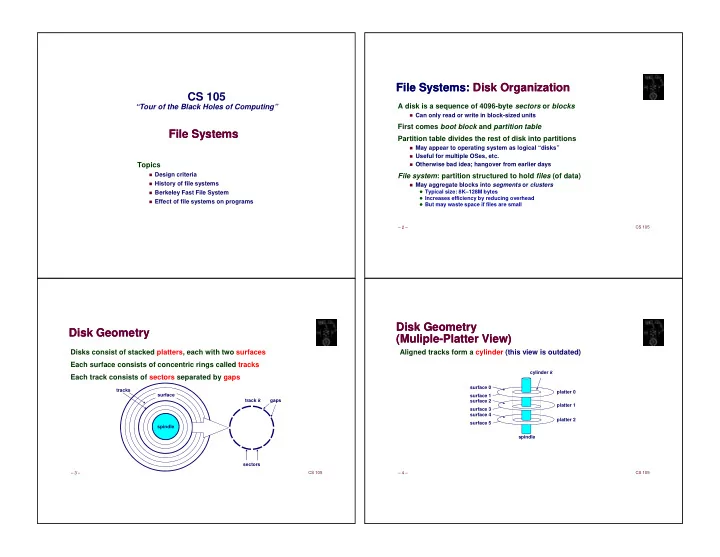
Disk Geometry Disk Geometry

Disks consist of stacked platters, each with two surfaces Each surface consists of concentric rings called tracks Each track consists of sectors separated by gaps

spindle surface tracks track k sectors gaps

– 4 – CS 105

Disk Geometry (Muliple-Platter View) Disk Geometry (Muliple-Platter View)

Aligned tracks form a cylinder (this view is outdated)

surface 0 surface 1 surface 2 surface 3 surface 4 surface 5 cylinder k spindle platter 0 platter 1 platter 2

slide-2
SLIDE 2

– 5 – CS 105

Disk Operation (Single-Platter View) Disk Operation (Single-Platter View)

The disk surface spins at a fixed rotational rate spindle By moving radially, arm can position read/write head

  • ver any track

Read/write head is attached to end

  • f the arm and flies over

disk surface on thin cushion of air spindle

– 6 – CS 105

Disk Operation (Multi-Platter View) Disk Operation (Multi-Platter View)

– 7 – CS 105

Disk Access Time Disk Access Time

Average time to access some target sector approximated by :

Taccess = Tavg seek + Tavg rotation + Tavg transfer

Seek time (Tavg seek)

Time to position heads over cylinder containing target sector

Typical Tavg seek = 9 ms

Rotational latency (Tavg rotation)

Time waiting for first bit of target sector to pass under read/write head

Tavg rotation = 1/2 x 1/RPMs x 60 sec/1 min

Transfer time (Tavg transfer)

Time to read the bits in the target sector.

Tavg transfer = 1/RPM x 1/(avg # sectors/track) x 60 secs/1 min

– 8 – CS 105

Disk Access Time Example Disk Access Time Example

Given:

Rotational rate = 7200 RPM (typical desktop; laptops usually 5400)

Average seek time = 9 ms (given by manufacturer)

Avg # sectors/track = 400

Derived:

Tavg rotation = 1/2 x (60 secs/7200 RPM) x 1000 ms/sec = 4 ms

Tavg transfer = 60/7200 RPM x 1/400 secs/track x 1000 ms/sec = 0.02 ms

Taccess = 9 ms + 4 ms + 0.02 ms

Important points:

Access time dominated by seek time and rotational latency

First bit in a sector is the most expensive, the rest are “free”

SRAM access time is about 4 ns/doubleword, DRAM about 60 ns

Disk is about 40,000 times slower than SRAM, and

2,500 times slower then DRAM

slide-3
SLIDE 3

– 9 – CS 105

Logical Disk Blocks Logical Disk Blocks

Modern disks present a simpler abstract view of the complex sector geometry:

Set of available sectors is modeled as a sequence of b-sized logical blocks (0, 1, 2, ...)

Mapping between logical blocks and actual (physical) sectors

Maintained by hardware/firmware device called disk controller (partly on motherboard, mostly in disk itself)

Converts requests for logical blocks into (surface,track,sector) triples

Allows controller to set aside spare cylinders for each zone

Accounts for (some of) the difference in “formatted capacity” and “maximum capacity”

– 10 – CS 105

Block Access Block Access

Disks can only read and write complete sectors (blocks)

Not possible to work with individual bytes (or words or…)

File system data structures are usually smaller than a block

OS must pack structures together to create a block

Disk treats all data as uninterpreted bytes (one block at a time)

OS must read block into (byte) buffer and then convert into meaningful data structures

Conversion process is called serialization (for write) and deserialization

OS carefully arranges for this to happen by simple C type-casting

Need to work in units of blocks affects file system design

Writing (e.g.) a new file name inherently rewrites other data in same block

But block writes are atomic can update multiple values at once

– 11 – CS 105

Aside: Solid-State Disks Aside: Solid-State Disks

They aren’t disks! But for backwards compatibility they pretend to be… SSDs are divided into erase blocks made up of pages

Typical page: 4K-8K bytes

Typical erase block: 128K-512K

Can only change bits from 1 to 0 when writing

Erase sets entire block to all 1’s

Erase is slow

Can only erase 104 to 106 times

Must pre-plan erases and manage wear-out

Net result:

Reads are fast (and almost truly random-access)

Writes are 100X slower (and have weird side effects)

– 12 – CS 105

Design Problems Design Problems

So, disks have mechanical delays (and SSDs have their own strange behaviors) Fundamental problem in file-system design: how to hide (or at least minimize) these delays? Side problems also critical:

Making things reliable (in face of software and hardware failures)

People frown on losing data

Organizing data (e.g., in directories or databases)

Not finding stuff is almost as bad as losing it

Enforcing security

System should only share what you want to share

slide-4
SLIDE 4

– 14 – CS 105

Typical Similarities Among File Systems Typical Similarities Among File Systems

A (secondary) boot record A top-level directory Support for hierarchical directories Management of free and used space Metadata about files (e.g., creation date) Protection and security

– 15 – CS 105

Typical Differences Between File Systems Typical Differences Between File Systems

Naming conventions: case, length, special symbols File size and placement Speed Error recovery Metadata details Support for special files Snapshot support

– 16 – CS 105

Case Study: Berkeley Fast File System (FFS) Case Study: Berkeley Fast File System (FFS)

First public Unix (Unix V7) introduced many important concepts in Unix File System (UFS)

I-nodes

Indirect blocks

Unix directory structure and permissions system

UFS was simple, elegant, and slow Berkeley initiated project to solve the slowness Many modern file systems are direct or indirect descendants of FFS

In particular, EXT2 through EXT4

– 17 – CS 105

FFS Headers FFS Headers

Boot block: first few sectors

Typically all of cylinder 0 is reserved for boot blocks, partition tables, etc.

Superblock: file system parameters, including

Size of partition (note that this is dangerously redundant)

Location of root directory

Block size

Cylinder groups, each including

Data blocks

List of inodes

Bitmap of used blocks and fragments in the group

Replica of superblock (not always at start of group)

slide-5
SLIDE 5

– 18 – CS 105

FFS File Tracking FFS File Tracking

Directory: file containing variable-length records

File name

Inode number

Inode: holds metadata for one file

Fixed size

Located by number, using information from superblock (basically, array)

Integral number of inodes in a block

Includes

Owner and group

File type (regular, directory, pipe, symbolic link, …)

Access permissions

Time of last i-node change, last modification, last access

Number of links (reference count)

Size of file (for directories and regular files)

Pointers to data blocks

Except for pointers, precisely what’s in stat data structure

– 19 – CS 105

FFS Inodes FFS Inodes

Inode has 15 pointers to data blocks

12 point directly to data blocks

13th points to an indirect block, containing pointers to data blocks

14th points to a double indirect block

15th points to a triple indirect block

With 4K blocks and 4-byte pointers, the triple indirect block can address 4 terabytes (242 bytes) in one file Data blocks might not be contiguous on disk But OS tries to cluster related items in cylinder group:

Directory entries

Corresponding inodes

Their data blocks

– 20 – CS 105

FFS Free-Space Management FFS Free-Space Management

Free space managed by bitmaps

One bit per block

Makes it easy to find groups of contiguous blocks

Each cylinder group has own bitmap

Can find blocks that are physically nearby

Prevents long scans on full disks

Prefer to allocate block in cylinder group of last previous block

If can’t, pick group that has most space

Heuristic tries to maximize number of blocks close to each other

– 23 – CS 105

Effect of File Systems on Programs Effect of File Systems on Programs

Software can take advantage of FFS design

Small files are cheap: spread data across many files

Directories are cheap: use as key/value database where file name is the key

But only if value (data) is fairly large, since size increment is 4K units

Large files well supported: don’t worry about file-size limits

Random access adds little overhead: OK to store database inside large file

But don’t forget you’re still paying for disk latencies and indirect blocks!

FFS design also suggests optimizations

Put related files in single directory

Keep directories relatively small

Recognize that single large file will eat much remaining free space in cylinder group

Create small files before large ones

slide-6
SLIDE 6

– 24 – CS 105

The Crash Problem The Crash Problem

File system data structures are interrelated

Free map implies which blocks do/don’t have data

Inodes and indirect blocks list data blocks

Directories imply which inodes are allocated or free

All live in different places on disk

Which to update first?

Crash in between updates means inconsistencies

Block listed as free but really allocated will get reused

Block listed as allocated but really free means space leak

Allocated inode without directory listing means lost file

– 25 – CS 105

File System Checking File System Checking

Traditional solution: verify all structures after a crash

Look through files to find out what blocks are in use

Look through directories to find used inodes

Fix all inconsistencies, put lost files in “lost+found”

Problem: takes a long time

Following directory tree means random access

Following indirect blocks is also random

Random == slow

Huge modern disks hours or even days to verify

System can’t be used during check

– 26 – CS 105

Journaled File Systems Journaled File Systems

One (not only) solution to checking problem

Before making change, write intentions to journal

“I plan to allocate block 42, give it to inode 47, put that in directory entry foo” Journal writes are carefully kept in single block atomic

After making changes, append “I’m done” to journal

Post-crash journal recovery

Journal is sequential and fairly small fast scanning

Search for last “I’m done” record

Re-apply any changes past that point

Atomicity means they can’t be partial All changes are arranged to be idempotent

Write an “I’m done” in case of another crash

– 27 – CS 105

Summary: Goals of Unix File Systems Summary: Goals of Unix File Systems

Simple data model

Hierarchical directory tree

Uninterpreted (by OS) sequences of bytes

Extensions are just strings in long filename

Multiuser protection model High speed

Reduce disk latencies by careful layout

Hide latencies with caching

Amortize overhead with large transfers

Sometimes trade off reliability for speed