Federated Data Model Follow-Up DC GIS Steering Committee - - PDF document

federated data model follow up dc gis steering committee
SMART_READER_LITE
LIVE PREVIEW

Federated Data Model Follow-Up DC GIS Steering Committee - - PDF document

Federated Data Model Follow-Up DC GIS Steering Committee Distributed Email January 2005 4-28-2005 Discussed at Steering Committee Included Data Listing by Agency Activities: Some Agency Feedback EMA and OCTO reviewed


slide-1
SLIDE 1

Slide 1

DC GIS Steering Committee 4-28-2005

Barney Krucoff, GIS Director Office of The Chief Technology Officer Barney.Krucoff@dc.gov

Slide 1

Federated Data Model Follow-Up

  • Distributed Email – January 2005
  • Discussed at Steering Committee
  • Included Data Listing by Agency
  • Activities:

– Some Agency Feedback – EMA and OCTO reviewed the Agency Data List – Full Data Catalog is on DC GIS Intranet (dcgis.in.dc.gov) – Currently has 830 Datasets, 200 for distribution

Slide 2

Intranet Data Catalog Federated Data Model Review

S t a n d a r d s P r

  • c

e d u r e s

Slide 4

Agency Action Items Review

  • Review and comment on the Federated

Data Model document

  • Identify a primary GIS contact(s) at the

agency

  • Coordinate the layers that each agency

will own and maintain and determine update cycles for each

  • Maintain a consolidated geospatial data

maintenance plan

Slide 5

Federated Data Model Follow-Up

  • Anticipated changes/additions to the

Federated Model – Accuracy and Precision – Snapbase – Cluster Tolerance – Metadata – Topology – Cartography (print and web) – Data Catalog

slide-2
SLIDE 2

Slide 2

Slide 6

Updated Data

  • Dun and Bradstreet

12/2004

  • CAMA

12/2004

  • Charter School

1/2005

  • Public School

1/2005

  • School Attendance Zone

2/2005

  • Metro Station

2/2005

  • Metro Entrance

2/2005

  • CAMA

1/2005

  • Owner Point (draft)

4/2005

  • Sales Point (draft)

4/2005

Slide 7

Data Update - OwnerPoints

  • Incorporates ITS Public Extract
  • New Table Schema
  • Impacts Applications and Services
  • 205 Columns, down from 254
  • Available as OwnerPt_42705 and SalePt_42705
  • Currently updating Metadata

Slide 8

New Data

  • Polling Place

10/2004

  • Parking Meter

11/2004

  • Property Lines CAD – Update

4/2005

Slide 9

  • Street Centerline
  • Military Areas
  • Places of Worship
  • Embassy
  • Points of Interest
  • Library
  • DC Quad
  • Dun and Bradstreet
  • Owner Point
  • Sale Point

» May 2005 publication

Current Data Update

Slide 10

Data Update - Street Centerline

  • Before - 5 layers (Street, Alley, Service

Road, Drive, and Ramp)

  • Now - One Consolidated Layer
  • Extracted from DDOT geodatabase
  • Updated Table Schema
  • Includes DDOT Centerline Updates

Geographic Information System & Enterprise System Architecture

Zhen Lo, GIS Systems Architect

slide-3
SLIDE 3

Slide 3

Slide 12

Presentation

  • Review of the current enterprise architecture
  • Support federated data model
  • One stop for geospatial data, services, and

support

  • Increase reliability and performance of the GIS

infrastructure

Slide 13

Central GIS System (Currently)

  • Improved access and visibility of geospatial

data within the District

  • Establish a framework for data sharing (ESRI)
  • Enabled District employees to use GIS

technology via the Intranet

  • Formed a GIS user community for

collaboration

Slide 14

Issues to resolve

  • Difficulty performing data maintenance

– Data access – Data integration

  • Communication between data

provider(Agency) and host (OCTO)

  • Turn around time for expanding data inventory
  • Lack of application framework or standards

Slide 15

The Approach

  • Use the ESRI Enterprise suite software
  • Build upon current data standards
  • Adopt OCTO server consolidation approach
  • Work with Agencies independently to comply

with architecture framework to enable data and services sharing

Slide 16

Federated Data Model

Slide 17

Enterprise Architecture Requirements

Data

  • Establish data standards
  • Frequency of updates
  • Metadata standards

Portal

  • Common interface or methodology to services
  • Method of service discovery

Application Development Framework

  • Development standards, coding languages

common interfaces System Infrastructure

  • Servers, networks, software
slide-4
SLIDE 4

Slide 4

Slide 18

Data Interoperability Methods

Slide 19

GeoDatabase Design Process

Used by OCTO and Agencies:

  • Conceptual Design

– Data sources, metadata, application – Scale, spatial reference, symbology

  • Logical Design

– Business rules, relationships, database schema – Feature classes, topology, domains

  • Physical Design

– Actual tables, spatial objects, and views

Slide 20

Central GIS Geodatabases

ArcSDE + Oracle Spatial ArcSDE Editing Versioned Database Metadata Catalog Web Service Catalog

Central GIS Portal

Syncrohization Syncrohization

Parks Planning DDOT Zoning

Syncrohization Syncrohization Syncrohization Upload and Manage

Slide 21

DCOZ Feature Dataset Example

Default

Zone overlay Default version Editing version Posting version Disconnected editing version Zoning layer Default version Zoning Feature dataset

GENERATION 1 GENERATION 2

Topology Enforced topology rules for data precision and business rules Posted version for data display/ data distribution Versioned layer for editing Version checked

  • ut into personal

geodatabase for

  • ffline editing

(contractor)

Slide 22

Gateway to GIS Services The DC GIS Portal

Slide 23

Central GIS

Distributed Users GIS Catalog DCGIS Portal Agency Agency GIS Datasets Maps Locators GIS Datasets Maps Locators

DC GIS Portal and User Experience

1 1 Publish data, services and document In GIS catalog Search and find GIS data/ services Connect to agency GIS services Connect, download, and use GIS services 2 3 3

slide-5
SLIDE 5

Slide 5

Central GIS Portal

Slide 25

Application Framework

Slide 26

DC GIS Portal Framework

PlumTree Portal

Slide 27

Enterprise System Infrastructure

Slide 28

Current DC GIS Production Systems

O D C 1 D M Z O D C 2 D M Z

Web1 Web2 web4 Content Switch Content Switch Db2 Db1

Oracle Replication service for EIC features table only

db3 web3

Internet

www.dc.gov

rrc.dc.gov

EIC DCGuide Slide 29

Proposed System Hardware

WAN Switch Internet

OpenPower OpenPower OpenPower OpenPower

DMZ Switch DC WAN Intranet

2TB Hitachi SAN Gigabit Fibre Switch Optical Fibre connection 4 IBM 445 x series Servers 4 x 3.0 GHz Xeon processors 16 GB RAM 2 x 146.8 GB SCSI 3 Hard Disk

slide-6
SLIDE 6

Slide 6

Slide 30

Virtual Server Concept

Physical Architecture Virtual Layer

OS Application OS Application OS Application Server CPU NIC RAM Server CPU NIC RAM Server CPU NIC RAM

2TB SAN

VMOTION WIN2K IMS App server WIN2K IMS App server WIN2K SDE WIN2K3 ArcServer WIN2K SDE WIN2K IMS App server WIN2K IMS App server WIN2K AD/DNS WIN2K 3DGIS WIN2K AD/DNS WIN2K 3DGIS

Slide 31

Proposed DCGIS Enterprise System

Slide 32

Summary: New GIS Enterprise Architecture

  • A framework for GIS application development, data

sharing, and agency cooperation

  • Continue to expand and improve the District’s

geospatial data and services

– Increased flexibility – Increased reliability – Increased in performance and quality of service

Slide 33

Agency GIS Strategic Planning Process

Slide 35

Agency GIS Strategic Plan Outline

  • Mission
  • GIS-related Agency Goals (FY2005 budget
  • Agency GIS Goals
  • Applications
  • FY 2005 Projects
  • Accomplishments

NOTE: THIS IS OCTO’S FIRST DRAFT OF A GIS STRATEGIC PLAN FOR YOUR AGENCIES. PLEASE CHANGE THIS AS YOU WISH TO MAKE IT YOURS. We think the focus on using GIS to achieve this year’s agency goals can increase agency awareness of GIS

slide-7
SLIDE 7

Slide 7

Slide 36

Inventories

  • Datasets are listed in the inventory if your agency is an

Originator, GIS Lead, or Cooperating Agency

  • Please review, correct, and add to the inventory
  • Inventory A lists relevant ESRI GIS software licenses

and maintenance agreements

  • Inventory B is for GIS applications or customizations of

standard ESRI packages

Data GIS Applications & Software Inventory

Automated Routing Streamlines Bulk Trash Collection in Washington DC

Office of Information Technology Services 37 Slide 38

Project Background

The Department of Public Works (DPW) is developing an automated routing and reporting system based on Geographic Information System (GIS) and Routing software; DPW successfully implemented computerized bulk trash routing in the period from November 2003 to November 2004; Now DPW is seeking to automate the steps to make the process user friendly and to extend it to other

  • perations.

1) Citizens call for bulk trash collection appointments through the Mayor’s Call Center at 727-1000. 5) There is an average of 6 days between a citizen’s call and the collection of their bulk trash. 2) From 200 to 300 citizen appointments are assigned for collection each day, and an appointment sheet for each one is printed from the Hansen System for SWMA. 3) Appointment sheets are distributed by hand to 10 different crews for collection (approximately 20 – 30 appointment sheets per crew) This step adds a day to the lag between a citizen’s call and their bulk collection.

Without Computerized Routing

4) At times crews have difficulty finding addresses and the the distribution of stops among the crews is not always efficient. This limits the number of stops they can get to per day. 39 Slide 40

With computerized routing, the 200 – 300 appointments are delivered from the Hansen System as computer files and are assigned to crews in moments.

Slide 41

Each crew receives a succinct checklist of their stops……

slide-8
SLIDE 8

Slide 8

Slide 42

… and a route map to help them efficiently visit all their stops.

Slide 43

The impact was immediate and dramatic:

Crews completed their work returned to the yard 1.5 to 2 hours earlier than before, and there was a significant decrease in mileage needed to service a similar number of service requests. The crews enjoy working with the maps and reports.

These results create opportunities for SWMA managers: 1) To increase the number of bulk appointments served each day; 2) To reduce the average time between a citizen’s call and the collection of their bulk; 3) To deal with absent workers, down trucks, and special tasks, through quick reassignment of work when necessary; 4) To increase opportunities for staff training.

43 Slide 44

Route Smart Post Route Smart 11-03 to 2-04 11-04 to 2-05 # of Days 67 73 # of Routes 664 772 Routes Ran per Day 10 11 Scheduled SR's 13,205 13,356 Completed SR's 10,754 9,597 Unscheduled SR's 3,872 3,654 Total Hours on Collection 4,343 5,003 Collection Hours per Route 6.54 6.48 Total Miles 19,987 27,672 Collection Miles 11,078 18,905 Travel Miles 8,909 8,750 Total Miles per Day 298 379 Collection Miles per Day 165 259 Travel Miles per Day 133 120 Total Vehicle Cost 190,185 $ 216,348 $

Slide 45 Office of Information Technology Services 45

Limitations of Initial Routing Implementation

  • GIS technical knowledge and time is required

to perform routing;

  • It takes approximately 40 minutes per day to

perform the routing;

  • The routing software and data are stored on a

single desktop PC;

  • In the initial form of implementation it was not

practical to extend the routing to other types of activities.

Slide 46 Office of Information Technology Services 46

Proposed Solution – System Integration

Integration of standard software components to automate the existing process will create:

  • An application that routes multiple bulk collection crews and creates

succinct crew-specific reports and maps resulting from a review of several routing options each day;

  • A system that successfully interfaces with the Mayor’s Call Center

Hansen Service Request System;

  • A user-friendly application interface to be operated by a foreman and

supervisors directly responsible for the bulk trash collection work;

  • An application that can be easily adapted to a variety of Hansen service

request activities.

Slide 47 Office of Information Technology Services 47

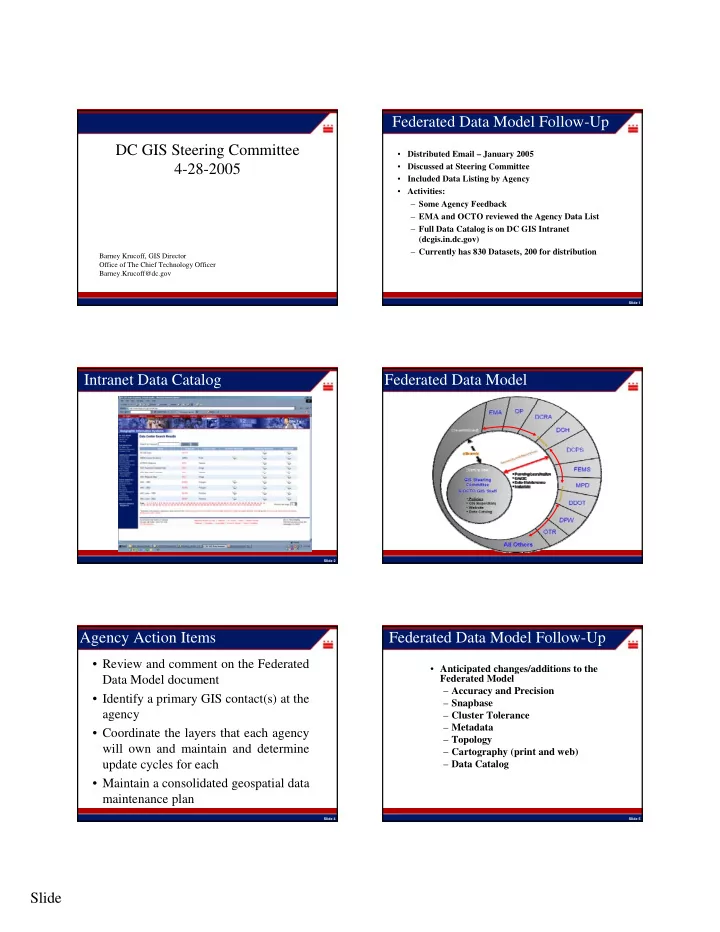
Transferred as Updates Occur Transferred Daily Hansen Bulk Trash Collection Service Requests Points of Departure (Equipment Yards) DDOT Mayor’s Call Center DPW OCTO GIS Data Server OCTO GIS CITRIX Server Cluster (Operating ArcView 3.2 and RouteSmart 4.4) OCTO Client PC with ICA client DPW Remote Office DPW Remote Office Client PC with ICA client Client PC with ICA client

Proposed Configuration:

Street Centerline Routing Reference Network (RRN)

Agency Data Providers Users Central Computing Services – Application And Data Servers

DDOT Remote Office
slide-9
SLIDE 9

Slide 9

Slide 48

Automated Routing Application – Trial Version

Slide 49

User Chooses Between Solutions

Slide 50

Packer Truck – A blade scoops the trash forward and crushes it. The bulk packers

  • nly service wide alleys or

Streets. Liftgate Truck – A hydraulic platform raises items to the level of the truck bed. It is small enough to service any street or alley.

Slide 51

3 Packers, 7 Liftgates 1 Packer, 7 Liftgates

Slide 52

After the Route Choice is Made and Saved, a Map and a Manifest Report will be Generated and Printed for each Crew

Slide 53 Office of Information Technology Services 53

Benefits

Operational supervisors will be able to choose the routing solution and create the maps and reports themselves; By developing the application in a client server configuration it will be accessible from any computer on the network. This will facilitate data entry and printing at any DPW remote office; Now approximately 40 minutes are spent each day by 1 GIS

  • technician. The application will free up the GIS technician for that

amount of time each day while still saving 1.5 –2 hours per crew per day; Routing reports and maps for other service request activities will be

  • established. Some possibilities are abandoned and junk vehicle

investigations and potholes. Similar improvements in efficiency are expected for those activities.

slide-10
SLIDE 10

Slide 10

This process can be applied to many other activities that DPW and other agencies perform in the City. We believe there are dozens of opportunities to apply this combination of teamwork and technology to increase efficiency throughout DC government.

Office of Information Technology Services 54

Conclusions

  • An automated bulk routing application will improve an

already successful process by saving even more time;

  • The operational supervisors will be empowered to create

their own routes, reports and maps by choosing from a set of solutions;

  • The output will be printed on site – daily pickup of a packet
  • f maps and reports at 2750 South Capitol and delivery to

Brentwood will no longer be necessary;

  • The application will be designed for adaptation to other

service request-based activities.

Office of Information Technology Services 55

Development of Master Address Repository (MAR)

Slide 57

Project Background

  • Strategic Plan completed in 2001

– updated in 2003

  • Address Steering Committee formed in 2001
  • Address Standards completed in 2001
  • Contracts for Database Design/Development and

Data Development signed in September 2003

  • Project completion scheduled for Spring of 2005

Slide 58

Project Objectives

  • Create a repository that is real-time, and contains

100% of all valid DC addresses

  • Create an enterprise system that is capable of allowing

ALL DC agencies to verify addresses for their business purposes

  • Create an enterprise application tool that is capable of

cleaning address data and purging incorrect address data

Slide 59

Standards

  • Developed Addressing Standards to begin

getting all this information into shareable form

  • Standards have 2 parts:

– Data format: how will addresses be parsed, what types of fields will be used, domain of values – Address assignment rules (how addresses are determined in the field)

slide-11
SLIDE 11

Slide 11

Slide 60

AddressPoints vs. OwnerPoints

  • For condo buildings: MAR will only have one AddressPoint. OwnerPoints

will have one point per unit.

– MAR has 122,916 address points. OwnerPoint has 176,293 records – Units are in a related table

  • For rental apartment buildings: Both MAR and OwnerPoints will have one

address for the entire building.

  • There may be many address points for a single SSL that would have only
  • ne OwnerPoint.

– Campuses – Building with multiple addressed front doors

  • MAR points are located at the center of the building whereas the

OwnerPoints are located somewhere on the property as defined by old georeferanced scans.

  • In MAR the complete address will be 1420 Corcoran Street NW wheareas

in OwnerPoints it would be 1420 Corcoran St NW (street type abbreviated)

  • OwnerPoints also includes properties without an address. MAR does not

include properties without addresses.

  • AddressPoints don’t replace OwnerPoints, but the vector property map will

replace OwnerPoints

Slide 61

How Agencies Will Interact w/ The MAR

  • Web Service (XML)

– Inputs

  • Addresses “441 4th Street NW”

– Returns

  • If verified

– Return Code – AID (if verified) – Status – Full Address – Phrased Address – X,Y – USNG – Ward – ANC – SMD – PSA – PD

  • Backwards compatible with the existing mini-MAR web service
  • If not verified

– Return Code – Candidate Addresses w/ information – Feedback Link » User can follow the link to have a tracking number assigned to an address they want checked.

Slide 62

Interaction w/ MAR Continued

  • Related Web Services

– Inputs

  • Square Suffix Lot: 0100 0037
  • Intersection: 4th Street NW AND/& D Street NW
  • Block: 400 BLOCK(BLK) of 4th Street NW
  • Cross Streets: 4th Street NW BETWEEN D Street NW AND/& E Street

NW

  • Place Name: One Judiciary Square

– Location+

ArcGIS MAR Geocoding Extension

Slide 64

What the extension does

  • Calls the MAR Web Service (currently mini-

MAR)

  • Populates the input table with the matched

address, Address ID, and X, Y coordinate pairs.

  • Allows interactive match

Slide 65

Browse for Input Database containing the table to be matched Input Table with address to be matched (select from a drop-down list of tables in the Database). Field containing Addresses Output fields containing the address found, AID, and the coordinates

slide-12
SLIDE 12

Slide 12

Slide 66

Step 1: Browse to Database

Slide 67

Step 2: Choose Table

Slide 68

Step 3: Pick Appropriate Fields

Slide 69

Step 4: Exit Application

Slide 70

Input Table

Slide 71

Output Table

slide-13
SLIDE 13

Slide 13

MAR Data Scrubbing Tool

Slide 73

MAR Data Scrubbing Tool

  • MDS tool works with the MAR database in

ORACLE

  • It parses, validates and verifies addresses

against the MAR

  • Generates exception reports
  • Address Editor to edit addresses

Slide 74

MDS Tool Icon on the desktop Login Screen Only authorized users can access it.

How to run the MDS tool

Slide 75

Data Loading

Access, Excel, dBase, ORACLE

Slide 76

Parsing & Field Mapping

Address Components Street # Fraction # Street Name Street Type Quadrant Unit # Zipcode Zip4

Slide 77

Validating Addresses

MDS Tool MDS Tool checks for checks for every every address address component component

slide-14
SLIDE 14

Slide 14

Slide 78

Verifying addresses against the MAR

Slide 79

Reports

Slide 80

Report of Unvalidated Addresses

Slide 81

Reports/exports

Reports/exports

  • Unvalidated addresses
  • Unverified addresses
  • Verified addresses

(Excel readable csv and text files)

Slide 82

Interactive QC of Unvalidated Addresses

Slide 83

MAR Continuous Improvement

ArcGIS Extension

slide-15
SLIDE 15

Slide 15

Slide 84

PENCIL ICON PAN RIGHT PAN DOWN PAN LAFT PAN UP

ArcGIS Interface

  • Unverified records will

be geocoded

  • An analyst will move

the geocoded point to a building

  • GIS data layers will be

displayed to help the analyst

Slide 85

One-time layer set-up

Slide 86

Processing valid but unverified addresses

Slide 87

Verification process

Slide 88

MAR Maintenance

  • DCRA

– Responsible for maintaining individual addresses

  • Including Field Work
  • Actual Address Ranges (tentative)
  • OCTO

– Responsible for technical support

  • Database
  • Web Service
  • Batch Processing
  • Initial Field Work
  • Initial address range push (tentative)
  • DDOT

– Responsible for maintaining street segments

  • Street Names
  • Theoretical address ranges (redefined)

Slide 89

Project Issues

  • The MAR (as scoped) handles addresses but the

data for units is incomplete and unchecked.

– Condo units are well represented – The quality of rental units in unknown – AID relates to the building/address not the unit

  • Address ranges are inconsistent and incomplete

– Not part of the MAR contractor’s scope – Can cause erroneous results

  • Public housing is not well represented well in the

current dataset. This is being fixed by OCTO and the contractor.

  • Web service was delayed while the data model was

in flux.

slide-16
SLIDE 16

Slide 16

Slide 90

What's Next?

  • Once the MAR is established and tested, it will

be available for address verification:

– through a web-interface that provides basic verification of a single address (open to the public as well as DC staff) – through web services to specific address users, so that queries can be made as part of the business of that agency – through the Address Administrator for address cleanup and batch verification activities

Slide 91